
Home
Account setting
Staff
Lists
Forms
Templates (HTML emails/SMS messages)
Sending messages by SMS and email
Classes, events, attendance and Zoom
Automation
Create a birthday invitation and automation
Communication
Microsite
E-Commerce
Networks, Federations and Franchises
How to guides
Personal information and electronic message laws in Canada and the USA
Get support
Terms and conditions
https://activitymessenger.com/
10410 Waverly, Montréal, H3L 2W4
Terms and conditions

Connect an Activity Messenger form to Zapier
Activity Messenger does not have a native Zapier app, but a form can trigger a Zap through its outgoing webhook. Activity Messenger sends the completed form submission to a Webhooks by Zapier Catch Hook URL.
Before you begin
You need:
- Permission to edit the Activity Messenger form.
- A Zap with Webhooks by Zapier as its trigger.
- A form or payment form. Contract forms do not expose the webhook option.
Treat the Zapier Catch Hook URL as a secret. Anyone with the URL can send data to the Zap.
Create the Zapier trigger
- Create or open a Zap.
- Select Webhooks by Zapier for the Trigger step.
- Select Catch Hook as the event.
- Continue to the Test tab and copy the webhook URL.
Use Catch Hook, not Retrieve Poll. Activity Messenger sends an HTTP POST with a JSON request body.
Add the webhook to the form
- In Activity Messenger, open the form you want to connect.
- Select the Options tab.
- In the Confirmation section, enable Enable webhook.
- Paste the Zapier Catch Hook URL into the webhook URL field.
- Click Save.
Learn how to connect Activity Messenger to Zapier using webhooks and automatically send your data to other applications, such as Google Sheets.
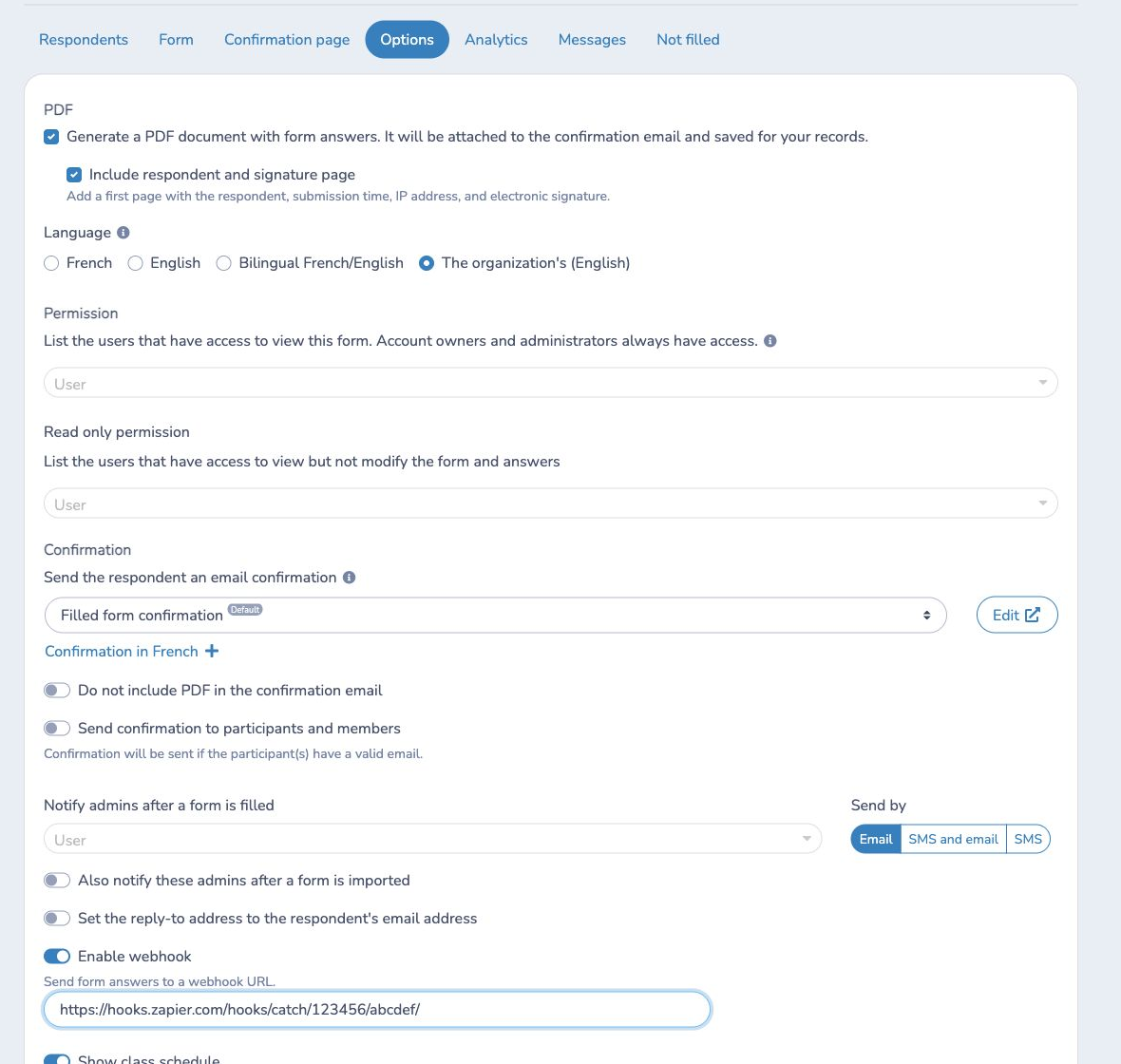
The setting belongs to this form. Repeat these steps for every form that should trigger a Zap.
Test and finish the Zap
- Keep Zapier's trigger test open.
- Complete and submit a new test response in the Activity Messenger form.
- For a payment form, complete the payment-form workflow.
- Return to Zapier and test the trigger.
- Map the received fields to the actions in your Zap.
- Test the actions, then publish the Zap.
The payload includes:
idemailmobilefirst_namelast_namecreated_atform_answers
form_answers contains the answers collected by the form. Submit a realistic
test response so Zapier can discover the answer fields you plan to use.
Important behavior and limits
- The webhook is sent after a completed form submission. Payment forms send it after the form's invoice processing is finalized.
- Activity Messenger sends the webhook in the background, so the respondent does not wait for Zapier to finish.
- A form stores one webhook URL.
- Contract forms do not show the webhook setting.
- Activity Messenger does not sign the request or add a custom authentication header. Keep the unguessable Catch Hook URL private.
- If Zapier changes the Catch Hook URL, update the URL in the Activity Messenger form.
Example
To add every registration to a spreadsheet, create a Catch Hook trigger, paste
its URL into the registration form, and submit a test registration. In the next
Zap step, map first_name, last_name, email, and the required
form_answers values to spreadsheet columns.