
Home
Account setting
Staff
Lists
Forms
Templates (HTML emails/SMS messages)
Sending messages by SMS and email
Classes, events, attendance and Zoom
Automation
Create a birthday invitation and automation
Communication
Microsite
E-Commerce
Networks, Federations and Franchises
How to guides
Personal information and electronic message laws in Canada and the USA
Get support
Terms and conditions
RL-24
https://activitymessenger.com/
10410 Waverly, Montréal, H3L 2W4
Terms and conditions

Automatically enroll members in recurring weekly classes
Let customers choose their weekly class schedule while purchasing a membership. Activity Messenger saves the exact class, weekday, and time, enrolls the member in matching upcoming class dates, and reuses the schedule after successful recurring membership renewals.
For example, a one-class-per-week membership can allow one weekly choice, while a two-classes-per-week membership can allow up to two choices.
# Before you begin
- Create the membership and connect every eligible class to it. You can connect classes directly or use the membership's class-tag rules.
- Add upcoming dates to each connected class. Only schedules with an upcoming class date are offered during checkout.
- Use a payment form containing a Membership question.
- Make the membership recurring if its saved schedule should be reused on later renewals.
# Enable recurring class schedule selection
- Go to Forms, open the payment form, and select the Form tab.
- Add a Membership question or edit the existing Membership question.
- Under Choose a membership (or create a new one), select the membership customers will purchase.
- Enable Ask the member to choose a recurring class schedule.
- Under Maximum weekly class choices, enter the maximum number of recurring class schedules the customer can select. The supported range is 1–50.
- Save the Membership question.
If the schedule-selection control is unavailable, connect at least one class to the selected membership. A class-tag rule also counts as a connection.
# What the customer chooses
During checkout, the customer sees the available weekdays in Monday-to-Sunday order. Each choice also identifies the connected class and its local start time.
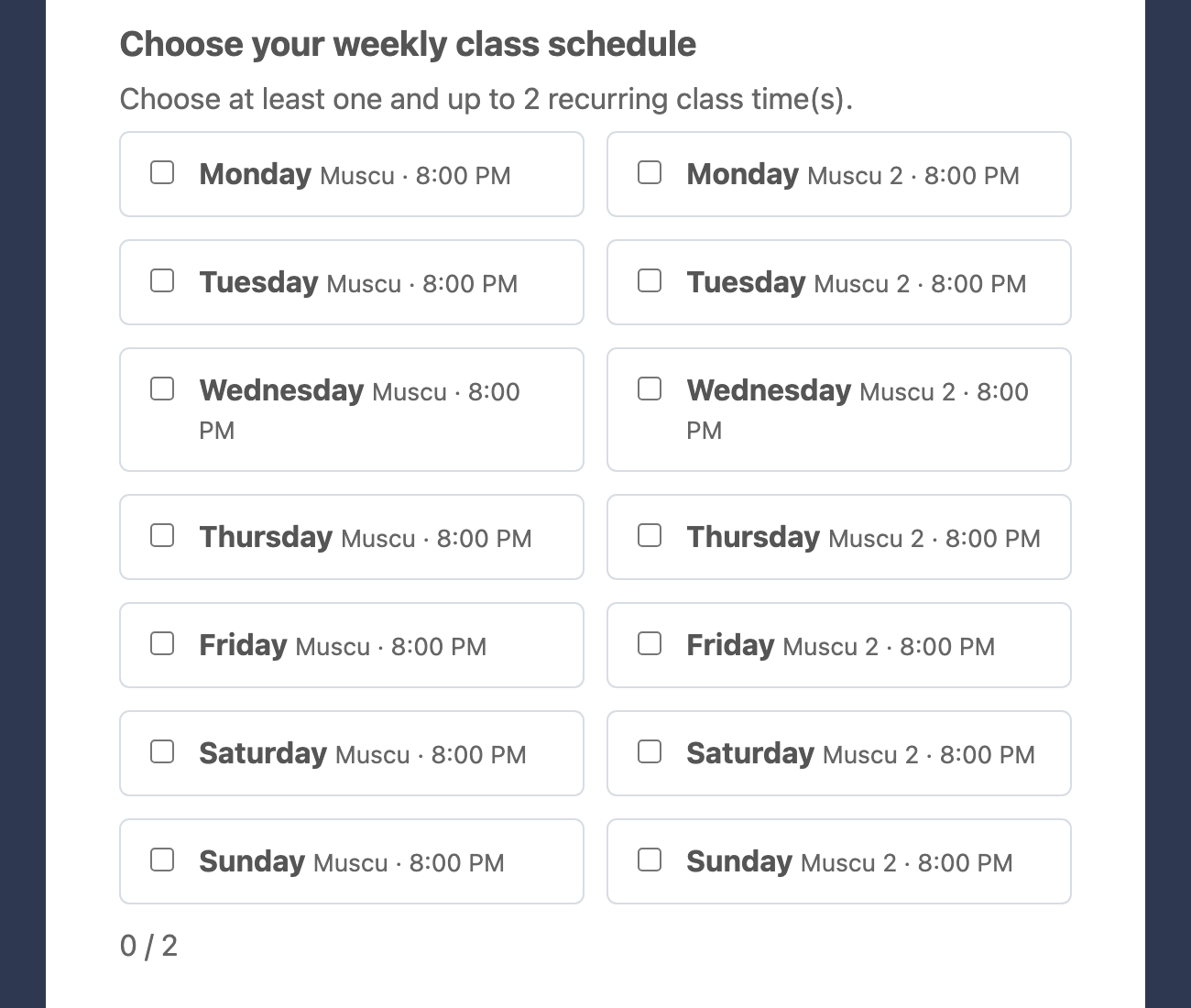
When the membership is selected, the customer must choose at least one schedule and cannot exceed the configured maximum. Two classes or times on the same weekday remain separate choices because each selection identifies an exact class, weekday, and start time.
# What happens after purchase
After the purchase is completed, Activity Messenger:
- Saves the selected recurring schedule on the member.
- Enrolls the member in matching upcoming class dates that fall inside the membership's active period.
- Reuses the same schedule when a recurring membership renews successfully.
- Adds attendance only for the selected class, weekday, and start time.
When a recurring membership is cancelled or no longer renews, no new renewal attendance is added. Attendance that was already created is not removed automatically by this setting.
# Example
A two-classes-per-week membership is connected to these schedules:
- Monday at 6:30 PM
- Wednesday at 6:30 PM
- Saturday at 11:00 AM
Set Maximum weekly class choices to 2. A customer can select Wednesday and Saturday. Activity Messenger enrolls that member only in matching Wednesday and Saturday dates during the membership term and repeats those selections after each successful recurring renewal.
# Important behavior
- Only connected class schedules with at least one upcoming class date appear.
- The membership question prevents checkout until at least one schedule is selected.
- The browser and server both enforce the configured maximum.
- Schedule choices are checked again when the form is submitted. A class, weekday, or time that is no longer available is rejected.
- The saved schedule matches an exact class, weekday, and start time. If a class moves to another weekday or time, the existing saved schedule does not automatically follow it.
- This setting controls recurring class enrollment. It does not change the membership's coupon-generation or coupon-redemption rules.
- The customer chooses the schedule during membership checkout. This feature does not add a separate self-service schedule editor after purchase.