
Home
Account setting
Staff
Lists
Forms
Templates (HTML emails/SMS messages)
Sending messages by SMS and email
Classes, events, attendance and Zoom
Automation
Create a birthday invitation and automation
Communication
Microsite
E-Commerce
Networks, Federations and Franchises
How to guides
Personal information and electronic message laws in Canada and the USA
Get support
Terms and conditions
RL-24
https://activitymessenger.com/
10410 Waverly, Montréal, H3L 2W4
Terms and conditions

Add a default fee to invoices
Activity Messenger can add an organization-wide default fee to invoices. Use it for an administrative, facility, service, or other fee that should be charged regardless of how the client pays.
This is different from a credit card convenience fee. A credit card convenience fee is tied to card payments. The default other fee is an invoice item and can apply even when the client pays by cash, cheque, Interac, or another offline method.
# Before you begin
You need permission to configure payment settings for the organization. If you want the fee to report to accounting, create or choose the ledger code and taxes before saving the fee.
The credit card convenience fee settings appear only when Stripe or Moneris is configured. The other fee settings are separate.
# 1. Open the fee settings
- Go to E-Commerce → Fees.
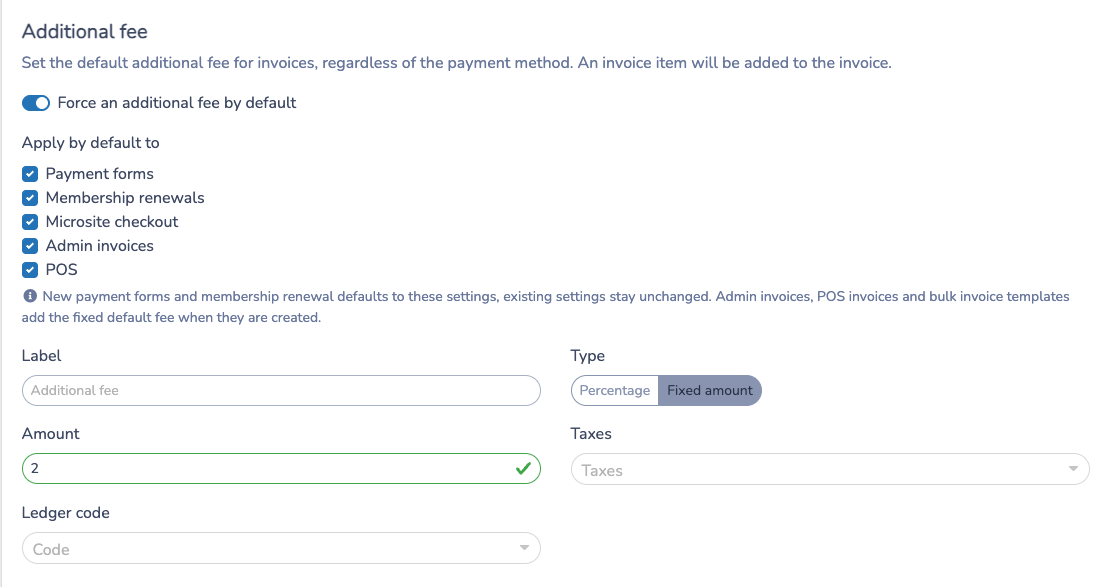
- Find the Additional fee section.
# 2. Configure the other fee
- Enable Force an additional fee by default.
- Enter the label clients and administrators should see on the invoice.
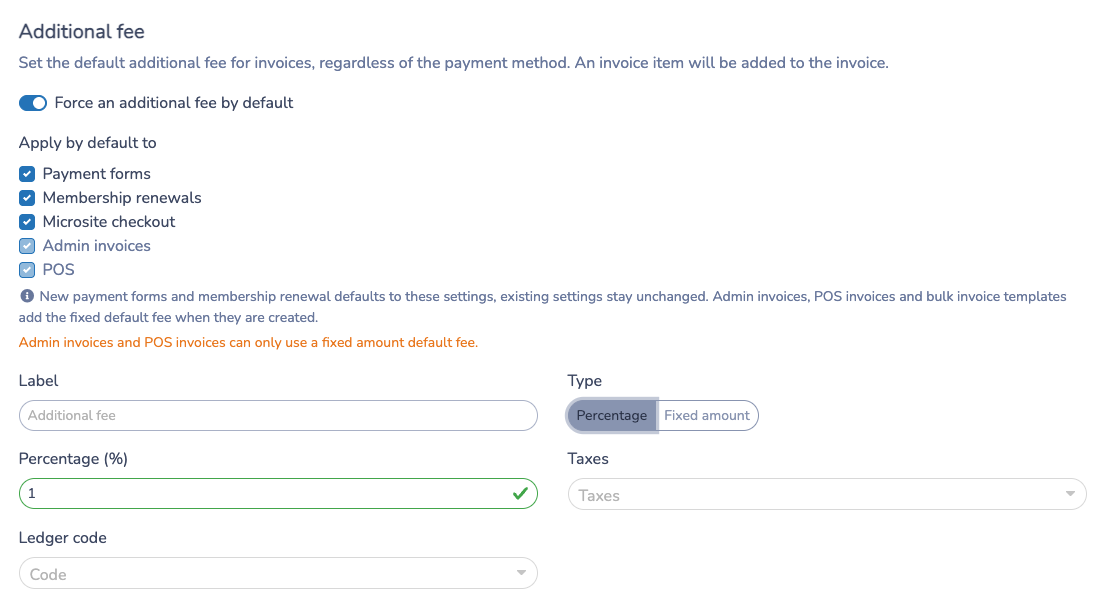
- Choose Percentage or Fixed amount.
- Enter the percentage or dollar amount.
- Select the taxes and ledger code, if needed.
- Save the settings.
A percentage fee is calculated from the invoice items that the fee applies to. A fixed fee uses the dollar amount you enter.
# 3. Choose where the fee applies by default
Under Apply by default to, select the workflows that should receive the organization default:
- Payment forms
- Membership renewals
- Microsite checkout
- Admin invoices
- POS
Admin invoices and POS invoices can only use a fixed amount default fee. If the other fee is set to a percentage, those two options are disabled and will not be saved.
# 4. What happens in each workflow
For payment forms, the organization default is used when new payment settings are created. Existing form payment settings are not overwritten. You can still open a form and adjust its payment options.
For membership renewals, the organization default is used when renewal payment settings are created. Existing renewal settings keep their saved values until you edit them.
For microsite checkout, Activity Messenger keeps the other fee synchronized as clients add, update, or remove cart items.
For admin invoices and POS invoices, a fixed default fee is added as an invoice item when the invoice is created. The item is marked with a Default fee badge so administrators can distinguish it from custom invoice items.

For multiple-client invoice templates, a draft template can include the default fee. Invoices generated from the template clone that fee item and do not add a second one.
# 5. Add or remove the fee on an invoice
If an invoice does not already have the default fee and the organization has a fixed default fee configured, administrators can open the invoice item dropdown and select Default fee.
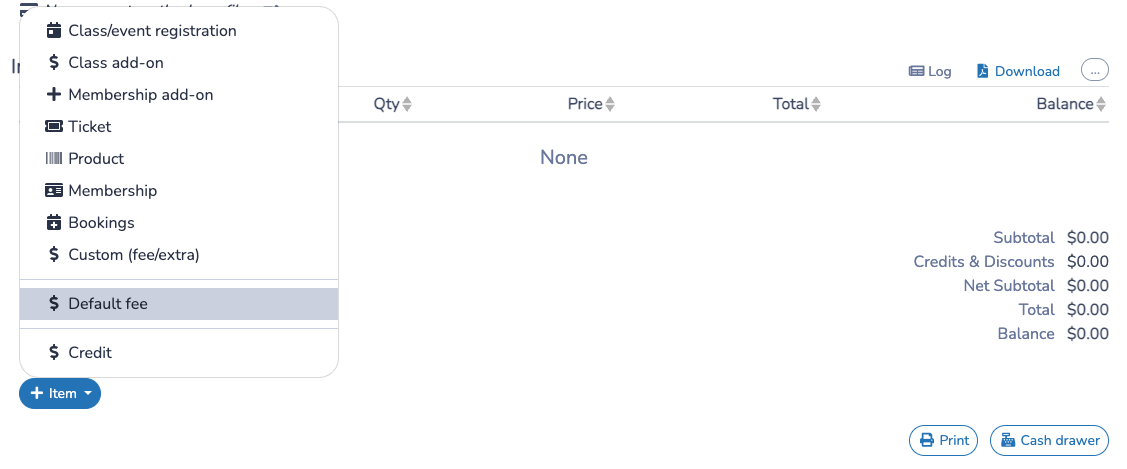
Activity Messenger prevents the same invoice from receiving the default fee twice. If the default fee item is unpaid, it can be removed from admin and POS invoices like other removable invoice items.
# Example
Suppose your organization charges a $5 facility fee on front-desk and POS sales.
- Open E-Commerce → Fees.
- Enable the other fee.
- Set the label to
Facility fee. - Choose Fixed amount and enter
5.00. - Select Admin invoices and POS under Apply by default to.
- Save.
New admin invoices and POS invoices will include one $5 default fee item. If an administrator removes it by mistake, they can add it again from the invoice item dropdown as long as the invoice does not already contain the fee.
# Important notes
- The default other fee applies regardless of payment method.
- A credit card convenience fee is separate and may still apply to card payments if configured.
- Admin invoice and POS defaults require a fixed amount.
- Existing payment form and membership renewal settings are not changed retroactively.
- Activity Messenger adds only one default fee item to an invoice.
- Form-linked invoices follow the payment options saved on the form.
- Remove an unpaid default fee item from the invoice if it should not be charged.