
Home
Account setting
Staff
Lists
Forms
Templates (HTML emails/SMS messages)
Sending messages by SMS and email
Classes, events, attendance and Zoom
Automation
Create a birthday invitation and automation
Communication
Microsite
E-Commerce
Networks, Federations and Franchises
How to guides
Personal information and electronic message laws in Canada and the USA
Get support
Terms and conditions
RL-24
https://activitymessenger.com/
10410 Waverly, Montréal, H3L 2W4
Terms and conditions

Group ledger codes and report sales by category
Organize your existing ledger codes into categories such as Business model, Department, or Revenue stream, then use the dedicated sales report to compare their performance. Categories are optional and are configured separately for each organization.
# Before you begin
You need permission to configure ledger codes and view financial reports. Your organization should already have the ledger codes you want to classify. If you are setting them up for the first time, see Set up accounting and ledger codes.
Categories classify ledger codes. Each ledger code can belong to one category, and every sale using that ledger code is reported under the same category.
# 1. Enable ledger-code categories
- Go to E-Commerce → Ledger codes.
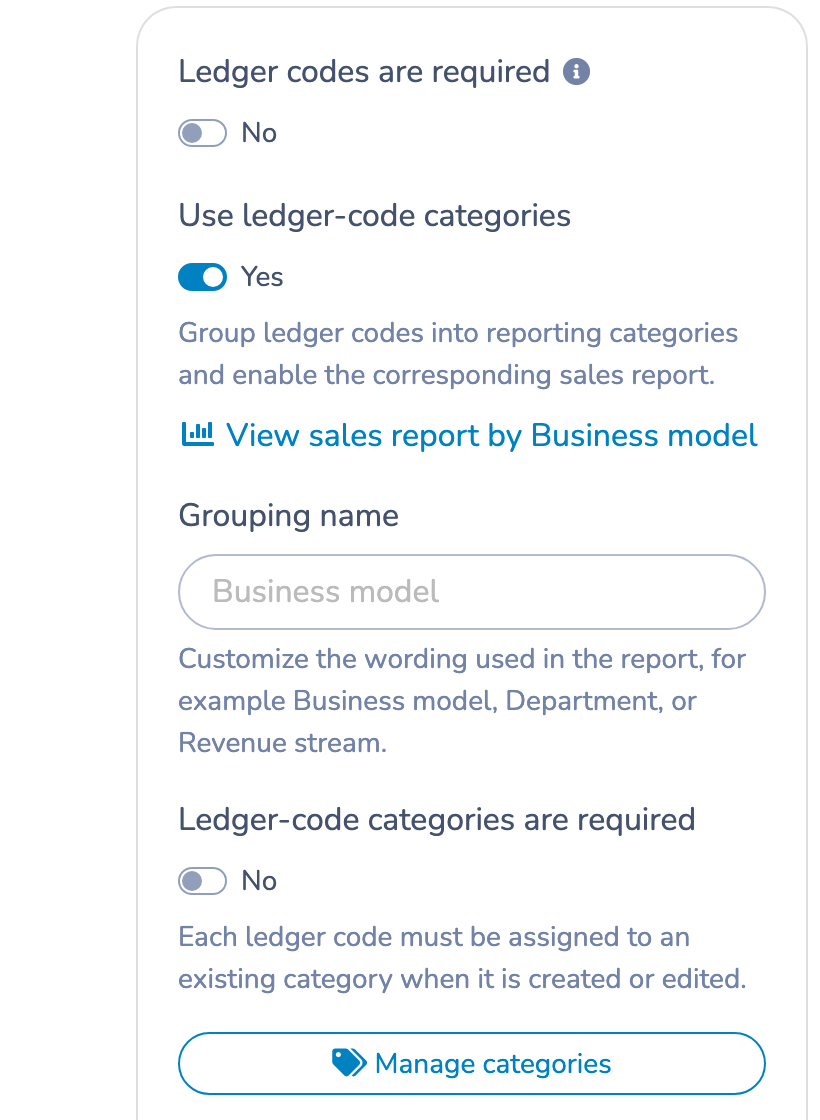
- Under Use ledger-code categories, turn on the switch.
- Under Grouping name, keep the default Business model or enter the term used by your organization, such as
DepartmentorRevenue stream. - Optional: turn on Ledger-code categories are required to require a category whenever a ledger code is created or edited.
The report link and category-management action appear as soon as categories are enabled. Disabling the setting removes the category report from your organization but does not replace your regular ledger-code sales report.
# 2. Create categories
Select Manage categories, enter a category name, and select Create. Add one category for each reporting group you need.
From the same window, you can:
- See how many ledger codes belong to each category.
- See the assigned ledger-code names, including archived codes.
- Rename a category.
- Delete a category that is not assigned to any active or archived ledger code.
Category names must be unique within the organization.
# 3. Assign existing ledger codes
You can assign codes in either of these ways:
- Use the category menu directly in a ledger-code row to update one code.
- Select several rows, choose a category in the bulk-assignment bar, and select Assign.
Use the category filter above the table to show all codes, uncategorized codes, or one category. If categories are optional, you can also remove an assignment. If they are required, No category cannot be selected while creating, editing, or assigning a code.
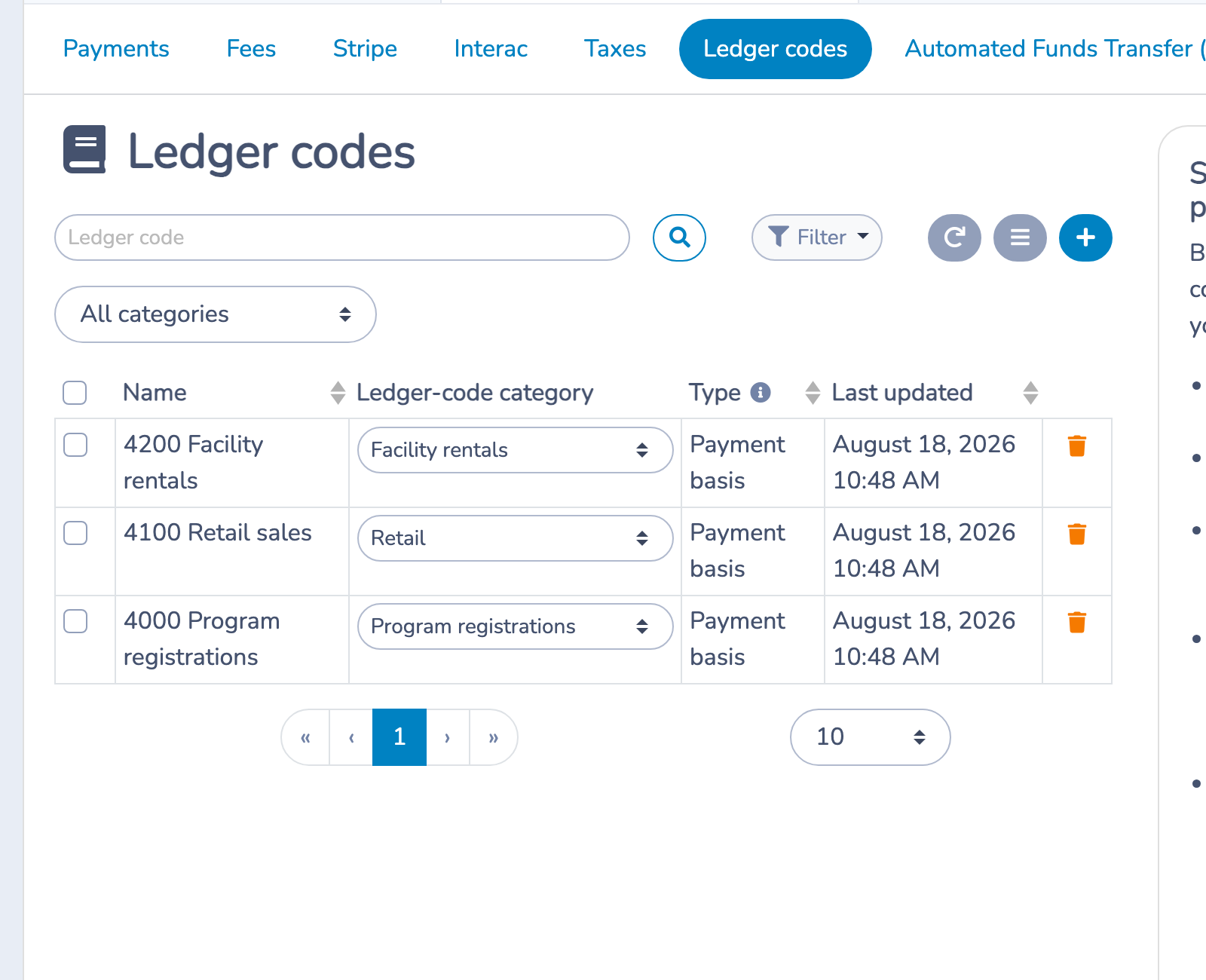
Turning on the required setting does not categorize old codes automatically. Filter by No category to find and complete any missing assignments.
# 4. Open the sales report
Open the report from either location:
- Select View sales report by Business model from the Ledger codes settings; or
- Go to E-Commerce → Reports and select Sales by Business model. If you customized the grouping name, that name replaces Business model.
When you open this report without dates in the link, it starts with the previous three complete calendar months. You can change the date range and use the contract, point-of-sale, and administrator filters when they are available.
Use the grouping menu to show all categories, Uncategorized, or one category. Changing this filter refreshes the charts, monthly evolution, and summary.
# 5. Read the charts and tables
The report contains:
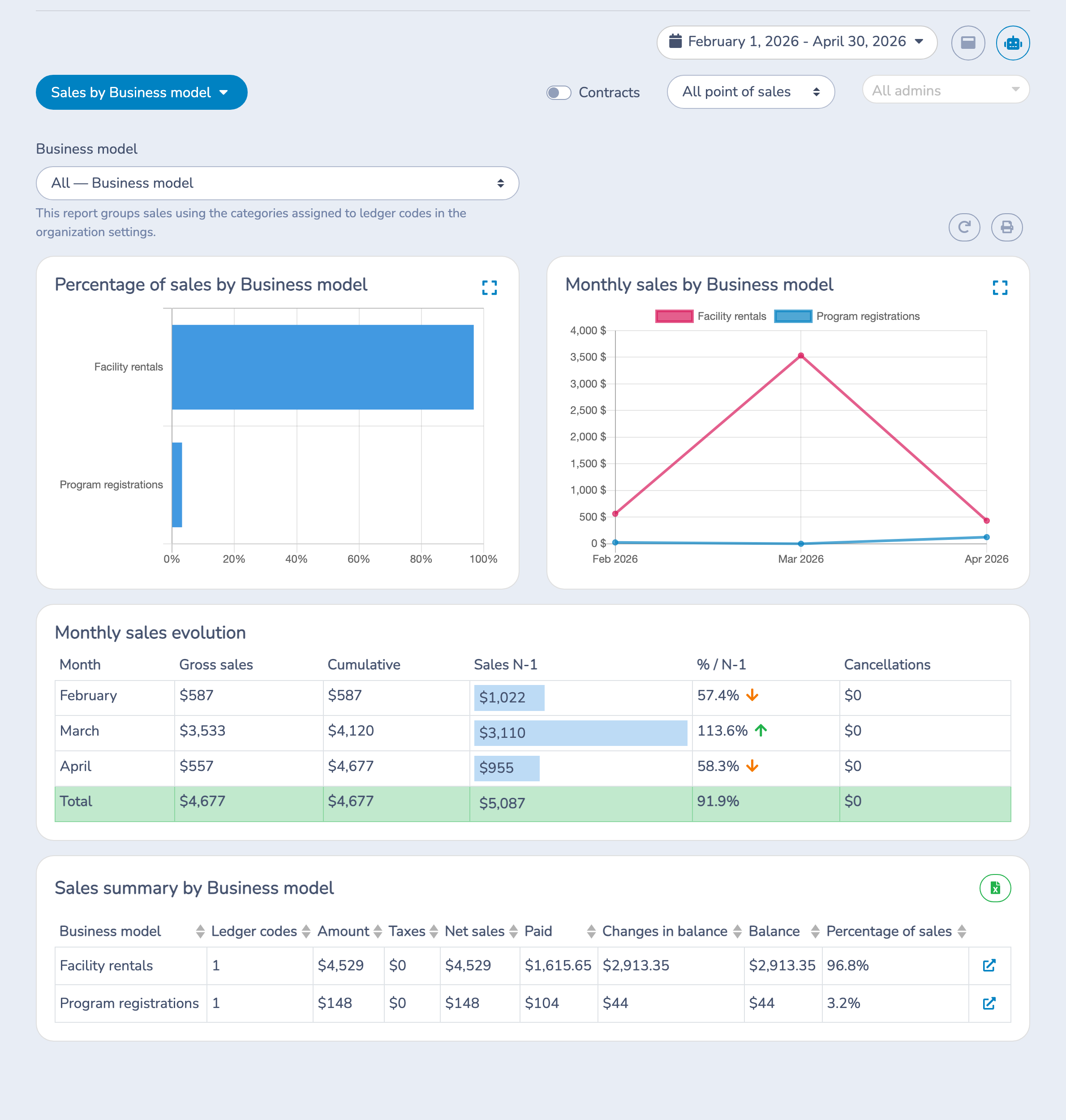
- Percentage of sales by Business model, which compares each category's share of net sales.
- Monthly sales by Business model, which shows net sales for every category by month.
- Monthly sales evolution, which compares gross sales with the same month one year earlier and shows cancellations separately.
- Sales summary by Business model, which provides financial totals and the number of ledger codes in each category.
Select the expand icon on either chart to view it in a larger window.
Monthly evolution columns
- Gross sales: sales recorded during the month before cancellations.
- Cumulative: running total of gross sales across the selected date range.
- Sales N-1: sales for the same calendar month one year earlier, using the same category and filters.
- % / N-1: current gross sales as a percentage of Sales N-1. A dash appears when the previous-year value is zero.
- Cancellations: cancellations recorded during that month.
Gross sales minus cancellations equals net sales. Because the lower summary table reports Net sales, its total can differ from the Gross sales total until cancellations are subtracted.
Category summary
The summary shows the amount before tax, taxes, net sales, paid amount, change in balance, balance, percentage of sales, and number of ledger codes for each category. Select a column heading to sort the table. Select the link at the end of a row to open the detailed ledger-code report for that category.
Use the Excel button beside the summary to export it. Use the print button above the charts to print the complete category report.
# Example
Suppose an organization uses Program registrations, Retail, and Facility rentals as business models.
- Create those three categories.
- Assign every registration revenue code to Program registrations, store codes to Retail, and rental codes to Facility rentals.
- Open Sales by Business model and choose the previous quarter.
- Compare each group's percentage of sales and monthly trend.
- Review Sales N-1 to compare every month with the same month last year.
If a sale has no ledger code, or its ledger code has no category, it appears under Uncategorized. Use that result as a cue to review your ledger-code assignments.
# Important notes
- Categories do not change ledger codes, accounting exports, or historical transaction amounts; they add a reporting level.
- Each ledger code can belong to only one category.
- The required-category setting applies when a ledger code is created or edited and does not assign existing codes automatically.
- A category in use cannot be deleted, including when it is assigned only to an archived code.
- Cancellations belong to the month in which the cancellation was recorded.
- Sales N-1 is the same month one year earlier; it is not the original sale linked to a cancellation.
- Changing the Grouping name changes the report wording only. It does not rename your categories.