
Home
Account setting
Staff
Lists
Forms
Templates (HTML emails/SMS messages)
Sending messages by SMS and email
Classes, events, attendance and Zoom
Automation
Create a birthday invitation and automation
Communication
Microsite
E-Commerce
Networks, Federations and Franchises
How to guides
Personal information and electronic message laws in Canada and the USA
Get support
Terms and conditions
https://activitymessenger.com/
10410 Waverly, Montréal, H3L 2W4
Terms and conditions

Configure RL-24 eligibility for class and form add-ons
Choose which add-on fees can be included in the eligible expenses reported on an RL-24 slip. You can configure the default on a form, override it for a specific class, and correct previously invoiced add-ons from the RL-24 interface.
# Before you begin
You need permission to edit forms and classes. The organization must use RL-24 slips, and the selected class must have RL-24 eligible enabled in its settings. To correct add-ons that have already been invoiced, you also need access to the organization’s RL-24 management page.
# Configure add-ons on a form
- Open the form that contains the Class/Event question.
- Edit the question and locate the Add-ons section.
- Turn on Class to configure add-ons associated with the registration.
- For each add-on, turn on RL-24 eligible when its fee should be included in eligible expenses.
- Save the question and the form.
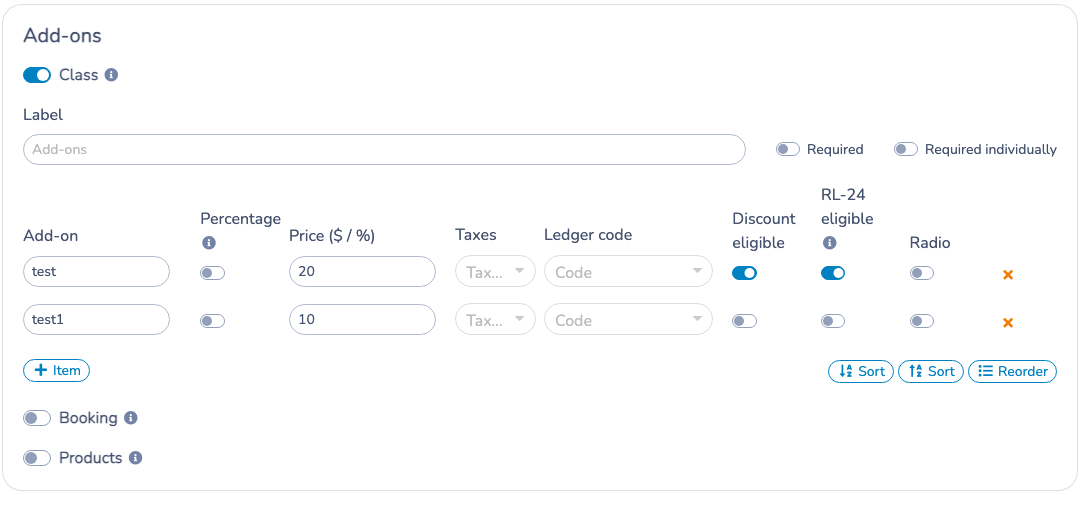
The switch is off by default and is shown only when the selected class is enabled for RL-24 slips. The same option is available for Booking and Products add-ons when those sections are enabled. Hiding the switch does not erase its saved value.
# Override the form add-ons for one class
A class can use its own add-ons instead of the add-ons configured on the form.
- From the Class/Event question, open the settings for the selected class.
- Turn on Override form add-ons options.
- Add or edit the class-specific add-ons.
- Set RL-24 eligible for each add-on, then save.
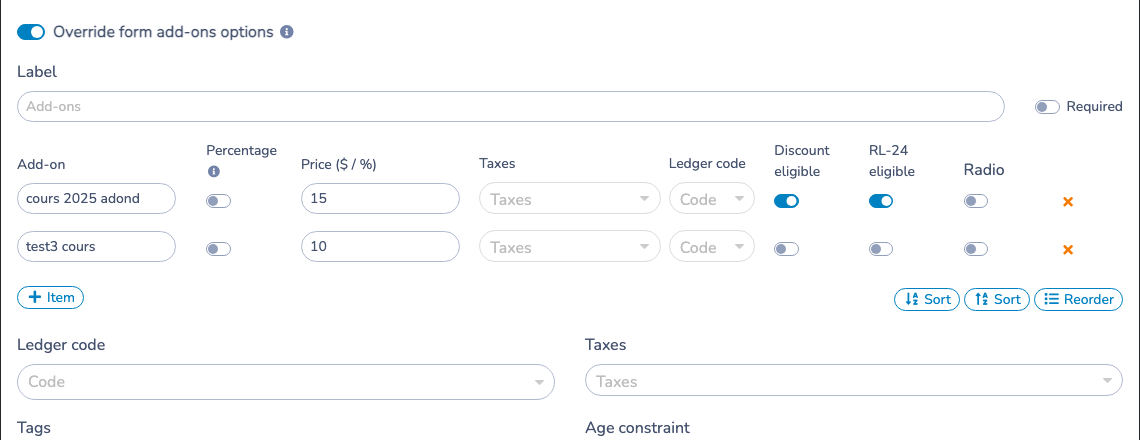
When the override is enabled, the class add-ons replace the form add-ons for that class. Other classes keep the form configuration unless they also define an override.
# What happens when an invoice is created
The eligibility status in effect at the time of invoicing is copied to the invoice add-on:
- An eligible add-on is included in the RL-24 eligible amount.
- A non-eligible add-on is excluded from that amount.
- Changing the form or class later affects new invoices only. It does not silently change add-ons already invoiced.
This preserves the original invoicing decision while allowing an administrator to correct it when necessary.
# Correct add-ons that were already invoiced
On the RL-24 page, open Invoices, then select Manage RL-24 add-ons. Choose the class and add-on name, review the number of matching invoiced add-ons, and apply Eligible or Not eligible.
The correction is applied in bulk to editable invoices for that class and add-on—not to only one child or one invoice. The current invoice statuses determine the selection shown in the bulk editor. If an add-on has never received an invoice-level status, its original form or class setting is used. A mixed set is left unselected so the administrator can make an explicit choice.
Participations already linked to an existing RL-24 slip are locked in this correction screen. The invoice itself is not locked; the protection prevents an issued slip from being changed indirectly.
# Example
A Before care add-on costs $20. Turning on RL-24 eligible includes that $20 on new invoices used to calculate the RL-24 amount. If invoices were created before the setting was enabled, use Manage RL-24 add-ons to correct those historical invoice add-ons.