
Home
Account setting
Staff
Lists
Forms
Templates (HTML emails/SMS messages)
Sending messages by SMS and email
Classes, events, attendance and Zoom
Automation
Create a birthday invitation and automation
Communication
Microsite
E-Commerce
Networks, Federations and Franchises
How to guides
Personal information and electronic message laws in Canada and the USA
Get support
Terms and conditions
RL-24
https://activitymessenger.com/
10410 Waverly, Montréal, H3L 2W4
Terms and conditions

Sales reports
Sales reports explain what appears on finalized invoices, how invoice items are classified, which discounts were applied and how sales flow into accounting or deferred-revenue analysis.
# Before you begin
Open E-Commerce > Reports, choose Sales, then select the report. You need permission to view financial reports. Promo codes and discounts, Period journal entries and Deferred revenue are limited to eligible administrative roles.
The main Sales reports support combinations of sale status, administrator, point of sale, contract, recipient list, ledger code, product, package, promo code, tags and item types. The selected date range is interpreted in the organization's timezone.
# Sales
Use Sales for invoice-item detail. The range uses when the sale or item change was recorded, according to the selected status. Choose Paid, Not paid, Credit, Cancelled, Refund, Cancelled or refund, or Item changes to answer the specific question.
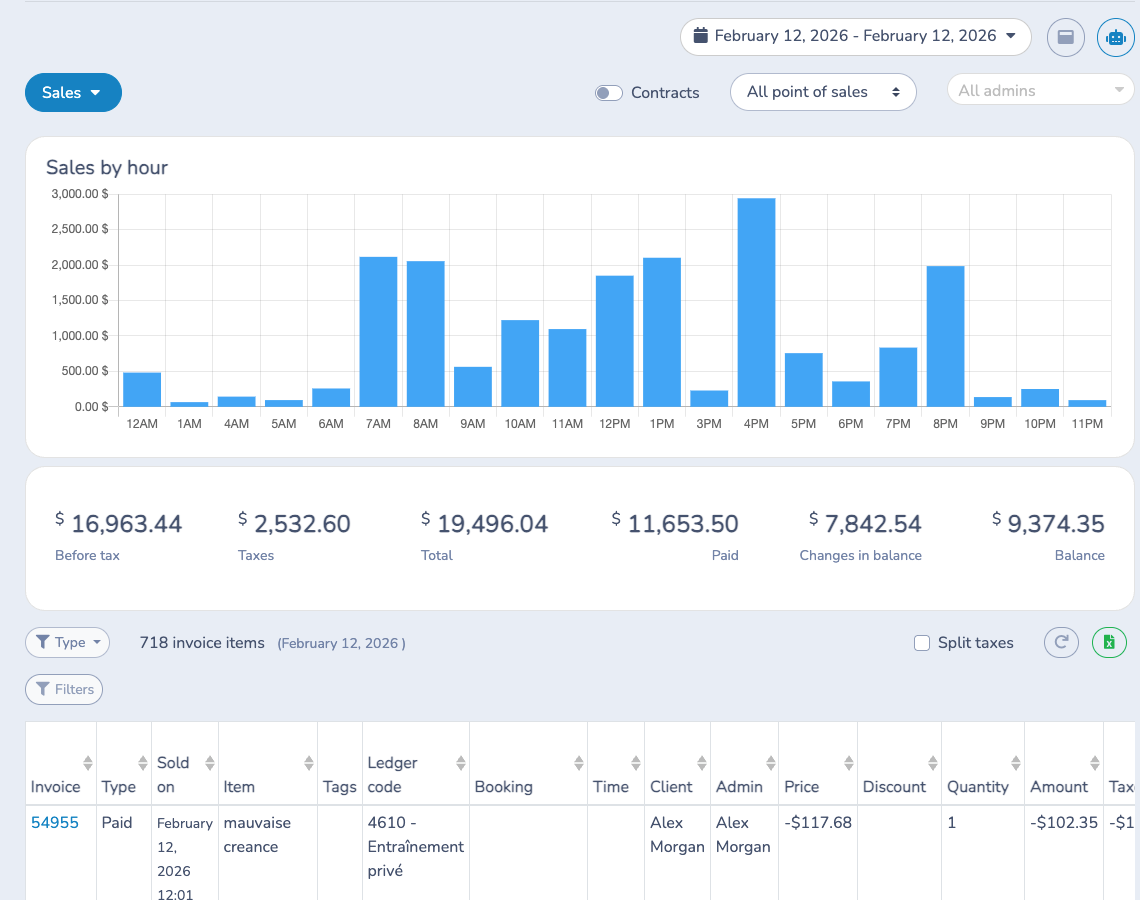
The totals show amount before tax, taxes, total, paid amount, change in balance and remaining balance. A paid sale is not the same as a payment received in the period: use Payments when the cash date matters. Filter the item detail, open the source invoice for exceptions and use Excel for the full filtered result.
# Sales summary
Use Sales summary to group the selected sales activity by day. It applies the same sale-status and item filters as Sales and shows amount before tax, taxes, total, paid amount, balance changes and remaining balance.
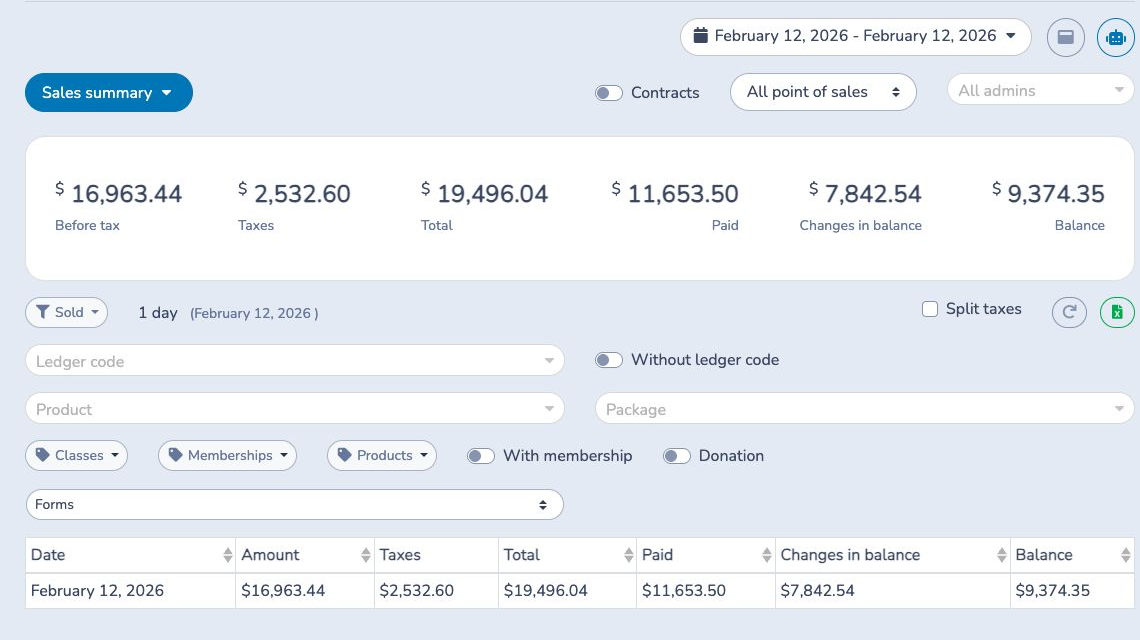
Use it for daily comparisons and trends, then open Sales with the same dates and filters when you need invoice-item detail. Excel exports the grouped result.
# Sales by ledger codes
Use Sales by ledger codes to group the selected invoice-item sales by the ledger code assigned to each item. It shows financial totals, percentage of sales, a ledger-code percentage chart and a monthly trend chart.
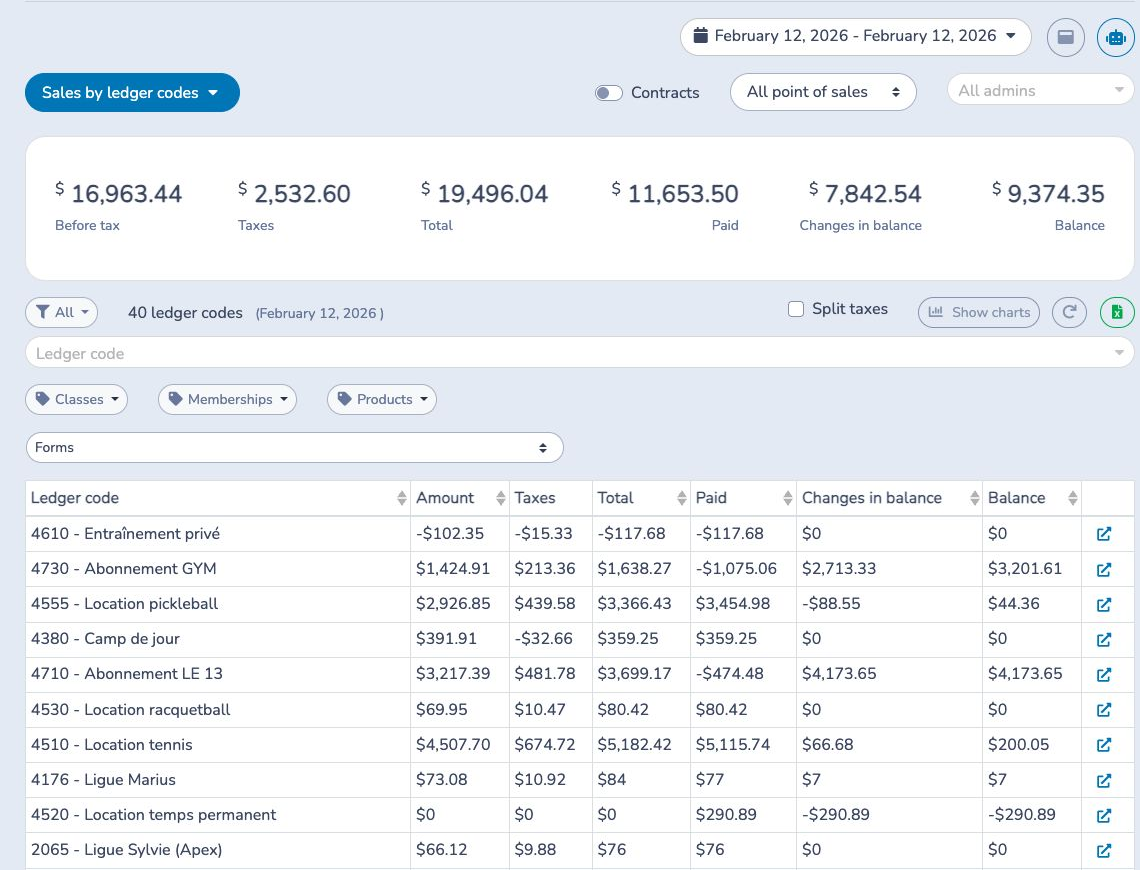
Filter by one or more ledger codes, an optional ledger-code category and the same product, package, class, membership, promo-code and status filters used by Sales. Without ledger code identifies sales that need classification; open the linked Sales detail to find the source items. This is a sales-basis view; use Payments by ledger code for money received and refunded.
# Promo codes and discounts
Use Promo codes and discounts to report the discounts on finalized, non-deleted invoices whose finalization date falls in the selected range. The report supports three types:
- Promo codes: a promo-code application stored on an invoice item.
- Manual discounts: an administrator-entered discount on an invoice item.
- Manual credits: a negative custom invoice item that is not a cancellation.
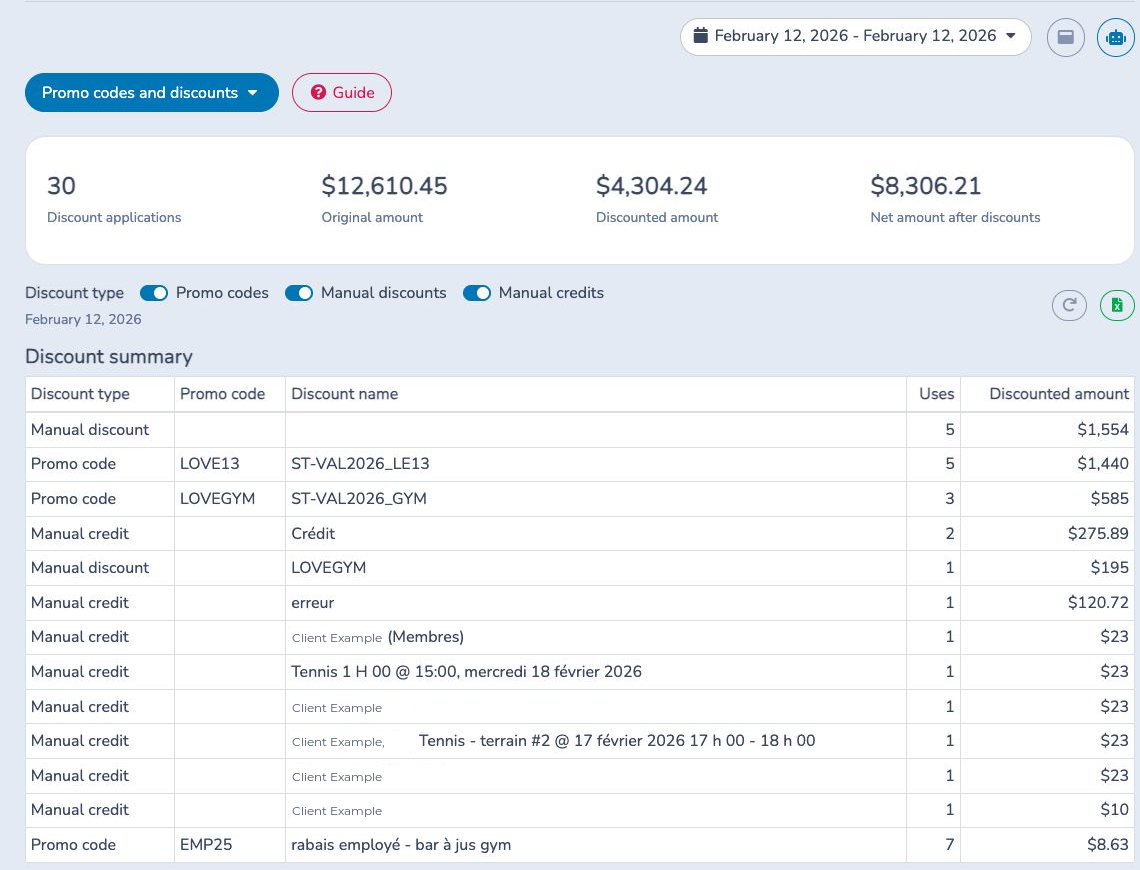
The cards show discount applications, original amount, discounted amount and net amount. One item can have more than one selected discount and therefore contribute more than one application. Turning a type off changes the summary, details and totals to include only the selected types.
The summary groups by discount type, promo code and discount name. Details show the invoice finalization time, discount, item and connected record, account owner, participant, amounts, invoice and current invoice status. Excel exports separate Summary and Details sheets with the selected types.
# Period journal entries
Use Period journal entries to create one balanced entry for the selected range. Each sold item's ledger code controls its posting basis:
- Payment basis: post revenue and taxes when payment is received.
- Sales basis: post revenue and taxes when the sale is recorded; unpaid amounts flow through Accounts Receivable and later payments reduce it.
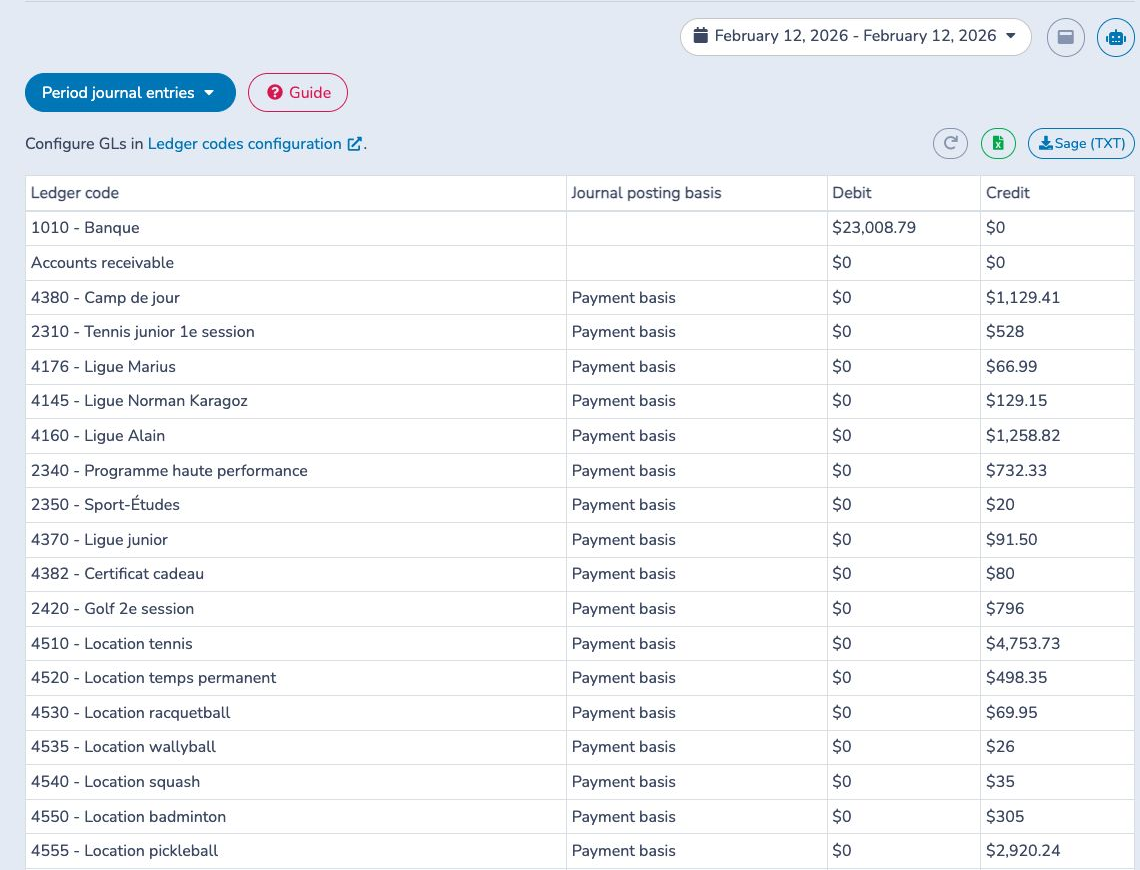
Configure the cash/bank debit, Accounts Receivable, tax and ledger-code mappings first. Equal debits and credits mean the entry balances, but do not prove every item uses the intended ledger code. Excel includes the period entry and supporting Sales and Payments sheets. QuickBooks or Sage uses the end of the selected period as the journal date.
This is not a bank-deposit report. Use Payments for non-Stripe deposits and Stripe payouts for Stripe deposits. Do not import overlapping period and deposit-level entries unless your accountant has defined the clearing workflow.
# Deferred revenue
Use Deferred revenue to reconcile eligible service revenue between an opening and closing date:
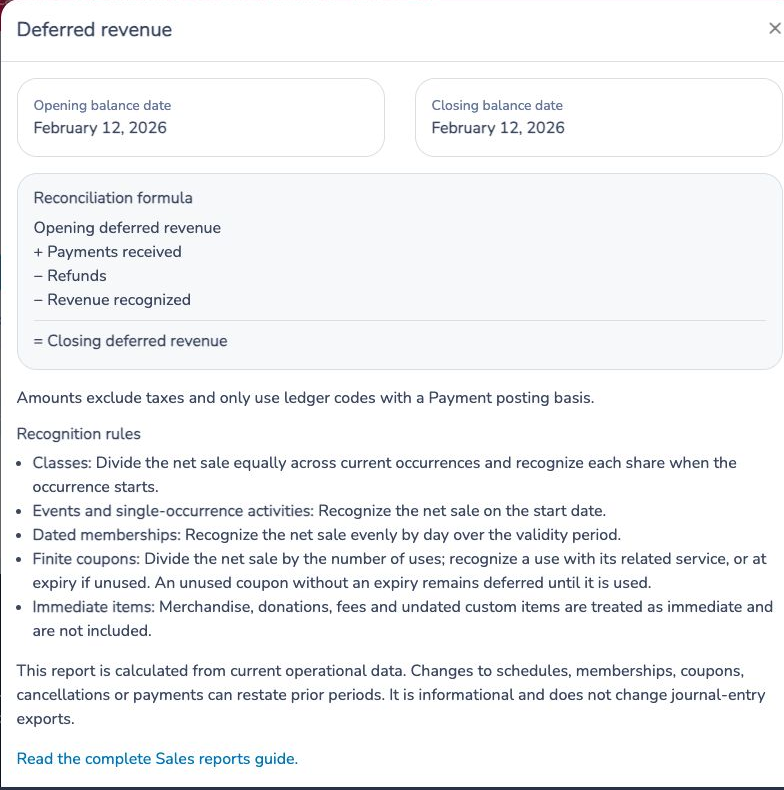
Amounts exclude tax and use only ledger codes with a Payment posting basis. Classes recognize equal shares as occurrences start; single-occurrence events recognize at their start; dated memberships recognize evenly by day; and finite coupons recognize with use or at expiry. Immediate merchandise, donations, fees and undated custom items are excluded.
The Summary tab groups the opening balance, payments, refunds, recognized revenue and closing balance. Use Details for the supporting items and Exceptions for records that could not be calculated, such as missing ledger codes or unsupported configuration. Current changes to schedules, memberships, coupons, cancellations or payments can restate earlier periods. This report is informational and does not modify journal-entry exports.