
Home
Account setting
Staff
Lists
Forms
Templates (HTML emails/SMS messages)
Sending messages by SMS and email
Classes, events, attendance and Zoom
Automation
Create a birthday invitation and automation
Communication
Microsite
E-Commerce
Networks, Federations and Franchises
How to guides
Personal information and electronic message laws in Canada and the USA
Get support
Terms and conditions
RL-24
https://activitymessenger.com/
10410 Waverly, Montréal, H3L 2W4
Terms and conditions

Stripe reports
Stripe reports connect Activity Messenger transactions with your Stripe account. Use Stripe payouts to match bank deposits, Stripe payments to inspect the transactions and fees inside them, and Stripe disputes to follow chargebacks.
# Before you begin
Open E-Commerce > Reports, choose Stripe, then select the report. You need an eligible administrative role and a connected Stripe account. When several organizations share that account, Stripe payments can include all of them and offers an organization filter.
# Stripe payouts (bank deposits)
Use Stripe payouts (bank deposits) as the source of truth for matching Stripe's net deposits to your bank account. The selected range uses Stripe's payout arrival date, not the original payment date. Each row is one payout.
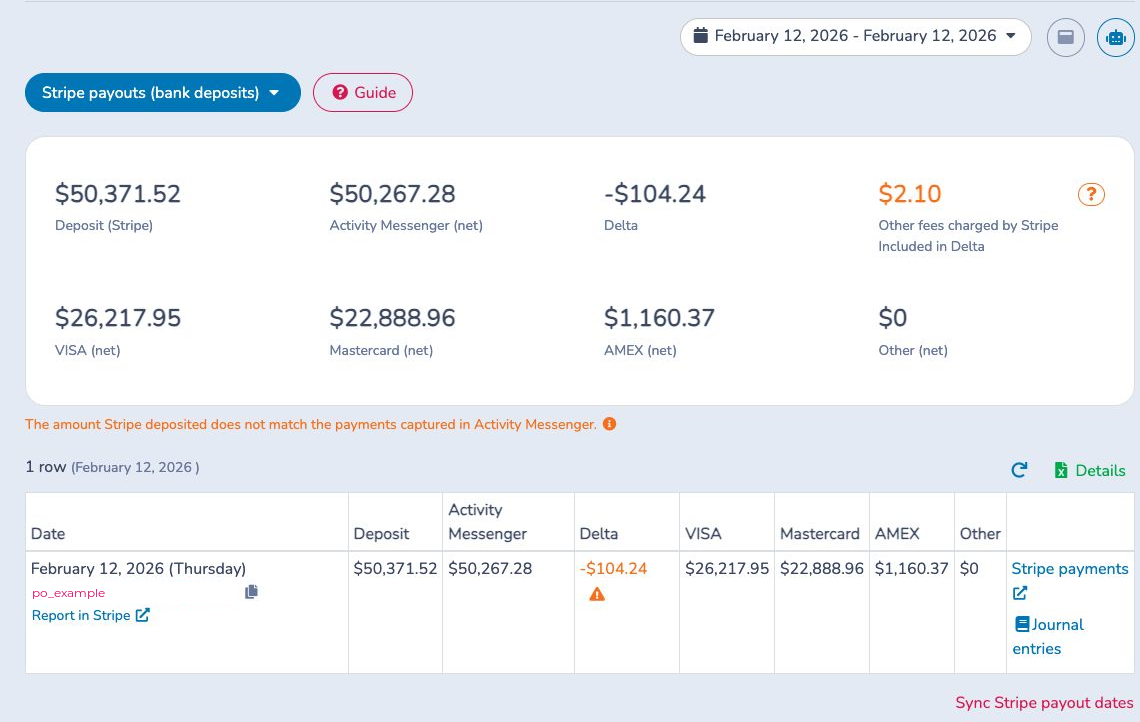
The report shows:
- Deposit (Stripe): the payout amount reported by Stripe.
- Activity Messenger (net): Activity Messenger payments and refunds assigned to the payout after applicable fees.
- Delta: the difference between the Stripe payout and Activity Messenger.
- Visa, Mastercard, AMEX and Other: net value by card brand.
- Other Stripe fees: additional balance fees already included in Delta.
Match each Deposit amount and date with the bank statement. Use the payout ID or Report in Stripe to open the source payout, then open Stripe payments to see its transactions. A new payout can temporarily have a non-zero Delta until overnight reconciliation finishes. When Stripe does not report per-payment processing fees, a persistent Delta can represent the estimated all-in Stripe fees and adjustments.
For an unexplained Delta, open the red analysis warning. It compares Activity Messenger and Stripe, identifies unmatched payments, charges, refunds, fees or adjustments and recalculates the difference. Contact support when an older mismatch remains unexplained.
Details exports payouts, payments, sold items, ledger allocations, payment dates and reconciliation exceptions. Journal entries previews a payout- level entry for the connected accounting configuration.
# Stripe payments
Use Stripe payments for payments and refunds processed through the connected Stripe account, including supported online cards, Terminal cards and Interac, and bank debits.
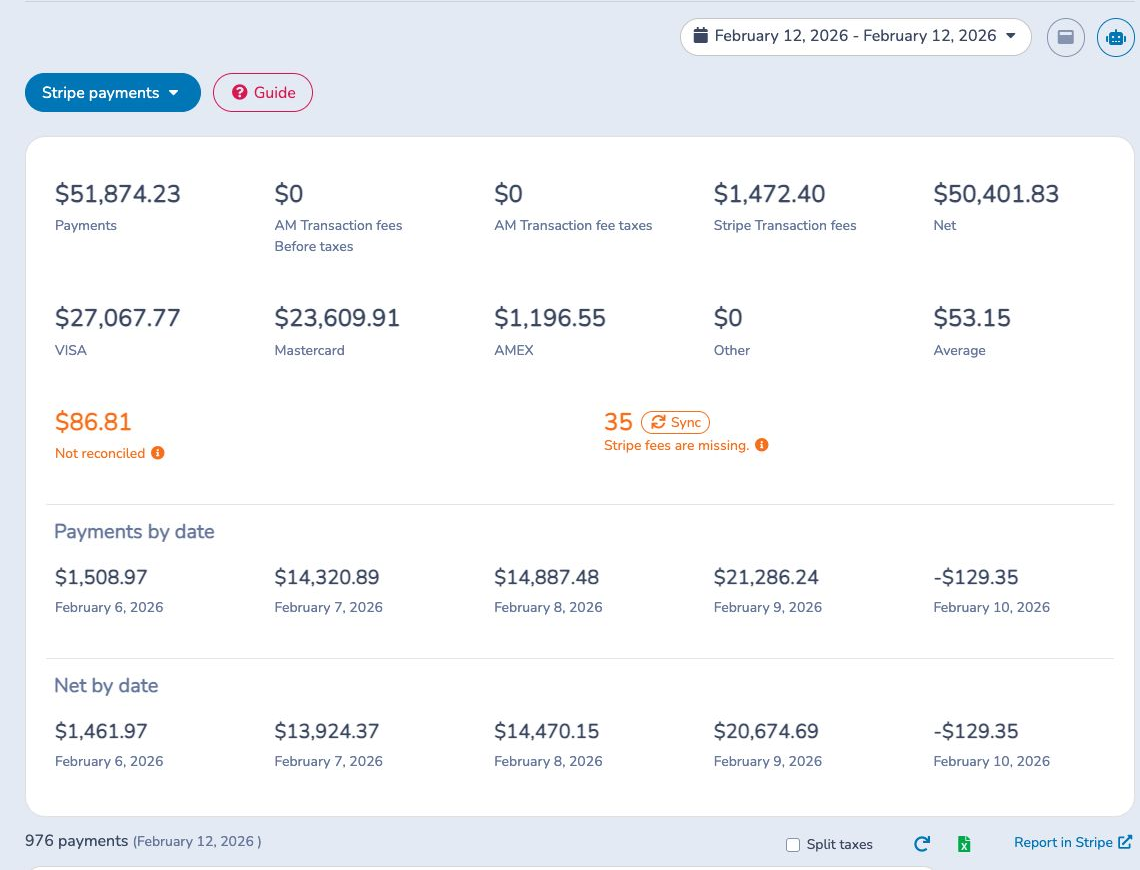
Choose the date basis carefully:
- With By payout date off, the range uses the transaction date. Use this for payment activity and fee analysis.
- With By payout date on, the range uses payout arrival dates and returns the transactions assigned to those deposits. Use this after opening Stripe payments from a payout row.
The report calculates net from payments and refunds less Activity Messenger fees, taxes on those fees and Stripe processing fees. It also shows card-brand totals, average amount, missing fees and payment-to-invoice-item reconciliation exceptions.
Filter by Stripe type, ledger code and—when accounts are shared—organization. Open a row for Activity Messenger and Stripe fees, net, payout date, charge, balance transactions, payment intent or refund. Use Sync when fee detail is missing, wait for background processing, then refresh. Excel exports transaction detail and totals by payment date. Failed refunds have a separate Excel export.
# Stripe disputes
Use Stripe disputes to find payments disputed by a cardholder or bank and follow the current Stripe status and response deadline.
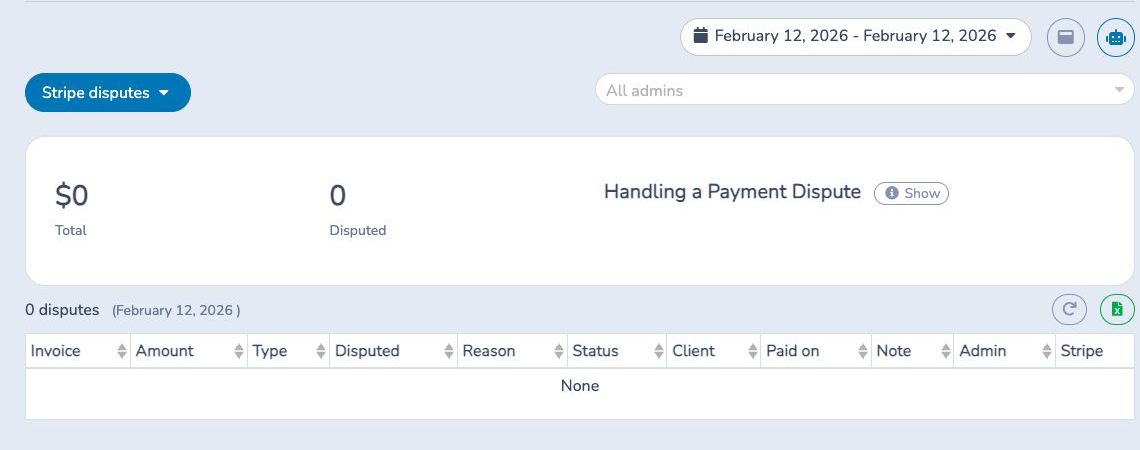
Open the source record in Stripe, contact the client, gather supporting proof and submit the evidence in Stripe before the deadline. The report shows the disputed amount, reason, status, client, payment and related invoice information when available. Add an internal note when useful.
If the dispute is lost, void the related Activity Messenger payment so the invoice and financial reports no longer treat the funds as received. Excel exports the disputes in the selected range.