
A clipboard works fine, but it stops working once you’re juggling twelve groups, a mix of full-week and drop-in campers, counsellors who need different levels of access, and parents calling the office because their kid woke up with a fever.
A digital summer camp attendance sheet solves this by connecting attendance directly to registration, so lists build themselves, updates show up everywhere at once, and nothing depends on someone remembering to update a second file.
This guide covers what to look for in a summer camp attendance sheet, how parents can report absences without a phone call, how to keep staff and groups organized even with drop-in campers mixed in, and how attendance connects to the rest of your camp’s records, from payments to medical forms.
Key Takeaways:
- A digital summer camp attendance sheet syncs automatically with registrations, so lists are accurate the moment a camper signs up.
- Parents can mark their own child absent from their account, within a cutoff window you control, and staff can see exactly who made the change and when.
- New group-building tools handle mixed full-week and drop-in camps, distributing kids across groups automatically while keeping friends together.
- Instructors without a tablet can generate a printable attendance PDF in a couple of clicks.
- Add-on filters, participant notes, and birthday icons make the attendance list useful for more than just checking boxes.
- Attendance and payments live on the same platform, so a missed payment or an unsigned waiver shows up right where you’re already looking.
Table of Contents
- Why an Automated Summer Camp Attendance Sheet Beats Spreadsheets
- Checking Campers In and Out
- Letting Parents Report Absences and Late Arrivals
- Giving Staff the Right Level of Access
- Building Groups, Even With Drop-In Campers
- Notes, Birthdays, and Add-Ons at a Glance
- Printing Attendance Lists Without a Tablet
- Bulk Managing Your Attendance List
- Sending Reminders and Updates by SMS
- Tracking Payments and Attendance Together
- Camp Liability Waivers and Medical Forms
- Frequently Asked Questions
- Final Thoughts on Summer Camp Attendance
🏕️ If you’re a camp manager looking to potentially switch your camp management solution, here is a list of the 5 best camp management software on the market.
Why an Automated Summer Camp Attendance Sheet Beats Spreadsheets
A spreadsheet only knows what someone types into it. An online registration platform already knows who’s signed up, which week they’re attending, and whether anything has changed since yesterday, so your attendance sheet can be generated automatically from that information instead of being recreated by hand every Monday morning.
When a parent registers, the system sorts that camper into the correct week and group without anyone on your team touching a spreadsheet. Whenever something changes, the list updates instantly, everywhere it’s viewed:
- 🔄 A family cancels or switches weeks
- ➕ A sibling gets added mid-season
- 🔁 A camper moves between groups
- ⚠️ A registration is flagged incomplete
This matters most in the moments when accuracy matters most: a fire drill, a parent asking who’s supervising their child right now, or a health and safety inspector asking to see today’s numbers. An automated summer camp attendance sheet means the answer is always up to date, not “let me go check.”
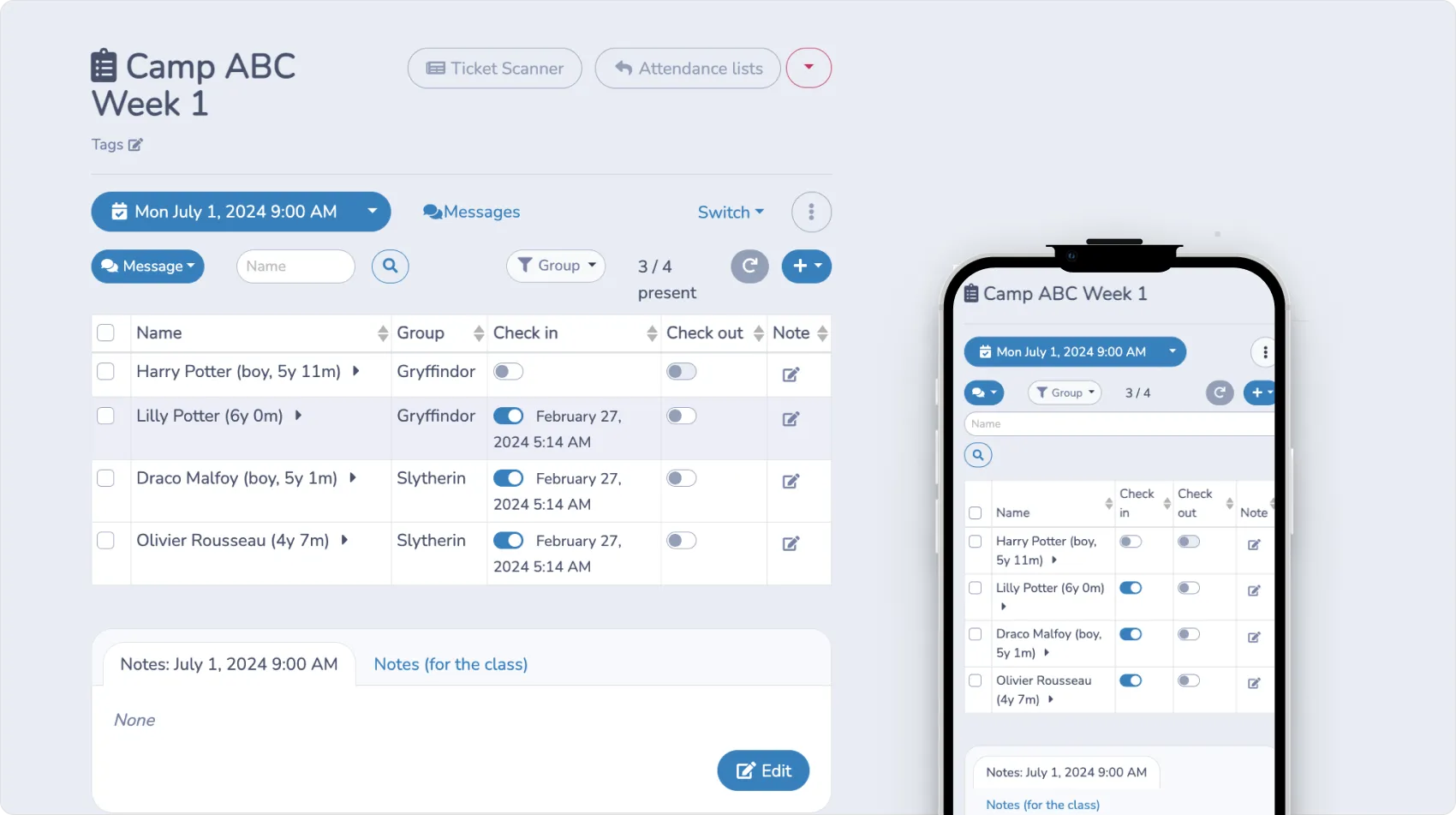
Checking Campers In and Out
A clean check-in and check-out process cuts down on errors at drop-off and pickup, which are usually the two most chaotic moments of any camp day. When a counsellor marks a camper present, the system timestamps it automatically, so there’s a record of exactly when that happened without anyone writing down a time by hand.
A few ways camps typically handle check-in:
- ✅ A counsellor taps present or absent next to each name on a tablet
- 📲 A ticket or membership card gets scanned at the door, which timestamps the entry and adds a layer of access control
- ✏️ Corrections get made in a couple of taps when someone’s marked incorrectly
Those timestamps also turn into useful data over time. If a camper is consistently picked up after your posted cutoff, or a group is consistently late checking in from an off-site activity, that pattern becomes visible instead of anecdotal, and you can follow up with the family directly instead of guessing.
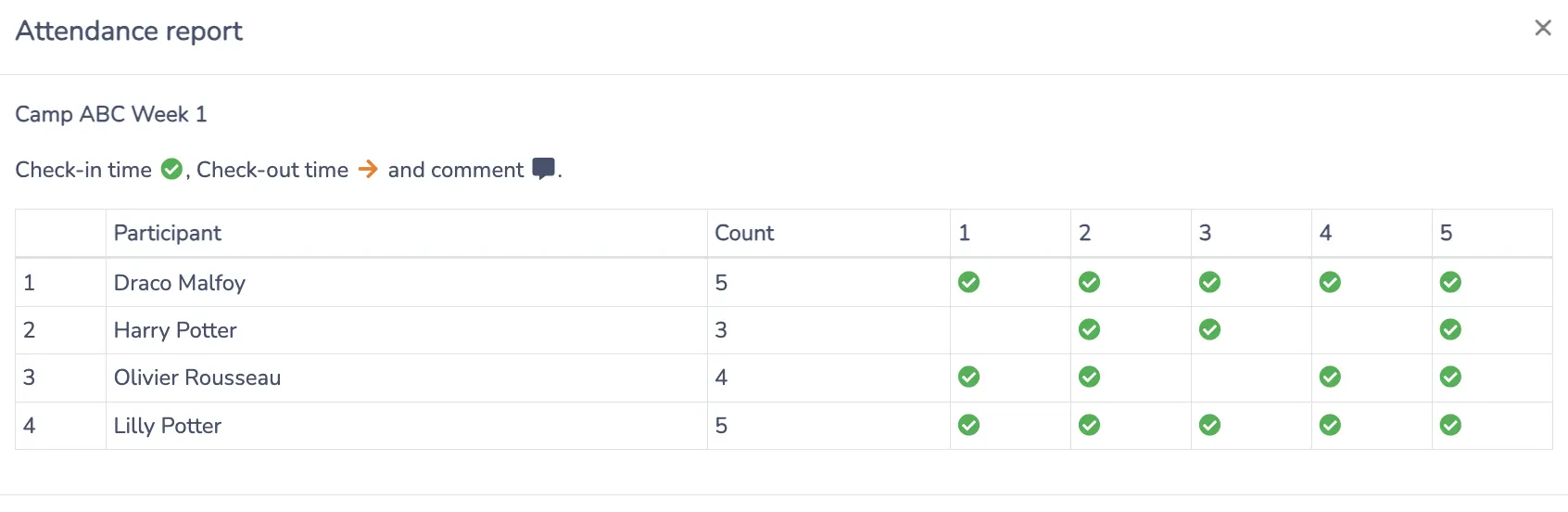
📌 Pro Tip: Most of the camps we work with closely track their campers’ attendance. The “Today” tab in our system eliminates the need to toggle between multiple lists, showing all campers who attended on any given day.
Letting Parents Report Absences and Late Arrivals
This is one of the newest additions to the attendance module, and it takes a recurring front-desk task off your plate entirely.
Parents can now mark their own child absent or submit a late notice directly from their account, instead of calling the office or emailing a counsellor who may not check that inbox until lunch. From the dedicated Absence and Late Notices tab, they can view past notices, filter by date, and submit a new notice for a specific date or date range.
You stay in control of how far this goes:
- ⏰ Set a cutoff, like no same-day changes past 10am the day before, after which parents can no longer self-report
- ↩️ Decide whether parents can undo an absence they’ve submitted, always respecting that same cutoff
- ✋ Mark or undo an absence yourself from the attendance list at any time, regardless of what the parent has or hasn’t done
- 🔔 Choose which staff get notified by email or SMS whenever a camper is marked absent, so the right person always knows
Every entry on the list clearly shows whether the absence was logged by a parent or by an admin, and exactly when. These notices sync automatically with the attendance module and the family’s view of their registered classes and events, so nothing gets lost during the handoff between a parent’s phone and your attendance list.
Giving Staff the Right Level of Access
Not every staff member needs to see every family’s information, and giving blanket access to your full roster creates unnecessary risk.
A tiered approach usually looks like:
- 👀 Counsellors seeing only the roster for their own group that week
- 💬 Admins deciding who’s allowed to message parents on behalf of the camp, and through which channels
- 🔒 Instructors starting without export access to attendance lists by default
- 🖨️ Specific instructors getting print access turned on under Attendance Taking, when they need it for an off-site activity, limited to their own assigned lists unless you open it up further
This kind of tiered access matters more for a camp than for most other programs, since you’re often managing dozens of staff, many of them seasonal or part-time, who handle information about other people’s children.
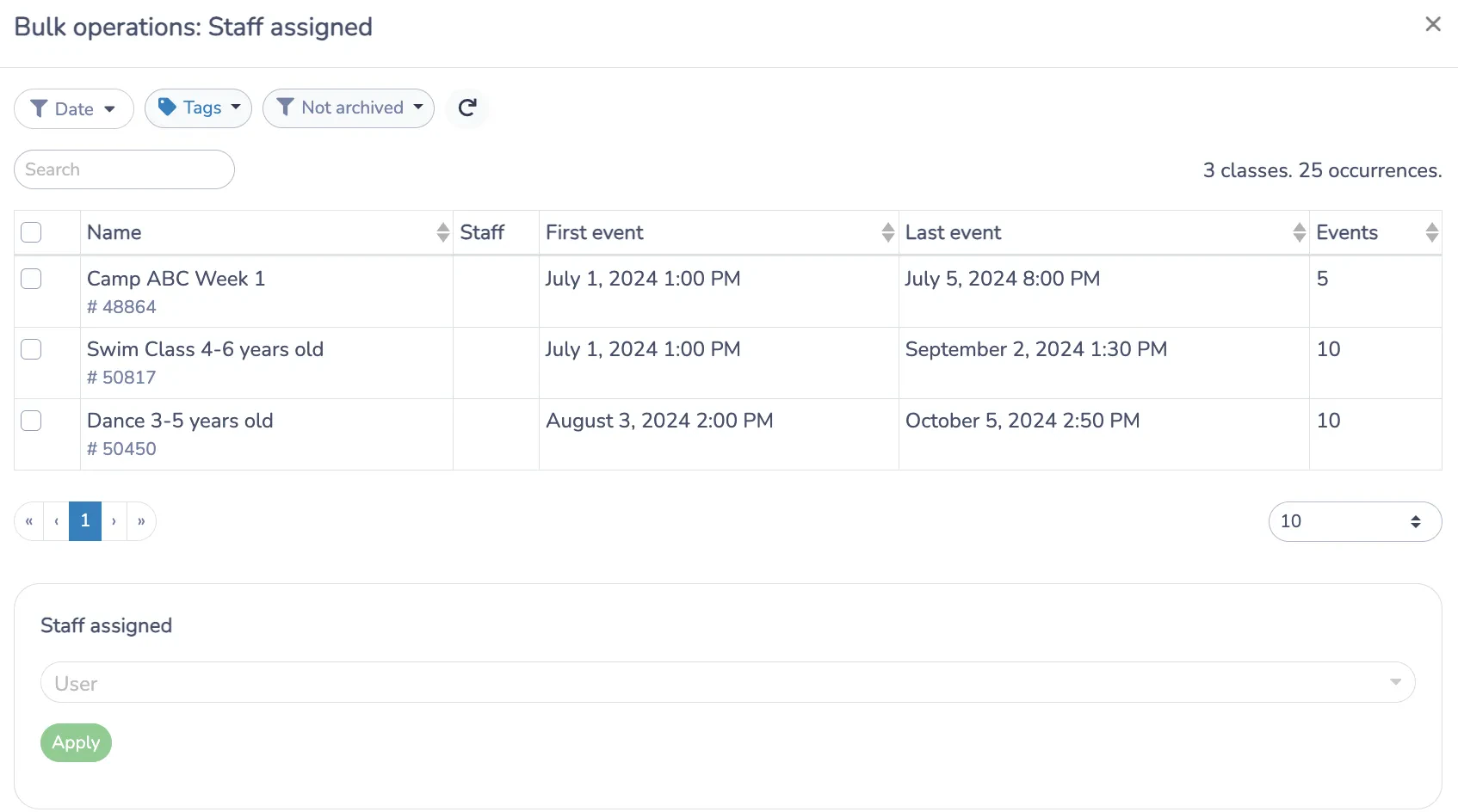
📌 Pro Tip: It’s important to limit access so that staff can only view information about parents and students in their class. You also control who is allowed to communicate with parents and how they may do so on behalf of your club.
Building Groups, Even With Drop-In Campers
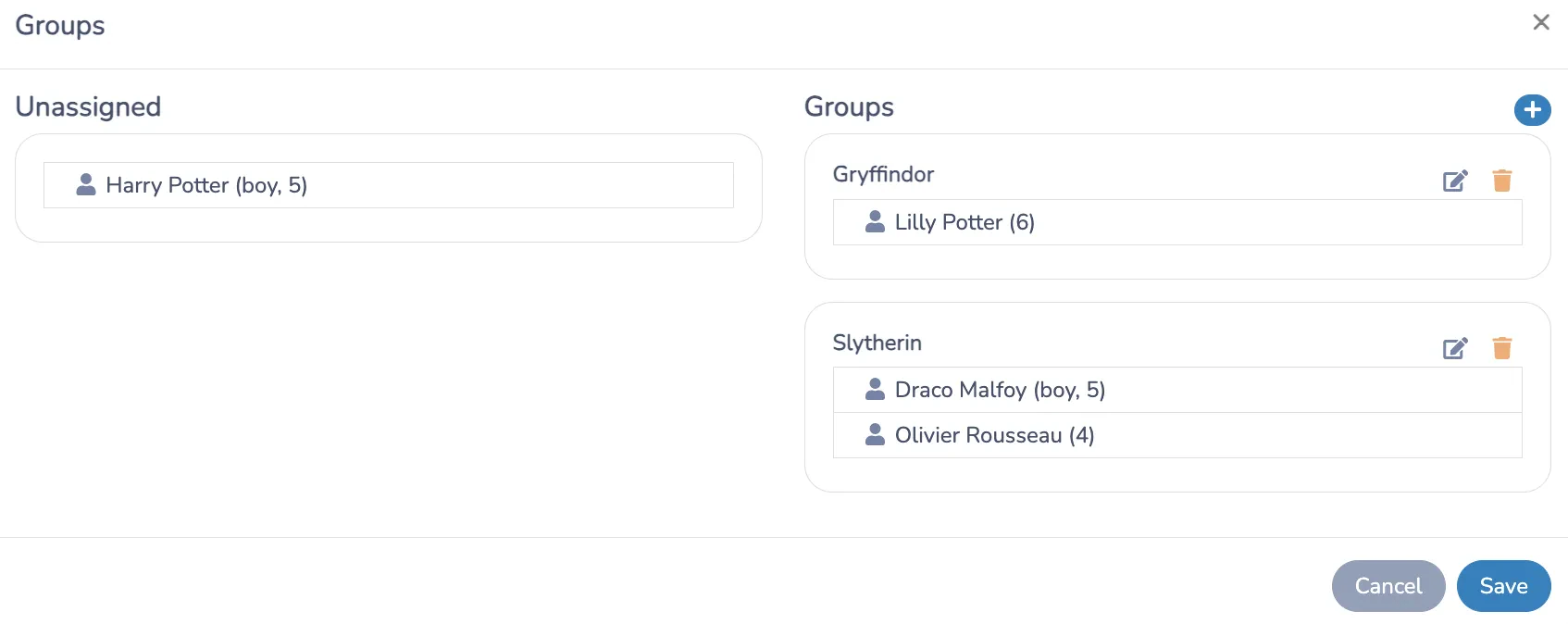
Splitting kids into groups gets complicated fast when a camp mixes full-week registrations with single-day drop-ins. Counting attendance by hand each morning, splitting out the full-week kids first, and then adjusting again based on which drop-ins showed up that day can turn a five-minute task into a thirty-minute one.
The group-building tools now include:
- 📅 Each camper’s attendance days shown directly under their name, so partial-week campers are easy to spot
- ⚖️ An auto-distribution option that balances groups by day automatically
- 🤝 An option to keep friends together during that distribution
- 💾 Saved preferences, so a distribution pattern that works for a class doesn’t need to be rebuilt every week
Notes, Birthdays, and Add-Ons at a Glance
A handful of smaller updates make the daily attendance view more useful for staff working on the ground, not just for whoever’s running reports at the end of the week:
- 📝 Global participant notes now follow a camper throughout their entire time at camp, not just for a single day or session, so anything a counsellor flags stays visible to the whole team going forward
- 🎂 Birthday icons appear directly on the attendance list on a camper’s birthday, a small touch that lets counsellors mark the occasion without digging through a registration form to check
- 🔍 Add-on filters let you filter the list by age or by specific add-ons, useful for quickly pulling up who’s signed up for lunch service or any other optional extra
- ➕ Add-on columns break each add-on type out separately in the expanded view, instead of bundling them into one hard-to-read field
None of these are dramatic changes on their own, but together they turn the attendance list from a bare-bones check-in tool into something counsellors actually reference throughout the day.
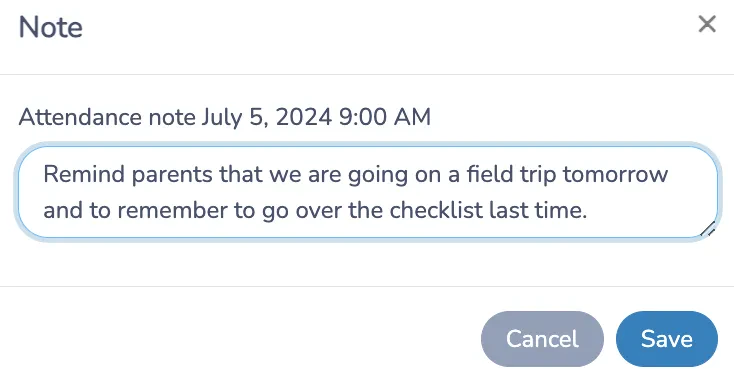
📌 Pro Tip: Communicating important class details to our staff through notes on the camp roster has been a game-changer. This helps with important communication with parents before and after camp, ensuring that no information is missed and that staff receive updates at the right time.
Printing Attendance Lists Without a Tablet
Not every counsellor is taking attendance from a tablet or phone, especially on off-site trips, at outdoor activities, or in facilities with unreliable WiFi. Assuming every staff member has a device on hand at all times isn’t realistic for most camps.
A manual PDF generation option creates a clean, printable summer camp attendance sheet on demand, with customizable options depending on what needs to be on the page for that particular activity. You can generate it directly from the attendance view or the course or event page, so staff can grab a printed list wherever they’re already working.
Bulk Managing Your Attendance List
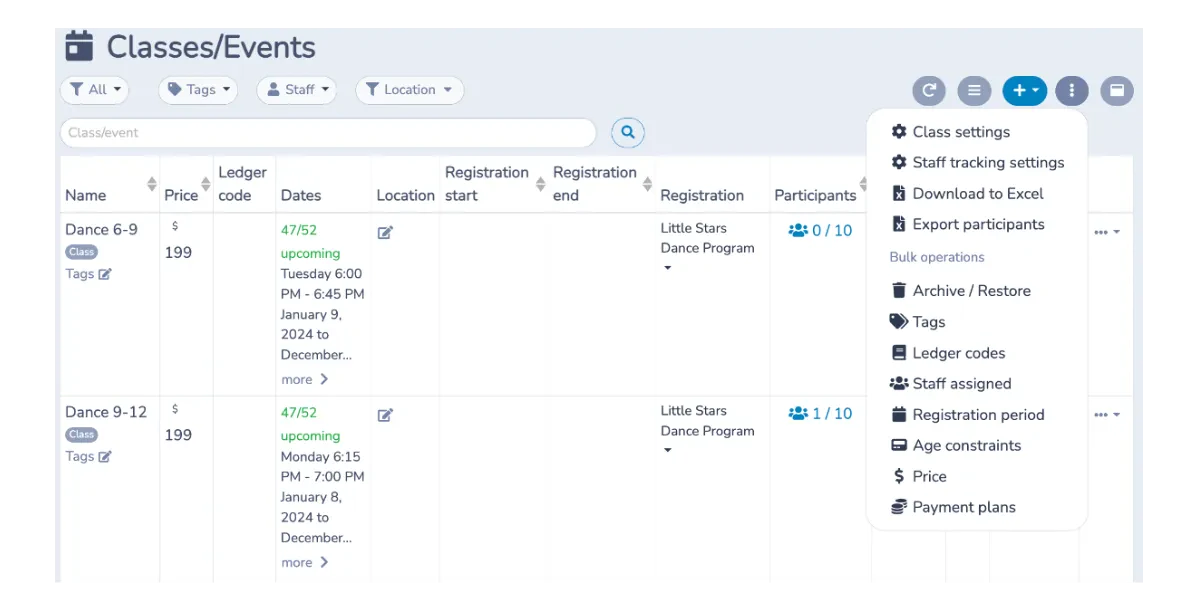
A new bulk-remove option lets you take multiple attendees off a list at once instead of clicking through each one individually. It’s a small feature on paper, but it saves real time in the moments it matters most, like when a session gets restructured, a group is combined with another, or a batch of registrations needs to be pulled the morning of.
Sending Reminders and Updates by SMS
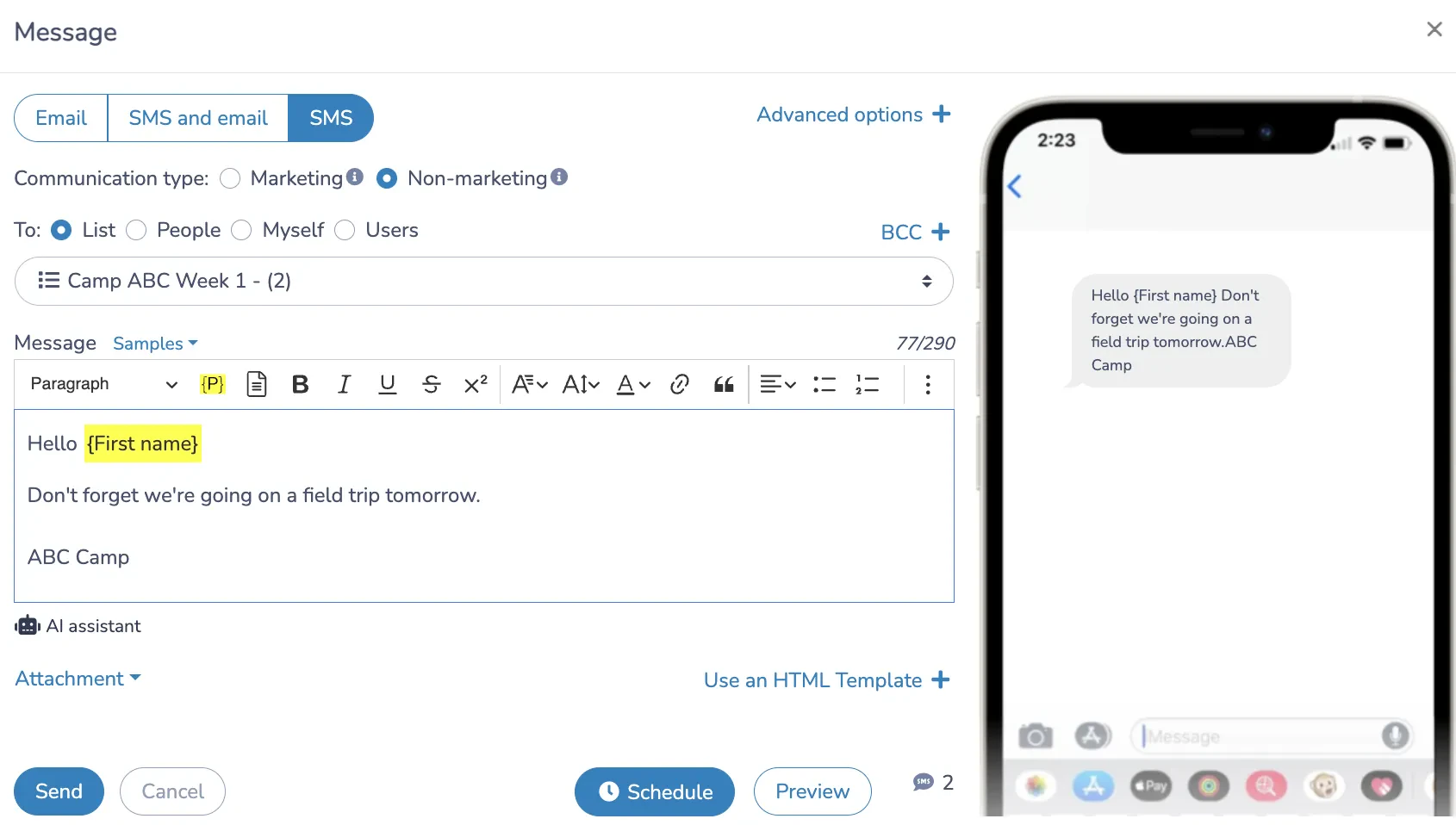
Attendance runs smoother when parents already know what’s coming, and SMS is the fastest way to reach them. Straight from the attendance list, you can send targeted messages to one camper’s family or your whole roster:
- ⏰ Reminders sent before each activity to reduce last-minute no-shows
- 🚨 Quick updates about delays, cancellations, or schedule changes
- 📝 Templates and placeholders that keep messages consistent and personalized, so every family gets the right name and week automatically
Because these messages are sent from the same attendance list you’re already using, there’s no separate contact export or messaging tool to manage on the side.
Tracking Payments and Attendance Together
For seasonal camps juggling weekly sessions, deposits, and balance payments, keeping attendance and billing in separate tools creates room for mistakes to slip through.
Keeping attendance and payments on one platform means:
- 💳 A missed payment shows up right next to the camper’s name on the same list your counsellors are already using
- 📂 Office staff aren’t cross-referencing a separate accounting file to catch overdue balances
- 📊 Directors get a full picture of who’s attended and who’s paid without pulling two reports
That visibility alone can save a camp from chasing down unpaid balances weeks after the fact.
Camp Liability Waivers and Medical Forms
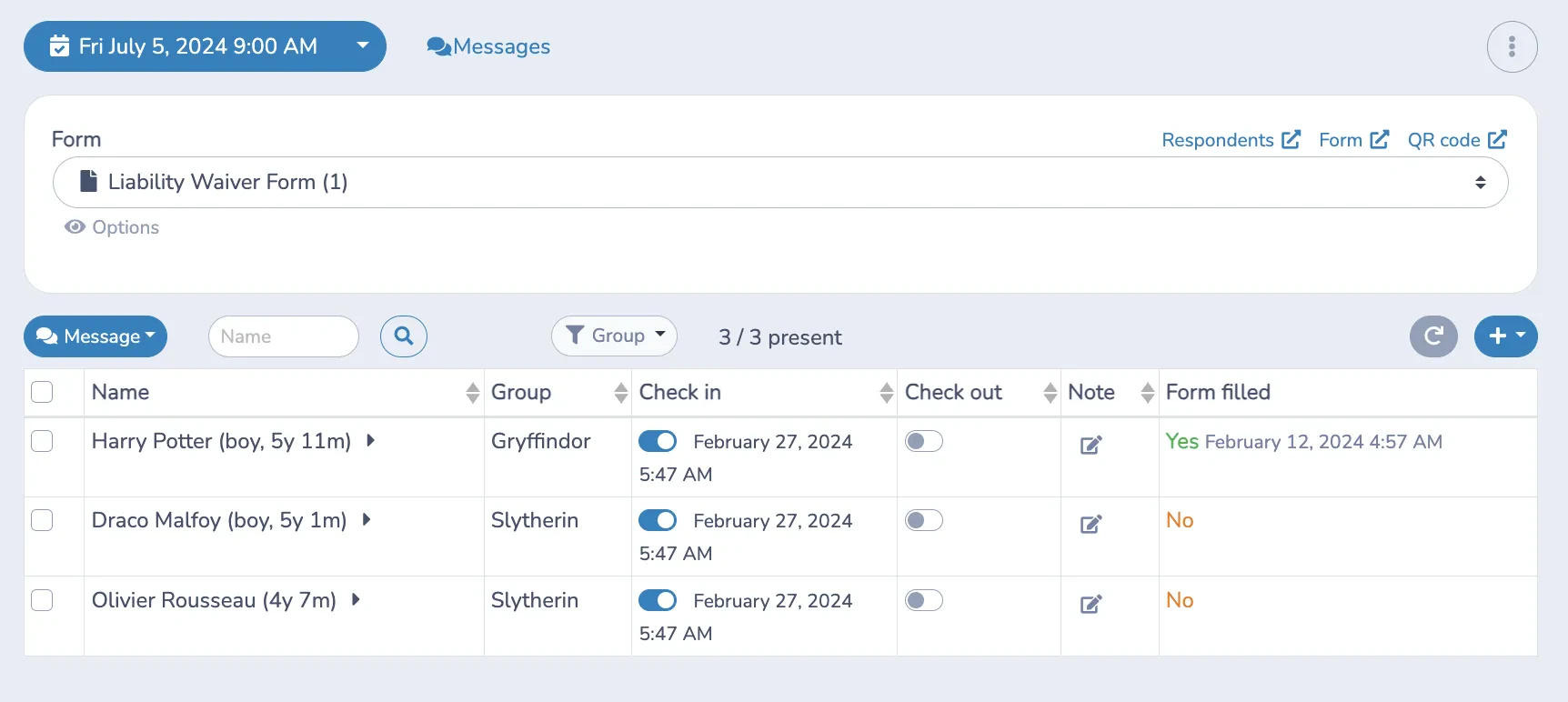
From the attendance list, you can see instantly who’s completed their liability waiver and medical form, without opening a separate compliance tracker or asking someone to cross-reference a binder.
- 🚩 Missing waivers or forms are flagged right on the list counsellors already use to check kids in
- ✅ Compliance gets confirmed before the day gets going, not discovered halfway through an activity
- 🗂️ Directors get a reliable, centralized record if questions come up later, from a parent or a regulator
Frequently Asked Questions
What is a summer camp attendance sheet?
A summer camp attendance sheet is a record of who is present, absent, or expected to attend camp on a specific day. Traditionally, this was done using a paper list or spreadsheet; however, most camps now utilize software that automatically generates the sheet based on registrations and updates it in real time as campers check in and out.
How do I track child and staff attendance for camp?
Camper attendance is usually tracked through check-in and check-out, either by a counsellor marking kids present or by scanning a ticket or membership card at the door. Staff attendance can be tracked in the same way, through a separate roster or schedule for each session or shift.
Can parents report their child absent from camp?
Yes, with the right software, such as Activity Messenger. Parents can submit an absence or late notice directly from their account, within whatever cutoff window the camp sets. Admins can also mark or undo absences directly from the attendance list at any time, regardless of what the parent has already submitted.
Why is accurate attendance tracking important for summer camps?
It keeps campers safe, ensures that everyone is accounted for during activities and off-site trips, and helps staff respond quickly in an emergency. It also gives camp directors a reliable attendance record when they need to demonstrate who was present during an activity or respond to questions about an incident.
Can I print a camp sign-in sheet if I don’t have a tablet?
Yes, Activity Messenger includes a manual PDF generation option that creates a printable attendance list on demand. This feature can be accessed from the attendance view or the course or event page, allowing staff without devices to take accurate attendance.
Final Thoughts on Summer Camp Attendance
None of this is about replacing the clipboard for the sake of it. It’s about making sure the information your camp depends on (who’s here, who’s missing, who’s paid, who’s cleared to participate) lives in one place instead of scattered across a sign-in sheet, a spreadsheet, a phone line, and a filing cabinet.
Following our aquisition of Planitou’s camp and recreation services earlier this year, we’ve been rolling out attendance improvements like these at a faster pace, with more of them built specifically for the realities of running a camp, rather than adapted from software meant for something else.
🗓️ If your camp is still stitching together attendance from a sign-in sheet, a spreadsheet, and a few sticky notes, book a free demo to see how Activity Messenger can bring attendance, groups, payments, and waivers into one place.
📖 Related Reading: