
Camp days are full of small risks: a scraped knee on the field, a bee sting at the picnic table, or a camper who needs an EpiPen. Most camps handle this with a waiver, but a stack of paper forms in a filing cabinet doesn’t actually help a counsellor in the moment.
A digital summer camp waiver form fixes the timing problem. Instead of a camp liability waiver that only matters if something goes wrong, it becomes something staff can actually check before a session starts, immediately updated once the parent hits submit.
This guide walks through what to include in a summer camp waiver form, how to collect digital signatures, and how to connect your waiver to the camp management software you already use. Plus, there’s a free template near the bottom if you want to skip ahead.
Key Takeaways:
- A summer camp waiver form should cover risk acknowledgment, medical authorization, photo/media consent, and emergency contact details, all with a legally binding digital signature.
- Digital waivers cut down on lost paperwork and give directors an instant view of who’s signed and who hasn’t, instead of flipping through a binder the morning of.
- A camp liability waiver doesn’t need to be collected inside your registration flow. A separate link or QR code lets you gather waivers for one-off events, like field trips, without asking parents to log into an account.
- Scheduled reminders, sent automatically to families who haven’t completed their waiver, close most of the gap between “sent” and “signed” without any manual follow-up.
- Waiver status should live next to attendance and payment records, not in a separate compliance tracker, so you never discover a missing form mid-activity.
Table of Contents
- What to Include in a Summer Camp Waiver Form
- Building Your Camp Liability Waiver
- Add a Digital Signature
- Test Your Waiver Before Sending It
- Connect Your Waiver to Camp Registration
- Share Your Summer Camp Waiver Form With a Link or QR Code
- Send Reminders to Boost Completion Rates
- Track Waiver Status Alongside Attendance
- Free Summer Camp Waiver Form Template 👇
- Frequently Asked Questions
- Final Thoughts
Author’s note: Olivier draws on his years running a kids’ sports program before co-founding Activity Messenger, where he now helps camps across North America manage registrations, waivers, and communication in one place.
What to Include in a Summer Camp Waiver Form
Before building your camp liability waiver, decide exactly what information and permissions you need from families. A good summer camp waiver should cover the risks and policies that are relevant to your program without turning into an unnecessarily long form.
At minimum, consider including the following:
Camper and Parent Information
Start with the basic information you’ll need to identify the camper and contact their parent or guardian:
- 👤 Camper’s full name
- 🎂 Date of birth or age
- 👨👩👧 Parent or guardian’s full name
- 📧 Parent or guardian’s email and phone number
- 📅 Camp session, week, or program they’re attending
Emergency and Medical Information
Your waiver can also include the information staff may need if an emergency occurs:
- 🚨 Emergency contact name and phone number
- 🩺 Authorization for emergency medical treatment
- 💊 Relevant medical conditions, allergies, or medications
- 🏥 Physician or healthcare provider information, if required by your camp
- 💳 Health insurance information, if required
For more detailed health information, you may want to use a separate summer camp medical form rather than putting every medical question into the waiver itself.
Risk Acknowledgment
The waiver should explain the risks associated with the activities your camp actually offers. A swimming camp, sports camp, and overnight camp may not need identical risk acknowledgments.
Depending on your program, you may need to address activities such as:
- 🏊 Swimming and water activities
- ⚽ Sports and physical activities
- 🥾 Hiking and outdoor activities
- 🚌 Transportation and off-site trips
- 🧗 Climbing, ropes courses, or other specialized activities
- 🌲 Outdoor and environmental risks
Avoid simply copying a generic waiver without considering whether it reflects the activities at your camp.
Consent and Permissions
Depending on your program, you may also need consent for:
- 📸 Photo and video use
- 🚌 Transportation
- 🏕️ Off-site activities and field trips
- 🩹 Emergency medical treatment
- 👤 Participation in specific activities
If your camp has activities with additional risks, consider whether they need their own acknowledgment or consent rather than relying entirely on the general camp waiver.
Parent or Guardian Signature
Finally, include a signature field for the parent or guardian, along with the date the waiver was signed. See the section below for more on how digital signatures work and what to check for.
📌 Important: A waiver template is a starting point, not legal advice. Requirements for liability waivers and electronic signatures can vary depending on where your camp operates. Have a qualified legal professional review your final waiver if you’re unsure whether it meets your organization’s requirements.
The goal isn’t to create the longest possible waiver. It’s to collect the information, acknowledgments, and permissions your camp actually needs before a camper arrives.
Building Your Camp Liability Waiver
Once you’ve decided what your waiver needs to cover, you can build the form in a few straightforward steps.
Step 1: Decide What Your Waiver Needs to Cover
Start with the activities, policies, and information that are specific to your camp. Use the checklist above as a starting point, then remove anything you don’t actually need.
Keeping the form focused makes it easier for parents to complete and reduces the chance of important information getting buried in a long questionnaire.
Step 2: Build Your Form
Create the fields you’ll need for camper information, emergency contacts, medical authorization, risk acknowledgment, and other permissions.
If you’re using a digital form builder, you can make certain questions required so families can’t accidentally submit an incomplete waiver.
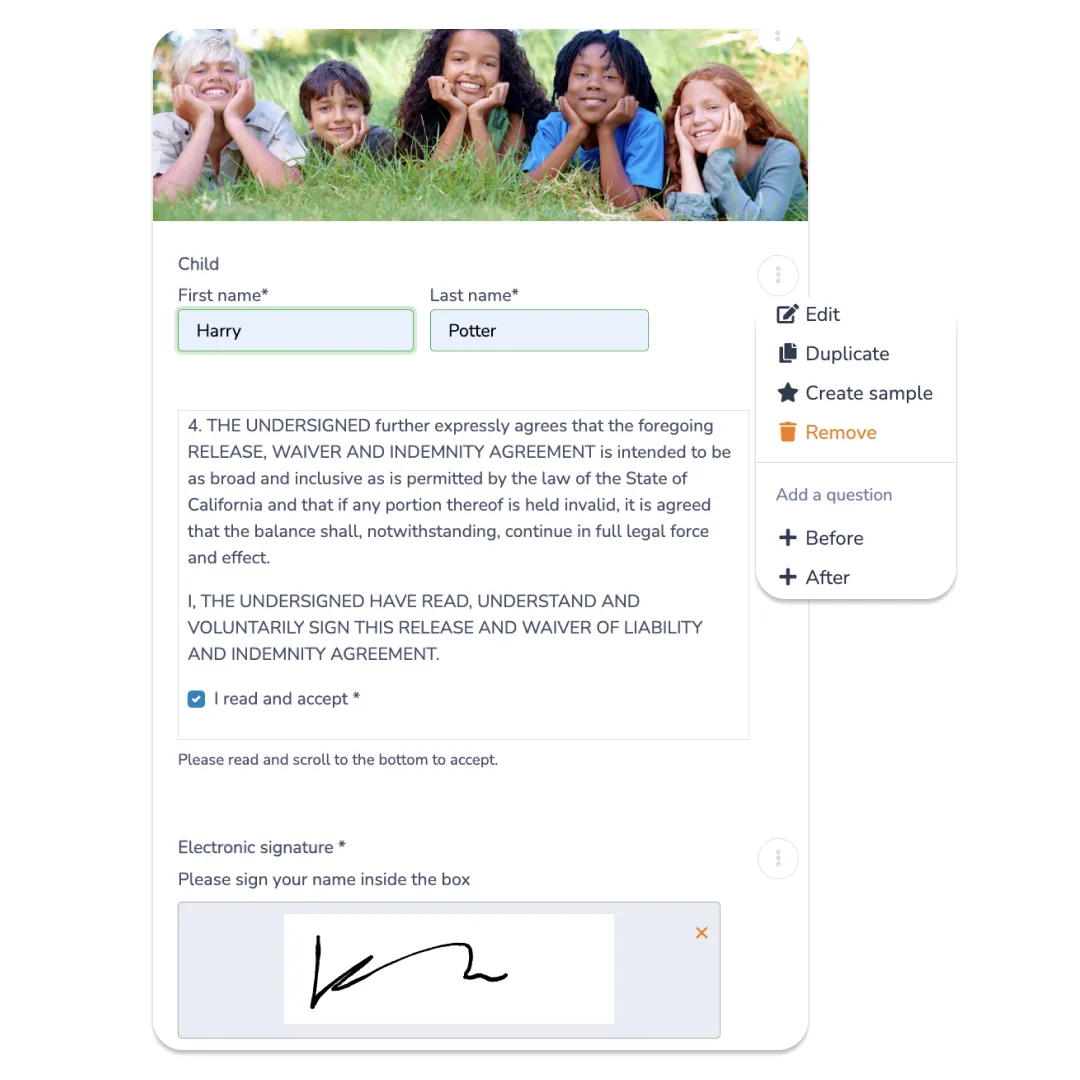
Step 3: Add Your Camp’s Waiver Language
Your waiver should clearly explain the risks associated with your activities and the permissions you’re asking the parent or guardian to provide.
This is the part where a generic template needs to be adapted to your camp. A waiver for a day camp with swimming and field trips may need different language from one for a sports camp that stays on-site.
👇 From here, the sections below cover the signature, testing, and sharing steps in detail.
Add a Digital Signature
Paper waivers create a filing problem the moment camp starts. Someone has to collect them, sort them by camper, and store them somewhere they won’t get lost, damaged, or left in a folder that never makes it back to the office after a field trip.
With a digital summer camp waiver form, families sign directly from their phone or computer, and the signed copy is stored automatically in that camper’s file.
There’s no password to create or remember: the first time a parent registers, an account is created automatically in the background using their email, and future logins just send a one-time code to that same email. Their information stays saved for next time, without adding a login step that slows anyone down.

Most platforms, including Activity Messenger, also let you brand the form itself: your logo, your colours, your camp’s own wording around risk and consent, instead of a generic template that looks like it belongs to whichever tool you’re using.
A digital signature can create a clear record of who completed the waiver and when. Make sure your signing process meets the electronic signature requirements that apply to your organization.
Test Your Waiver Before Sending It
A waiver can look finished from the administrator’s side and still be frustrating for parents to complete.
Before sending it to your full camp roster, submit a test waiver yourself from both a phone and a computer. When filling it out, pay close attention to the parent experience.
Check that:
- 📱 The form works well on a mobile device
- ✍️ The signature field is easy to complete
- 🔒 Required fields prevent incomplete submissions
- 📄 The completed waiver is stored correctly
- 👀 Staff can easily find a camper’s signed waiver
- 📧 Confirmation messages are sent as expected
- 🔔 Reminder messages only go to families who still need to sign
It’s much easier to fix a confusing field or broken workflow before hundreds of families start receiving the form.
Connect Your Waiver to Camp Registration
A summer camp waiver doesn’t always need to be collected as part of the registration process. The right approach depends on how your camp operates.
Collect During Registration
If every camper needs the same waiver, collecting it during registration keeps the process together. Families can provide their information, register for camp, and complete the required waiver in one flow.
This works especially well when the waiver is a standard requirement for every camper.
Collect Separately
Sometimes you need a waiver after registration has already happened, for field trips, special activities, one-day events, guest participants, or an updated waiver for a returning camper. In these cases, parents shouldn’t have to create a new registration or navigate through an entire camp portal just to sign one form.
Keeping your waiver connected to your camp management system also means staff don’t have to maintain a separate spreadsheet or manually match signed documents to campers.
Activity Messenger can collect waivers as part of registration or separately through a direct link, so camps can use whichever approach fits the situation.
Handle Waivers for Field Trips and Special Activities
A general camp waiver may cover your regular program, but a field trip, overnight activity, or specialized program often needs its own acknowledgment.
Consider a separate risk acknowledgment for:
- 🚌 Off-site transportation
- 🏊 Water activities
- 🧗 Specialized or higher-risk activities
- 🏕️ Overnight trips
- 🎟️ Special events with different participation requirements
You should also decide when your camp requires a new waiver. Some organizations collect one each season; others reissue it whenever activities or policies change. There isn’t one renewal schedule that fits every camp, so let your program and legal requirements guide it.
Replace Your Standalone Waiver Tool
Instead of running Smartwaiver or a similar waiver-only platform alongside your registration software, the waiver can live in the same system as everything else. One less tool to pay for, one less login for staff, and one less place a signed form can end up disconnected from the camper’s actual registration.
📌 Pro Tip: Keep previous signed versions of waivers according to your organization’s record-retention policies. If your waiver changes, you may need to know which version a parent actually signed.
Share Your Summer Camp Waiver Form With a Link or QR Code
Once your waiver is ready, make it as easy as possible for families to find and complete it. A digital waiver can be shared in several ways:
- 📧 Email: Send the waiver directly to registered families before camp starts.
- 📱 SMS: Text the waiver link to parents who haven’t completed it yet.
- 🔗 Direct link: Add the waiver to your website, registration confirmation, or parent portal.
- 🖨️ QR code: Print a QR code for drop-off, check-in, or last-minute signing.
- 🌐 Website: Embed the waiver directly on a page where families can access camp information.
QR codes are especially useful when a family needs to sign a waiver at the last minute. For example, you can display one at check-in or send one with a field trip reminder so parents can open the form directly from their phone.
The important thing is to give families a direct path to the waiver. The fewer steps between receiving the request and signing the form, the easier it is to get everything completed before camp begins.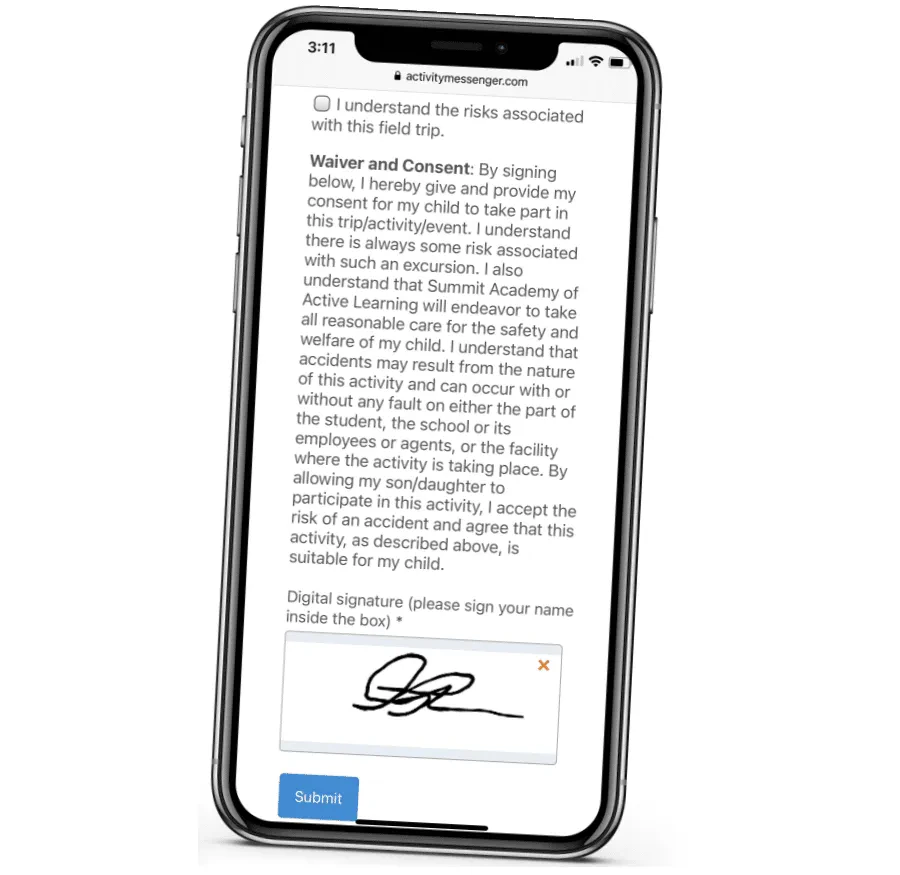
Send Reminders to Boost Completion Rates
Sending the waiver once doesn’t guarantee that every family will complete it. Some parents will miss the email, open it and forget, or assume they’ll take care of it later.
Automated email or SMS reminders can help close that gap without requiring camp staff to manually check the roster and contact families one by one.
A simple reminder schedule might look like:
- 📅 First reminder: Send the waiver when registration is complete or several weeks before camp.
- 🔔 Second reminder: Follow up with families who haven’t signed as the start of camp gets closer.
- ⏰ Final reminder: Send a last reminder shortly before the session begins.
The key is to only remind families who still have an incomplete waiver. Once someone signs, they should automatically stop receiving reminders.
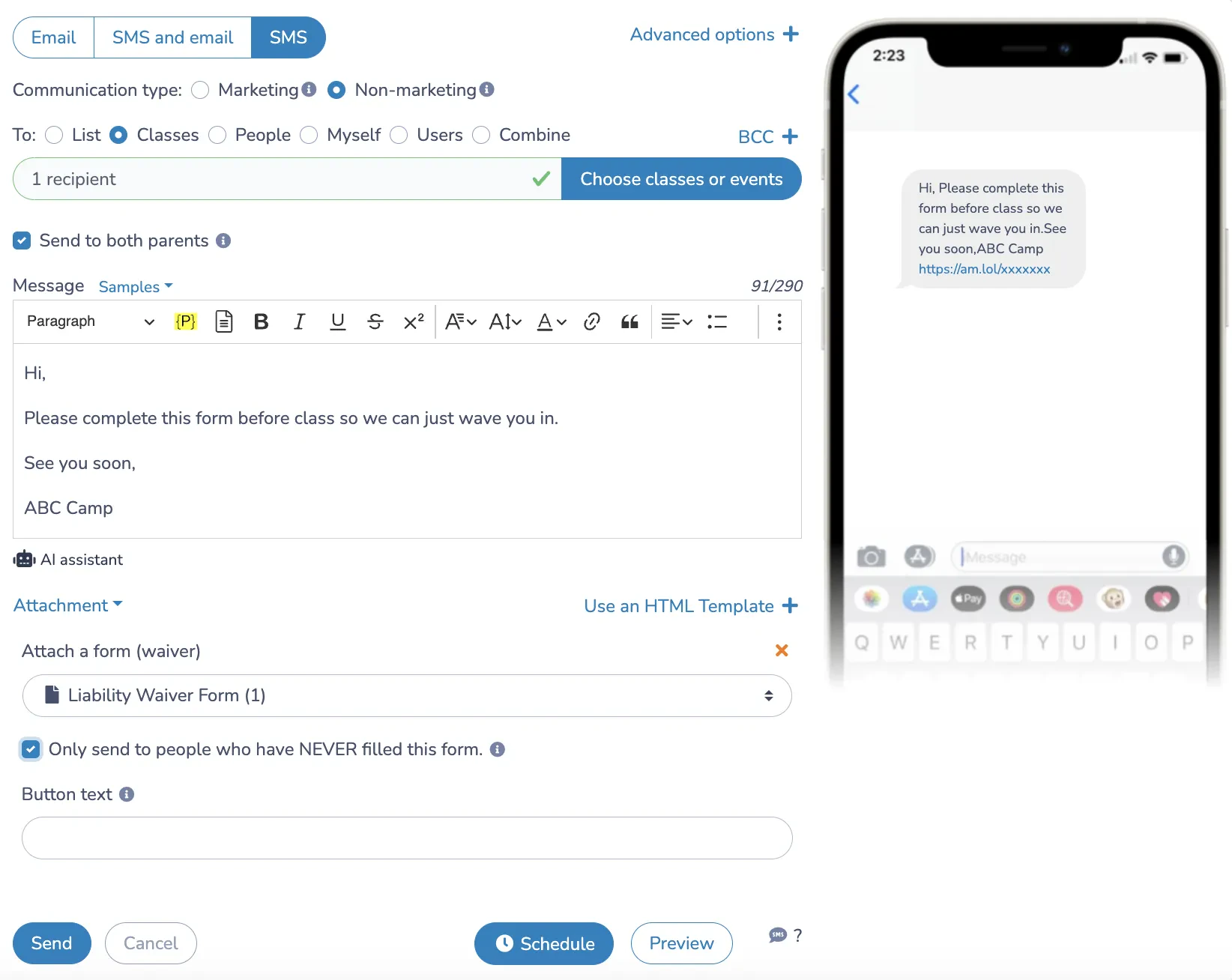
📌 Pro Tip: Don’t wait until the morning of camp to discover which families haven’t signed. Set up your reminder workflow early, so your staff can focus on preparing for camp instead of chasing paperwork.
Track Waiver Status Alongside Attendance
Collecting a digital waiver is only useful if your staff can tell who has completed it.
Instead of maintaining a separate spreadsheet or searching through email for signed forms, keep waiver status alongside the rest of your camper information, like attendance.
Before camp starts, staff can quickly see:
- ✅ Which campers have completed their waiver
- ⚠️ Which campers are still missing one
- 📩 Who needs another reminder
- 📋 Which campers have the required information on file
This becomes even more useful during the camp season. If a camper is attending a field trip or special activity, staff can check the relevant waiver before the activity begins rather than discovering a missing form at the last minute.
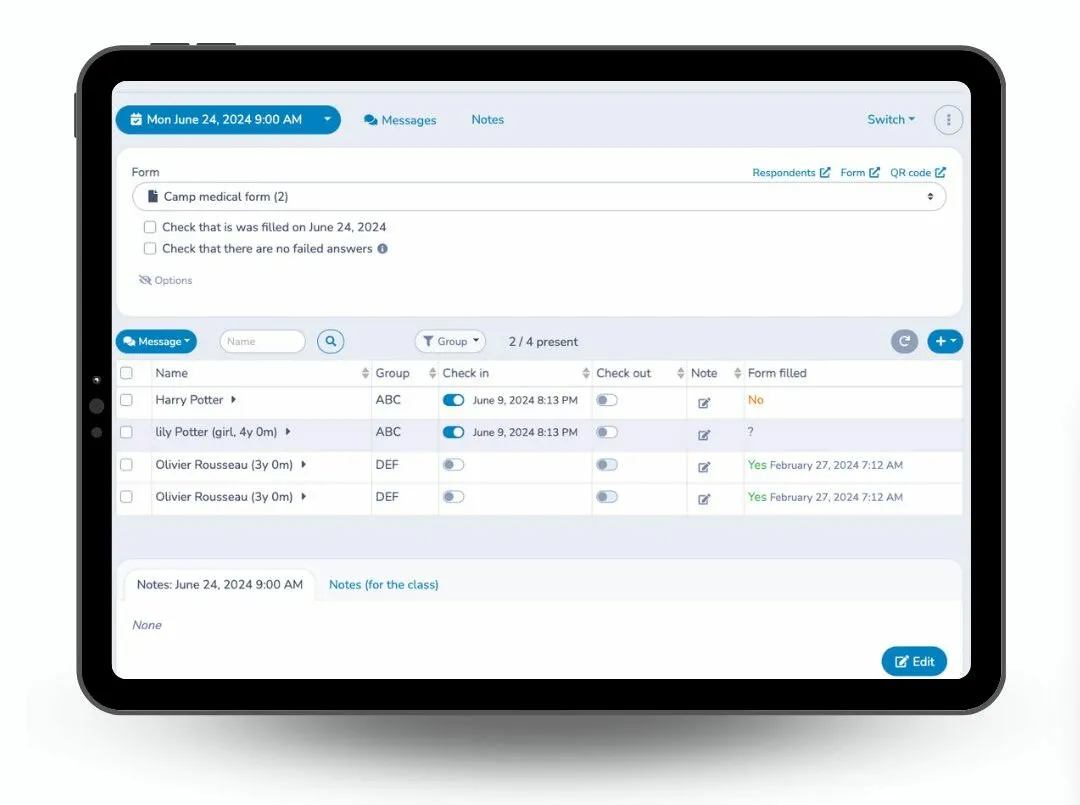
Real-time tracking also gives camp directors a clearer picture of their overall completion rate. Instead of asking the front desk who’s signed or going through a filing cabinet, they can see the status at a glance.
Keeping waiver records alongside registration and attendance information makes the process easier to manage and reduces the chance that a missing form gets overlooked.
Free Summer Camp Waiver Form Template 👇
Want to skip building the form from scratch? We’ve put together a free summer camp waiver form template covering risk acknowledgment, medical authorization, and photo consent. Use it as a starting point and adjust it to your camp’s specific activities.
Frequently Asked Questions
What is a summer camp waiver form?
A summer camp waiver form is a document that asks a parent or guardian to acknowledge the risks associated with a camp’s activities and provide relevant permissions or authorizations. It may also collect emergency contact information, medical authorization, photo consent, and other information the camp requires.
What should be included in a summer camp waiver?
A waiver typically includes camper and parent information, emergency contacts, risk acknowledgment, relevant permissions and consents, and a parent or guardian signature. The exact content should reflect your camp’s activities and the requirements that apply to your organization.
What is the difference between a camp waiver and a medical form?
A waiver primarily addresses risk acknowledgment, liability, and consent, while a medical form collects health information that staff may need to safely care for a camper. Some camps combine them, while others keep them separate.
Do parents need to sign a summer camp waiver every year?
Many organizations collect a new waiver each season, while others update and reissue their waiver when their activities or policies change. Check the requirements that apply to your organization and consider having your waiver reviewed by a qualified legal professional.
Can I use the same waiver for every camp activity?
Not necessarily. A general waiver may not address the specific risks associated with every activity. Swimming, off-site trips, overnight programs, and other specialized activities may require additional acknowledgment or consent.
Can I collect a summer camp waiver without registration?
Yes, you can share a waiver separately using a direct link or QR code, which is useful for field trips, special activities, guest participants, or families who have already completed registration.
How do I get families to complete their waivers on time?
Ensure that you send the waiver well before camp starts and use automated reminders for families who haven’t completed it. Email and SMS reminders can help you follow up without manually checking your roster and contacting each family individually.
Final Thoughts
A summer camp waiver form should do more than sit in a filing cabinet until something goes wrong. When done right, it should give your camp a clear record of who has acknowledged your policies, provided the required permissions, and completed the form before participating.
Going digital makes that easier to manage. Families can sign from their phones, staff can see who’s completed the waiver, and automatic reminders can help close the gap between sending the form and getting it signed.
If you’re still managing camp waivers on paper or across separate spreadsheets and email threads, book a demo to see how Activity Messenger brings digital waivers, registration, communication, and attendance together in one place.
📖 Related Reading: