If you’re in Canada, you can offer clients to pay with Interac e-Transfers. Activity Messenger tracks everything for you.
💬 What our customers say:
“Adding Interac e-Transfer by email as an option to pay online has saved thousands of dollars a month in credit card fees. This was made possible by Activity Messenger’s auto-reconciliation, which saves us 3 days of admin work a week!” — Duncan M., Founder & CEO, HamOnt Sports
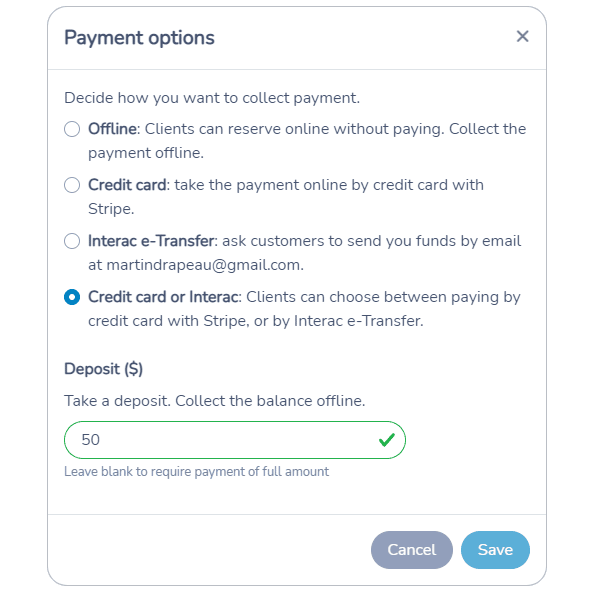
When you set up a Payment Form, you define which method of payments you accept. You can allow your client to choose between credit card or Interac e-Transfer.
You can also use Payment Forms to request deposits or partial payments. Your client will be able to pay the balance of their invoice later.
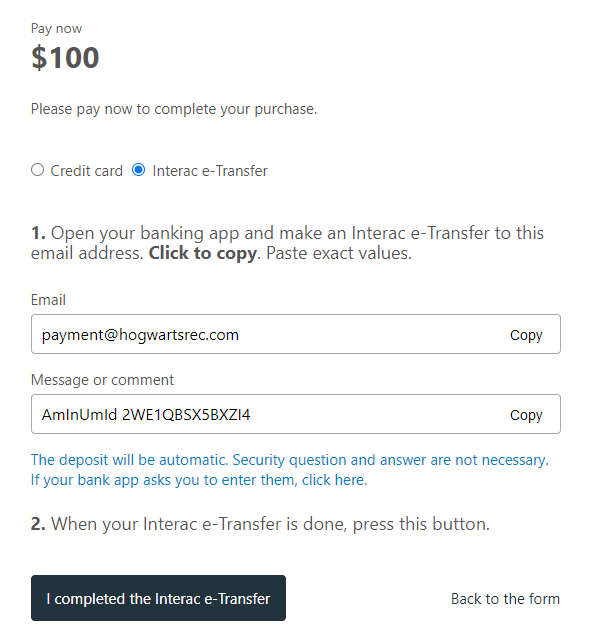
Your client will be provided with simple instructions to follow to complete the e-Transfer. The message or comment will contain an encrypted transaction ID to identify the invoice. It will be used to track the payment.
From your bank application, you can turn on Interac e-Transfer Autodeposit. Avoid having to manually accept and type in the security answer each e-Transfer.
Then, configure your email client (Gmail or Outlook) to forward confirmation emails to interac@activitymessenger.com. The payment will get automatically settled against the invoice.