If you’re on the hunt for the best form building tool for your business, you’re not alone. Many Canadian organizations rely on Google Forms because it’s free, fast, and simple.
But as your operations grow — and your privacy requirements expand — Google Forms often becomes limiting. It can’t support Canadian data residency, doesn’t offer customer support, and lacks essential features for organizations that need more than just a basic form builder.
That’s where Activity Messenger comes in.
Designed specifically for Canadian organizations, it combines modern form tools with communications, automated workflows, payments, and bilingual capabilities — all while keeping your data securely stored in Canada.
If you’ve outgrown Google Forms or need a privacy-compliant alternative, this comparison will help you understand how both platforms stack up.
Key Takeaways:
- Canadian Data Storage: Activity Messenger stores 100% of your data in Canada, ensuring full compliance with Law 25.
- Bilingual Platform: Fully available in French and English — no leftover English labels.
- More Advanced Features: Bulk SMS, email marketing, online payments, digital signatures, and attendance tracking.
- Integrations You Already Use: Canva, ChatGPT, Stripe, Zoom, and Zapier.
- Canadian Customer Support: Local, bilingual support for all clients — unlike Google Forms, which offers none.
- All-in-one Tool: Replace Mailchimp, Jotform, SmartWaiver, Eventbrite, and SurveyMonkey with one Canadian platform.
Table of Contents
- Comparison Table
- Similarities Between Google Forms and Activity Messenger
- Differences Between Google Forms and Activity Messenger
- Watch These Videos to Learn More
- Frequently Asked Questions
- Conclusion: The Best Canadian Google Forms Alternative
Comparison Table
Feature
| Activity Messenger | Google Forms |
| Ease of Use | ✅ | ✅ |
| Conditional Logic | ✅ Advanced branching & multi-level logic | ✅ Basic |
| Question Types | ✅ 30+, including signatures, uploads, payments, waivers, class selectors | ⚠️ Limited to standard form fields |
| Analytics & Reporting | ✅ Detailed reports, filters, exports | ⚠️ Basic charts & summaries |
| Fully Bilingual (FR/EN) | ✅ Full platform + forms | ⚠️ Partial translations; English appears in UI |
| Brand Customization | ✅ Themes, media blocks, Canva integration | ⚠️ Limited styling options |
| Bulk Email & SMS | ✅ Email campaigns + SMS messaging | ❌ |
| Automated Workflows | ✅ Scheduled emails, triggers, reminders | ❌ |
| Digital Signatures | ✅ Built-in | ❌ |
| Online Payments | ✅ Stripe-powered payments & invoices | ❌ |
👉 Explore our comparison articles on Microsoft Forms and SurveyMonkey for an in-depth analysis of other popular form-building software.
Similarities Between Google Forms and Activity Messenger
Fast, User-Friendly Form Design
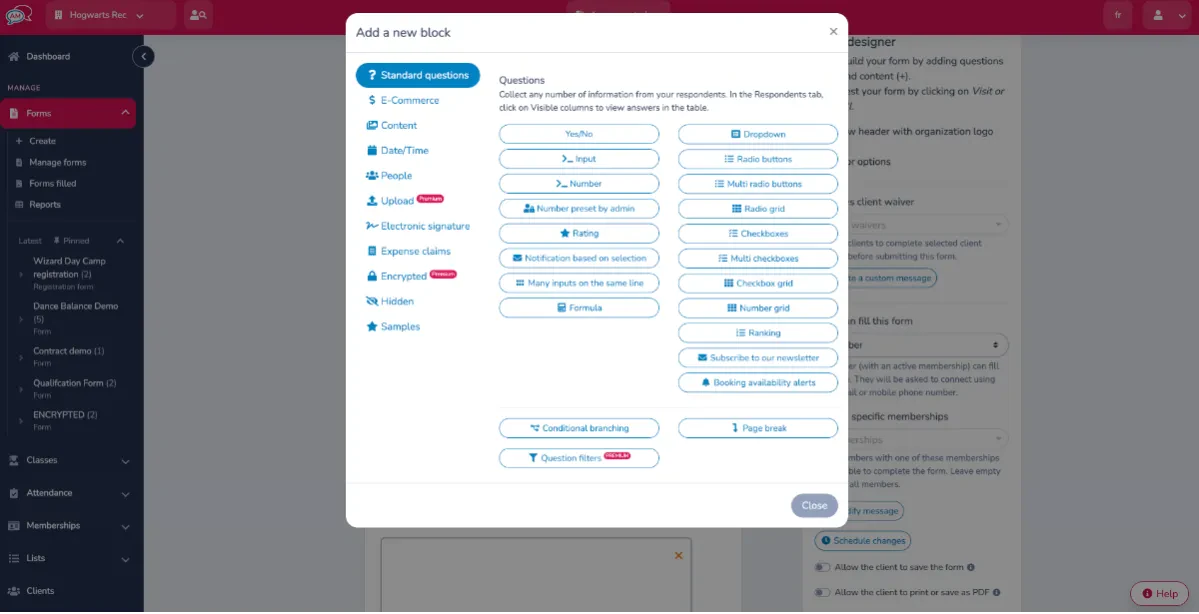

Both Google Forms and Activity Messenger offer intuitive, beginner-friendly interfaces. You can create a form in minutes using drag-and-drop tools and common question types such as multiple choice, checkboxes, dropdowns, and open text.
However: Activity Messenger includes many more question types — including roster lists, class selection blocks, document uploads, signature fields, and conditional logic that goes far beyond Google Forms.
You can even add multiple classes or activities to a single form.
Allows Collaboration
Like Google Forms, Activity Messenger offers response analysis and data extraction for all your forms. This enables you to discover more about your participants’ experience.
With detailed reporting and comprehensive analysis, you can make informed decisions and better understand your clients.
Customization
Both platforms allow you to personalize the look and feel of your forms with images, videos, and themes. Activity Messenger also supports full bilingual mode (FR/EN), conditional logic to show or hide questions based on respondents’ previous answers, and branded visuals designed in Canva.
Data Analysis
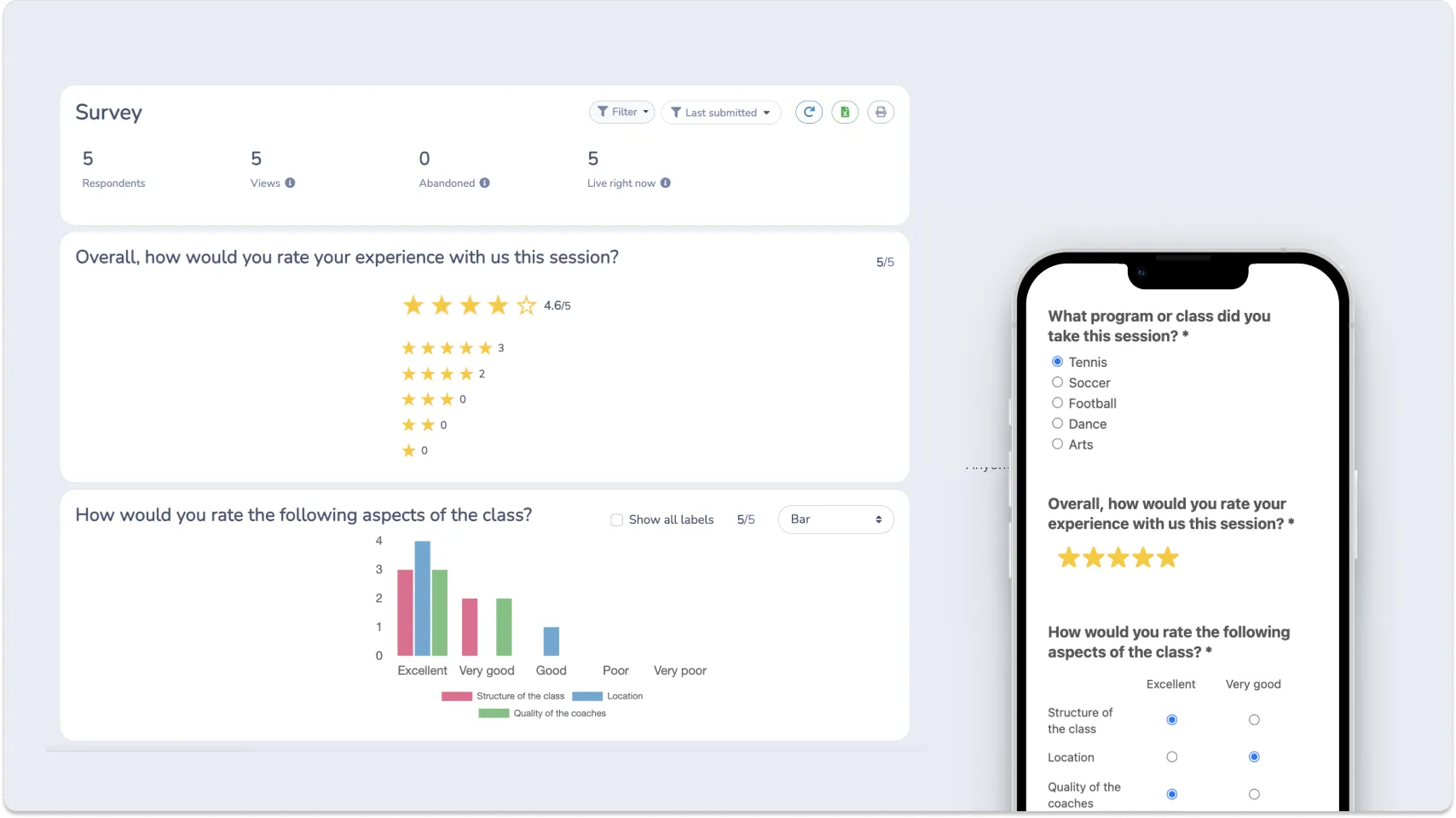
Google Forms generates basic charts and graphs for quick overviews.
Activity Messenger provides deeper reporting, letting you visualize trends, segment data, filter responses, and export detailed results for analysis.
📌 Read More: Discover how-to articles for Google Forms, including creating registration forms, certificates, surveys, skill assessments, and waitlists. You can also learn more about customizing your forms and adding additional sections.
Differences Between Google Forms and Activity Messenger
1. Canadian-Based Customer Service
Google Forms does not offer personalized customer support.
Activity Messenger provides 100% Canadian-based, bilingual support — available to every customer regardless of plan size.
💬 What our customers say:
“When we first joined, we had no idea how much of our operations we would be able to do in Activity Messenger. We also love working with the AM team. They are extremely helpful and receptive to new ideas and happy to implement new things that will benefit their clients. The AM team is very accessible and we never have to worry about waiting for them to respond; they are ON IT.” — Catherine D., Member Services Manager & Finance, Non-Profit Organization Management
“The team is incredibly helpful, I honestly cannot say enough about the customer service this company provides.”— Annie C., Enrolment Coordinator, Education Management
2. Fully Bilingual Platform
Activity Messenger is fully available in both French and English.
Every interface element, form question, setting, and email template is translated.
Google Forms, by contrast, often leaves English terms visible in the French UI.
3. Bulk SMS Messaging
Google Forms is limited to form creation.
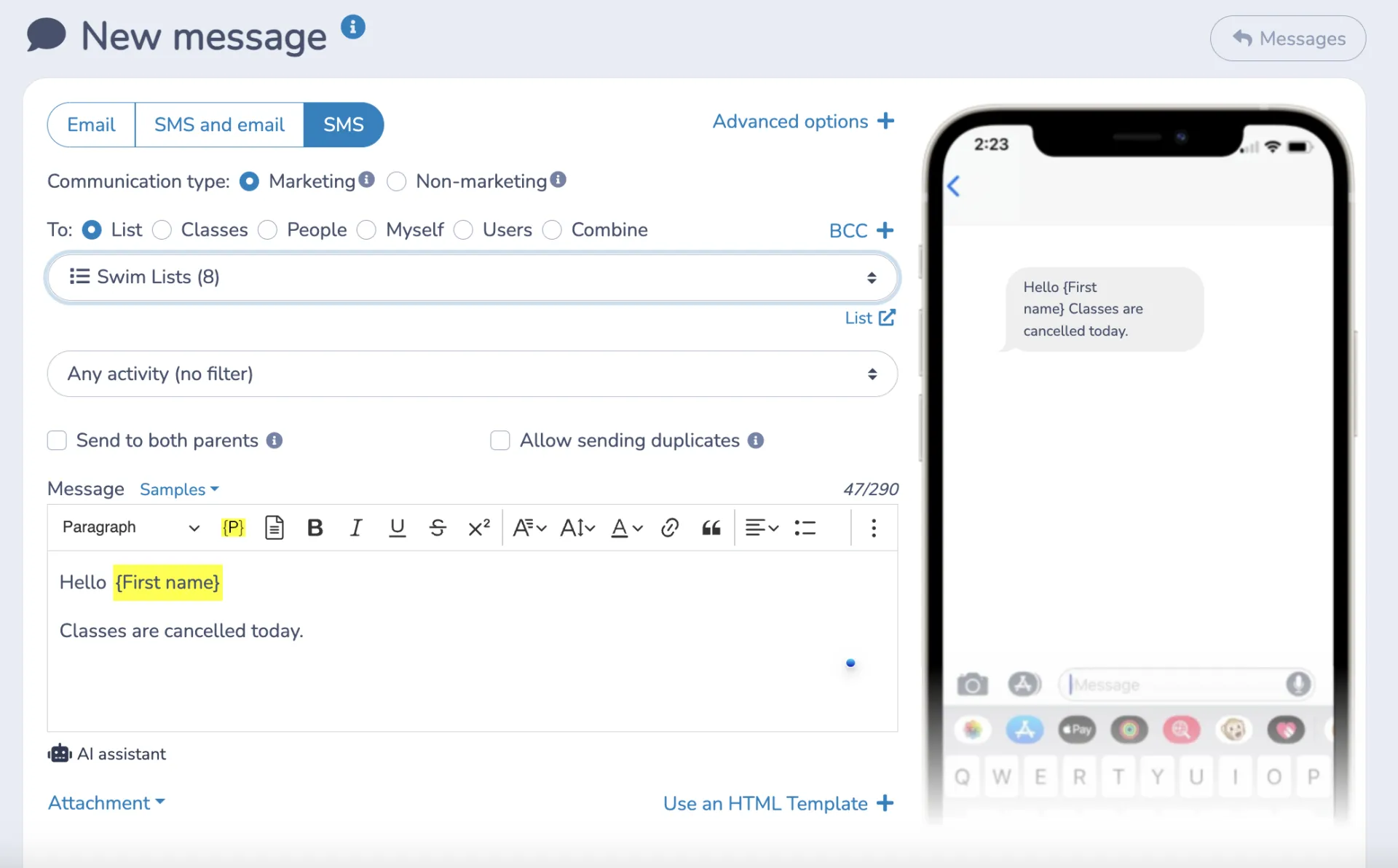
Activity Messenger lets you send bulk SMS/text messages — perfect for:
- Last-minute reminders
- Mandatory form submissions
- Time-sensitive alerts
- Attendance follow-ups
With SMS open rates near 98%, response rates increase significantly.
4. Data Storage in Canada
Google stores data internationally, including in the United States.
Activity Messenger stores 100% of your data in Montreal, ensuring compliance with the strictest privacy requirements — including Law 25.
5. Canva & ChatGPT Integration

Activity Messenger integrates directly with Canva and ChatGPT, allowing you to:
- Create branded visuals
- Improve form descriptions
- Generate questions
- Translate content instantly
- Draft polished copy
- Build surveys faster
It keeps your brand consistent across forms, emails, and social media.

6. Sending Emails and Newsletters (Mailchimp Alternative)
Activity Messenger is also a Canadian-based alternative to MailChimp. Activity Messenger lets you keep in touch with your subscribers and people who respond to your forms. Additionally, you can automate a wide range of communications, such as:
- Confirmation emails
- Welcome messages
- Scheduled reminders
- End-of-session outreach
- Automated follow-up workflows
7. Much More Than Forms
Activity Messenger includes a full suite of tools designed for Canadian SMBs, nonprofits, and recreation organizations, including:
- Email newsletters
- Online payments
- Digital signatures
- Bulk certificates
- Online donations
- Class and activity management
Activity Messenger offers simple yet powerful functionality on one platform designed for Canadian-based SMEs, NPOs, and organizations. We help you simplify and automate your business processes in a single tool.
📌 Read More: Why Google Forms might not be ideal for a growing business
Watch These Videos to Learn More 👇
How to add conditional logic with Google Forms?
How to create a survey using Google Forms?
👉 Want more videos? Visit our YouTube channel for hundreds of how-tos, comparisons, and tips to optimize your operations.
Frequently Asked Questions
What are some popular alternatives to Google Forms?
Popular alternatives include SurveyMonkey, Typeform, Jotform, and Activity Messenger, each offering unique features and customization options to meet different form creation and survey needs.
Why look for a Google Forms alternative?
Users may seek alternatives for advanced customization, more diverse question types, advanced analytics, or better integration with non-Google products, depending on specific project requirements.
How do these alternatives compare in terms of ease of use?
While Google Forms is known for its simplicity, alternatives like Typeform, Activity Messenger and Jotform also offer intuitive design interfaces but with a wider range of customization options.
What advanced features do these alternatives offer?
Features like conditional logic, advanced design customization, real-time data analysis, and interactive elements are common to platforms that replace Google Forms.
Are there free versions or trials available for these Google Forms alternatives?
Most alternatives offer basic free versions or premium trial periods that allow users to test advanced features.
Conclusion: The Best Canadian Google Forms Alternative
For Canadian organizations seeking a secure, bilingual, and more capable alternative to Google Forms, Activity Messenger is the top choice.
With advanced form-building tools, integrated communication features, Canva and ChatGPT workflows, and 100% Canadian data storage, it’s more than just a form builder — it’s a complete communication and automation platform.
💡 Ready to streamline your forms, communications, and workflows? Book a demo with Activity Messenger and discover how we can simplify your operations while keeping your data safe in Canada.