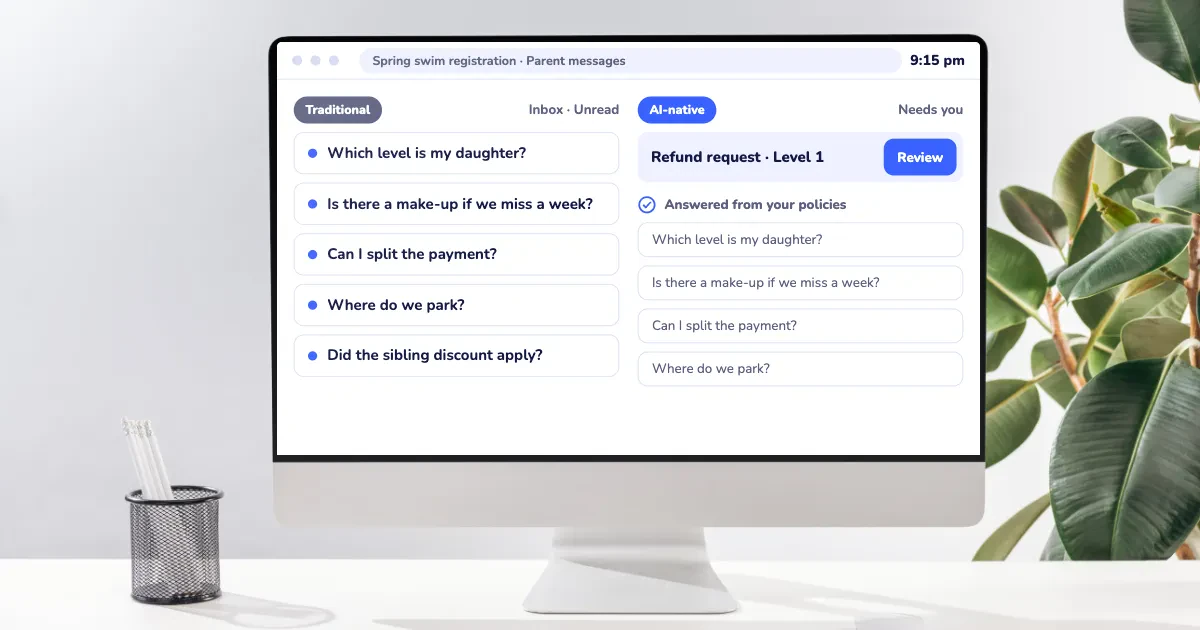
Camps have a lot to track: day camps, specialty weeks, before- and after-care, lunch programs, medical forms, payment plans, and the steady stream of parent emails that starts up every spring. And now, nearly every software vendor says it uses AI.
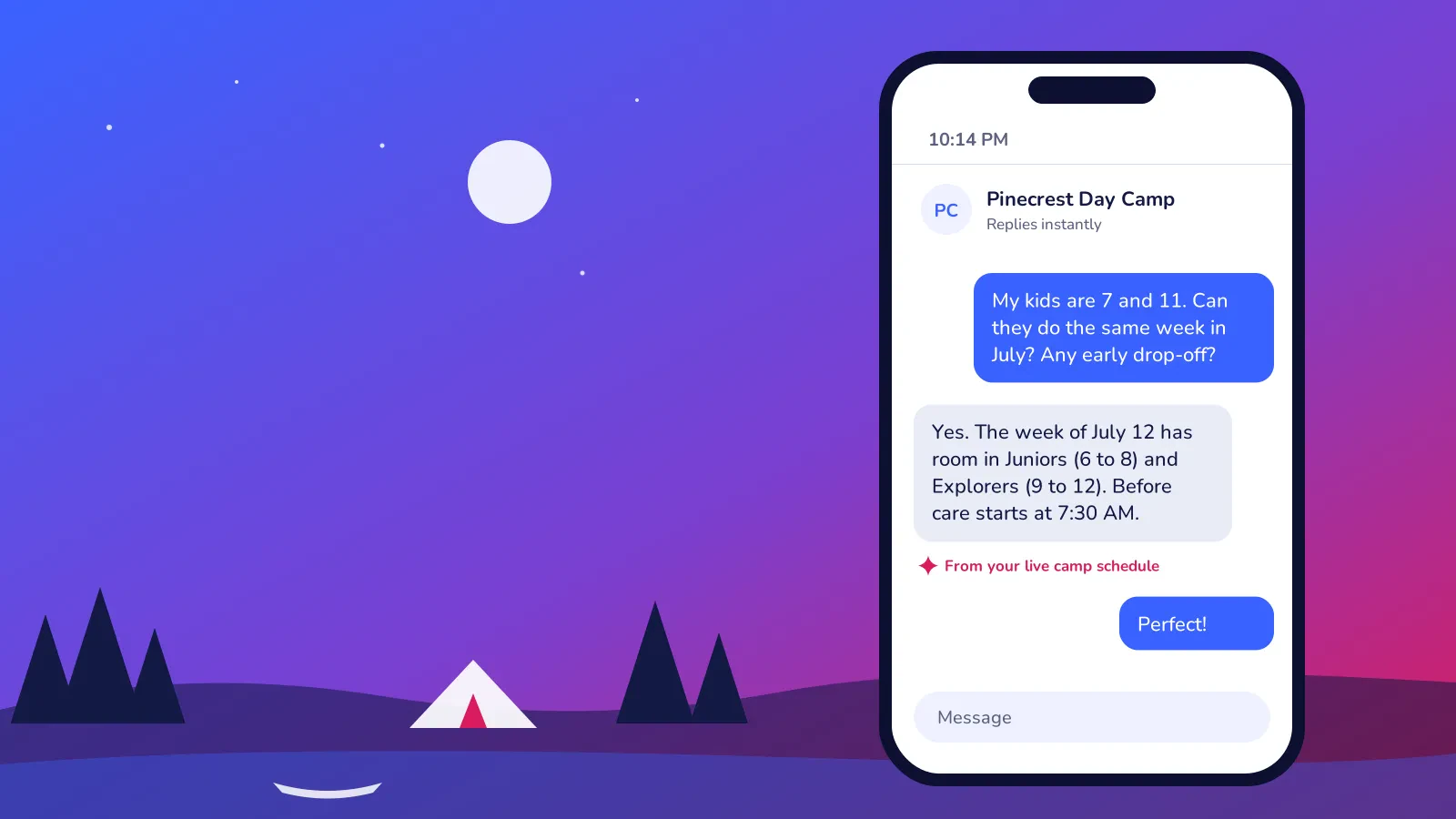
Picture a parent emailing late one night in March, right after your early-bird reminder lands in her inbox: "My kids are different ages. Can they be at camp the same week in July? Do you have early drop-off? Oh, and my daughter has a peanut allergy."
It sounds like a quick reply, but it's not. You need to know your age groups, which weeks still have room, your before-care hours, and how you handle allergies. AI-native camp software can bring all of that together because the AI works inside the system that already holds it.
This guide explains what AI-native camp software means, how to spot it, and what to ask before you trust it with your families.
Key Takeaways
- AI-native camp software is built so AI can use your real camp data (weeks, age groups, rosters, forms, payments) to finish tasks your office does today.
- The quickest test is whether the AI can answer a parent's question using your actual camp weeks and openings, or only with general text.
- The biggest time savings for camps show up in parent questions, week selection, missing medical forms, session setup and re-enrolment for next summer.
- Decisions about a camper's health, safety, behaviour or pickup should stay with your director and staff.
- You don't need AI-native software to run a good camp. If your current system handles registration and communication well, AI is one more thing to weigh alongside price, support, and migration effort.
Table of Contents
- What Is AI-Native Camp Software?
- AI-Native vs AI Added On: How to Tell the Difference
- Where AI Helps a Camp Day to Day
- What AI Shouldn't Decide at Your Camp
- Questions to Ask in a Demo
- Frequently Asked Questions
- Final Thoughts
What Is AI-Native Camp Software?
AI-native camp software is registration and camp management software that gives AI direct access to the information your camp already runs on: camp weeks, age groups, capacities, waitlists, before and after care, family accounts, medical forms, payments, and message history. With that data, the AI can help with the work that depends on it.
Think about what your camp office already knows: which July week is nearly full for the older kids, which family gets the sibling discount, and that the August weeks always go first, year after year. Most of spring is spent answering questions that rely on exactly that kind of knowledge.
AI-native software is built so AI can work from the same knowledge, even when nobody is at the desk. In practice, that looks like:
- 💬 Answering a parent's question about dates, prices, before care or openings using your live camp schedule.
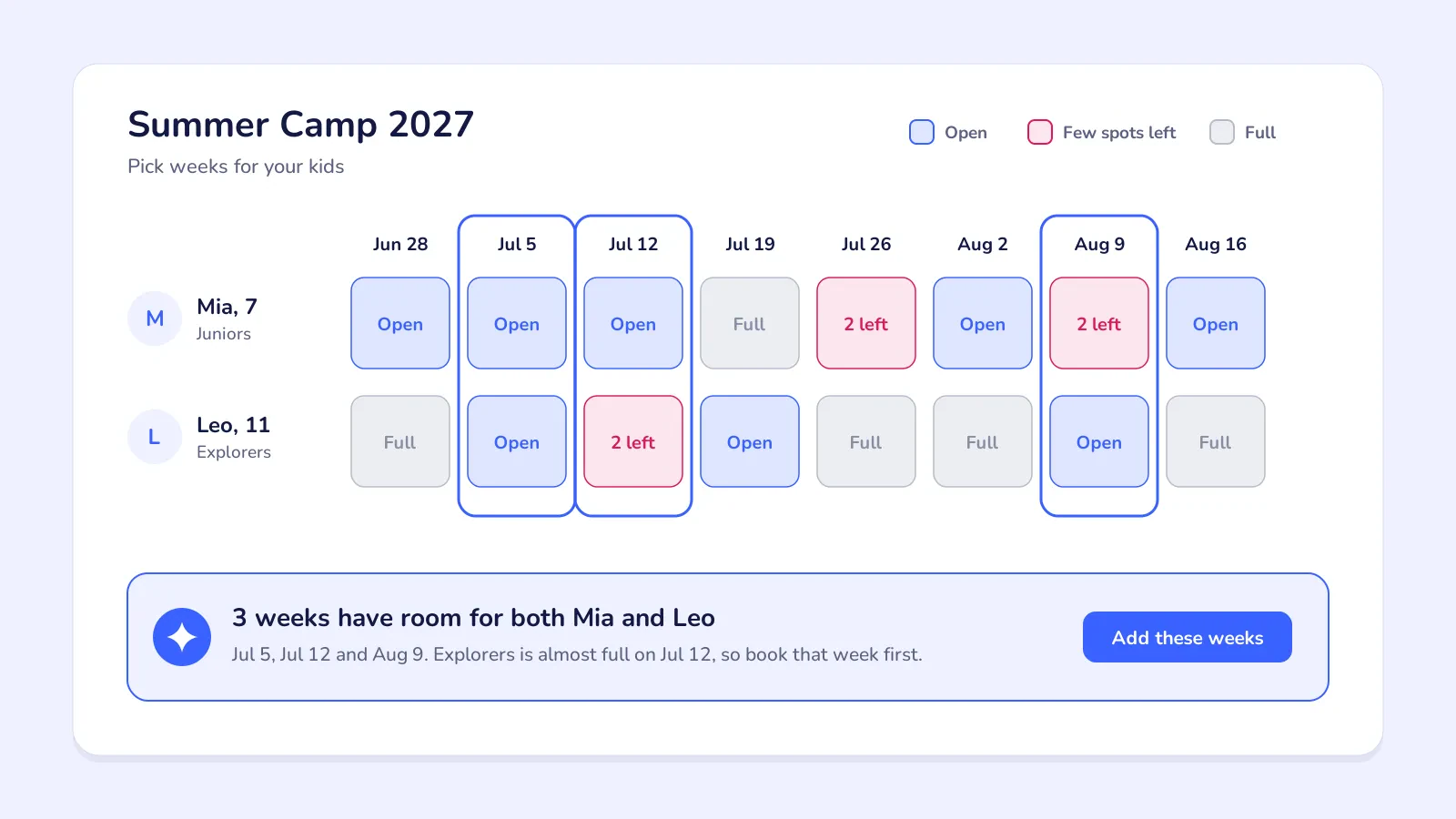
- 🏕️ Suggesting weeks and groups for a camper based on age, siblings and the dates a parent needs.
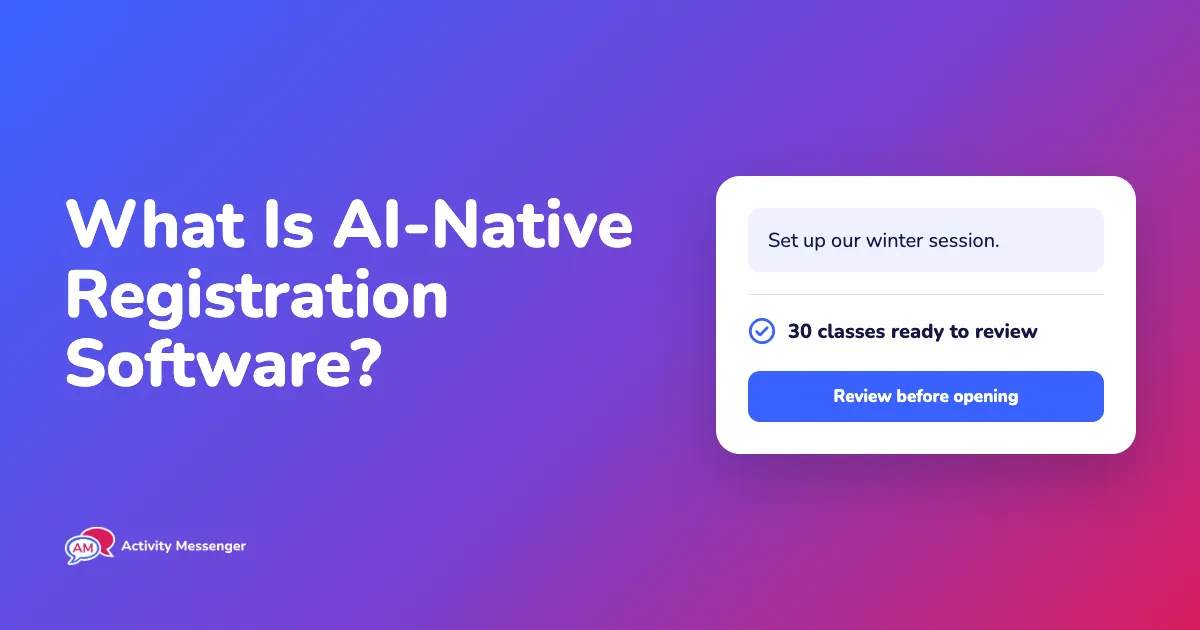
- 📝 Building a registration form or a new summer session from a plain description of what you want.
- 📧 Drafting the email to everyone in a given week when a heat warning moves the field trip.
- 🌐 Translating your forms and messages between English and French.
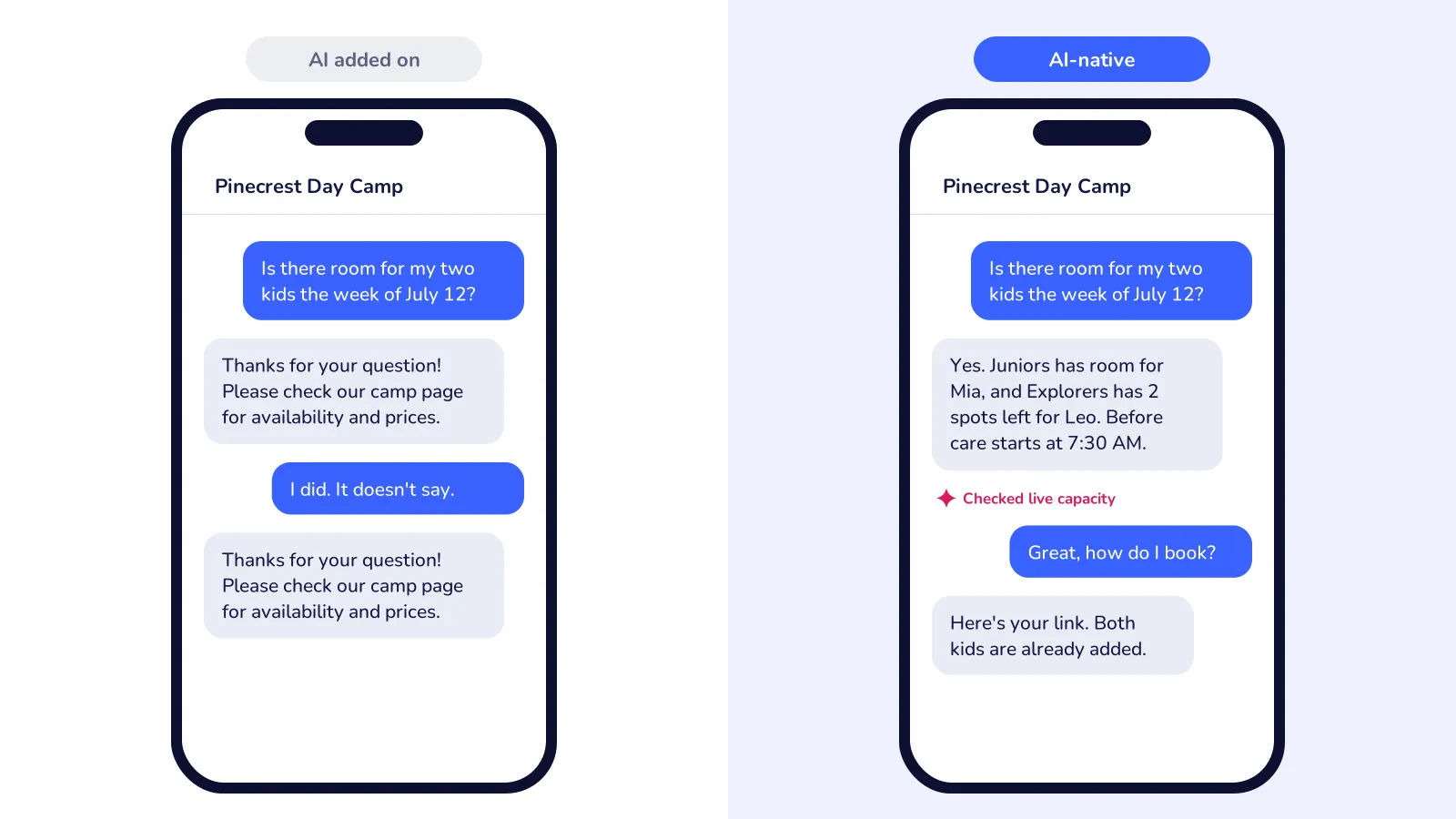
Here's what a vendor's feature page usually skips. An AI is only as helpful as the data it can reach. If a chatbot can't see your camp weeks, it'll tell parents to "check the website." Or it'll guess.
Put the AI inside the system that holds your schedule, though, and it can give the same answer your office would.
AI-Native vs AI Added On: How to Tell the Difference
Most camp software was built long before today's AI tools came along. So a lot of platforms are now adding AI on, usually as an email-writing assistant or a separate chatbot trained on FAQs.
Those tools can save you a few minutes. The catch is that they mostly work with whatever text you type in, which means they can't check your camp weeks, your rosters, your forms, or a family's balance.
Here's how the two approaches compare on everyday camp tasks:
| Task | AI added on | AI-native |
|---|---|---|
| Parent asks "is there room for my son in July?" | ⚠️ Gives a general answer or links to the camp page | ✅ Checks live capacity by age group and the waitlist |
| Family wants siblings in the same weeks | ❌ Can't see your age groups or openings | ✅ Finds weeks with room for both kids |
| Field trip moved because of a heat warning | ⚠️ Helps write the email; you pick the recipients | ✅ Drafts the message and pulls that week's roster |
| Setting up summer camp | ❌ Manual setup, week by week | ✅ Builds weeks or forms from a description you review |
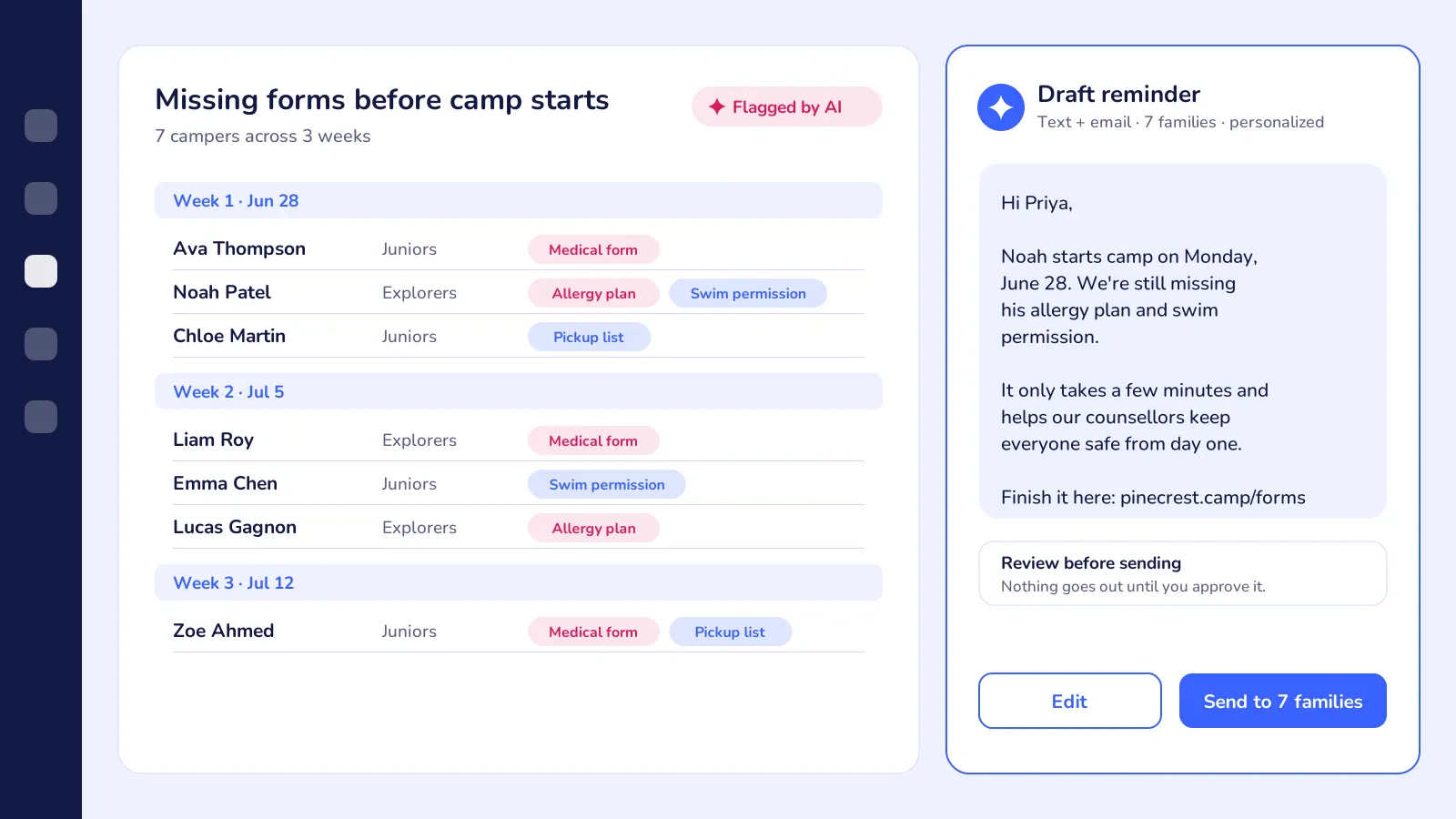
| Campers missing a medical form or allergy plan | ❌ You run the report and write the email | ✅ Finds them and drafts a reminder for you to send |
| French version of a registration form | ⚠️ Copy, paste and translate elsewhere | ✅ Translates inside the form builder |
The goal is fewer steps between a question and the right answer. When you compare systems, count the clicks and copy-pastes each task takes.
Where AI Helps a Camp Day to Day
AI earns its keep on the jobs that come back every season and depend on information you already have. Camp directors know these jobs well. Maybe a little too well.
💬 The questions you answer every spring
What are the camp hours? How much is a week? Is there a sibling discount? Do you offer before care? Can I pay in instalments? Your office answers these questions all spring long, and then parents ask them again at night, once the kids are finally in bed.
Those unanswered emails can cost you. A parent who does not hear back tonight might book another camp tomorrow, especially when the popular weeks are filling up and she is trying to cover the whole summer.
AI-native software can answer from your live camp schedule and pricing. Anything unusual, like a billing dispute, a custody question or a complaint, goes to a person.
With Activity Messenger, AI is built into the platform alongside registration, payments, and SMS and email, so answers come from the same place your camp weeks live.
🗓️ Fitting families into the right weeks
Camp registration is harder than picking a date. Parents are trying to build an entire summer around work, cottage trips, and other camps, often for more than one child and across more than one age group.
When a family is not sure which weeks work for everyone, they email you and then wait. Sometimes the spot is gone by the time you reply.
AI can ask a parent a few simple questions — the kids' ages, the weeks they need, and whether they want before- or after-care — and suggest the weeks and groups that still have room. Anything unusual still gets confirmed by your office.
🩺 Chasing missing forms before the first week
Every camp director knows the June scramble: medical forms half done, allergy action plans never uploaded, swim permissions missing, pickup lists blank.
What a registration report doesn't show is that a missing form is also a safety gap on the first morning of camp, when counsellors need to know who carries an EpiPen and who is allowed in the deep end.
AI can help by flagging campers missing required forms, sorting them by week, and drafting a reminder for you to review and send.
📝 Setting up summer and registration forms
Every season starts from scratch: weeks, age groups, capacity limits, before- and after-care, prices, early-bird deadlines, forms. If you run a full summer with several groups and a few specialty camps, that means a lot of clicking before registration even opens.
AI-native software can draft the setup from a plain description, something like, "Same weeks as last summer, skip the long weekend, and add a STEM week for the older kids in July." You review it and fix anything that is off.
Activity Messenger's AI helps you create forms and messages inside the platform. Its forms also use conditional logic, so a parent registering a kindergartener never sees questions meant for the leadership program.
🔁 Re-enrolment for next summer
Families who do not come back rarely tell you why. They just disappear from the list, and you are left wondering why July is filling more slowly than usual.
AI can spot families who came last summer but have not registered yet, or kids who have aged into a new group, and draft a reminder you can send by text or email before the early-bird deadline.
With Activity Messenger, those messages go out by SMS and email from the same system that holds your registrations. No exporting lists to another tool.
☀️ Weekly updates, weather and field trips
Summer means a steady stream of messages: what to pack next week, a thunderstorm that cancels beach day, a reminder about wacky hat day. Each one needs to reach the right families quickly. AI can turn a one-line note into a draft, pull the right roster, and create images for camp promotions and weekly updates.
What AI Shouldn't Decide at Your Camp
Some camp decisions affect a child's safety. Those belong to your director and staff. Good AI-native software can suggest and draft, but a person makes the final call.
Keep these with your team:
- 🩺 Medical forms, allergies and medication. AI can flag a missing form or a mention of an EpiPen or seizure plan. Someone on staff still needs to read it, call the family if needed, and brief the counsellors.
- 🚗 Pickup authorization and custody. Who can pick a child up, and any custody arrangement, should be set and changed by a person, with the right paperwork.
- 🤝 Inclusion and support needs. Whether a camper needs a one-on-one support worker or a different group is a conversation between your director and the family.
- 💬 Behaviour concerns and incident reports. A call home about a rough day, a bump on the head or a conflict between campers should come from a real person at your camp.
- 💳 Refunds, credits and billing disputes. AI can pull up the history. Someone with judgment should reply.
Here is the less obvious part: the more a tool does on its own, the more important it is that you can see what it did. Ask whether the software shows you every message the AI sent and every answer it gave a parent. Also ask whether you can turn it off for certain topics.
The same goes for your family's data. Camps store a lot of information about kids: birthdates, health notes, allergies, pickup contacts, and photos. Ask where that data is hosted, whether it is used to train outside AI models, and who at the vendor can see it.
Questions to Ask in a Demo
The word "AI" on a feature page doesn't tell you much. A demo tells you a lot more, especially if you show up with real scenarios from your own camp.
Use these questions when comparing AI-native camp software:
- ☑️ Can it answer a real parent question live? Type in something like "I have a little one and an older one. Which July weeks have room for both, and do you have aftercare?" See if the answer uses your actual camp weeks and openings.
- ☑️ What can the AI see? Camp weeks, age groups, rosters, waitlists, forms, balances, message history? If it can't see it, it can't help.
- ☑️ What can it do without me? Sending a message, offering a waitlist spot or changing a registration should need your approval, unless you decide otherwise.
- ☑️ Where do I review what it did? You want a log of every answer and message, in plain language.
- ☑️ Does it work in French? For Canadian camps, check both the parent-facing answers and the translated forms.
- ☑️ What does it cost? Ask whether AI features are included in your plan or get billed per message, per camper, or as an add-on.
- ☑️ What happens to my data? Ask where it's hosted and whether it trains outside models.
Before you commit, run a real sibling registration, a real parent question, and a real rain-day cancellation through the system. A few minutes of testing beats any feature list.
If you're thinking about switching
AI features alone rarely justify a migration. Moving camps means exporting data, rebuilding your weeks and age groups, setting up forms, waivers and payment plans, and letting parents know what is changing. Give yourself a few weeks. Plan it for the fall, well before spring registration.
And if your current system already gives you trouble with parent communication, account-free registration or pricing, AI-native software may just be one more thing on an already long list.
Frequently Asked Questions
What is AI-native camp software?
AI-native camp software is camp registration and management software that uses AI with your camp's real data, like camp weeks, age groups, rosters, forms and payments, to answer parents and help with admin. The AI works inside the system. So its answers match your actual schedule and openings.
Is AI-native camp software the same as having a chatbot on my website?
No. A website chatbot usually only knows the FAQs you feed it. AI-native software can check live information, like which weeks have room, who's on the waitlist and what a family has already booked, before it answers.
Can AI tell me if a camper is missing a medical form?
Yes. AI can flag campers with missing or incomplete medical forms, allergy plans or permissions, and draft a reminder to their families. A staff member should still review the forms and decide what happens with any health or safety information.
Will AI replace my camp office staff?
For most camps, no. It takes the repeat questions and routine messages off their plate, freeing up time for families who need a real conversation, for counsellor training, and for the chaos of drop-off and pickup.
Is my families' data safe with AI camp software?
It depends on the vendor. Ask where the data is hosted, whether it trains outside AI models, and whether you can review everything the AI sends to parents.
Do small day camps need AI-native software?
Not necessarily. A small camp with one director can run just fine on good registration and messaging tools. AI starts paying off once parent questions, form chasing, and season setup eat up a real chunk of someone's spring.
Final Thoughts
AI-native camp software is most useful when it can see your camp weeks, age groups and families, and use that information to give the answer your office would give. So test it. Bring real questions from your camp before you trust any feature page.
Keep your director and staff in charge of medical decisions, pickup, and anything else that affects a camper's safety. Let the software handle repeat questions, form reminders, season setup, and weekly updates.
Activity Messenger is built for camps that want registration, payments, waivers, texting and AI in one place. If spring parent emails and summer setup are taking over your evenings, it is worth a look.
Whatever you choose, run a real parent question through it first.
🏕️ Curious what AI-native camp software would look like with your own camp weeks and age groups? Book a free demo, and we'll walk through a sibling registration, a missing-form reminder and next summer's setup using your schedule.