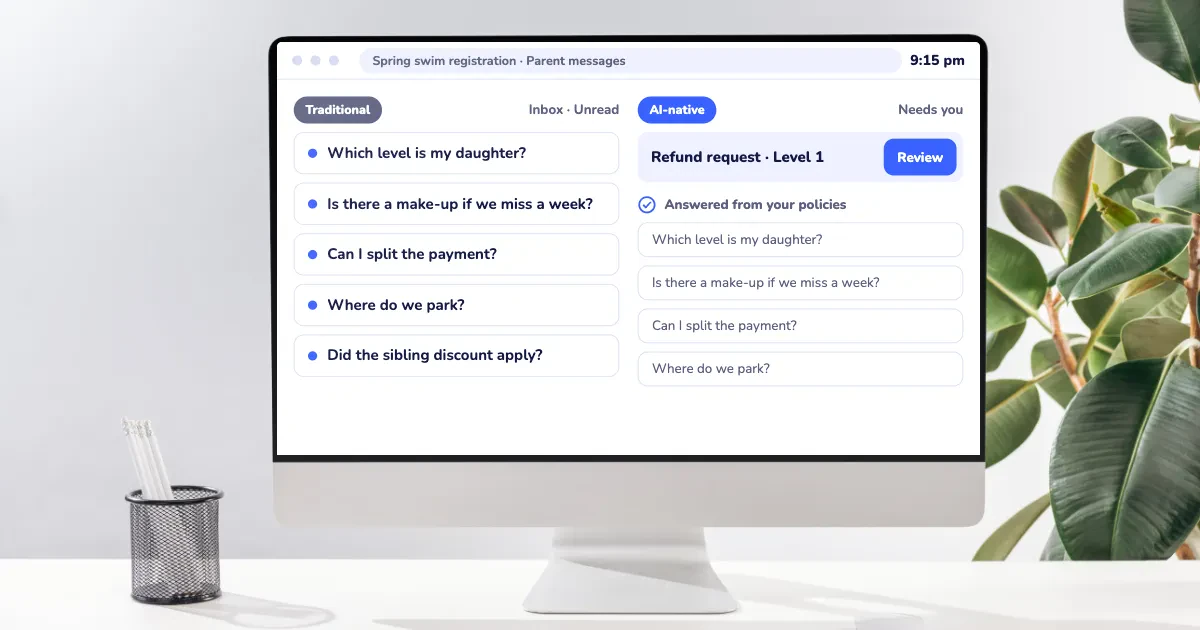
Gymnastics clubs have a lot running at once: rec classes, preschool programs, competitive teams, open gym, camps, birthday parties, and the parent emails that come with all of it. Now nearly every software vendor in the space says it uses AI.
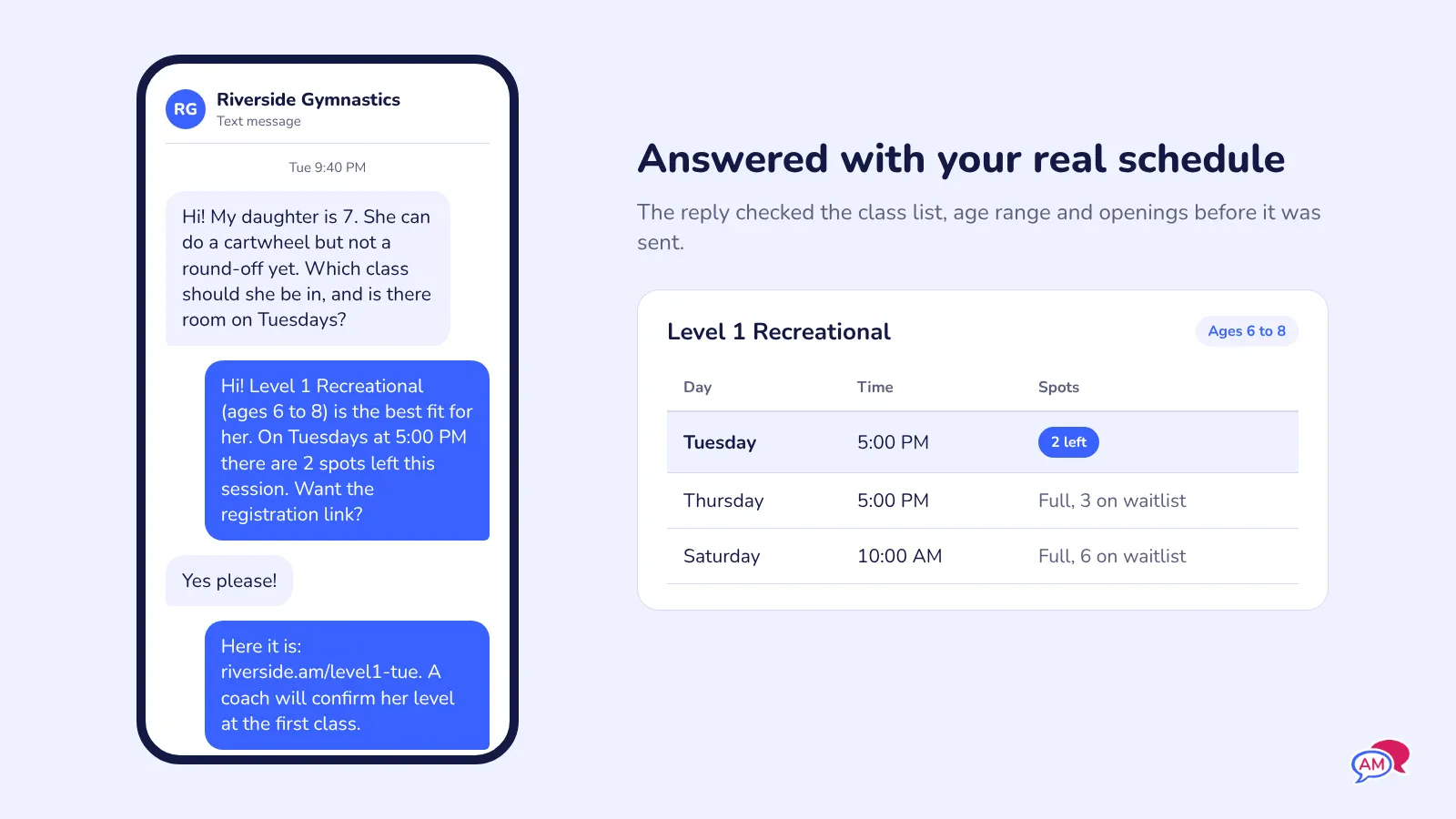
For example, a parent might end up emailing late at night while they're absentmindedly scrolling for gymnastics gyms. They might say, "She's 7, she has a cartwheel but no round-off, which class fits and is there room on Tuesdays?" Answering that means knowing your levels, age cutoffs, and Tuesday openings. AI-native gymnastics club software can do it because the AI works inside the system that holds that information.
This guide explains what AI-native gymnastics club software means, how to spot it, and what to ask before you trust it with your families.
Key Takeaways
- AI-native gymnastics club software is built so AI can use your real club data (classes, levels, rosters, payments) to finish tasks your front desk does today.
- The quickest test is whether the AI can answer a parent's question using your actual schedule and openings, or only with general text.
- The biggest time savings for gymnastics clubs show up in parent questions, class placement, re-enrollment, and registration setup.
- Safety and progression decisions, like moving a gymnast up a level or clearing a medical form, should stay with your coaches and staff.
- You don't need AI-native software to run a good club. If your current system handles registration and communication well, AI is one more thing to weigh alongside price, support and migration effort.
Table of Contents
- What Is AI-Native Gymnastics Club Software?
- AI-Native vs AI Added On: How to Tell the Difference
- Where AI Helps a Gymnastics Club Day to Day
- What AI Shouldn't Decide at Your Gym
- Questions to Ask in a Demo
- Frequently Asked Questions
- Final Thoughts
What Is AI-Native Gymnastics Club Software?
AI-native gymnastics club software is registration and class management software where AI has direct access to the information your club already runs on: classes, levels, age ranges, capacities, waitlists, family accounts, payments, and message history. Because the AI can read that data, it can help with tasks that depend on it.
Your front desk will know that Tuesday's 5:00 PM Level 2 has one spot left, the Martins have two kids and get the sibling discount, and that Saturday preschool always fills first. Most of their day is answering questions and doing tasks that rely on that firsthand knowledge they've built.
AI-native software is designed so AI can work from that same knowledge without needing the person behind the desk. In practice, that looks like:
- 💬 Answering a parent's question about times, prices, or openings using your live schedule.
- 🤸 Suggesting the right class for a new gymnast based on age, experience, and the skills a parent describes.
- 📝 Building a registration form or a new session from a plain description of what you want.
- 📧 Drafting the email to every family on the Thursday roster when a coach calls in sick.
- 🌐 Translating your forms and messages between English and French.
Here's what doesn't show up on a vendor's feature page: the AI is only as useful as the data it can reach. A chatbot that can't see your class list will tell a parent to "check the website" or, worse, make up an answer.
When the AI sits inside the system that holds your schedule, it can give the same answer your front desk would.
AI-Native vs AI Added On: How to Tell the Difference
Most gymnastics club software was built years before today's AI tools existed. Many platforms are now adding AI features on top of their existing software, often a writing assistant for emails or a separate chatbot you train with FAQs.
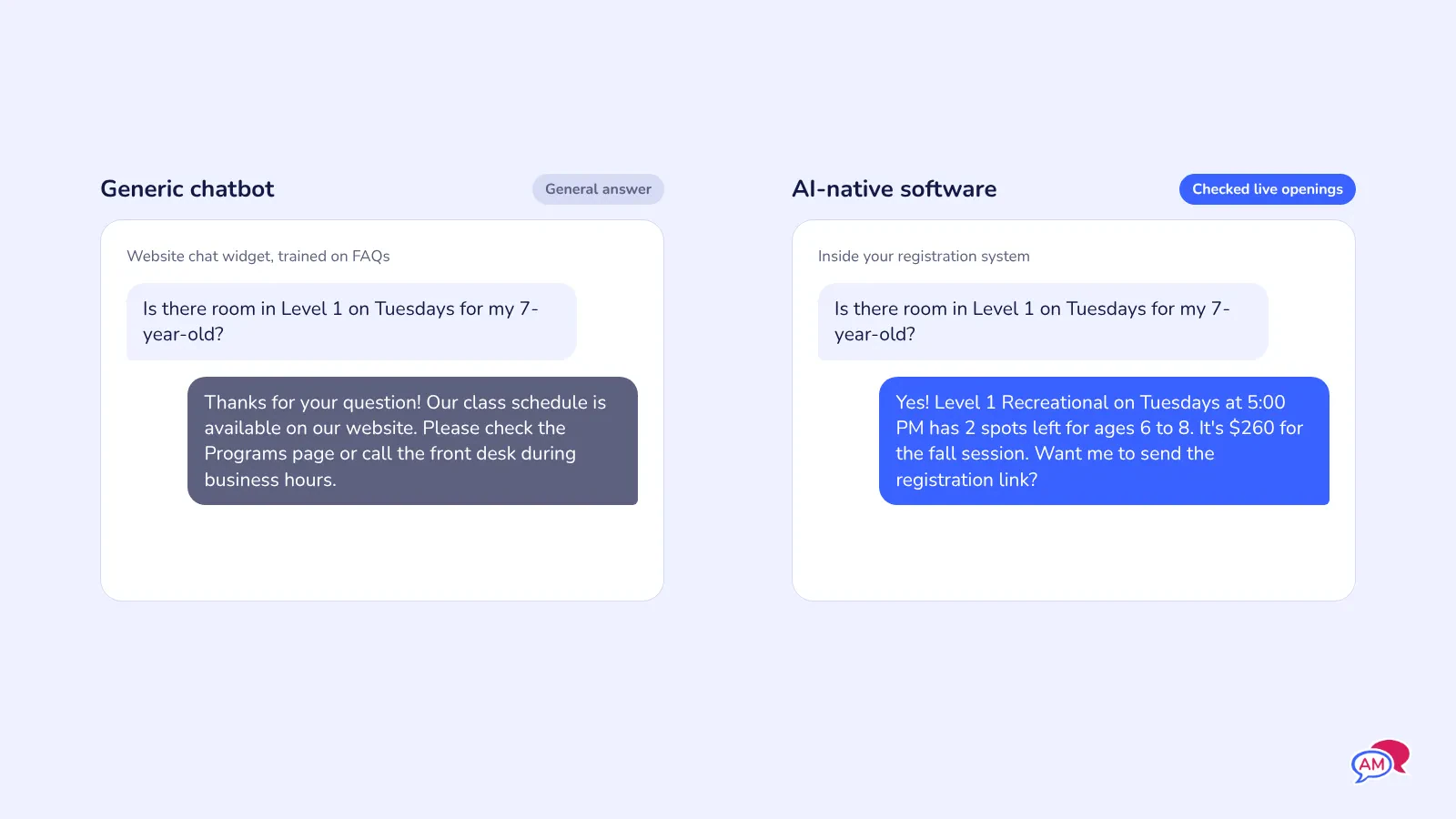
Those tools can save a few minutes, however, they often only usually work with text you type in, so they can't check your rosters, your openings, or a family's balance.
Here's how the two approaches compare on everyday gymnastics club tasks:
| Task | AI added on | AI-native |
|---|---|---|
| Parent asks "is there room in Level 1 on Tuesdays?" | ⚠️ Gives a general answer or links to the schedule | ✅ Checks live capacity and the waitlist |
| New family needs a class recommendation | ❌ Can't see your levels or age cutoffs | ✅ Matches age and skills to your class list |
| Coach is sick, Thursday classes cancelled | ⚠️ Helps write the email; you pick the recipients | ✅ Drafts the message and pulls the affected rosters |
| Setting up the fall session | ❌ Manual setup, class by class | ✅ Builds classes or forms from a description you review |
| Families who haven't re-enrolled | ❌ You run the report and write the email | ✅ Finds them and drafts a reminder for you to send |
| French version of a registration form | ⚠️ Copy, paste and translate elsewhere | ✅ Translates inside the form builder |
The goal is fewer steps between a question and the correct answer. Count the clicks and copy-pastes a task takes in each system you're comparing.
Where AI Helps a Gymnastics Club Day to Day
AI earns its place in the jobs that repeat every week and depend on information you already have. These are the ones gymnastics clubs feel most:
💬 The same 20 parent questions
What time is Level 3? How much is the fall session? Is there a sibling discount? Can she do a makeup class this week? Your front desk answers these all day, and parents ask them again late at night when nobody's there.
Plus, the costs will add up. A parent who doesn't get an answer tonight may register somewhere else tomorrow because they were unable to reach the right person at the right time.
AI-native software can answer these from your live schedule and pricing, and pass anything unusual (a billing dispute, an injury, a complaint) to a person.
With Activity Messenger, AI is built into the platform alongside registration, payments, and SMS and email, so answers come from the same place your classes live.
🤸 Placing new gymnasts in the right class
Gymnastics placement is harder than picking a time slot. A seven-year-old with no experience and a seven-year-old with a solid back walkover belong in different classes, and parents usually don't know your level names.
When a child lands in the wrong group, the coach spends the first two weeks sorting it out, and the family feels it too.
AI can ask a parent a few simple questions (age, past classes, skills like cartwheel, round-off, or handstand) and suggest the best-fitting classes, with a note that a coach will confirm at the first class or during an evaluation.
📝 Setting up sessions and registration forms
Every new session means recreating classes, capacities, age ranges, prices, and forms. For a club running 60 or more classes a week, that's hours of clicking before registration day.
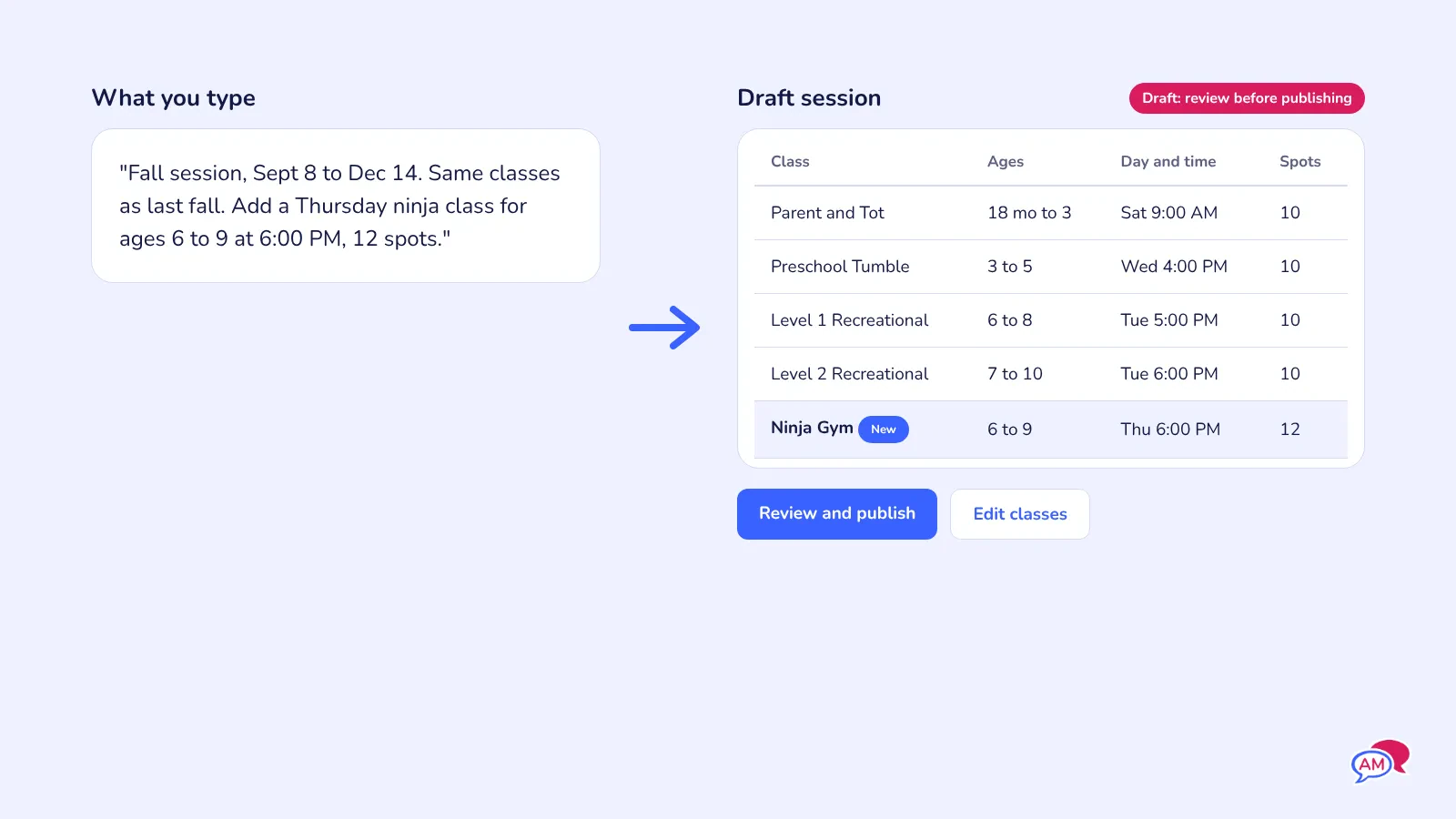
AI-native software can build a first draft from a description: "Fall session, Sept 8 to Dec 14, same classes as last fall, add a Thursday ninja class for ages 6 to 9." You review it and fix anything that's off.
Activity Messenger's AI helps you write and set up forms and messages inside the platform, and its forms use conditional logic so a parent registering a preschooler doesn't see questions meant for competitive team families.
🔁 Re-enrolment and families slipping away
The families who don't come back rarely tell you. Instead, they just don't register for winter, and you're stuck wondering why registrations are down.
AI can flag families enrolled last session who haven't registered yet, or whose child's attendance dropped, and draft a reminder for you to review and send by text or email.
With Activity Messenger, those messages go out by SMS and email from the same system that holds your registrations, so you don't have to export lists to another tool.
🎉 Birthday parties and camps
Party inquiries come in at all hours, and each one needs a date, a package, a deposit, and the child's details. Camp weeks bring their own wave of medical forms and "which week has room?" questions.
AI can answer availability questions, draft confirmation and reminder messages, and help create images for your party and camp promotions.
Read More: How to Increase Party Bookings for Your Activity Center
What AI Shouldn't Decide at Your Gym
Some decisions in a gymnastics club affect a child's safety, and those belong with your coaches and staff. Good AI-native software suggests and drafts, then hands the final call to a person.
Keep these with your team:
- 📈 Moving a gymnast up a level. Ensure that a coach who has spotted the skill in person makes this call. AI can remind you who's due for an evaluation, but it can't replace that one-on-one evaluation.
- 🩺 Medical forms and injury notes. AI can flag a missing form or a mention of a concussion. A staff member needs to read it and decide what happens next.
- 🤸 Readiness for competitive team. Tryouts, team fees, and conversations with families need a person.
- 💳 Refunds, credits and billing disputes. AI can pull up the history. Someone with judgement replies.
- 📨 Sensitive messages. An injury report, a coach change, or a behaviour concern should come from a real person at your club.
Here's the non-obvious part: the more a tool does on its own, the more it matters that you can see what it did. Ask whether the software shows you every message the AI sent and every answer it gave a parent, and whether you can switch it off for specific topics.
The same goes for your families' data. Gymnastics clubs hold information about kids, including birthdates, medical notes, and photos. Ask where that data is hosted, whether it's used to train outside AI models, and who at the vendor can access it.
Questions to Ask in a Demo
The word "AI" on a feature page tells you very little. A demo tells you a lot, as long as you bring real scenarios from your gym.
Use these questions when you're comparing AI-native gymnastics club software:
- ☑️ Can it answer a real parent question live? Type in "My son is 6 and has never done gymnastics, what's available on Saturdays?" and see if the answer uses your actual classes and openings.
- ☑️ What can the AI see? Classes, rosters, waitlists, balances, message history? If it can't see it, it can't help.
- ☑️ What can it do without me? Sending a message, offering a waitlist spot, or changing a registration should need your approval unless you choose otherwise.
- ☑️ Where do I review what it did? You want a log of every answer and message, in plain language.
- ☑️ Does it work in French? For Canadian clubs, check both the parent-facing answers and the translated forms.
- ☑️ What does it cost? Ask whether AI features are included in your plan or billed per message, per student or as an add-on.
- ☑️ What happens to my data? Ask where it's hosted and whether it's used to train outside models.
Before you commit, put one real registration, one real parent question and one real cancellation message through the system. Ten minutes of testing will tell you more than any feature list.
If you're thinking about switching
AI features alone are rarely worth a migration. Moving a club with hundreds of families means exporting your data, rebuilding your class structure, setting up forms and waivers, and telling parents what's changing. Plan for a few weeks, and time it between sessions, well before registration day.
If your current system already struggles with parent communication, account-free registration, or pricing, then AI-native software becomes one more reason on a list that's already there.
Frequently Asked Questions
What is AI-native gymnastics club software?
AI-native gymnastics club software is class and registration software where AI can use your club's real data, like classes, levels, rosters, and payments, to answer parents and help with admin tasks. The AI works inside the system, so its answers match your actual schedule.
Is AI-native software the same as having a chatbot on my website?
No. A website chatbot usually only knows the FAQs you type into it. AI-native software can check live information like openings, waitlists and a family's registrations before it answers.
Can AI place my gymnasts in the right level?
AI can suggest a starting class for a new gymnast based on age and the skills a parent describes. Your coaches should confirm placement and make every decision about moving a gymnast up a level.
Will AI replace my front desk staff?
For most clubs, no. It takes on repeat questions and routine messages so your front desk has more time for the families standing in front of them, phone calls that need a person, and the busy hour before evening classes.
Is my family's data safe with AI gymnastics club software?
It depends on the vendor. Ask where data is hosted, whether it's used to train outside AI models, and whether you can review everything the AI sends to parents.
Do small gymnastics clubs need AI-native software?
Not necessarily. A club with a few hundred families and one admin can run well on good registration and messaging tools. AI starts paying off when parent questions and session setup take up a real part of someone's week.
Does Activity Messenger include AI?
Yes. Activity Messenger has AI built into the platform, including one-click French and English translation for forms and an AI image generator for emails, alongside registration, payments, waivers and SMS and email.
Final Thoughts
AI-native gymnastics club software is useful when the AI can see your classes, levels and families and use that to give the answer your front desk would give. Test that with real questions from your gym before you believe any feature page.
Keep coaches in charge of placement, progression and anything touching a child's safety. Let the software handle repeat questions, session setup, and reminders.
Activity Messenger is built for clubs that want registration, payments, waivers, texting and AI in one place. If parent questions and session setup are eating your week, it's worth a look.
Whatever you choose, put a real parent question through the system before you commit.
🤸 Curious what AI-native gymnastics club software would look like with your own classes and levels? Book a free demo, and we'll walk through a parent question, class placement, and fall session setup using your schedule.