New features for July 2025

Camille Marais
1 July 2025 Product Updates 2 min read

Every month, we push Activity Messenger further to give you smarter, more intuitive tools that make a real difference in your daily work. Here’s what’s new this July and how it can help you work faster and serve your members even better.

Table of contents:

🧾 Control Who Can View Invoice Details

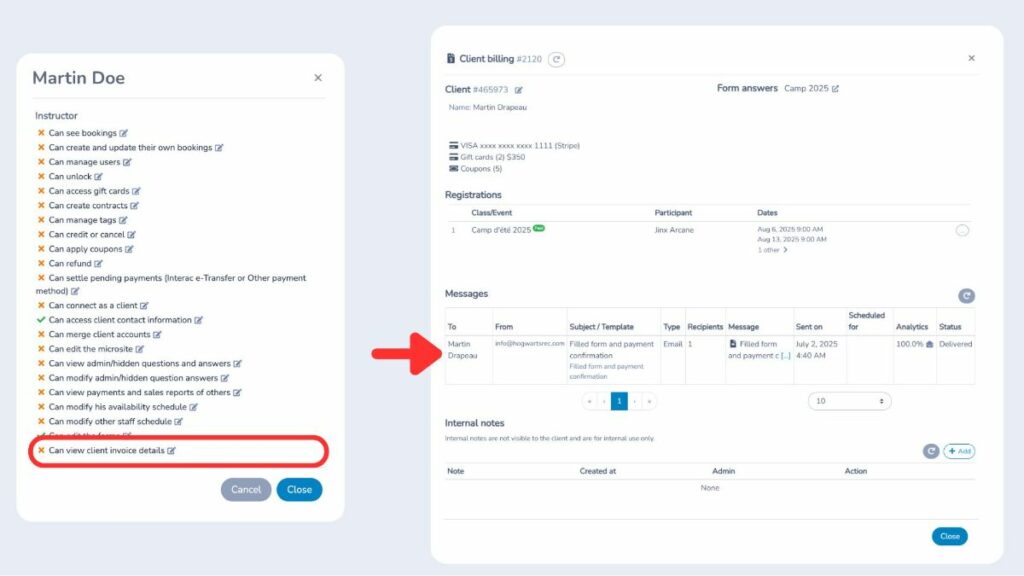
Protect your financial data with an extra layer of privacy. You can now decide exactly which users are allowed to view detailed invoices, including:
  • Individual item prices;
  • Discounts;
  • Taxes;
  • Total amounts.

Invoices-Activity-Messenger

Manage this setting anytime from the User Control Panel. By default, it’s disabled for anyone with the Instructor role, helping you keep sensitive information secure within your organization.

💸 Easier Tax Management

Handling taxes is now simpler and more transparent:
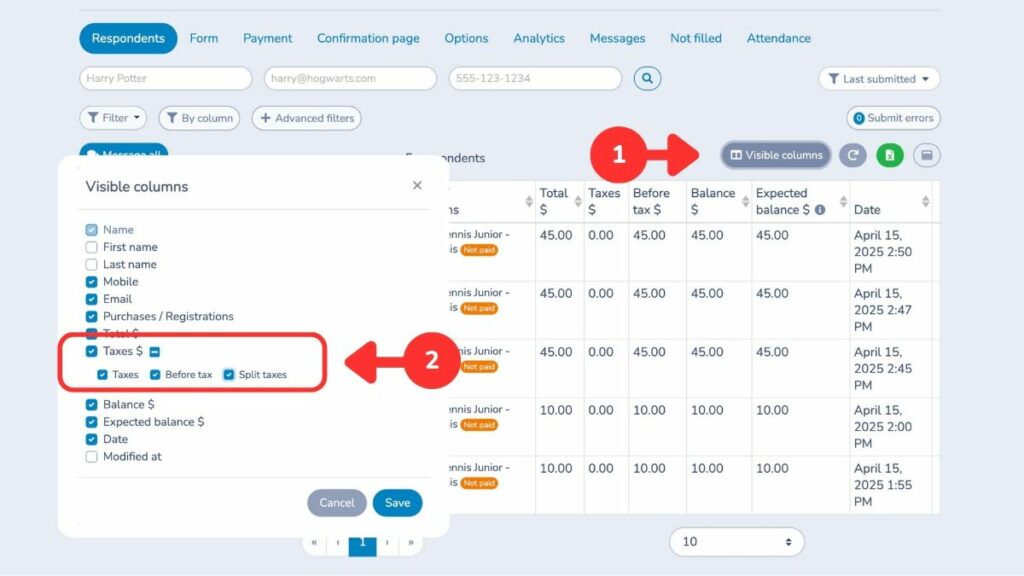
  • In Forms > Respondents, you can now show four additional columns: each tax (federal and provincial/state), subtotal before tax, and total after tax. Just click on Visible Columns to enable this view;
  • When exporting to Excel, federal and provincial/state taxes are now displayed in separate columns;
  • On any client invoice, you can choose to show or hide detailed tax information.

Taxes-EN-Activity-Messenger

These improvements make it easier to track, report, and explain taxes to your clients.

🔍 New Filter for Automated Reminders

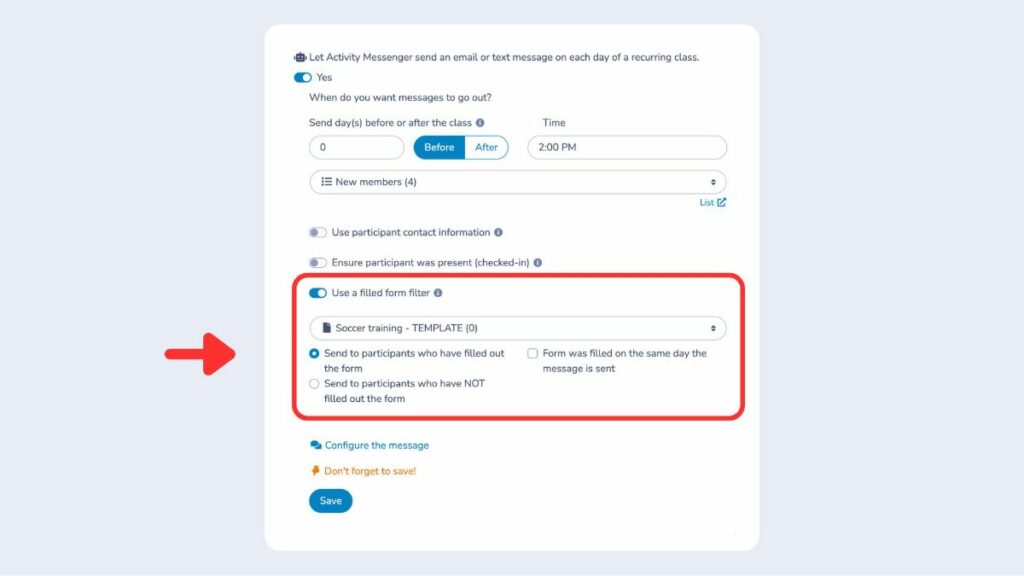
Send smarter reminders by targeting exactly who receives them. You can now set a reminder to go only to people who have (or haven’t) completed a specific registration form.

Find this option under Communications > Automation. It’s a simple way to:
  • Keep your messages relevant;
  • Avoid unnecessary emails;
  • Improve the participant experience.

Automation-Activity-Messenger

👉 New “Pending” Registration Status

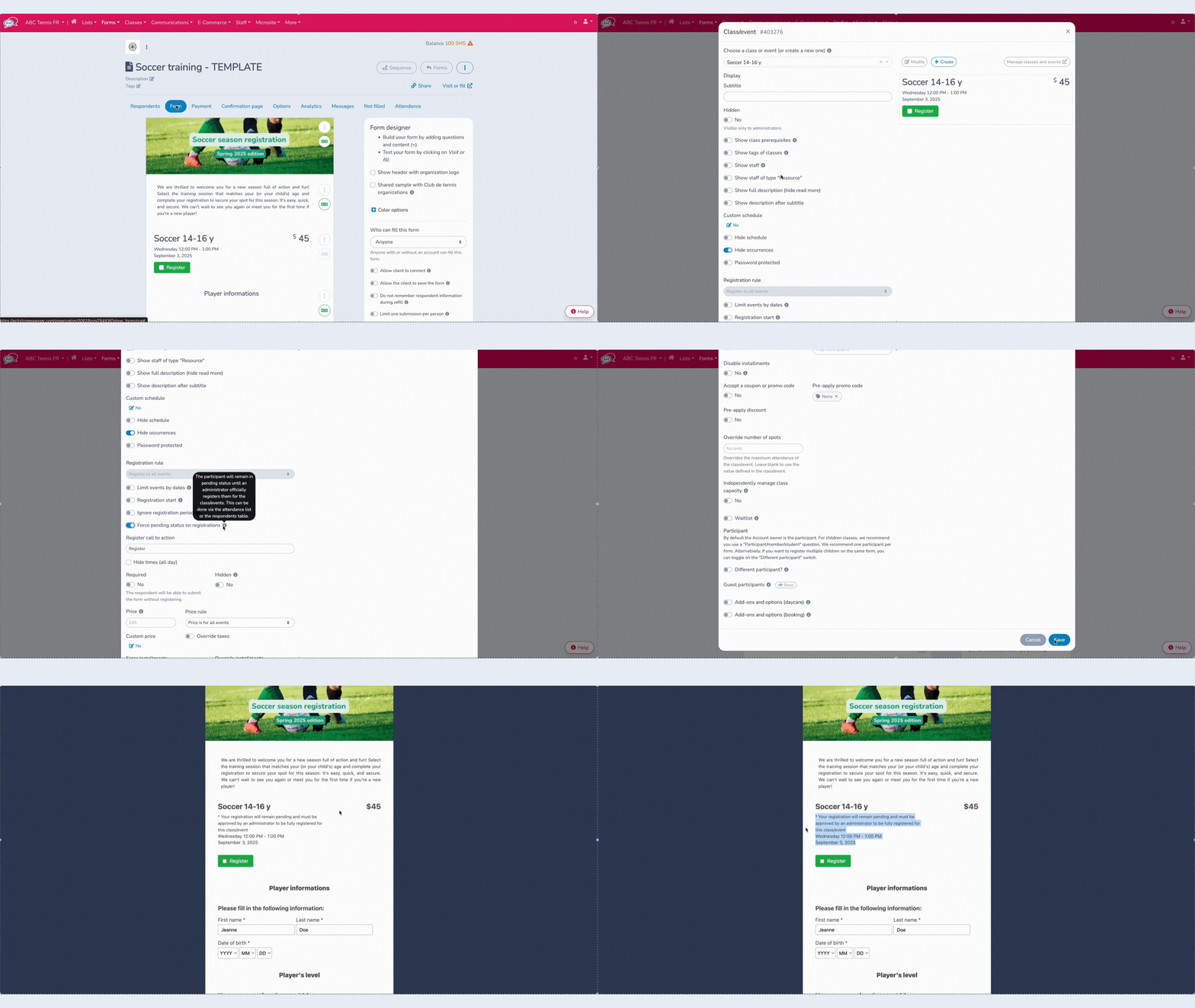
You can now mark a participant as Pending directly from Forms > Classes/Events. Here’s how it works:

  • Pending status does not count towards available spots;
  • A message is shown at registration telling the participant that an admin must confirm their spot;
  • You can approve or decline their registration manually, even if spots are still open.

This is different from waitlists, which only activate when a class is full. Pending status is perfect for activities where you want to screen or approve registrations before confirming.
Waitlist-Activity-Messenger

In attendance lists, you’ll now see a dedicated Pending section, making it easy to confirm spots from:

  • The attendance list itself;
  • The respondent table;
  • The client account.

💡 Looking for online registration software? Book a discovery call with one of our advisors.

Even More Updates

In July, we’ve also added:

  • Let clients remove an item on the checkout page before paying;
  • Track the date when a skill or level was assigned to a participant;
  • Receive a notification when a contract is signed (enable in the form settings);
  • Allow clients to cancel their recurring membership from their account (if enabled);
  • Hide a form question so it’s only visible to admins;
  • Block clients with an outstanding balance from submitting a new form (enable in the form settings);
  • Apply or remove promo codes directly from an invoice as an admin;
  • Define registration periods with exact start/end dates, days, hours, and minutes;
  • Add a ticket barcode placeholder in reminder emails for faster check‑in;
  • Add custom terms and conditions per class that participants must accept before completing registration.

Join the growing number of organizations that trust Activity Messenger to simplify their operations. Book a free demo today and see how we can help you save time and grow faster!

Interested in our platform ? Book your online demo today

Subscribe for exclusive content

Receive News and Updates about our product