If you’re using WooCommerce to sell class registrations, memberships, or program access, you’ve probably appreciated its flexibility. WooCommerce is one of the most widely used e-commerce tools in the world — and for selling products, it works extremely well.
But for organizations built around people, schedules, and participation, WooCommerce often feels like a workaround. Classes become “products.” Enrollments look like “orders.” Attendance, waivers, reminders, and renewals live somewhere else.
That’s why many organizations across fitness, recreation, sports, arts, and education eventually look beyond WooCommerce. Instead of continuing to adapt a product-first ecommerce tool, they’re switching to Activity Messenger, a platform built specifically for managing classes, memberships, programs, and communication in one place.
If your organization has outgrown basic e-commerce and now needs structure, automation, and participant-first workflows, this guide will help you understand where WooCommerce fits and when it’s time to move on.
DISCLAIMER: Activity Messenger is our software. We created it after experiencing the limitations of e-commerce tools like WooCommerce for managing classes, memberships, and programs.
WooCommerce is a powerful e-commerce solution built to sell physical and digital products through its WordPress plugin.

It excels at:
For retail and e-commerce-focused businesses, WooCommerce is a solid choice.
Where challenges arise is when organizations try to manage programs instead of products — things like weekly classes, camps, leagues, or member access tied to attendance and schedules. WooCommerce wasn’t designed around those concepts, so teams begin adapting it in ways that increase complexity over time.
WooCommerce can “work” for programs until these red flags appear:
Sessions, instructors, capacity, and schedules aren’t native concepts, so staff rely on manual tracking.
Family details, waivers, emergency contacts, and attendance live outside of WooCommerce.
Selling a membership is easy; managing who can attend, renewals, and benefits is not.
Class reminders, schedule changes, and renewal notices require separate messaging tools.
Each new program adds more setup, more maintenance, and more places where things can break.
📌 Read More: Customers also consider making the switch from Shopify, another powerful e-commerce tool, to an all-rounder like Activity Messenger.
Many organizations try to fill the gaps with add-ons or integrations. While this extends WooCommerce’s functionality, it introduces new challenges.

One for forms, one for waivers, one for memberships, one for messaging — none provide a complete workflow.
Monthly fees add up, often exceeding the cost of a unified platform.
Participant records, attendance, and communication history are spread across systems.
Triggers like class start times, waitlist promotions, or membership expiry are difficult to automate across tools.
More systems mean more updates, more configuration, and more opportunities for errors.
👉 In short: Add-ons can extend WooCommerce, but they can’t turn it into a purpose-built program management platform.
| Feature | WooCommerce | Activity Messenger |
| Designed For | Selling physical and digital products online | Managing classes, memberships, events, and multi-program operations |
| Registration Forms | ❌ Requires plugins; limited participant-specific fields | ✅ Fully customizable, mobile-friendly forms with family accounts, waivers, health info, and surveys |
| Memberships | ⚠️ E-commerce subscriptions, limited program awareness | ✅ Memberships tied to access, attendance, renewal cycles, and benefits |
| Attendance Tracking | ❌ Not available | ✅ Real-time rosters, check-ins, QR codes, Apple/Google Wallet, auto-updating attendance lists |
| Online Ticketing & Event Access | ❌ Needs third-party plugins | ✅ Built-in ticketing and event registration with participant tracking |
| Payments & Invoicing | ✅ Standard checkout; requires add-ons for recurring billing or invoicing | ✅ Integrated payments, invoices, payment plans, refunds, POS, and corporate billing options |
| Gift Cards & Certificates | ❌ Plugin required | ✅ Sell, issue, and redeem directly for classes, memberships, or credit |
| Communication Tools | ❌ Requires email plugins or extensions | ✅ Email + SMS, automated reminders, surveys, post-program communications |
| Automations | ❌ Limited; usually plugin-dependent | ✅ Automated confirmations, reminders, waitlist promotions, surveys, and membership renewals |
| Staff Management & Onboarding | ❌ Not built-in | ✅ Role-based access, onboarding workflows, and instructor management |
| Data Hosting & Compliance | 🇺🇸 U.S.-based; GDPR tools available via plugins | 🇨🇦 Canadian hosting, PIPEDA-compliant, bilingual forms, CASL-compliant messaging |
| Best For | Online stores selling products or downloads | Programs, classes, camps, workshops, memberships, community organizations, and multi-channel operations |
📌 Read More: Activity Messenger also acts as a Canadian-based alternative to Constant Contact, Eventbrite, Jotform, Smartwaiver, and Mailchimp.
Activity Messenger approaches the problem from a completely different angle than WooCommerce. Instead of starting with a checkout and layering features on top, it starts with how organizations actually run programs day to day — before, during, and after registration.
Activity Messenger manages the full lifecycle of a class or membership, from discovery to participation to follow-up. Registration, payments, attendance lists, certificates, invoices, and communication are all connected to the same participant record, eliminating the need to reconcile orders, customers, and exports.
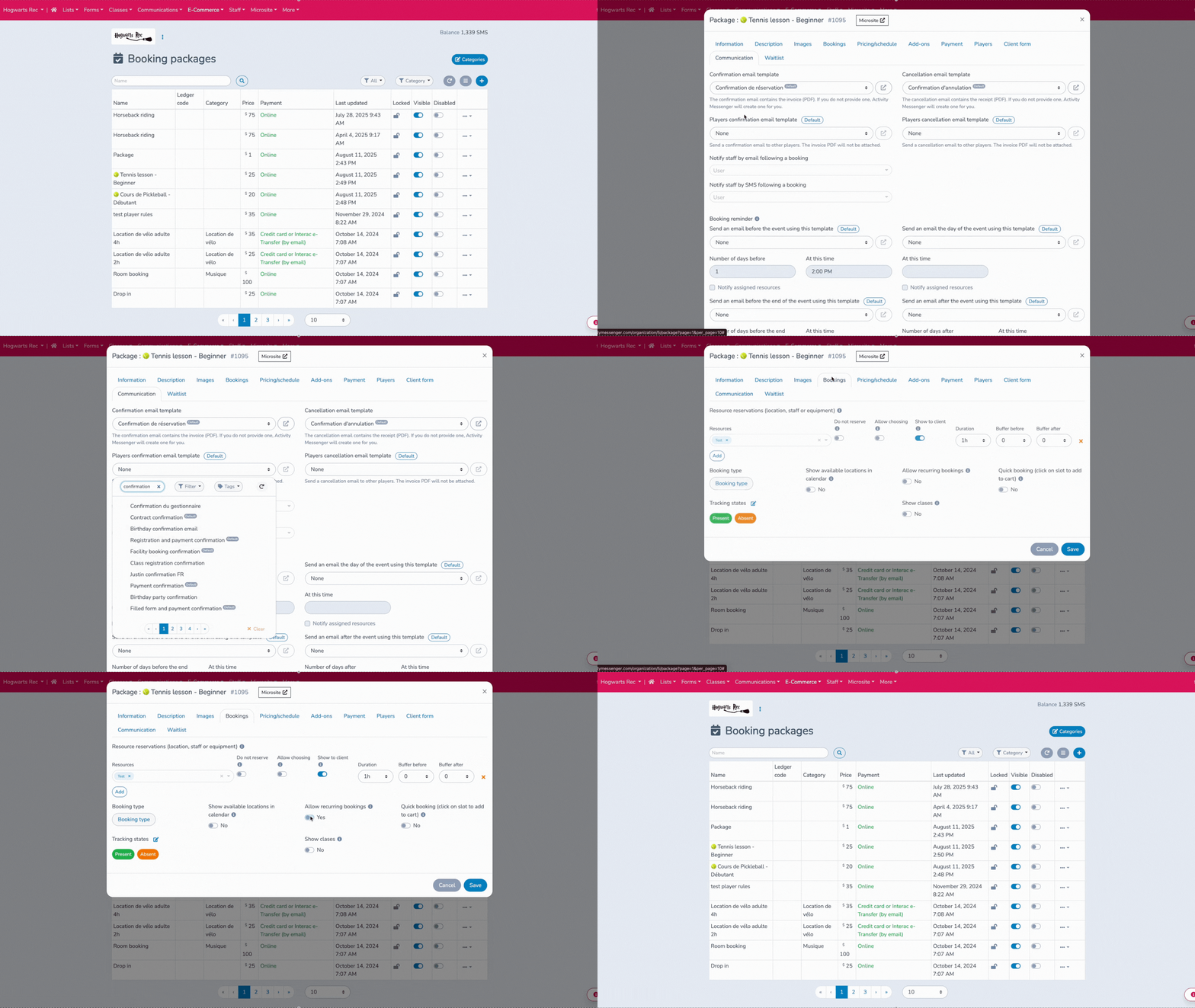
This structure makes it easier to scale programs without adding complexity. New sessions, seasonal offerings, or membership tiers can be launched without rebuilding workflows each time.
Beyond standard registrations, Activity Messenger supports:
These tools allow organizations to mix online and in-person sales without maintaining separate systems or reports.
Unlike e-commerce platforms, Activity Messenger tracks who is expected, who attended, and who still has access. Attendance lists update automatically as registrations change, giving staff real-time visibility across classes, events, or member sessions.

This makes it easier to manage capacity, verify eligibility, and understand participation trends — without manual checklists or spreadsheets.
Activity Messenger includes built-in email marketing, SMS messaging, surveys, and automations, all triggered by program activity.
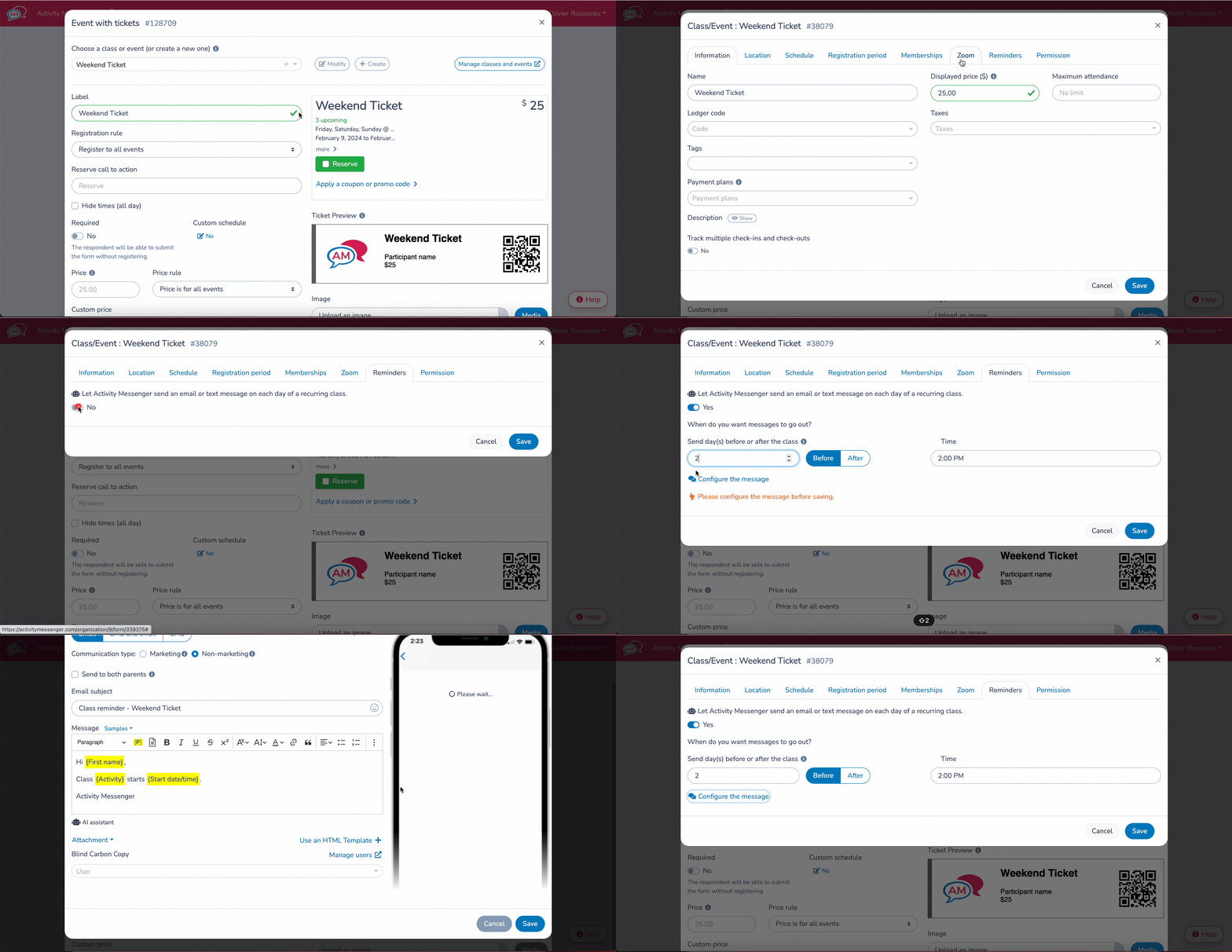
Organizations can automatically send:
Because messaging is tied to registrations and attendance, communication stays relevant and timely — not generic.
Beyond participant-facing tools, Activity Messenger also supports staff onboarding, scheduling, and internal workflows. Staff can be assigned roles, access attendance lists, and receive program updates without sharing login credentials or exporting data.
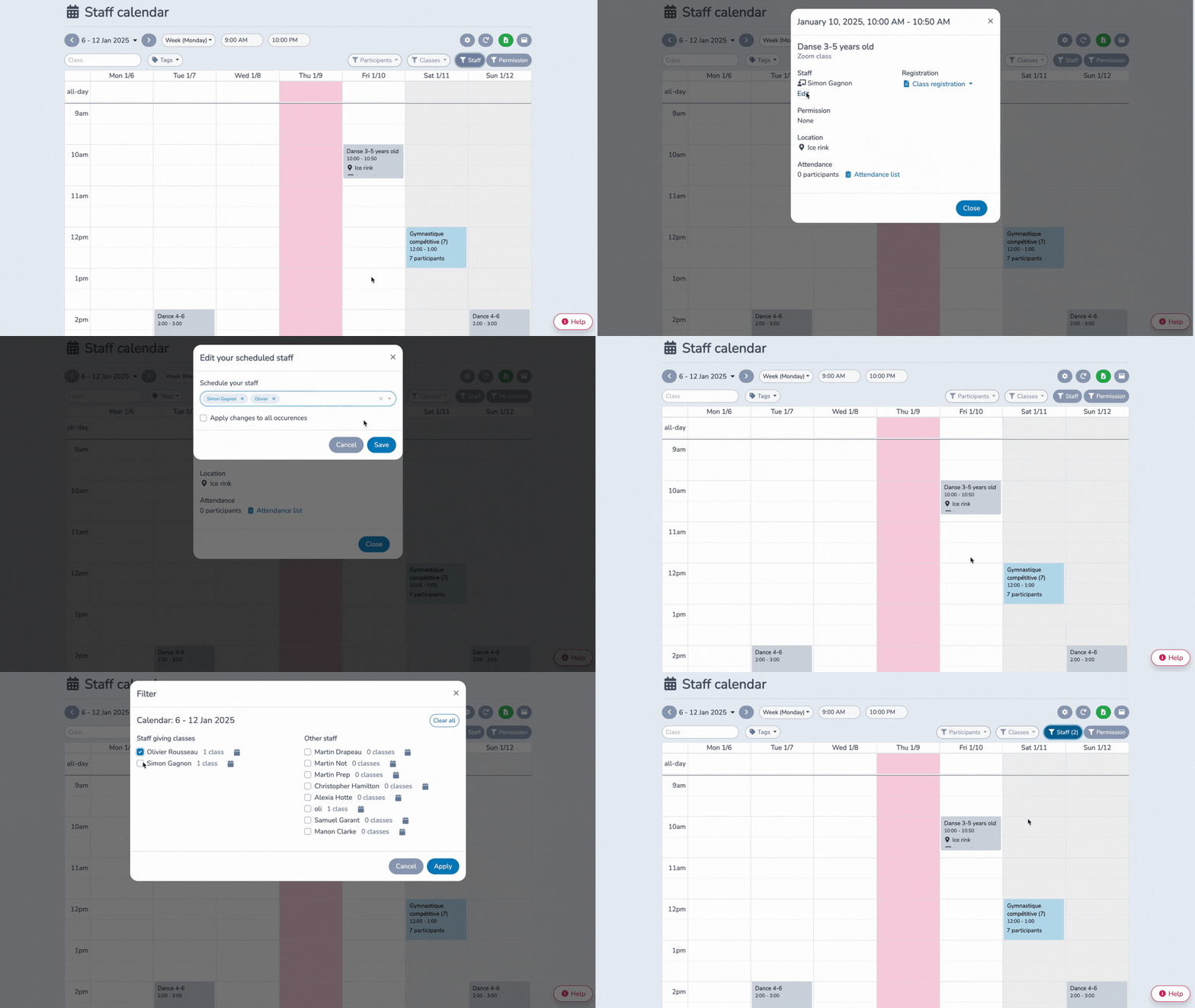
This is especially useful for organizations with instructors, seasonal staff, or volunteers who need limited, role-based access.
Activity Messenger is hosted in Canada and built with Canadian organizations in mind. Features like bilingual forms, PIPEDA-aligned data handling, and CASL-compliant messaging are built in — not added later through third-party services.
Activity Messenger is ideal for organizations that have been using WooCommerce to sell programs, classes, memberships, or event access but are running into limitations when it comes to operations beyond checkout.
Consider switching if you:
Switching isn’t just about replacing WooCommerce—it’s about gaining a system built to handle programs end-to-end, freeing staff time, and improving the participant experience.
Book a demo with Activity Messenger to see how we can help your organization today.
Book a demoTransitioning from WooCommerce to Activity Messenger can be straightforward if approached methodically. Here’s a recommended workflow:
Download all participant, customer, order, membership, and subscription data from WooCommerce. If you’re tracking multiple sessions, families, or teams, organize the data so it can map to Activity Messenger’s participant records.
Create classes, events, memberships, sessions, and pricing plans in Activity Messenger before importing participants. This ensures new registrations align with your operational workflows.
Activity Messenger supports family accounts and multiple participant types. Import your CSVs or Excel sheets, and link existing memberships or registrations to the correct programs.
Recreate registration forms with custom fields, waivers, and health info as needed. Set up online payments, POS, invoices, and gift cards for both online and in-person transactions.
Run a small pilot with a sample group to ensure registrations, automations, and communications work correctly. Test emails, SMS reminders, attendance tracking, and payment receipts.
Notify your community of the switch, highlighting improved registration, payment, and communication features. Provide guides or links to help families navigate the new system.
Launch your programs fully, monitor registrations and check-ins, and collect staff feedback to refine automations and workflows.
WooCommerce is primarily designed for selling products, so managing recurring classes, memberships, or events requires multiple plugins and manual work. It lacks built-in attendance tracking, automated reminders, and participant management features. Activity Messenger is built for these workflows, combining registration, payment, communication, and reporting into a single platform.
Unlike WooCommerce, Activity Messenger offers fully customizable registration forms, family accounts, waitlists, and multi-session enrollment. It also supports digital waivers, health info, and surveys, all tied directly to participant profiles. This streamlines operations and reduces manual data entry for staff.
The best alternative depends on whether memberships are tied to participation or access. For organizations offering classes, programs, or member benefits, Activity Messenger provides built-in memberships connected to attendance, renewals, and communication. This eliminates the need for separate membership and messaging tools.
Yes. You can export customers, orders, memberships, and subscriptions from WooCommerce and import them into Activity Messenger. The platform supports family accounts and multi-program structures, making the transition smoother than moving between typical e-commerce tools.
Switches usually happen when WooCommerce becomes difficult to scale for programs. As classes and memberships grow, staff face more manual work, disconnected data, and limited automation. A program-based platform reduces these issues by design.
Yes. All data is hosted in Canada, fully PIPEDA-compliant, and the platform supports bilingual forms and CASL-compliant messaging. This is a major advantage for organizations handling sensitive participant information.
Yes. Organizations can sell class passes, memberships, merchandise, or one-time access while maintaining full program management features. E-commerce is supported without sacrificing scheduling or participant tracking. Activity Messenger also offers Stripe integration for easy payments.
Organizations running classes, memberships, camps, workshops, or multi-program operations will see the biggest gains. Activity Messenger saves staff time, reduces reliance on multiple plugins, and provides a complete program management solution.
WooCommerce remains an excellent e-commerce tool. But when your organization revolves around classes, schedules, memberships, and people, ecommerce-first tools introduce friction over time.
Activity Messenger replaces those workarounds with a platform built for how programs actually operate. Instead of forcing WooCommerce to manage participation, choose a system designed around it.
💡 Ready to simplify registrations and move beyond ecommerce workarounds? Book a demo with Activity Messenger to see how your operations can run more smoothly.