
Home
Account setting
Staff
Lists
Forms
Templates (HTML emails/SMS messages)
Sending messages by SMS and email
Classes, events, attendance and Zoom
Automation
Create a birthday invitation and automation
Communication
Microsite
E-Commerce
Networks, Federations and Franchises
How to guides
Personal information and electronic message laws in Canada and the USA
Get support
Terms and conditions
RL-24
https://activitymessenger.com/
10410 Waverly, Montréal, H3L 2W4
Terms and conditions

Bank debits with Stripe — Canada and the United States
Let clients pay from their bank account through Stripe. Activity Messenger supports pre-authorized debits (PAD) from Canadian bank accounts and ACH Direct Debit from US bank accounts. Use them for one-time purchases, invoice balances, and scheduled payments.
A bank debit is not an instant payment. The client authorizes the withdrawal, then the payment remains pending while the bank processes it.
# Choose the right bank payment method
- Canada: a Canadian organization using CAD can offer Stripe bank transfer. The client connects a Canadian bank account. Processing can take up to 5 business days.
- United States: a US organization using USD can offer ACH Direct Debit (Stripe). The client connects a US bank account. Processing typically takes 4 business days.
The option depends on your organization's country/jurisdiction, currency, connected Stripe account, and access to Stripe bank debits. A Canadian CAD setup does not become an ACH setup simply because a client has a US bank account. Contact support if the expected option is missing.
These payments are withdrawals authorized by the client. They are different from an Interac e-Transfer or the separate Pre-authorized debit (AFT batch) workflow.
# Check your Stripe setup
- Open Organization settings → Finances → Stripe.
- Confirm that your Stripe account is connected and able to accept payments.
- Check the jurisdiction and currency shown on this page. Your Canadian setup must use CAD; your US setup must use USD.
- Find Bank transfers in Canada or ACH Direct Debit in the United States, depending on your setup. If access is unavailable, contact Activity Messenger support.
- Review the fees displayed for your organization. Stripe processing fees and Activity Messenger fees apply; use your settings for the applicable amounts.
# Enable bank debits on a form
- Open the payment or registration form you want to configure.
- Open its Payment tab, then Payment options.
- Enable Stripe bank transfer in Canada or ACH Direct Debit (Stripe) in the United States.
- Save the payment options.
The Stripe bank debit option and AFT batch payments cannot both be enabled on the same form. If the Stripe option is disabled because AFT is selected, decide which method this form should offer before changing it.
Form payment options and the invoice-balance setting below are separate. Configure each place where you want to offer bank debits.
# Let clients pay an invoice balance
On Organization settings → Finances → Stripe:
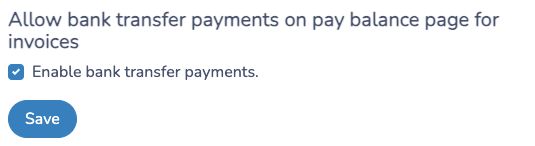
- In Canada, find Allow bank transfer payments on pay balance page for invoices, check Enable bank transfer payments, and click Save.
- In the United States, find Allow ACH Direct Debit payments on pay balance pages for invoices, check Enable ACH Direct Debit payments, and click Save.
The following screenshot shows the Canadian setting. The US setting uses the ACH labels above.
Clients can then choose the available bank debit option when following their invoice payment link.
# What the client does
At checkout or on the invoice payment page, the client chooses the bank debit option, securely connects an eligible bank account through Stripe, and authorizes the payment. Activity Messenger uses instant bank-account verification for this flow. If Stripe cannot verify the selected account, the client may need to use another available payment method.
A successful bank connection does not mean the payment has settled. The payment can remain pending and can later fail, for example because of insufficient funds.
# Scheduled payments
Bank debits can also be used for scheduled payments with an authorized bank account on file. Configure the schedule in the form's payment options and review the dates and amounts before making the form available.
For example, a program costing $3,500 could offer ten monthly payments of $350 in the organization's currency. Each scheduled debit has its own processing period. Allow for that delay when choosing payment dates.
To use scheduled payments, leave the Deposit option blank and select a compatible payment option. The form displays guidance if its current settings prevent scheduling.
# Track pending and failed payments
Open E-Commerce → Invoices and inspect the invoice and its payments.
- Pending: the debit has been initiated and is awaiting a result. Do not collect a duplicate payment just because it has not settled yet.
- Successful: the payment has been confirmed. Payment confirmation emails use your organization's configured template.
- Failed: review the failure and arrange another payment with the client. A failed-payment email can direct the client to the invoice payment page.
Business-day estimates are not guaranteed arrival dates. A debit's processing time is also different from Stripe's payout schedule to your organization's bank account.
Under Stripe → Email templates, review the payment confirmation, bank debit initiated, bank debit error, and missing-payment-method messages. US organizations see ACH-specific initiated and error templates. Under Failed payments daily digest, choose the users who should receive failure notifications.
# Preview safely before sharing
Preview the form and check the payment options and instructions. Any test that submits a payment must use a properly configured Stripe test account and Stripe's test banking details. Do not use a real bank account for a demonstration.