Best Regpack Alternatives (Software Comparison)

Olivier Rousseau
17 February 2026 Alternatives 2 min read

Many organizations start searching for Regpack alternatives when they need a registration platform that’s easier to use, more modern, or better suited for managing communication and automation alongside payments.

While Regpack is a well-known solution for handling online registrations, it doesn’t always meet the evolving needs of camps, classes, sports programs, and activity providers.

Today’s organizations need more than just registration forms. They need software that streamlines workflows, reduces administrative work, and creates a smooth experience for participants from signup to ongoing communication.

In this guide, we compare 7 of the best Regpack alternatives to help you find the right fit for your organization.


Key Takeaways:

  • Many organizations outgrow Regpack due to complexity. While powerful, its setup, workflows, and reporting often require significant time to learn and manage.
  • Modern registration software must go beyond forms. Today’s organizations expect integrated payments, communication, automation, and reporting in one unified platform.
  • Automation significantly reduces administrative workload. Features like automated reminders, waitlists, payment plans, and roster updates can save staff hours every week.
  • Pricing structures vary widely. Some platforms charge flat monthly fees, while others rely on per-registration costs that can become expensive at scale.
  • All-in-one platforms like Activity Messenger combine registration, communication, and automation. This reduces tool switching, simplifies workflows, and helps organizations manage the entire participant journey in one place.
  • The best alternative depends on operational complexity. Smaller programs may prioritize simplicity, while larger organizations often need advanced scheduling, reporting, and multi-program management.


Table of Contents


Author’s note: Olivier shares tips and tricks he’s learned over the past decade as the owner of a kids’ sports program in Montreal. Today, as the co-founder of Activity Messenger, he helps hundreds of dance studios, gymnastics clubs, swim schools, and camps across North America simplify their operations and increase revenue.

When Regpack Works for Organizations (And When it Doesn't)

Regpack provides an all-in-one solution for online registration, payment processing, reporting and automated communications.

Many organizations choose Regpack for several reasons:

  • ✅ Excellent Customer Support: Dedicated project managers are available to assist with system setup and troubleshooting, and users appreciate the responsive and helpful support team.
  • ✅ Powerful Customization Options: Regpack offers extensive customization capabilities, allowing organizations to create customized registration forms, automated emails, and detailed reports to meet their specific needs.
  • ✅ Affordable Pricing: Many users have found Regpack to be a cost-effective solution when compared to the competition, offering valuable features without breaking the bank.

However, some users have reported challenges with Regpack, such as:

  • 🚩 Steep Learning Curve: While highly customizable, the system can be complex to set up and manage, requiring users to invest time in learning its features and functionality.
  • 🚩 Complicated Financial Reporting: Some users find the financial reporting features complex and time-consuming, requiring manual adjustments to reconcile data with payment processors.
  • 🚩 Limited Mobile Optimization: The lack of a dedicated mobile app and browser compatibility issues, such as with Safari, can make it challenging for users to access the system on the go.

Overall, Regpack is a powerful tool that offers robust features and flexibility, but organizations should be prepared to navigate a learning curve and occasional system limitations to make the most of its capabilities.

1. Activity Messenger: Solving Key Challenges in Registration and Payment
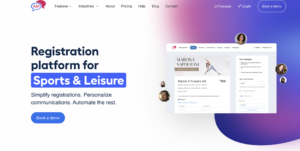
Activity Messenger Software

Activity Messenger is a modern alternative to Regpack that offers not only registration, but also replaces tools like Mailchimp, SurveyMonkey, and Jotform.

Why Choose Activity Messenger?

Teams that need to manage a wide range of activities benefit the most from our software. Regpack’s narrow focus on single-sector registration is not ideal for most organizations. Activity Messenger, however, offers universal and customizable registration solutions, making it the right fit for dynamic organizations wanting growth and simplicity.

While Regpack can overwhelm users with its extensive features, Activity Messenger simplifies processes through automation. Our intuitive design combines registration, payment, and communication into a single platform to optimize user experience and increase operational efficiency.


Core Features That Drive Results

Automated Class Management That Saves 15+ Hours Weekly

Most sports and activity businesses spend too much time on manual tasks. Staff members waste hours updating class rosters, sending confirmation emails, and processing registration paperwork. This takes time away from what matters most: teaching and engaging with students.
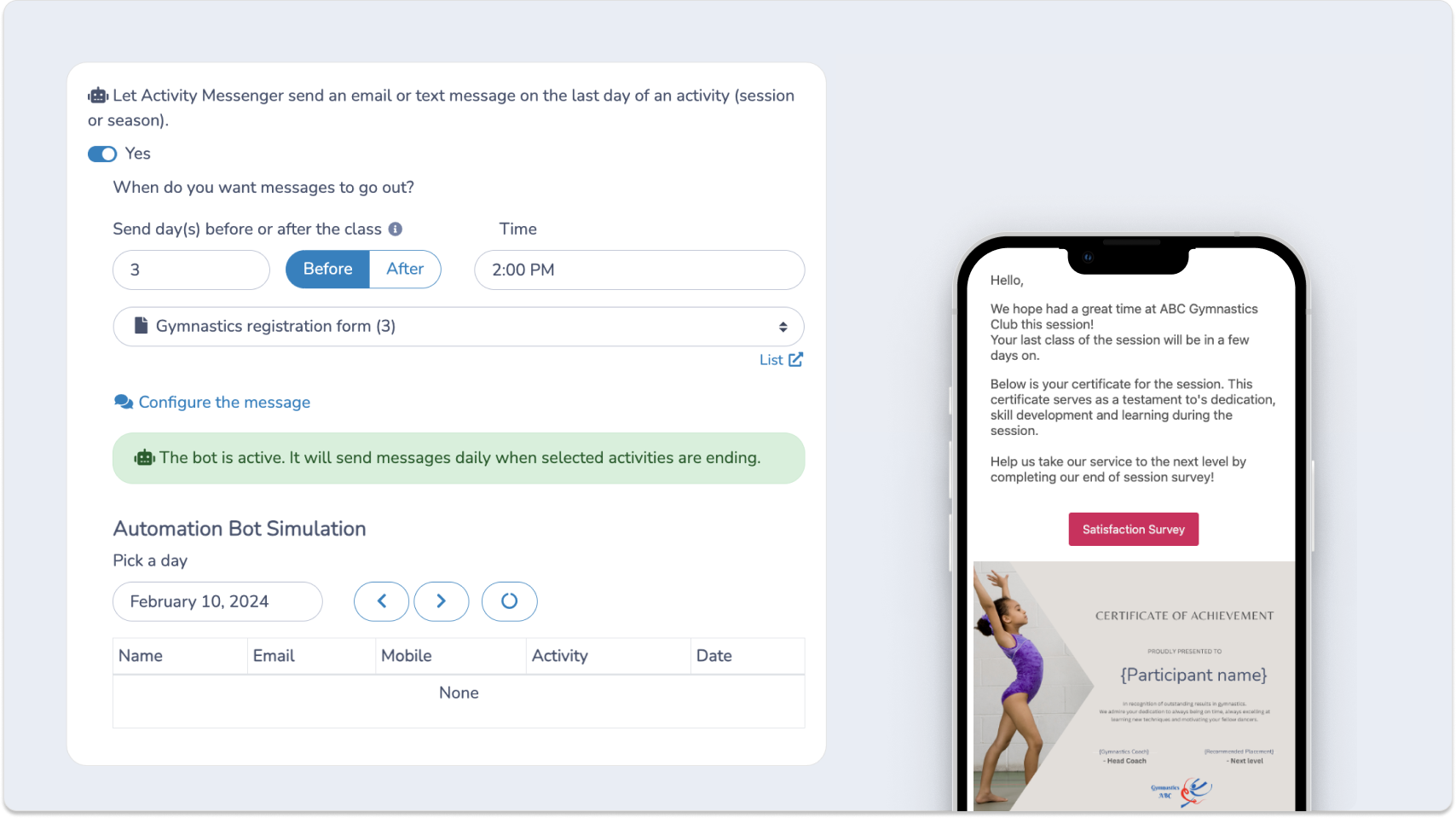
Automate survey collection

Activity Messenger solves this problem with intelligent automation. The system automatically processes registrations, updates class rosters, and sends reminder emails. Digital waivers replace paper forms, and bulk messaging tools keep everyone informed without extra work.

Real-world impact: Users experience up to 40% reduction in manual data handling thanks to our automated processes, reducing time spent on administrative tasks by half.


All-In-One Communication That Keeps Everyone Connected

Sports organizations often struggle with fragmented communication. They use separate tools for emails (think Mailchimp), text messages, and documentation. This leads to missed messages and confusion from parents.

Activity Messenger brings all communication together in one place: you can send bulk texts, create professional-looking newsletters with Canva, and manage digital contracts from a single dashboard. No more switching between apps or losing important messages.
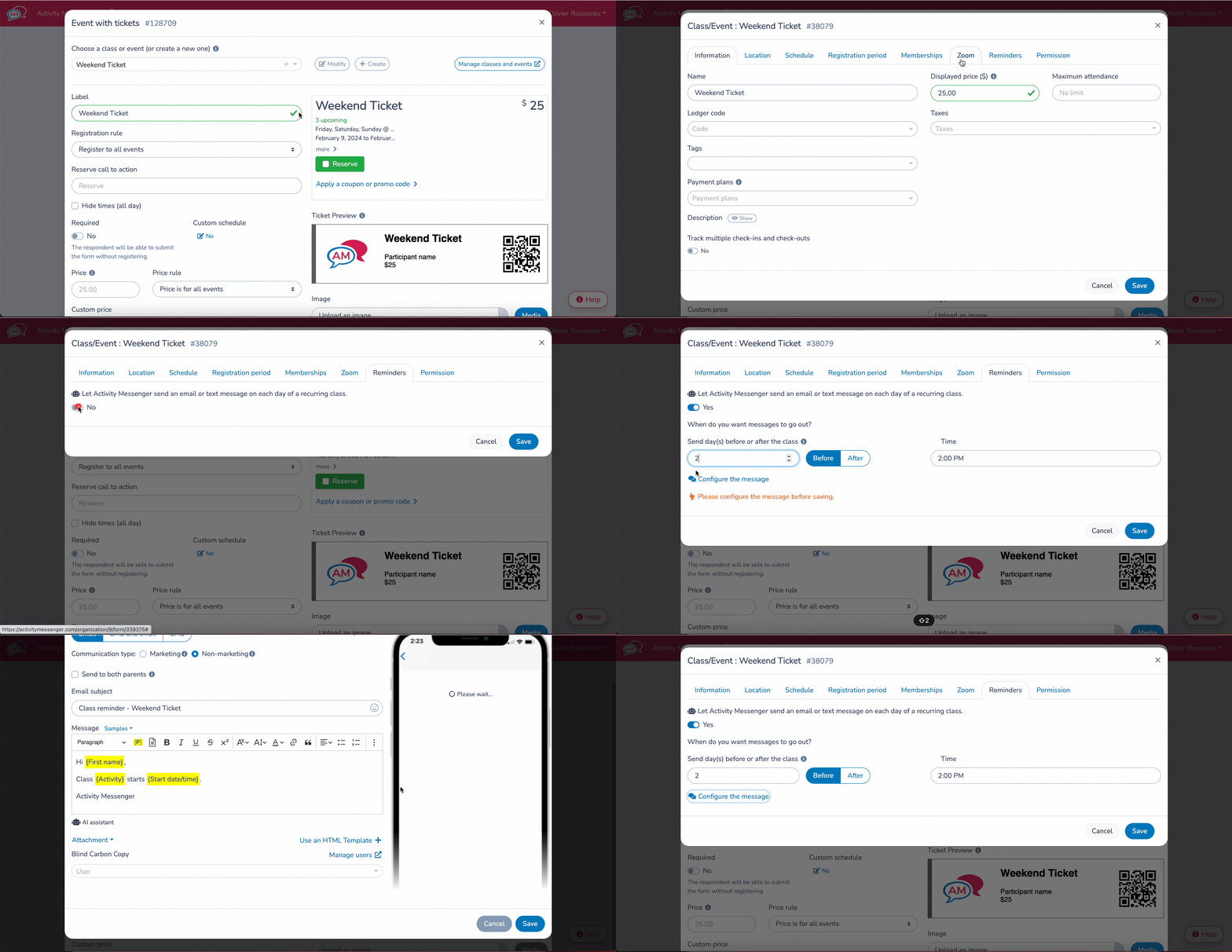
Our automated messaging is a built-in feature. It delivers timely notifications, reminders, and updates across all participant activities, so you can focus less on automations and more on the parts of running your business you actually enjoy.

Seamless Integration & Digital Management

We offer integration with various tools (Canva, Zoom, ChatGPT, etc.), minimizing the need for separate systems and creating an all-in-one experience. Our platform natively supports digital waivers, making it easy for users to manage contracts and permissions digitally, simplifying the admin work involved in participant onboarding.

Flexible Plans That Grow With Your Organization

Many registration systems force organizations into rigid plans that either offer too little or charge for features they don’t need. This results in wasted money or limited functionality that can hold you back.

Activity Messenger’s pricing lets you pay for what you actually need. You can upgrade or downgrade as your needs change, or start small with our software (for example, just SMS and email marketing) and migrate over time.

Cost advantage: Smaller organizations benefit from cost-effective pricing without compromising on features, with pricing that adapts to your growth.


Step-by-Step: Using Activity Messenger to Transform Your Process

Let me show you how to set up a smooth registration and payment system. I’ll guide you through each step to create forms that work exactly how you want them to.

Step 1: Set Up Your Registration Form

Start at your Activity Messenger dashboard. Click the “Create Form” button in the top menu. You’ll see a clean workspace with form elements on the left side.

  • Find the “Drag & Drop” panel on the left
  • Add custom fields for specific information you need
  • Include a waiver section if needed

You’ll know you’re done when all your required fields are in place, and the preview shows a clean, professional form.

Step 2: Connect Your Payment System

With your form structure ready, let’s add payment processing:

  • Click “Payment Settings” in the form editor
  • Select “Connect with Stripe”
  • Set your payment options (one-time, recurring, or both)
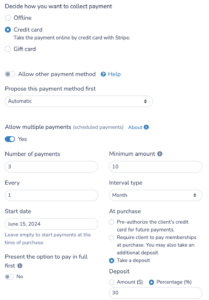
Connect Your Payment Processor

Step 3: Add Your Branding

Make the form match your brand:

  • Add an image box to the form
  • Upload or use our Canva integration
  • Choose your brand colours for buttons and headers

Step 4: Set Up Automated Messages

Now let’s create your communication flow:

  • Go to “Communication” in the main menu
  • Create a welcome email template
  • Set up payment confirmation messages

Camp Welcome Email Template

Step 5: Test and Launch

Before going live:

  • Fill out the form completely as a test user
  • Process a test payment
  • Check all automated emails

Your registration system is now ready to handle registrations and payments smoothly. Remember to check your dashboard daily for new signups and payment updates.

💡 Pro Tip: Activity Messenger is tailored to address the diverse needs of your organization. We provide customizable forms, help optimize attendance lists, allow for bulk certificate distribution to celebrate achievements, and offer gift cards to enhance revenue.

2. Jotform: Customizable, User-Friendly Forms

Jotform alternative

Jotform makes creating forms as simple as putting together LEGO blocks. It’s a great tool for small business owners and large organizations alike, offering an intuitive interface for designing visually appealing and functional forms.

The Good Stuff:

  • Drag-and-Drop Builder: Create forms quickly with an easy-to-use drag-and-drop interface.
  • Extensive Templates: Select from over 10,000 templates to start your project without needing to code.
  • Advanced Features: Use conditional logic, e-signatures, and integrations with Mailchimp and Salesforce.

The Not-So-Good:

  • Limited Communications: Communication with participants is very limited and requires add-ons or integrations.
  • Branding: Jotform branding appears on forms made with the free plan unless you upgrade.

Pricing & Plans

  • Quick Price Breakdown: Plans include Free, Bronze ($34/month), Silver ($39/month), Gold ($99/month), and custom Enterprise options.
  • Gotchas: No extra fees for payments, but going beyond plan limits means you might need to upgrade or remove old data.
  • Plan Highlights: Advanced features unlock with higher tiers, while the free plan has notable limitations.

Bottom Line

Jotform suits anyone needing user-friendly, customizable forms at affordable prices. It’s ideal for both data collection and automating workflow tasks.

📌  Read More: Discover how you can replace Jotform, Eventbrite, Mailchimp, and SurveyMonkey with a single tool here. Instead of investing in multiple tools for your organization, read how to streamline your budget into a single, all-in-one solution. 

3. Jumbula: Comprehensive Registration Management

Jumbula Alternative

Jumbula simplifies everything, from form creation to payment handling. Its intuitive wizards and customizable forms make managing registrations less of a headache.

The Good Stuff:

  • Effortless Program Creation: Creating classes, camps, and more is simple with Jumbula’s program wizards.
  • Customizable Registration Forms: Drag-and-drop form building allows for endless customization, gathering exactly the info you need.
  • Integrated Refund and Transfer Management: Handle refunds and transfers easily, keeping all data intact.

The Not-So-Good:

  • Limited Customization for Advanced Users: Some might find the customization options lacking for complex needs.
  • Registration Workflow Limitations: Issues with handling complex scenarios like multiple tuition or capacity options in a single season have been reported.

Pricing & Plans

  • Pay As You Go: First month free, then $15/month
  • Rise Plan: Starts at $150/month
  • Ascend Plan: Starts at $285/month
  • Nonprofits and Schools: Benefit from discounted pricing

Bottom Line

Jumbula is a great choice for organizations looking for an easy-to-use registration system. It is suitable for organizations that manage multiple programs and events and offers a strong value proposition.

4. Jackrabbit: Best for Dance and Gymnastics Studios

Jackrabbit Alternative

Jackrabbit management software offers robust solutions known for streamlining complex studio operations. Used by more than 7,000 studios, Jackrabbit is a pioneer in the industry.

The Good Stuff:

  • Smooth Operations: Manages scheduling, attendance, and private lessons in one place.
  • Engagement Tools: Includes custom apps and communications to keep clients updated and engaged.
  • Finance Management: Automatic billing and payroll solutions simplify financial tasks.

The Not-So-Good:

  • Complex Features: New users may need time to get acquainted with its expansive functions.
  • Limited Customization: Some may find that reporting flexibility isn’t as broad compared to competitors.

Pricing & Plans

  • Pricing Overview: Different tiers available to suit various studio sizes, with support included.
  • Hidden Fees: None reported; costs are transparent. However, pricing is based on the total student count at the end of each month.
  • Extras: No free plan restrictions, adding to its appeal.

Bottom Line

Dance and gymnastics studios looking to efficiently manage their operations will find a lot of value in Jackrabbit. Its strong feature set and reliable support make it an attractive choice.

5. iClassPro: Easy Class Scheduling

IClassPro

iClassPro is designed for easy class scheduling, billing, and communication. It’s a reliable solution for dance studios, gymnastics, and swim schools. This software is great for managing day-to-day operations.

The Good Stuff:

  • Scheduling Mastery: Students can book classes online using a clear calendar view.
  • Seamless Communication: Automated emails and messages keep everyone informed.
  • Effortless Payments: Simplifies billing with auto-charge features for smooth transactions.

The Not-So-Good:

  • Learning Curve: New users can find the options a bit much at first.
  • Customization Limitations: Some users want more flexibility, like HTML integration.
  • Pricing Structure: Monthly plan prices may be too high for smaller organizations.

Pricing & Plans

  • Signature Plan: $139 USD per month, per location
  • Elite Plan: $199 USD per month, per location
  • Premium Plan: $299 USD per month, per location
  • Limitations: Lower plans will not have online booking starting in 2024.

Bottom Line

iClassPro is ideal for mid-sized operations like dance and swim schools. It’s suited for those needing an easy class scheduling solution that handles billing and communication.

6. CourseStorm: Accessible Course Enrolment

 CourseStorm Alternatives

CourseStorm simplifies your registration process, saving time and encouraging more students to enroll.

The Good Stuff:

  • Streamlined Registration: It offers a smooth experience, combining browsing, signing up, and payment all in one place.
  • Customized Forms: You can tailor forms to collect information efficiently, avoiding unnecessary repetition.
  • Automated Waitlisting: It handles full classes by placing students on a waitlist automatically, easing manual tasks.

The Not-So-Good:

  • Limited Advanced Features in Core Plan: The basic plan skips some extras like multiple forms and tailored receipts, which could be crucial for sizable programs.
  • Pricing Structure: A percentage fee plus a per-registration rate might be too costly for bigger enrolments.

Pricing & Plans

  • Starter Plan: $119 per month
  • Core Plan: $219 per month
  • Pro Plan: $329 per month
  • All Access Plan: Starting at $499 per month

The Bottom Line

CourseStorm is for educational institutions that need a simpler process for student registration, especially where saving staff time and ensuring user-friendliness are priorities. It offers remarkable strengths, but check the plan and its feature limits according to your needs.

7. Sawyer: Best for Children's Activity Providers

HiSawyer Alternatives

Sawyer is the best way to manage kids’ activities. It’s a platform designed with parents and providers in mind to make the registration process as stress-free as possible. With easy-to-use features and helpful support, Sawyer sets itself apart.

The Good Stuff:

  • Streamlined Registration: Parents register their kids with just a few clicks, making activities easy to access.
  • Flexible Management: Customize rosters and track attendance with simple tools, improving your admin work.
  • Customer Acquisition: Get noticed by parents searching for activities through the Sawyer Marketplace.

The Not-So-Good:

  • Integration Limits: It doesn’t work with QuickBooks, posing challenges for managing accounts.
  • Learning Curve: Some features can be tricky until users become familiar with them, especially for those new to tech.

Pricing & Plans

  • Launch Plan: 2%/transaction + processing fees
  • Grow Plan: $169 per month + processing fees
  • Scale Plan: $329 per month + processing fees
  • Quick Overview: Charges a fee per order. Marketplace orders between $30 – $100 cost $2.99, and over $100 at $3.99. Direct business site orders are cheaper for smaller amounts.
  • Hidden Costs: Booking fees aren’t refundable and add up per order.
  • Value Consideration: While fees exist, they reduce admin workload, providing more time for the business’s educational aspects.

Bottom Line

Sawyer works best for those who manage children’s activities. It simplifies complex processes, allowing providers to invest in enriching their programs. Despite minor drawbacks, Sawyer’s features make it a worthy choice for this niche.

Final Thoughts: Choosing the Right Regpack Alternative

Regpack and Activity Messenger both offer powerful solutions for organizations managing classes, memberships, and registrations, each with its own strengths.

Regpack is well-suited for organizations that require robust automation features, payment processing flexibility, and a personalized user experience through its customizable registration flows. However, some users may find its interface complex and the setup process time-consuming.

Activity Messenger, on the other hand, takes a modern, mobile-first approach that streamlines registration, communication, and workflow management into a single platform. It simplifies complicated processes such as dynamic capacity management, multi-class registration, and automated follow-up, ensuring a seamless experience for both administrators and participants.


💡 See the difference yourself. Book a demo with Activity Messenger to explore how activity organizations save 15+ hours per week on administrative tasks.

Written by Olivier Rousseau Olivier is a kids' sports programs owner who has been operating for over a decade with locations in Montreal, Quebec City, and Ottawa. He also helps Gymnastics Clubs, Swim Schools, and Dance Studios streamline their operations. He is the co-founder of Activity Messenger an online registration platform for the sports & leisure industry.

Book a demo with an Activity Messenger expert

Subscribe for exclusive content

Receive News and Updates about our product