
For most youth activity providers, the hardest part is not getting parents to your registration page. It is getting them to finish. You spend time and money promoting your programs, but when parents click through and disappear without registering, it is hard to know why.
This guide breaks down the most common reasons parents abandon registration forms and what you can do to fix each one, along with tips to boost your conversions.
Key Takeaways:
- Most registration drop-offs occur for predictable, fixable reasons, not because parents have lost interest.
- Mobile-first design is no longer optional; most parents register on their phones.
- Conditional logic reduces the cognitive load of finding the right class.
- Transparent pricing and flexible payment plans remove the two biggest checkout barriers.
- Keeping parents on your website throughout the process builds the trust needed to complete enrolment.
Table of Contents
- 1. Your Registration Form Isn’t Mobile-First
- 2. Parents Have To Scroll Through A Long List Of Classes
- 3. Payment Is Complicated or Unclear
- 4. No Payment Plan Options
- 5. Parents Have to Leave Your Website to Register
- Final Thoughts: Small Fixes, Big Results
Author’s note: Olivier shares tips and tricks he’s learned over the past decade as the owner of a children’s sports program. Today, as co-founder of Activity Messenger, he helps hundreds of dance studios, gymnastics clubs, and swim schools across North America improve their sales and conversion rates.
1. Your Registration Form Isn’t Mobile-First
The Problem: Parents Sign Up on Their Phones, but Your Form Isn’t Designed for Mobile
Think about the last time you signed up for something on your phone. If you had to pinch and zoom, scroll endlessly, or deal with tiny buttons, you probably got frustrated. Now imagine a parent juggling a toddler while trying to sign up for gymnastics on their phone. If your registration form isn’t easy to use on mobile, they’ll likely give up.
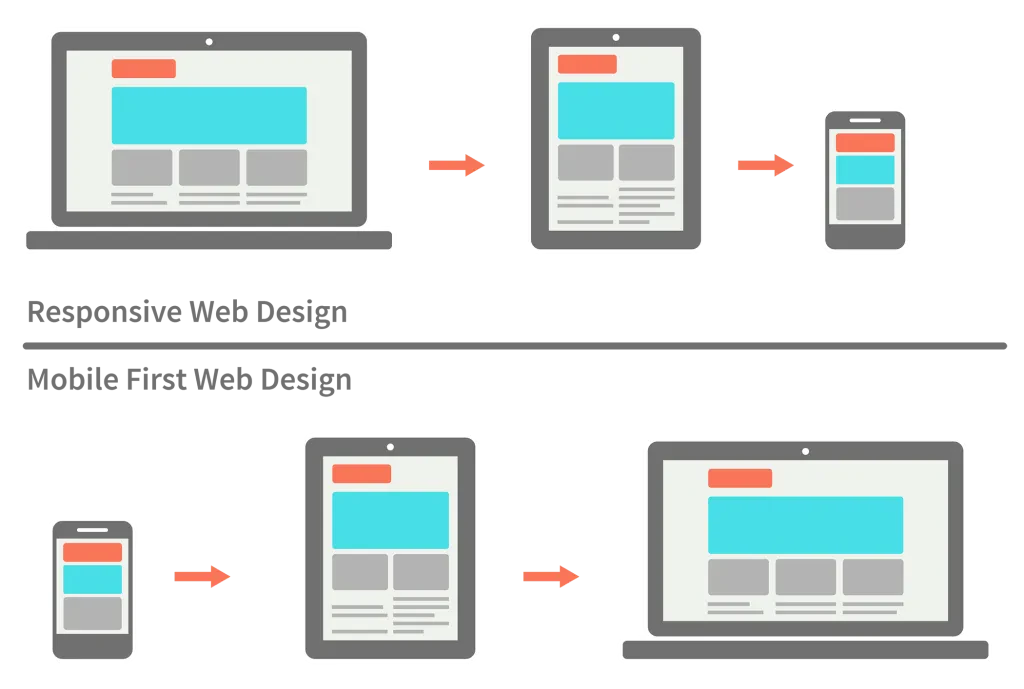
📌 Read More: Understanding the difference between mobile-first, adaptive, and responsive design
The Fix: Use a Mobile-First Registration Platform
Instead of just making a desktop form “responsive,” use a mobile-first platform like Activity Messenger that’s designed for small screens.
- ✅ Big buttons and easy navigation: No more tiny checkboxes or hard-to-tap fields
- ✅ Auto-fill and saved info: Parents can sign up faster without re-entering details
- ✅ One-page forms: No unnecessary scrolling or loading delays
- ✅ No account creation required: Parents simply fill a form (and we create an account on the back end)
👉 Many software vendors still use outdated registration systems designed for desktop computers that they have optimized for mobile. This just means that they made it “work” on smartphones. You should look for a mobile-first solution designed to work on both phones and desktops.
2. Parents Have To Scroll Through A Long List Of Classes
The Problem: Parents Get Overwhelmed and Give Up
If your program offers multiple classes, it’s easy for parents to get lost in a never-ending scroll of options, especially if they are on their phone. Maybe they’re looking for a beginner ballet class for a 6-year-old, but they have to wade through options for other types of classes, competitive teams, and other age groups before they find the right one.
If parents can’t find what they need quickly, they’ll leave. They may even have the best intentions of coming back to sign up until life gets in the way and they forget, or worse, register later with one of your competitors.
The Fix: Use Conditional Logic to Simplify the Process
Instead of displaying every single class upfront, use conditional logic to guide parents to the right choice.
- ✔️ Step 1: Select the child’s age
- ✔️ Step 2: Choose the skill level (beginner, intermediate, advanced)
- ✔️ Step 3: Pick a preferred time/day

By filtering out irrelevant classes, you make the process quick and intuitive in just a few clicks.
📌 Read More: How to improve your online registration process
3. Payment Is Complicated or Unclear
The Problem: Parents Don’t Know What They’re Paying For or Have Trouble Checking Out
Have you ever started to buy something online, only to abandon your shopping cart because the checkout process was too complicated? The same thing happens with activity registration.
Common payment roadblocks include:
- ❌ Hidden fees that appear at checkout
- ❌ Too many steps before entering payment details
- ❌ Forcing parents to create an account before paying
If payment feels like a hassle, parents will delay or abandon the process entirely.
The Fix: Simplify Checkout and Offer Multiple Payment Options
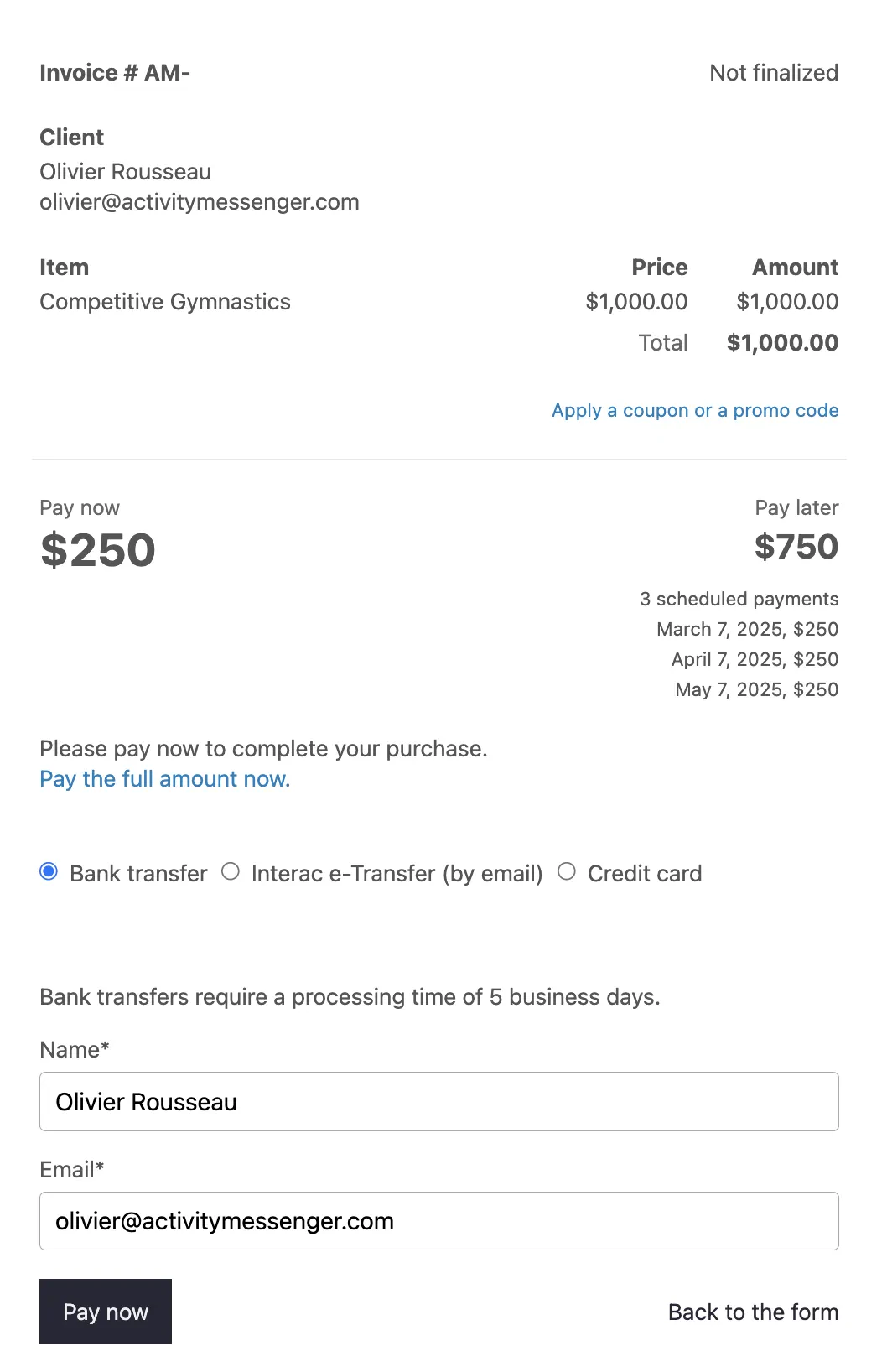
- ✅ Display full pricing upfront (including taxes and fees)
- ✅ Allow guest checkout—no account creation required
- ✅ Reduce the number of steps to complete payment
- ✅ Retarget abandoned forms
- ✅ Accept multiple payment methods (credit card, Interac e-transfer, pre-authorized debit)
📌 Read More: How to retarget abandoned forms
4. No Payment Plan Options
The Problem: Parents Need Flexible Payment Options
Some parents can’t afford to pay the full enrolment fee upfront, so they delay registration — or worse, choose a competitor that offers a payment plan.
The Fix: Offer Automated Payment Plans
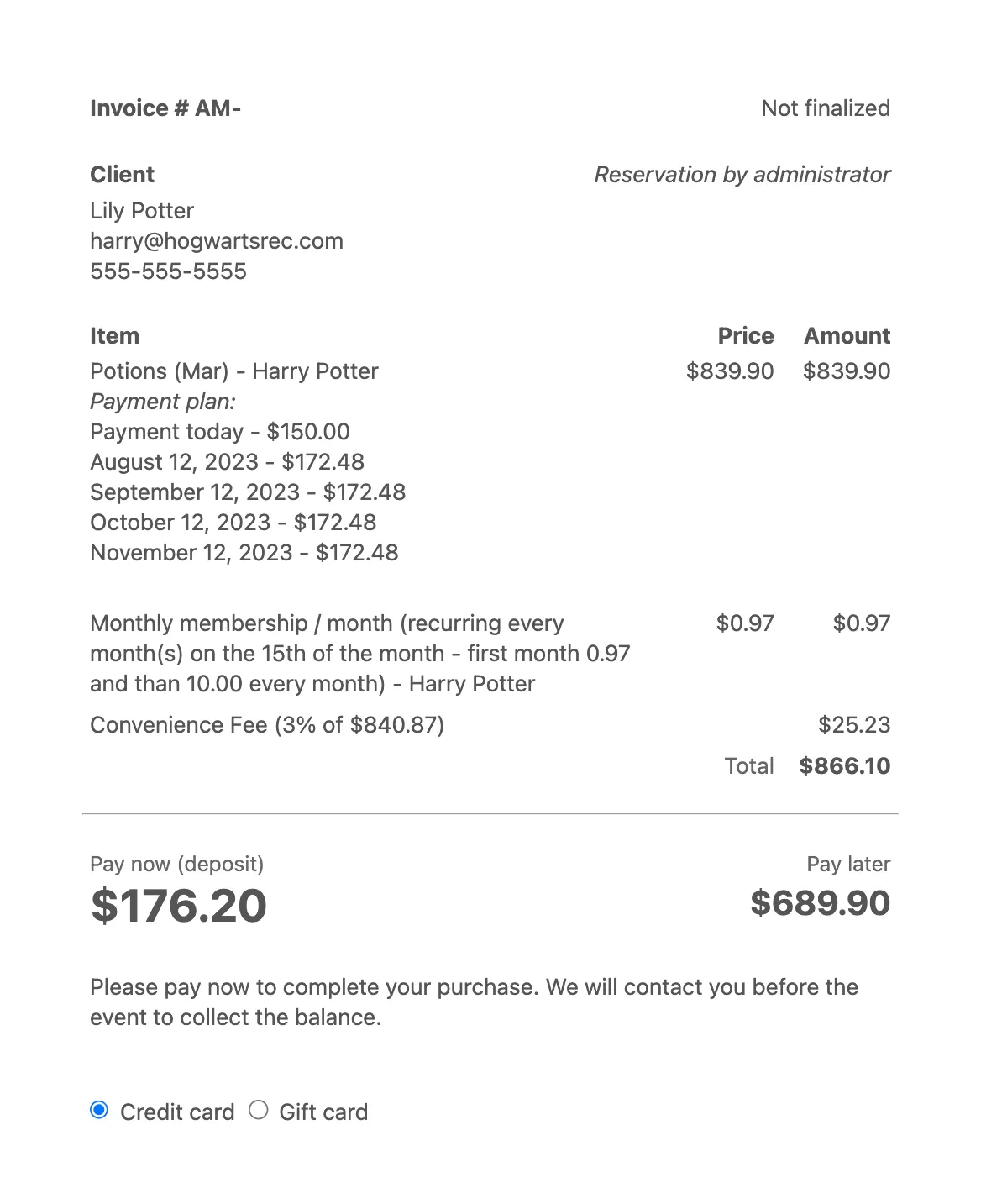
Instead of requiring full payment immediately, let parents split payments into manageable installments.
- ✅ Monthly or bi-weekly payments
- ✅ Automated billing (no chasing parents for payments)
- ✅ Clear breakdown of costs upfront
5. Parents Have to Leave Your Website to Register
The Problem: Redirecting Parents Breaks Their Trust
If you send parents to an external registration site that looks different from your website, it creates doubt.
- ❌ “Why am I on a different site?”
- ❌ “Is this secure?”
- ❌ “Do I need a separate login?”
Many parents won’t complete the process if they feel like they’ve been redirected to a new platform.
The Fix: Fully Integrate the Registration Process on Your Website
- ✅ Embed registration directly on your website
- ✅ Use branded forms that match your site’s colours and design
- ✅ Keep parents in a familiar environment from start to finish
Final Thoughts: Small Fixes, Big Results
Every abandoned form represents a family that wanted to enrol. The good news is that most drop-offs are preventable with a few straightforward changes to your registration flow. The studios with the strongest conversion rates are not always the ones with the best programs. They are the ones making it easiest for parents to say yes.
Ready to Improve Your Registration Process?
Activity Messenger helps dance studios, swim schools, and gymnastics clubs boost conversions with:
- ✅ Mobile-first registration
- ✅ Smart conditional logic
- ✅ Simplified payments & flexible plans
- ✅ Retargeting abandoned forms
- ✅ Seamless website integration
👉 Stop losing customers by optimizing your registration flow. Book a demo with an Activity Messenger expert.