A tennis facility can have courts spread across a large outdoor area, multiple entrances, and players arriving early in the morning or late at night when nobody is standing at the front desk. Your booking software can tell you who reserved Court 4, but someone still needs to make sure the right person actually gets through the gate.
That’s where tennis access control becomes part of facility management. Instead of treating the gate as a separate problem, the right system connects bookings, memberships, access, and attendance in one place. And when those gates are outdoors, the solution isn’t just software. It also involves scanners, access points, physical hardware, installation, and ongoing support.
This article looks at why that’s changing. We’ll cover what tennis access control looks like when it’s part of the platform rather than an afterthought, what we learned from installing our first outdoor unit at IGA Stadium in Montreal, and the one difference that matters most when comparing platforms in this space: whether the company behind the software also provides and supports the hardware.
Key Takeaways:
- Tennis facility management software needs to handle who gets on the court, not just when.
- Tennis access control removes the need for staff at every entrance, which matters for outdoor courts and multi-court complexes.
- Activity Messenger provides both the software and the physical tennis access control hardware, so facilities don’t need to coordinate separate software and hardware providers.
- We recently installed our first outdoor tennis access control unit at IGA Stadium, checking players in and telling them which court they’re on.
Table of Contents
- Why Tennis Access Control is Core to Facility Management Software
- Software And Hardware, From One Provider
- How Tennis Access Control Works
- Monitor Every Access Point in Real Time
- Beyond Entry: Revenue Protection And Staff Check-In
- Real Example: Outdoor Access Control At IGA Stadium
- What To Look For In Tennis Facility Management Software
- Frequently Asked Questions
- Final Thoughts
Why Tennis Access Control is Core to Facility Management Software
Tennis facilities have a layout problem that a lot of other activity businesses don’t. Courts are often spread across a large outdoor area, sometimes with several entrances, and staff can’t realistically stand at every gate to check people in. Add early morning or late evening bookings, and there’s a real chunk of the day when nobody is at the front desk at all.
Facilities need a way to confirm whether someone is a member or has a booking, let them in, and log their arrival, without a staff member doing it manually at every entrance. That’s made tennis access control a core piece of tennis facility management software rather than an add-on.
Software and Hardware, From One Provider
This is where many tennis facility management software solutions fall short.
The platform handles memberships and bookings, but access control becomes a separate project: pick a third-party vendor, buy their hardware, get it installed, then connect it back to your booking software through an integration.
When something breaks, the hardware provider blames the software provider, the software provider blames the hardware provider, and your gate stays down while they sort it out.
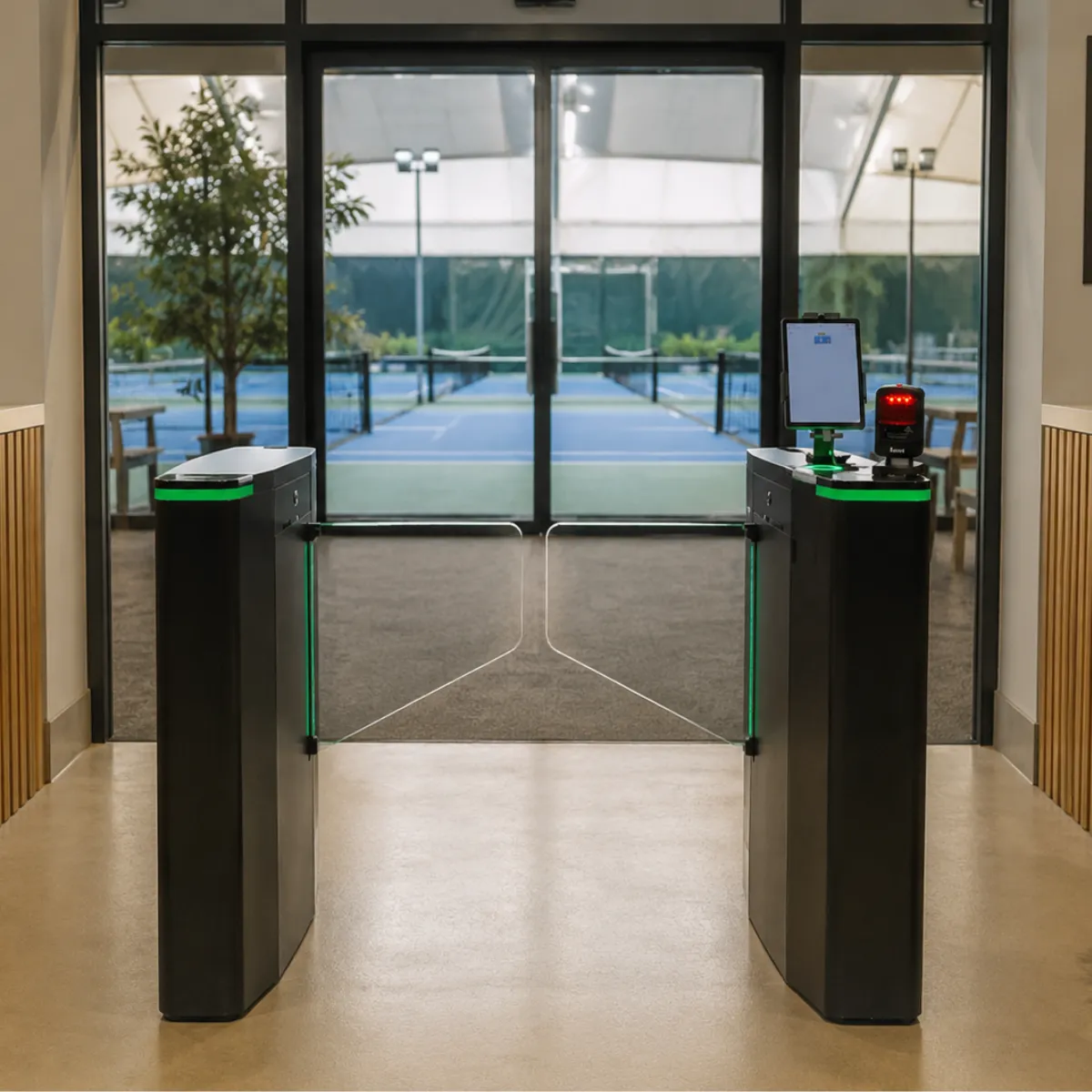
Activity Messenger skips that step. We co-install your access control system on-site at no extra cost, working directly with your team so the physical setup and software are fully functional before you go live, plus training so your staff is comfortable running it. One provider handles both, so if something goes wrong, there’s one number to call, not two companies pointing at each other.
How Tennis Access Control Works
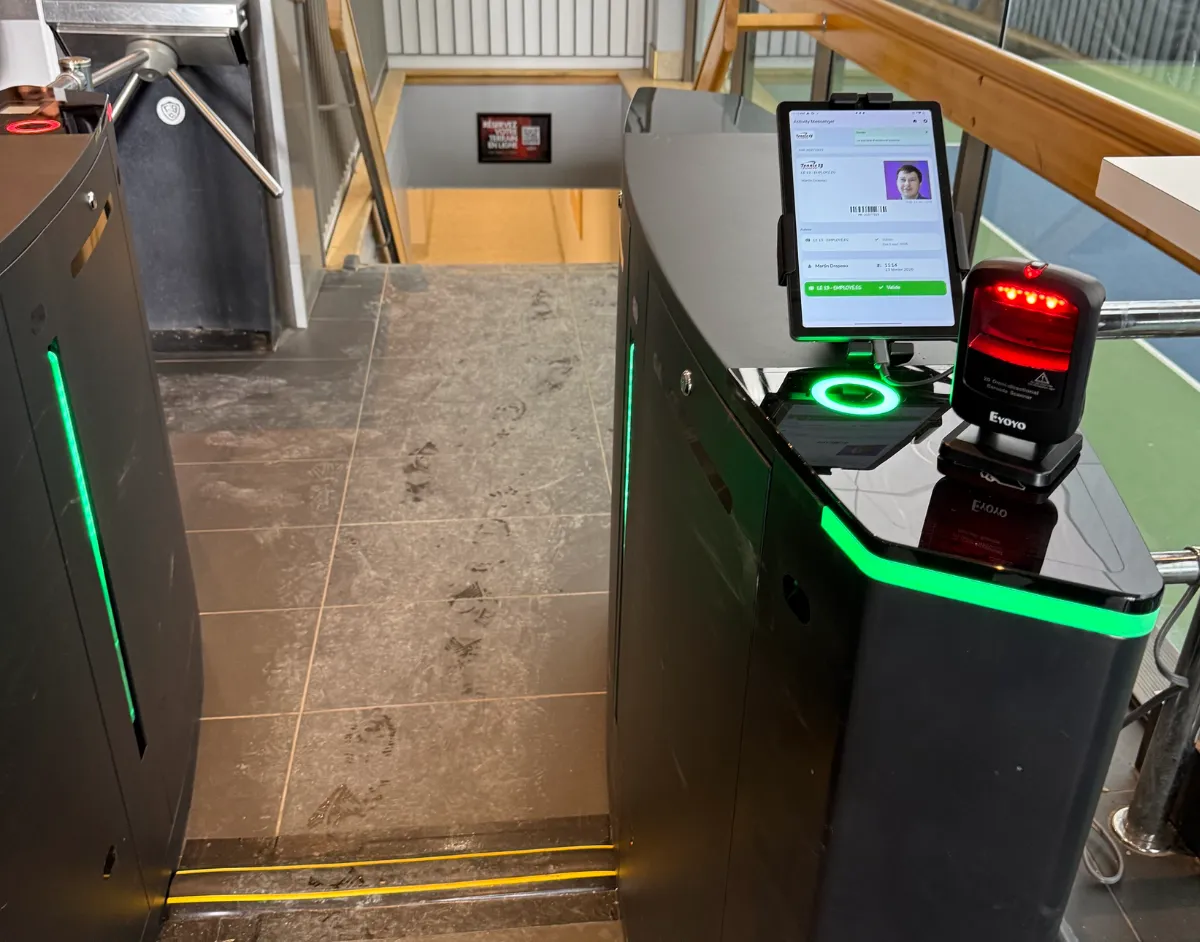
Every member or player gets a digital membership card, saved to Apple or Google Wallet, or a physical card if that’s a better fit for your facility.
Here’s what happens at the gate:
- 📱 They scan their card at one of our readers
- ✅ The system checks their membership or booking status
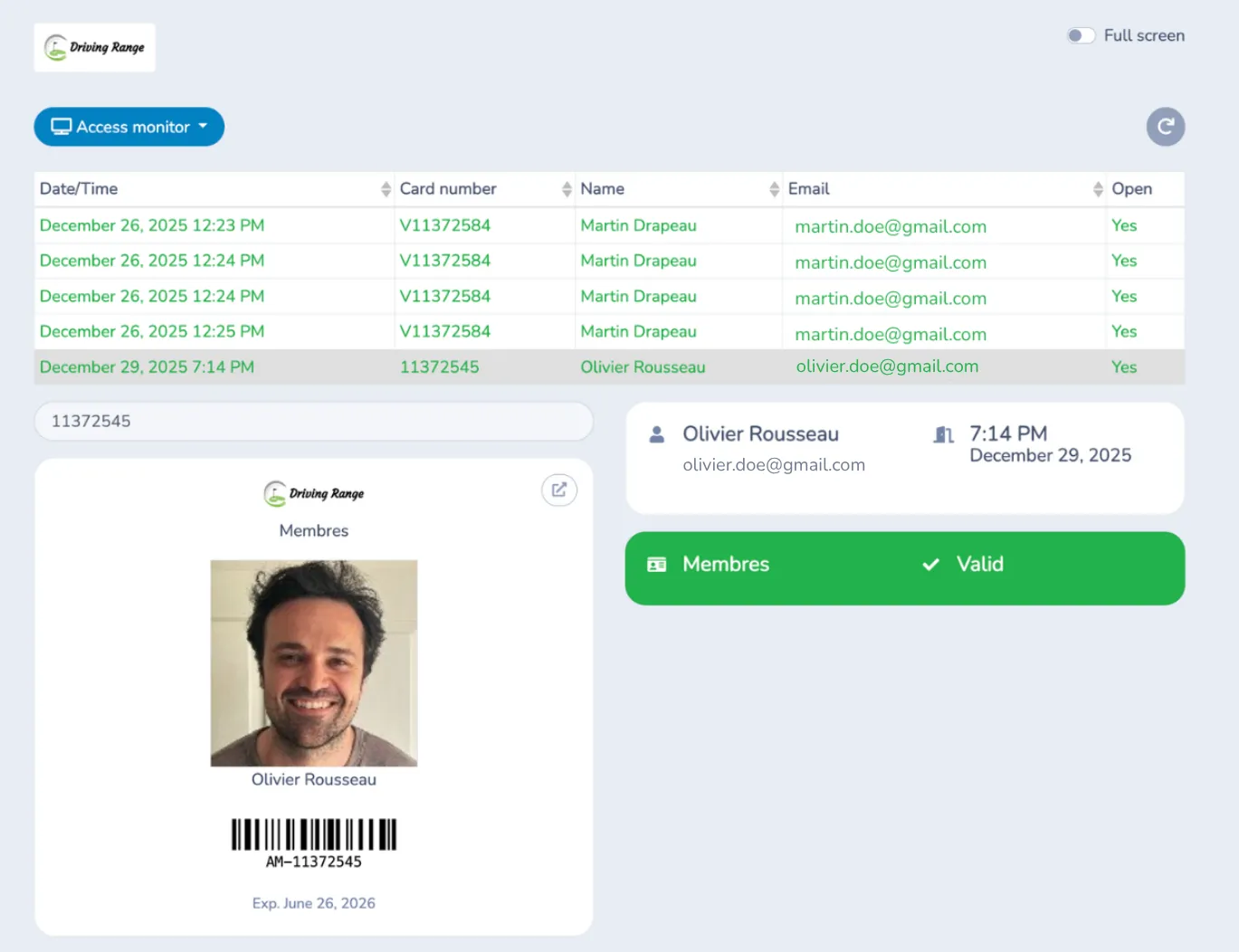
- 🖼️ Their photo appears on screen to confirm it’s really them, cutting down on card sharing
- 🚪 The gate or door opens if they’re authorized
- 🎾 The screen shows which court they’re playing on for that session
- 📋 Attendance is logged automatically when a member has a scheduled class or booking within the applicable check-in window
If a facility has more than one entrance or court cluster, each access point can run its own rules, and all of it feeds into one set of access logs.
Monitor Every Access Point in Real Time
When a tennis facility has multiple entrances, administrators need more than an access log they can check later. They need to know what is happening at the gates right now.
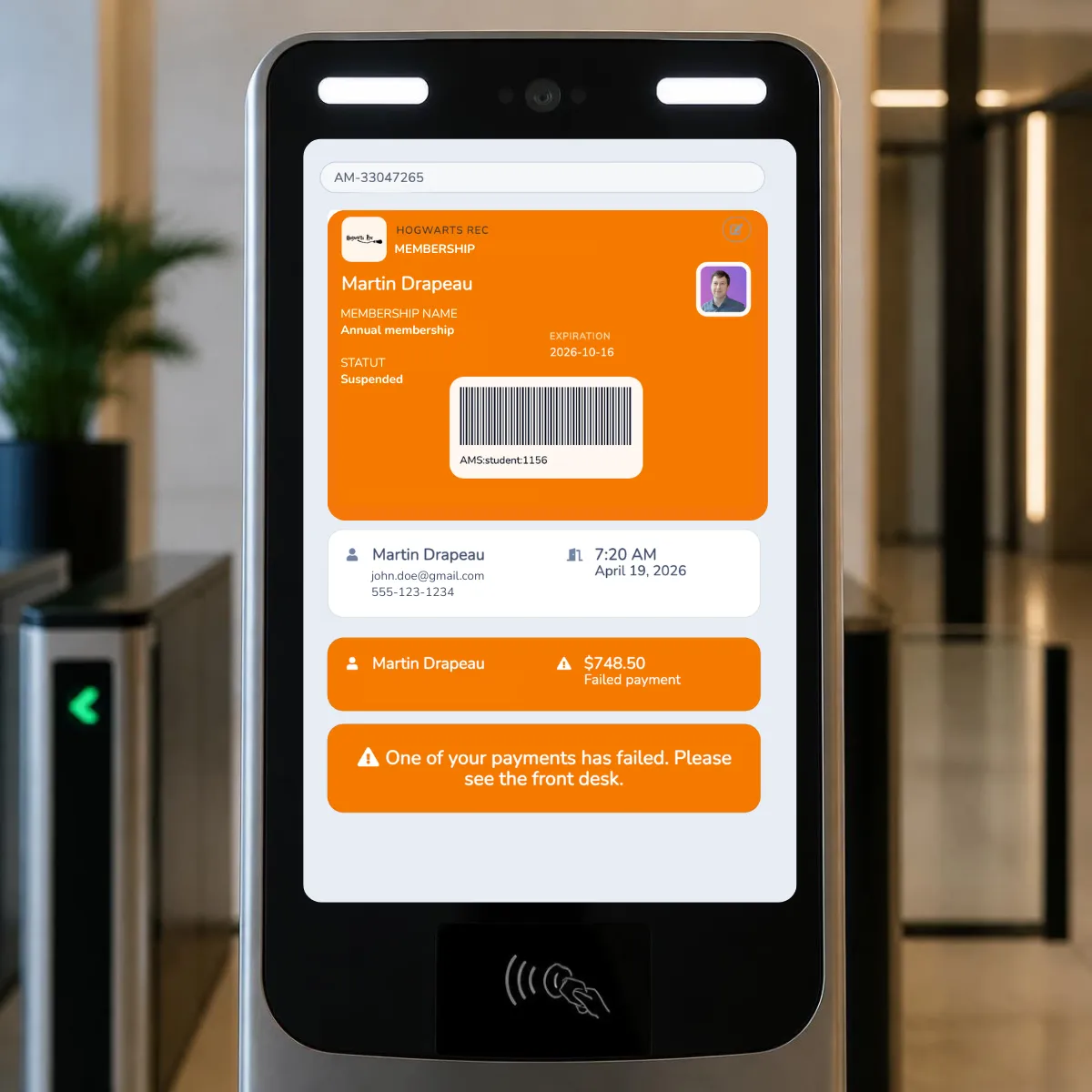
Activity Messenger’s Access Monitor provides a live view of access activity across your organization. Administrators and front-desk staff can see successful and failed scans across different access points from a single screen.
If a player is denied access, staff can open the player’s client account directly in the Access Monitor to investigate the issue. That means they don’t have to manually search for the member before figuring out what went wrong.
Beyond Entry: Revenue Protection And Staff Check-In
Tennis access control isn’t only about who gets through the gate.
It also protects revenue that tends to quietly disappear:
- 📊 Transparent gate reports show how often a gate opens and for how long, helping administrators identify unusual access patterns and potential revenue leakage
- ⏰ Entry times can be set so people can’t come in earlier than their booking allows
- 💳 If a member has an outstanding balance, the system can deny entry and redirect them to the front desk, no staff time spent chasing payment
- 🧑💼 The same access points can handle staff check-in and check-out, not just member entry
- 📲 Gates can be monitored and opened or closed remotely from an admin’s phone
Revenue protection also applies to empty courts. When a booking is cancelled or shortened, Activity Messenger lets your staff alert members whose saved preferences match that court and time, with an optional promo code to fill a last-minute opening.
Members can also subscribe to a daily summary of open court time, which helps off-peak hours reach the players most likely to book them.
Real Example: Outdoor Access Control At IGA Stadium
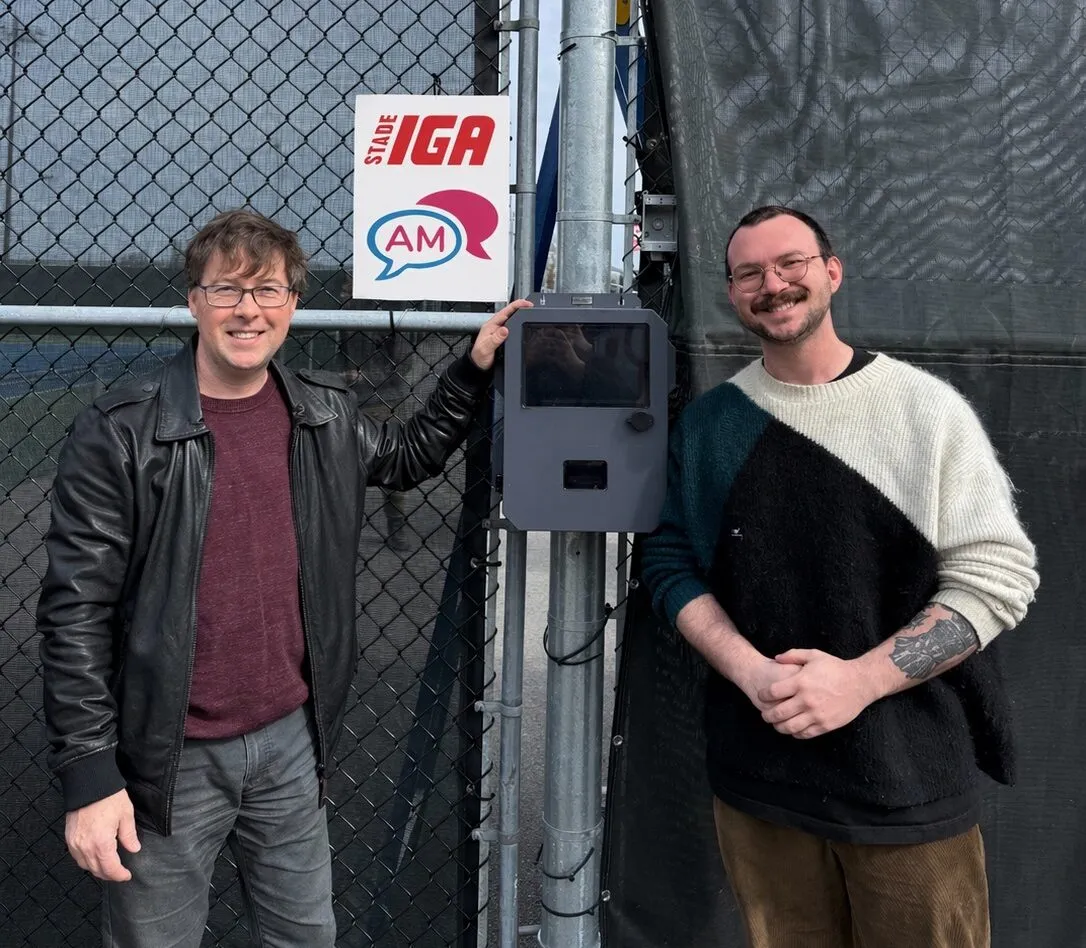
We installed our first outdoor tennis access control unit at IGA Stadium in Montreal. Players scan their digital wallet card at the box mounted by the courts, and the system tells them which court they’re playing on for that session, no front desk stop required.
This is a good example of what our end-to-end approach looks like day-to-day: someone on our team at the facility making sure the unit is working properly before a single player scans in.
This is the same tennis access control system available across Activity Messenger, now proven on an outdoor, multi-court facility.
What To Look For In Tennis Facility Management Software
Access control is one piece of a bigger decision. When you’re evaluating tennis facility management software, a few things are worth checking beyond the court booking calendar:
- 🔧 Does tennis access control come from the same provider as the software, or will you need a separate hardware vendor and contract?
- 🌳 Can the system handle outdoor, multi-entrance facilities, not just a single front door?
- 📋 Is attendance logged automatically, or does someone still need to check people in by hand?
- 🎾 Does the platform also handle camps, lessons, and leagues, or only court reservations?
- 💬 How is member and player communication handled around bookings, waitlists, availability alerts, and access issues?
Frequently Asked Questions
Do I need to buy hardware from a separate vendor for tennis access control?
No. Activity Messenger provides the access control hardware alongside the software, so you don’t need to coordinate separate providers for your membership system and physical access points. We also co-install the system on-site, connect the hardware to the platform, and provide training before you go live.
Can tennis access control handle multiple courts or entrances at one facility?
Yes, you can set up multiple access points for different entrances, doors, or areas of your facility, with each point configured according to your needs. All access activity can be monitored from a single Access Monitor, while detailed activity is available in your access control logs. This is particularly useful for facilities where courts are spread across different areas or have multiple entry points.
What happens when a player scans their membership card?
The player can scan a digital membership card from Apple or Google Wallet, a physical membership card, or a printed bar code. The system checks their membership or booking status and displays their information, including their photo and upcoming activity. If they’re authorized to enter, the configured gate or door can open. If they have a scheduled class or booking within the applicable check-in window, their attendance is logged automatically. The screen can also show the court or room assigned to their upcoming activity.
Is attendance tracked automatically?
Yes, when the member has a scheduled class or booking within the applicable check-in window. The scan records their arrival without requiring a staff member to manually mark attendance. This means the same scan used to authorize facility access can also handle attendance tracking for scheduled activities, reducing duplicate work for front-desk staff.
Can administrators see who is entering the facility in real time?
Yes, the Access Monitor provides a live view of access activity across your organization. Staff can see successful and failed scans across different access points as they happen. If a player is denied access, an administrator can open their client account directly from the Access Monitor to investigate the issue. This makes it easier to resolve access problems without manually searching through client records.
Can access control be used for outdoor tennis courts?
Yes. Activity Messenger supports indoor and outdoor access points, including installations at outdoor tennis facilities. Our first outdoor tennis access control unit was installed at IGA Stadium in Montreal, where players scan their digital membership cards at an access box near the courts. Outdoor installations can be configured for the specific access points and gates used by your facility.
Can I control when players are allowed to enter?
Yes, entry times can be configured for each access point. This allows facilities to control how early players can enter before a scheduled class or booking and apply different access rules to different locations. If a member doesn’t meet the configured access requirements, access can be denied, and the member can be directed to the front desk if further assistance is needed.
Can tennis access control be used for staff too?
Yes, the same access points can be used for staff check-in and check-out. This means you can use the physical access system for more than member entry, while keeping staff access activity connected to the same overall system.
Do we have to install the hardware ourselves?
No, Activity Messenger co-installs the access control system on-site at no extra cost. Our team works with your staff to ensure the physical hardware and software work together before you go live, and training is included. Remote technical support and service calls are also included in the monthly software subscription, with no additional hourly customer service fees.
Can tennis access control work with different scanners or tablets?
Activity Messenger supports barcode scanners, with 2D scanners recommended because they can read the barcodes displayed on smartphones. If you already have another scanner, it may work as long as it can be configured to automatically send an “Enter” command after each scan. Non-recommended tablets and scanners should be tested before going live to confirm that they work correctly with your setup.
Can administrators open or close gates remotely?
Yes, access points can be monitored and controlled remotely, including opening or closing gates from an administrator’s mobile device. This can be useful when a facility has multiple entrances or when staff aren’t physically located at every access point.
Final Thoughts
Court booking gets most of the attention in tennis facility management software, but for a lot of outdoor and multi-court facilities, tennis access control is what actually determines whether the day runs smoothly. And it’s as much a hardware problem as a software one. Reading a card, opening a gate, logging attendance, all of that runs through a physical unit mounted outside.
That’s the piece a lot of tennis facility management software leaves to someone else. Activity Messenger builds both sides, so there’s one provider to call, whether the question is about a booking rule or a scanner that needs a firmware update. We’re continuing to roll out tennis access control across outdoor facilities, starting with IGA Stadium, and we’ll share more as new access points go live.
🎾 Curious how tennis access control would work at your facility, hardware included? Book a free demo, and we’ll walk through a setup for your courts.
📖 Related Reading: