In this article, we’ll guide you through the process of creating an effective soccer player evaluation form and provide a template to get you started.
We’ll cover:
- Key components of a soccer player evaluation form
- A step-by-step guide to creating a player evaluation form
- How to use progress report to evaluate soccer players
- How to share skill evaluations with parents and players
- Include personalized certificates with progress reports
- Soccer Evaluation Form & Progress Report Template
Soccer Player Evaluation Form Template👇
Looking for a modern soccer management software? Here is a list of the 6 top Soccer Management Software on the market.
Key components of a soccer player evaluation form
To create a comprehensive evaluation form, consider including the following components:
1. Technical Skills
Assess the player’s proficiency in key technical areas such as:
- Dribbling: Ability to control the ball under pressure.
- Passing: Accuracy and timing of passes.
- Shooting: Power and precision in shooting.
- Ball Control: Comfort with the ball in various situations.
2. Tactical Awareness
Evaluate the player’s understanding of the game, including:
- Positioning: Awareness of positioning on the field.
- Decision-Making: Ability to make quick and effective decisions.
- Off-the-Ball Movement: How well the player moves without the ball to create opportunities.
3. Physical Attributes
Consider the player’s physical capabilities, such as:
- Speed: Quickness and agility on the field.
- Endurance: Ability to maintain performance throughout the game.
- Strength: Physical presence and ability to hold off opponents.
4. Mental Attributes
Assess the player’s mental and emotional qualities, including:
- Attitude: Willingness to learn and improve.
- Concentration: Focus during training and matches.
- Leadership: Ability to inspire and lead teammates.
5. Additional Comments
Provide space for coaches to add any additional observations or notes about the player’s performance or character.
A step-by-step guide to creating evaluation forms & skill tracking
Here’s how to do it:
1. Start with the basics:
Place your club’s logo or relevant image at the top of the form to keep your branding consistent.
2. Collect important information:
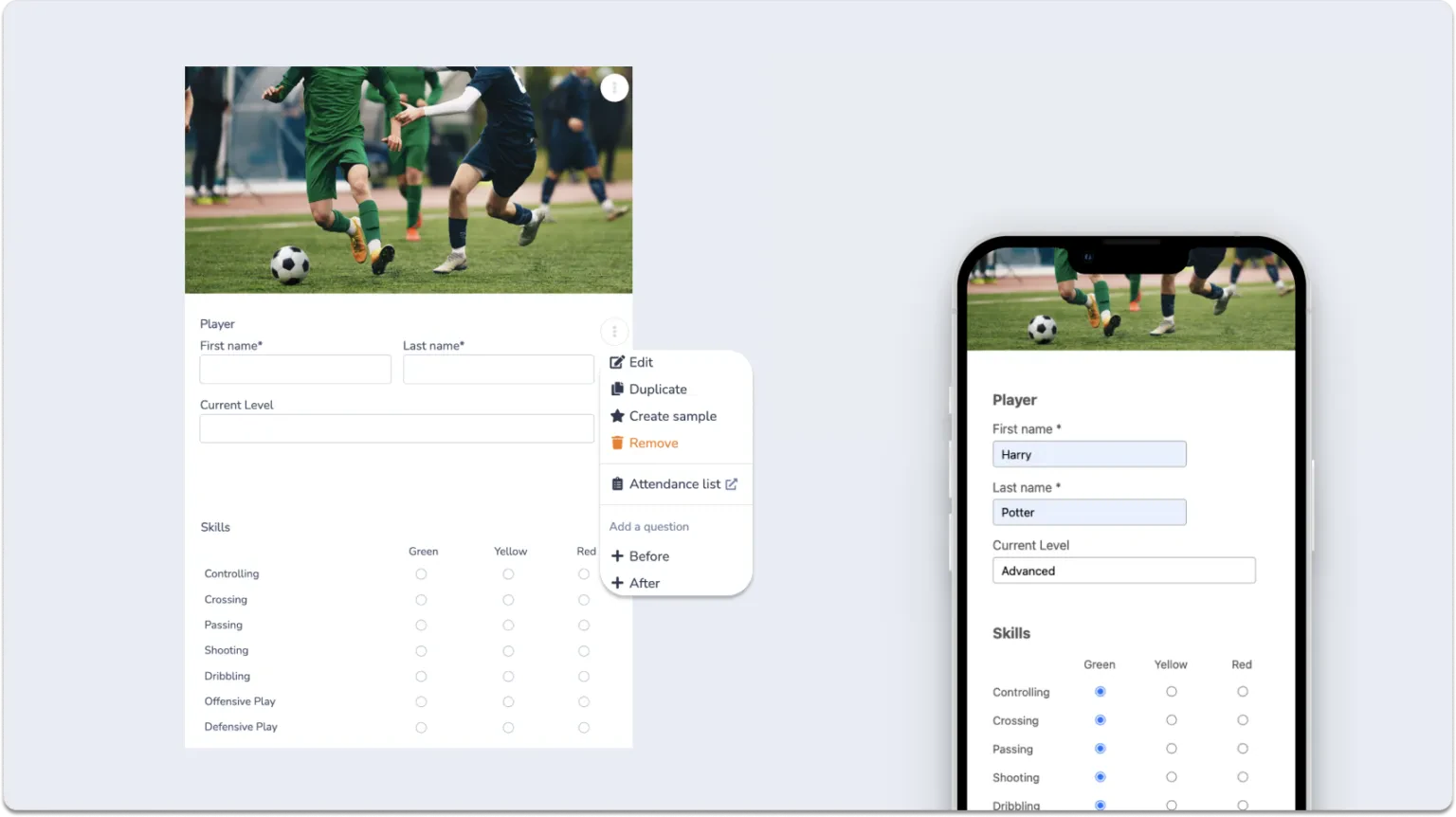
Include spaces for the player’s first and last name, current coach, age group, and level of play.
3. Player evaluation criteria:
Outline criteria such as on-field behaviour, attitude, and technical skills. Activity Messenger allows you to use a color-coded system (green, yellow, red) for easy understanding, complete with a legend that clarifies the meaning of each color.
4. Customize and Adapt:
Modify and expand each criteria to ensure the form is in line with your soccer academy’s or club’s specific evaluation protocols.
5. Additional fields:
Include spaces for comments, coach’s name, date of evaluation, and suggested level for the player’s next session.
Note: These steps are used when creating evaluation forms and skill tracking in Activity Messenger, but are the same if you are using another form builder such as JotForm, Google Forms, or Wufoo.
Use progress report to evaluate soccer players
With Activity Messenger, coaches can access evaluation forms easily. Each soccer coach can track and fill online progress reports for specific groups directly from attendance records.
Give your coaches access to evaluation forms
Each soccer coach can access online progress reports for their specific groups directly from the attendance records. This accessibility ensures that coaches have the tools they need to evaluate players accurately and efficiently.
Benefits of Digital Evaluation Forms:
- Ease of Access: Coaches can access forms anywhere, anytime.
- Centralized Data: All evaluations are stored in one place, reducing the risk of lost or misplaced forms.
Integrate progress reports with attendance tracking
Activity Messenger integrates progress reports with attendance tracking, allowing coaches to evaluate performance and attendance in one place. This integration simplifies data collection and provides a 360-degree view of a player’s development.
Advantages:
- Real-Time Data: Coaches can update records instantly, eliminating delays.
- Comprehensive Insights: A 360-degree view of players’ performance, combining attendance and skill assessments.
- Reduced Errors: Minimizes human error by consolidating tools and processes.
Coaches can fill out reports from their smartphones
Activity Messenger allows coaches to fill out reports conveniently from their smartphones. This flexibility ensures that coaches can provide detailed feedback immediately after practice or matches.
Deliver constructive feedback
The goal of progress reports is to provide players with detailed, constructive feedback to help them understand their current level and identify areas for improvement.
Key Elements of Effective Feedback:
- Specificity: Provide clear, detailed observations on player performance.
- Actionable Advice: Suggest concrete steps for improvement.
- Positive Reinforcement: Highlight strengths and achievements to motivate players.
📌 Pro Tip:Having worked with several clubs and academies, I’ve found that the younger generation of coaches appreciate the convenience of managing everything from their iPad or smartphone. The ability to track and view progress online in real time is also appreciated by parents and players.
How to share skill evaluation with parents and players
Here’s how to share skill evaluation forms with parents and players.
Send Progress Reports via Email/SMS
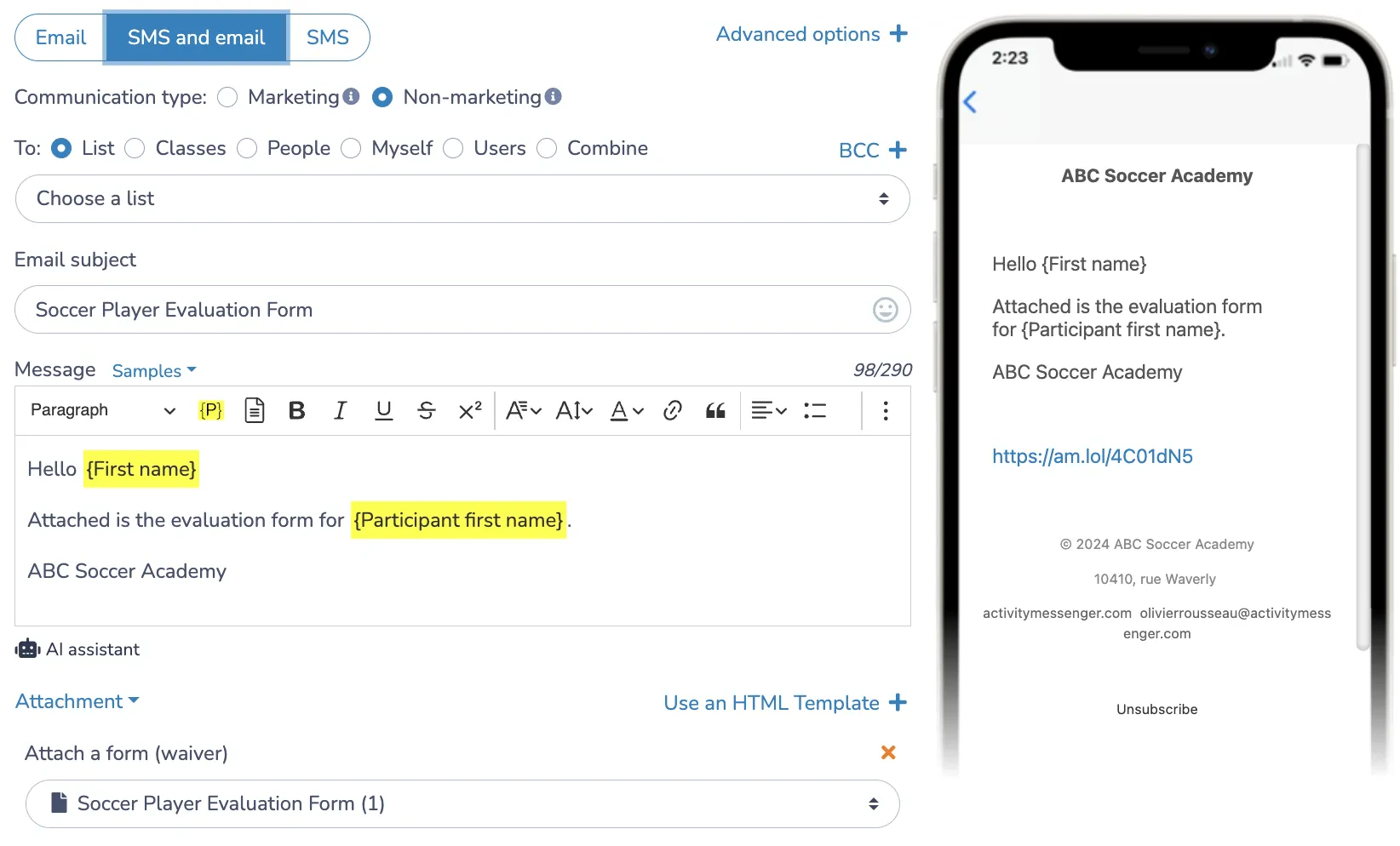
With Activity Messenger, you can send evaluation forms and progress reports to parents and players via SMS or email. Each message is customized with the player’s information, ensuring clear communication about their performance and development.
Parent Portal Access
Parents can conveniently access these reports at any time by logging into Activity Messenger. They have the option to view, download, or print the progress reports so they can stay informed about their child’s progress on the field.
Easy Access for Coaches, Players, and Parents
It is important that coaches, club managers, players and parents have easy access to these reports. This accessibility is critical to foster an environment in which the focus is on player growth and development.
Include personalized certificates with progress reports
Progress reports or mid-session evaluations can be a source of anxiety for soccer players and their parents. Finding the right balance between constructive feedback and positive reinforcement is critical. Personalized certificates can play a valuable role in this process, especially for younger athletes.
Create a Soccer Certificate with Canva
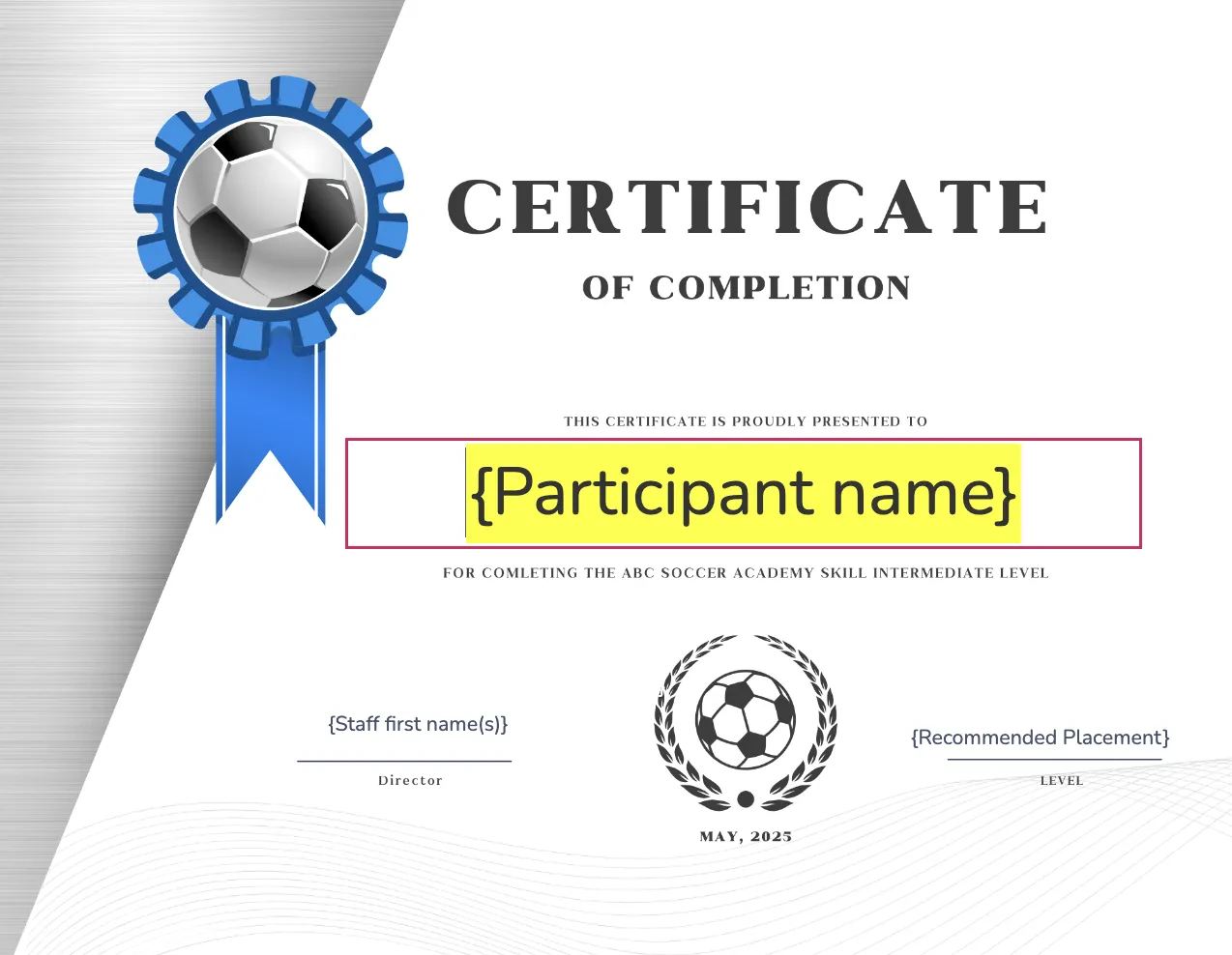
Use Canva to create personalized certificates for your soccer academy directly within Activity Messenger. Include space for mail merge tags to add a personalized touch, making each certificate unique and meaningful to players.
Incorporate Details from Your Progress Report
Automatically populate the certificate with the player’s name, team, and specific achievements or milestones using the mail merge feature. This ensures that each certificate reflects the player’s individual accomplishments.
Options for Emailing or Printing
Once the certificates are created, you can choose to print them in bulk for in-person distribution or attach them to an email sent to parents along with their child’s soccer progress report. This flexibility allows you to deliver recognition in the most convenient way for your academy.
📌 Pro Tip: You canuse the progress report email as an opportunity to ask parents to complete a coach evaluation form or an end-of-session survey. This approach gathers valuable feedback on staff performance and overall customer satisfaction.
Soccer Evaluation Form & Progress Report Template
Here is a Soccer Progress Report Template that was created using Activity Messenger. Test it out and see if you like it.
Even more tools for Soccer Coaches and Academy Owners
Here are a few more ways Activity Messenger can help manage and grow your Soccer Club or Academy.
It provides you with all the tools you need to succeed. Here are other ways we can help:
Sell tickets for your soccer tournaments
Best soccer quotes to inspire your community
Waitlist Management for soccer lessons
Email Marketing for Soccer Clubs
Marketing ideas for your soccer academy
How to Start a Soccer Academy
Soccer coach application form
Online registration for soccer session
Soccer registration platform
Soccer club liability waiver
——————
If you would like to learn more, book a demo with one our experts.
FAQ
What is the purpose of soccer evaluations and report cards? Soccer assessments and report cards evaluate skill development, provide constructive feedback, and set goals. They help players and parents track progress and identify areas for improvement on and off the field.
What key elements should be included in a soccer report card? Include evaluations of technical skills, on-field performance, physical fitness, coach observations, specific achievements, and recommendations for future training and competition levels.
How can soccer report cards be personalized for each player? Personalize by highlighting individual achievements, setting unique goals, and providing specific feedback that reflects each player’s journey and development.
How can technology be used in creating and managing soccer report cards? Use a digital platform like Activity Messenger to create, distribute, and store progress reports and evaluations, making them more accessible to parents, players, and coaches.