Every parent, client, or customer who registers on your site will receive one email they will absolutely open: the confirmation email. Confirmation emails routinely see open rates upwards of 70%, making them one of the highest-performing messages you’ll ever send, and one of the easiest to get wrong.
Most organizations treat the confirmation email as an afterthought, just a receipt with a date and a total. But that single email is also your best shot at answering the questions clients are about to ask anyway, setting expectations before the first class even starts, and cutting down the emails and phone calls your staff answer every single season.
This guide breaks down exactly what a strong confirmation email should include, with a real example and a case study showing what happens when you get it right.
Key Takeaways:
- A confirmation email should always include the session start date, activity name, invoice, exception dates, and participant names.
- Personalizing your confirmation email can reduce post-purchase support by 40-50%.
- Most registration software offers little to no customization, which is why so many confirmation emails feel generic and unhelpful.
- The right platform lets you add placeholders, images, buttons, and program-specific content to every confirmation email.
Table of Contents
What Is a Confirmation Email?
A confirmation email is automatically sent the moment a client completes a purchase or registration on your website. It’s sometimes called a welcome email, and it’s one of the few marketing touchpoints almost guaranteed to get opened: confirmation and order emails can see open rates of 70% or higher.
That kind of attention is rare, as most of your other emails will never get read that closely. Which makes it worth asking: is your confirmation email actually earning that attention, or just listing an order number and calling it done?
A well-built confirmation email does three things:
- 💬 Reduces post-purchase support
- 📚 Guides people to the right resources
- 📋 Sets expectations for what happens next
Here’s how to build one that actually does all three.
Confirmation Email Must-Haves
If your registration software‘s confirmation email doesn’t include the following, it’s time for a change:
- 🏷️ Name of the class/activity
- 📅 Start/end dates and times of the session
- 📍 Address of the class/activity location
- ⚠️ Exception dates
- 👥 Names of the participants
- 🚙 Parking details
- 💡 Frequently asked questions
- 🎒 What to bring
- ➡️ The next steps for parents/participants
- 📄 PDF version of the invoice
Leave one of these out, and you’re guaranteed a wave of emails from parents and clients.
Reduce Post-Purchase Support
Your registration software knows almost nothing about the specifics of how you run your business. That’s on you to fill in, which is exactly why a fully customizable confirmation email matters so much.
The goal is simple: use the confirmation email to answer the questions you already know are coming.
- Answer the top 3-4 questions you usually get after someone registers
- Set expectations for what happens between now and day one
If your front desk or coaches answer the same three questions every single session, put the answers in the confirmation email instead.
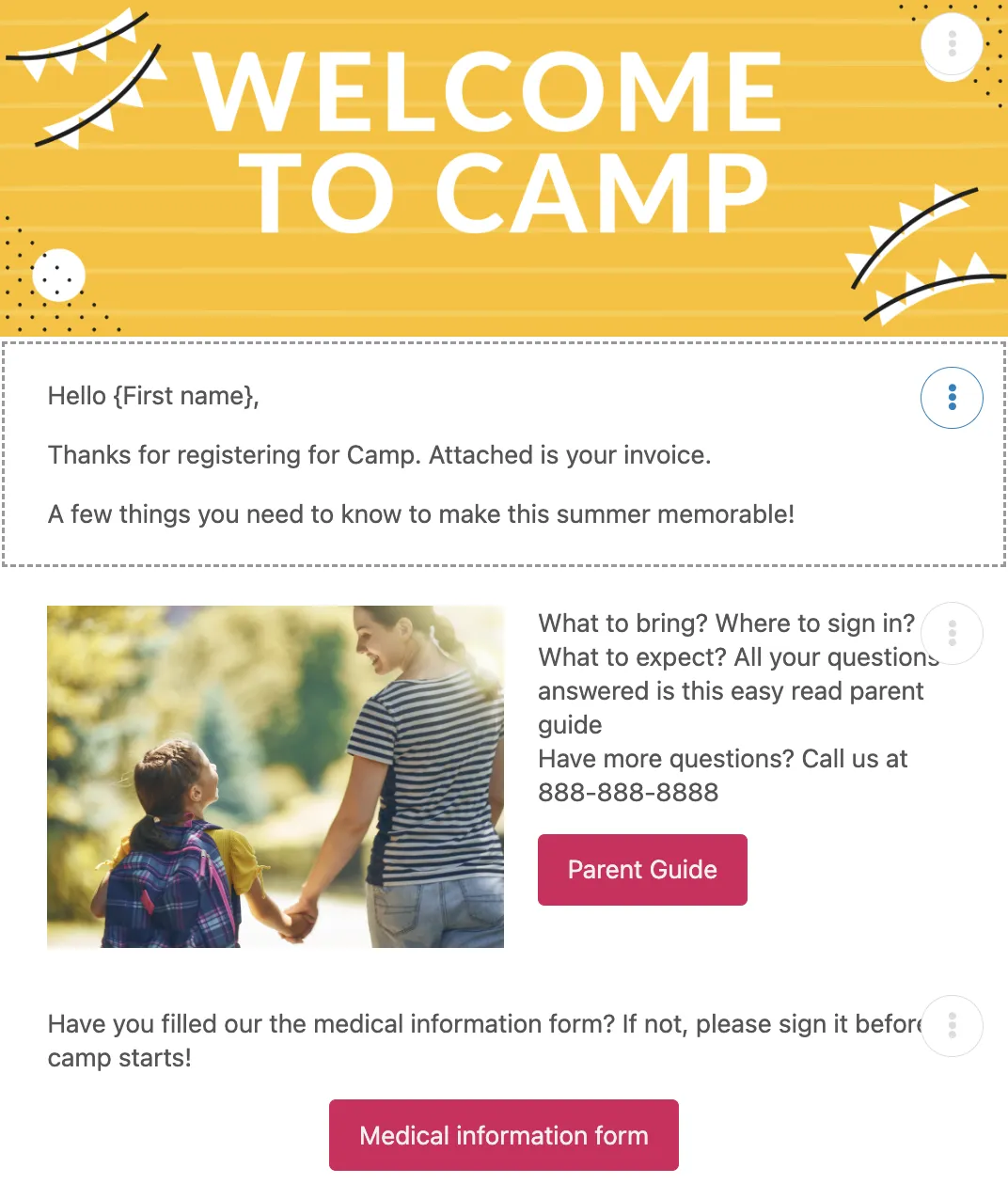
Here’s part of an actual confirmation email built for a youth soccer program:
Here’s some information to help you get ready for the start of the session:
- Classes are held outdoors, so we recommend sports shoes, comfortable clothing, a hat on hot days, and sunscreen
- Please arrive 10 minutes before class time. Classes are not cancelled for rain
- Shin pads and cleats are not required to participate
- Parents are asked to stay at the field for the duration of class
We’ll send a reminder 7-10 days before your child’s first lesson. Here’s the parent guide for more information.
👉 Notice what this does: it addresses the questions a coach would otherwise answer one-on-one, twenty times over, in the week before the season starts.
Case Study: How One Change Cut Support Requests by 40-50%
After adapting their confirmation email, Sportball Laval saw post-purchase email and phone support drop by 40-50%. Clients had the information they needed at the moment of registration, which meant less confusion for parents and a smoother season start for coaches, staff, and kids alike.
“When we set this automation up, we saw it as a great way to share information with new clients. We never expected to see a dramatic reduction in post-purchase questions from parents. This has saved us hours in repetitive communications and parents got the information right away.”
That’s not a small win. For a team answering the same questions across dozens of sessions and hundreds of families, that’s hours back every week.
Why Your Confirmation Email Isn't Working For You
If your confirmation email feels generic, that’s usually not on you. Every class management software sends a purchase confirmation by default, but most give you little to no ability to personalize it. That leaves organizations sending the same bare-bones email to every client, for every program, regardless of what that client actually needs to know.
The result: support requests that a five-minute email edit could have prevented.
The right tool should let you:
- 🎨 Fully customize the confirmation email
- 🖼️ Add images or a welcome video
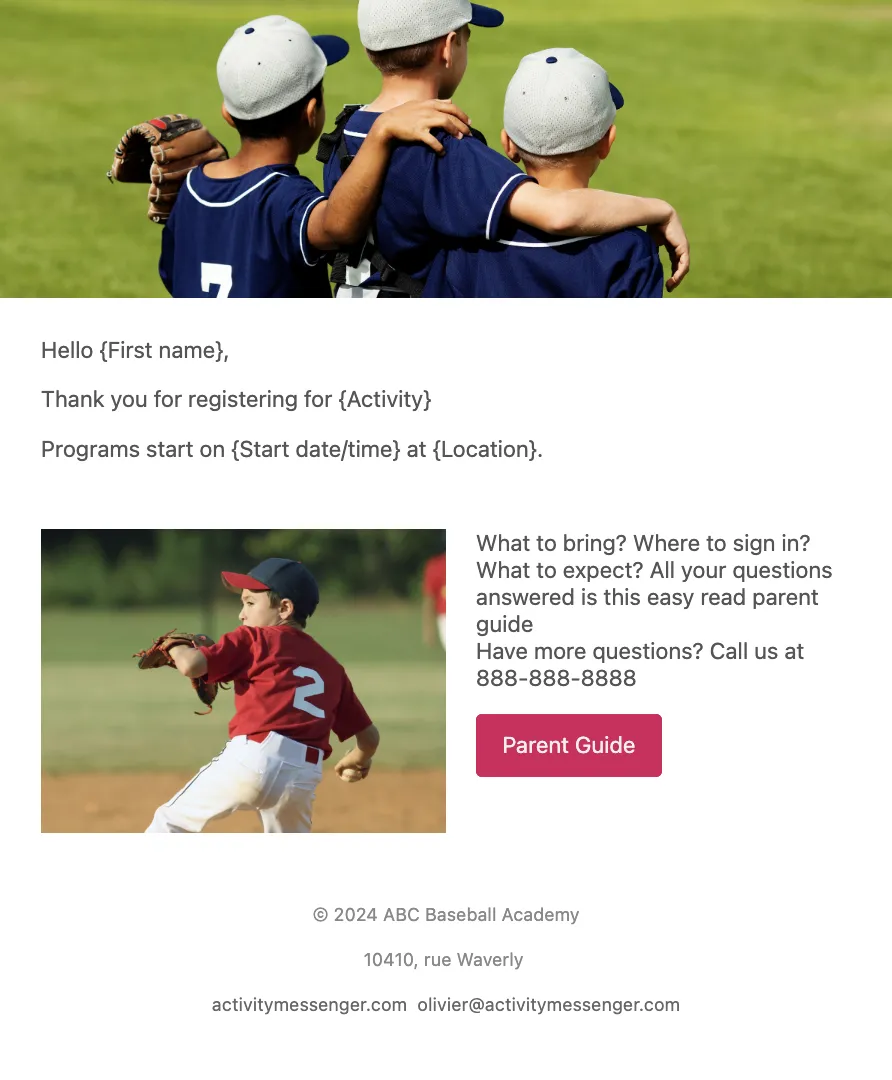
- ✨ Personalize with dynamic placeholders (name, start date/time, etc.)
- 🔗 Add buttons linking to forms, PDFs, or external URLs
- 🎯 Set different confirmation emails for different programs or activities
That’s the gap between a confirmation email that works and one that doesn’t: whether the software does this automatically, or leaves you rebuilding it by hand every season.
What Activity Messenger Does Differently
Most platforms make you choose between customization and automation. You either get a flexible confirmation email that someone on your team has to update by hand for every program, or an automated one that’s the same generic message for everyone.
Activity Messenger does both at once. Set up your confirmation email once per program with the specific details, images, and links that the program actually needs, and it will go out automatically every time someone registers.
A swim school running lessons, camps, and birthday parties can have three completely different confirmation emails live at the same time, each one built for what that specific audience needs to know, without anyone touching a send button.
⚡ See how confirmation and email automation work in Activity Messenger.
Frequently Asked Questions
What is a confirmation email?
A confirmation email is an automated message sent immediately after someone completes a purchase or registration on your website. Sometimes called a welcome email, it confirms the transaction and gives you a chance to share important details about the activity, session, or program the person just signed up for.
What should a confirmation email include?
At minimum, a confirmation email should include the start date and time of the session, the name of the activity, a PDF copy of the invoice, any exception dates (holidays, cancellations, makeup days), and the names of the registered participants. Beyond these basics, the most effective confirmation emails also answer common questions and set expectations for what happens before day one.
Why do confirmation emails have such high open rates?
Confirmation emails are transactional, not promotional, so recipients expect and actively look for them right after registering. Because the email contains the information the person needs (dates, receipts, next steps) rather than a sales pitch, open rates for confirmation emails often exceed 70%, far higher than typical marketing email benchmarks.
Can a personalized confirmation email actually reduce support requests?
Yes. When Sportball Laval customized their confirmation email with program-specific details and answers to common questions, post-purchase phone and email support dropped significantly. See the case study for the full breakdown.
Why can’t I customize my confirmation email in my current software?
Most class and camp management platforms automatically generate a confirmation email, but many offer little to no ability to personalize it by program, activity, or audience. That leaves organizations sending the same generic message to every client, regardless of what that specific program actually requires clients to know.
What’s the difference between a confirmation email and a reminder email?
A confirmation email is sent immediately after registration to confirm the purchase and share initial details. A reminder email is typically sent closer to the start date (often 7-10 days out) as a follow-up, reinforcing key details like start time, location, and what to bring.
Ready To Fix Your Confirmation Emails?
Most confirmation emails get one job: say thanks, list the date, and attach a receipt. But this is the one email almost every client actually opens, and that’s a lot of attention going to waste if all you’re sending is a generic receipt.
The organizations that get the fewest “wait, when does this start again?” emails aren’t doing anything fancy. They’re just putting the answers where clients will actually see them: in the confirmation email, before anyone has to ask.
If your current confirmation email was generated by your software and hasn’t been touched since, there’s a good chance it’s generating support requests you don’t need to deal with.
🚀 Book a free demo, and we’ll show you exactly how to build a confirmation email that answers your clients’ top questions automatically to avoid generic receipts and repeat phone calls.