If you’re using CampDoc for camper health forms but still juggling other tools for registration, payments, or parent communication, you’re not alone. Many camps have realized that while CampDoc excels in medical record management, it leaves gaps in the areas that take up the most staff time: registrations, reminders, and keeping families informed.
As today’s camps look for simpler, mobile-friendly, and more connected tools, many are switching to Activity Messenger. Built to manage registration, communication, and waivers in one place, Activity Messenger helps camps reduce admin work and deliver a smoother experience for families, all while keeping data secure and compliant in Canada.
Whether you’re a day camp, overnight camp, or recreation program, this guide will help you find the right balance between compliance and convenience for the best camp management software.
DISCLAIMER: Activity Messenger is our software. We created it after experiencing the various shortcomings of existing camp management software for years.
The platform CampDoc is described as an all-in-one camp management system including online registrations, electronic health records (EHR), health/medical forms, and other functionality.

Why it’s a strong baseline:
Limitations:
| Feature | CampDoc | Activity Messenger |
|---|---|---|
| Health Forms & Medical Tracking | Best-in-class medical record management built by doctors and nurses. | Customizable forms and health questionnaires, suitable for most programs. |
| Online Registration | Functional, but more rigid setup designed around medical data collection. | Streamlined, mobile-friendly registration with custom forms, family accounts, and sibling discounts. |
| Payments & Refunds | Limited flexibility; payment tools may require manual reconciliation. | Integrated payment processing, refunds, and payment plans with automatic receipts and reporting. |
| Digital Waivers & Signatures | Available through form uploads or attachments. | Fully digital waivers with e-signatures that auto-store and link to camper profiles. |
| Communication Tools (Email/SMS) | Limited; mostly email-based updates through the admin panel. | Built-in SMS, email, and automated reminders for confirmations and updates. |
| Automation | Minimal; relies on manual follow-up or exports. | Automate registration confirmations, payment reminders, rosters, and communication sequences. |
| Mobile Experience | Primarily desktop-focused; forms may be difficult on phones. | 100% mobile-friendly for parents and staff with integrated Apple/Google Wallet check-ins. |
| Data Privacy & Hosting | U.S.-based (HIPAA, FERPA, SOC 2 compliance). | Hosted in Canada, bilingual (English/French), with PIPEDA-compliant data handling. |
| Customer Support | Email and phone support; standard response times. | Personalized onboarding, chat/email support, and training for migration from other systems. |
| Best For | Camps with intensive health tracking or overnight programs needing EHR-level compliance. | Camps and recreation programs wanting an all-in-one system for registration, communication, and automation. |
| Starting Price | $340/month | $89/month |
| Capterra Rating | 4.8 | 4.7 |
📌 Read More: Best Camp Management Software (In-Depth Comparison)
Best suited for: Camps and recreation programs that require an all-in-one solution for registration, forms, waivers, and communication.
While CampDoc remains a respected platform for managing camper health information, Activity Messenger fills the gaps with a unified approach to camp management. It combines everything in one place, so you can eliminate the need for multiple tools.

Activity Messenger simplifies registration for families and staff. Parents can sign up from their phones, pay instantly, and receive automated confirmations and receipts. The platform supports multi-session enrollment, sibling discounts, and flexible payment plans, giving you control without the spreadsheets.
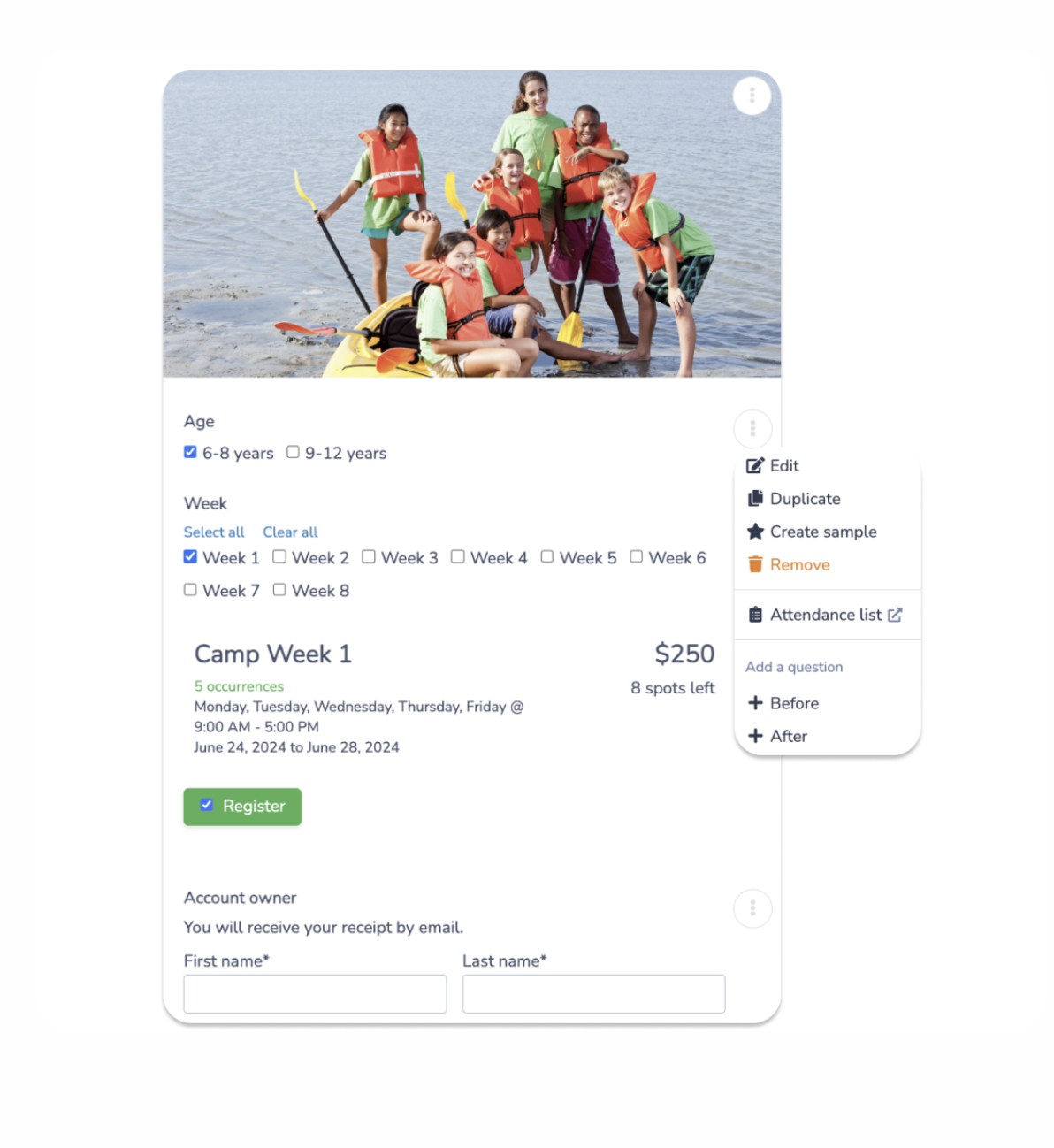
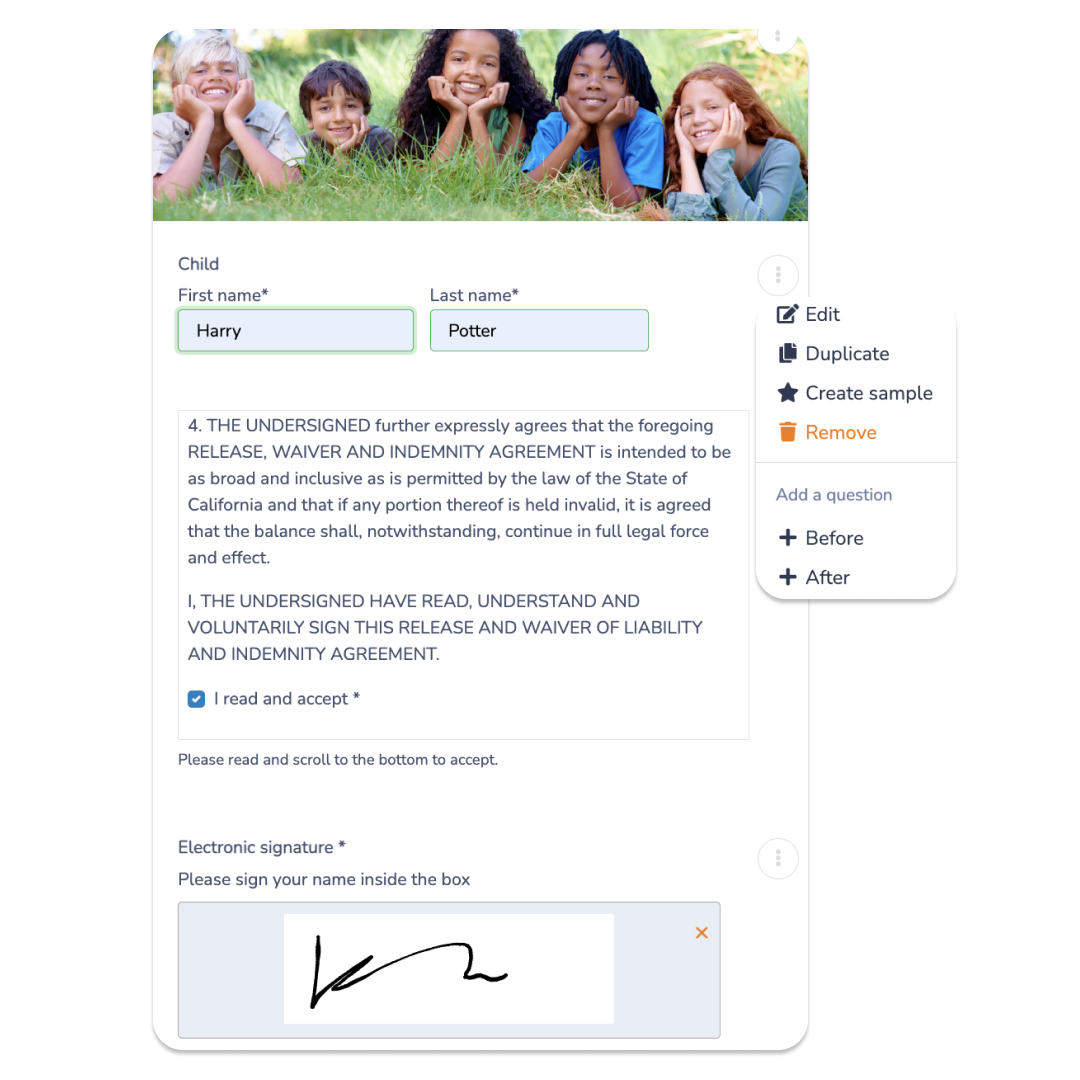
Create custom registration forms, waivers, and consent forms with built-in digital signatures. Submissions are automatically attached to camper profiles for easy review and reporting. For camps that need health data, Activity Messenger supports medical questionnaires and file uploads for immunizations or allergy information.
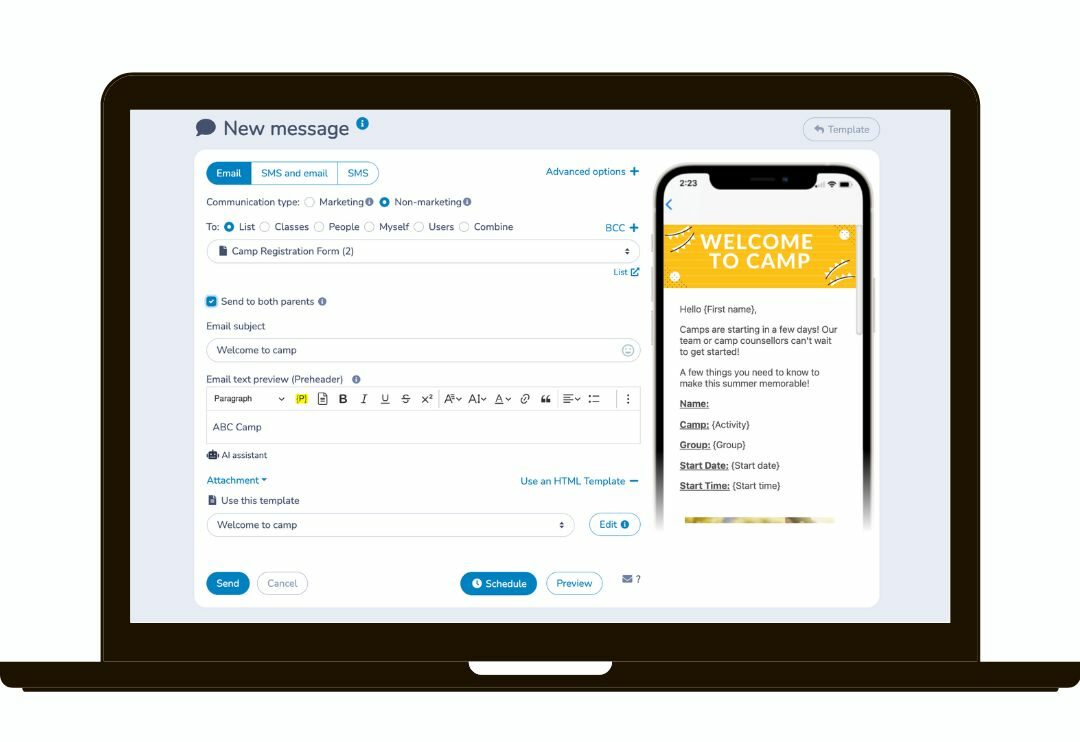
Unlike CampDoc, Activity Messenger integrates email, SMS, and push notifications directly into the platform. Send targeted reminders, weather alerts, and updates without exporting data to another tool. You can also automate recurring messages — confirmations, reminders, payment follow-ups, and check-in instructions — so nothing gets missed during busy weeks.
Activity Messenger is hosted in Canada and complies with PIPEDA standards, giving organizations peace of mind when handling sensitive data. The platform supports both English and French, ideal for camps serving bilingual communities.
Camps switching from CampDoc report saving hours each week on admin work and communication. By combining tools into a single platform, they gain flexibility, reduce manual tasks, and create a seamless experience for families.
📌 Read More: Check out our other blogs dedicated to camp management, including Mass Texting for Camps, How to Digitally Onboard Staff, and How to Create a Camp Registration Form.
The camp management landscape is evolving quickly. The top trends shaping the space include:
1. Automation & AI Tools
Camps are automating everything from payment reminders to camper rosters. With Activity Messenger, you can automatically send confirmation emails, balance reminders, or last-minute updates, freeing up staff time for programming and family engagement.
2. Mobile-First Registration
Parents expect the same smooth experience they get from online retailers. Activity Messenger’s registration forms are fully mobile-responsive, allowing families to register, sign waivers, and pay from their phones in under two minutes.
3. Integrated Communication Channels
The days of juggling email newsletters and texting apps are over. Activity Messenger combines both, so staff can send quick SMS reminders or full email campaigns from the same dashboard.
4. Data Security & Privacy
With more camps operating across borders, data location and compliance matter more than ever. Activity Messenger stores all data in Canada, ensuring PIPEDA compliance and peace of mind for privacy-conscious organizations.
5. Unified Platforms vs. Specialized Tools
Camps are moving away from fragmented systems toward all-in-one solutions. Instead of pairing CampDoc with tools like Mailchimp or Google Forms, Activity Messenger consolidates everything (registration, messaging, payments, and analytics) into one platform.
Schedule a personalized demo today to explore how Activity Messenger can boost your organization.
Book a demoSwitching from CampDoc (or any legacy vendor) may seem complex, but it doesn’t have to disrupt your season. Activity Messenger offers hands-on support for data migration, setup, and staff training, ensuring a smooth and stress-free transition.
Export your camper, family, and registration records, along with any health or waiver forms you want to preserve. The Activity Messenger team can help map these fields into your new system.
Run a small pilot import — for example, 10 to 20 camper records — to confirm everything transfers correctly. Test a live registration and payment to ensure the experience matches your expectations.
Let families know about the switch in advance. Activity Messenger provides sample templates and parent guides you can send out before launch. This helps reduce confusion and ensures everyone’s ready for the new system.
Staff training is key to a successful migration. Activity Messenger offers onboarding sessions and quick-reference guides to make the process simple. Once ready, launch your registration and monitor the first week closely for any issues.
After launch, verify that payments, rosters, and waivers appear as expected. Send a test message to families to confirm communication is working. Then, collect staff feedback to refine workflows for future sessions.
Most camps switch to gain more flexibility in communication, better automation, and lower costs.
CampDoc is particularly strong in medical/health record management for camps. It’s built by camp doctors and nurses and handles allergies, medications, and illness/injury logs with compliance in mind. Other platforms may handle registration and waivers well, but may require add-ons or integrations for the same depth of medical tracking.
Yes, most reputable vendors will help you export your camper/family/medical/registration history from CampDoc into CSV or other formats. You’ll need to map fields in the new platform and ensure that you maintain legal copies of medical/waiver records for compliance.
Platforms like Jumbula and Cogran are often more cost-effective for small or community-based camps, offering simpler registration setups, good automation and lower entry cost compared to enterprise platforms. Activity Messenger is a great all-in-one system that can lower the costs of juggling multiple tools by offering everything you need in one subscription.
Many do, but not all features may be equal. For example, camps with overnight housing, bunk assignments, medical logs, and staff housing may need a platform like CampBrain or UltraCamp; day camps may not require that depth.
Ask each vendor for setup/onboarding fees, monthly or seasonal subscription fees, per-registration or per-camper fees, payment processing fees, and any required add-ons (waivers, SMS, medical modules).
Start by defining your “must-haves” (e.g., medical tracking, SMS communications, wait-list automation, sibling discounts, multi-session billing). Then, match platforms based on your needs, budget, and staffing capacity for setup/training. Use vendor demos and request references from similar camps.
While CampDoc remains a trusted option for managing camper health forms and compliance, many camps are shifting toward more versatile, communication-first platforms.
Activity Messenger is built for busy camp directors who want to simplify workflows, stay connected with families, and keep data secure.
Explore your options, book a free demo, and see how Activity Messenger can save you time while delivering a better experience for your campers and their families.
💡 Are you ready to take your operations to the next level? Schedule a personalized demo today to see how Activity Messenger can transform your camp.