
One of the best ways to boost your reputation and attract new families is by gathering positive reviews and testimonials for your summer camp. At Activity Messenger, we’re dedicated to helping camps thrive. Here’s how you can effectively collect and utilize reviews to grow your summer camp.
In this article, we’ll explore practical strategies for summer camps to improve their approach to collecting online reviews and turn them into powerful tools for growth and engagement.
Key Takeaways:
- Timing is everything: Request reviews when experiences are fresh, such as immediately after camp ends or following a successful event when emotions are high.
- Automation increases response rates: Automated follow-ups at strategic moments ensure consistent feedback collection without overwhelming your staff.
- Make it effortless: Mobile-friendly, short feedback forms dramatically increase completion rates compared to lengthy surveys.
- Video testimonials create emotional connection: Parent and camper videos are more compelling than text and resonate strongly with prospective families.
- Turn surveys into testimonials: Keep internal surveys confidential to encourage honesty, then personally follow up with positive respondents to request public reviews.
- Negative reviews are opportunities: Professional, empathetic responses to criticism demonstrate your commitment to improvement and can turn critics into advocates.
Table of Contents
- Create a Seamless Feedback Process
- Engage with Parents During Camp
- Incentivize Feedback
- Highlight Reviews and Testimonials for Your Summer Camp
- Leverage Video Testimonials
- How to Manage and Respond to Reviews
- Use Online Surveys to Prompt Testimonials for Your Summer Camp
- Automate Your Waitlist for Better Reviews
- Webinar Highlight: The Importance of Testimonials for Your Summer Camp
- Frequently Asked Questions
- Final Thoughts: Start Collecting More Reviews Today
Author’s note: I’m Olivier, and I share the tips and tricks I’ve learned over the past ten years as the owner of a children’s sports program. Today, as the co-founder of Activity Messenger, I help hundreds of summer camps across North America streamline their operations and boost their revenue.
Create a Seamless Feedback Process
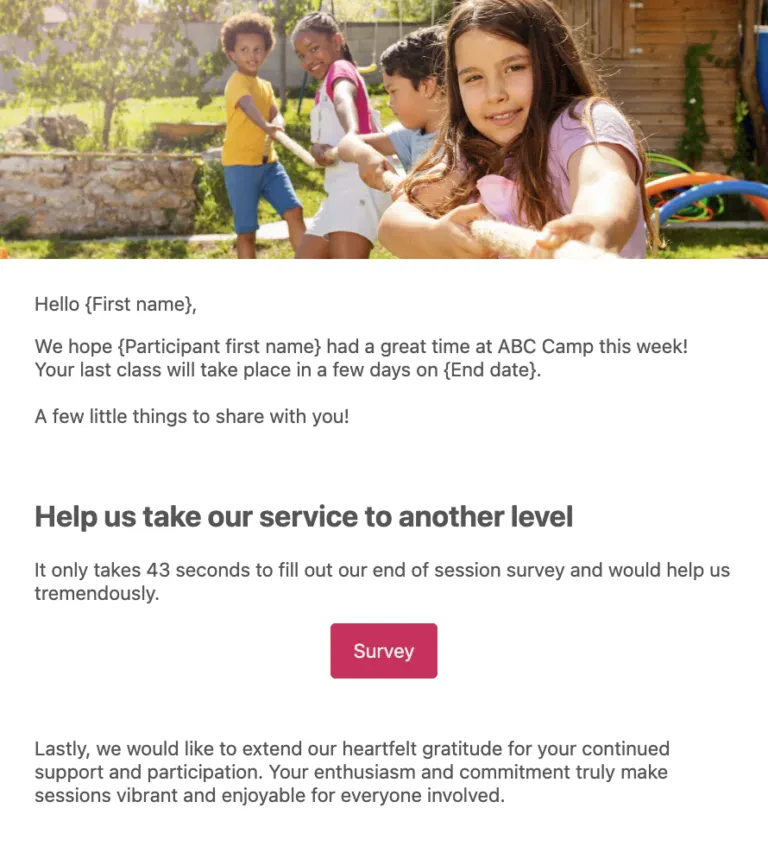
The easier you make it for parents to leave feedback, the more likely they are to do so. Create simple feedback forms that can be accessed from a smartphone or your camp’s website. For automated follow-up, consider integrating these tools with your camp management software.
How to simplify collecting feedback:
- Automate Requests: Use tools like Activity Messenger to send automated review requests at strategic times, such as at the end of a camp week or right after a camp event. This ensures that parents can provide feedback when the experience is fresh in their minds.
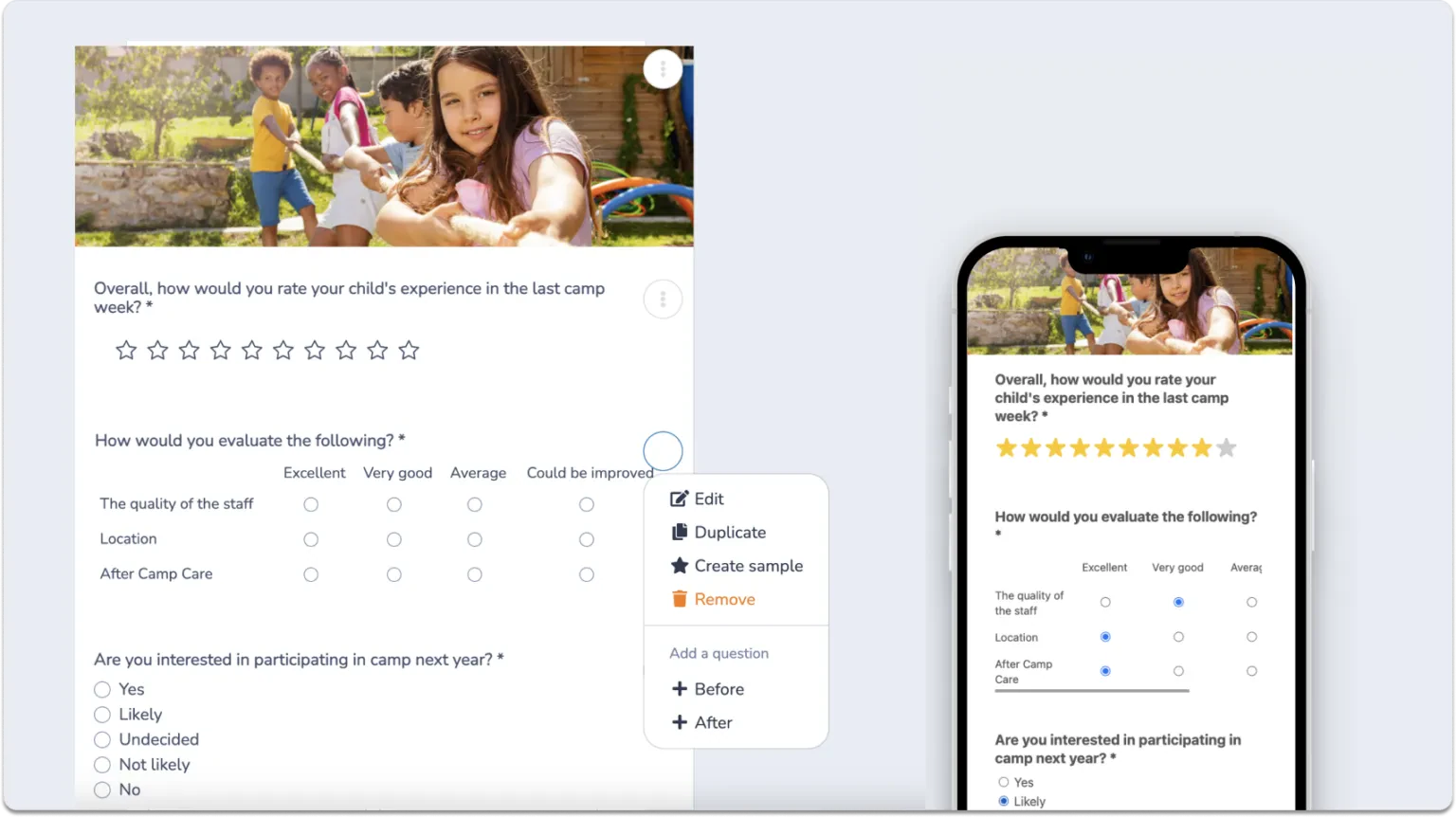
- Keep It Short: Keep your feedback forms short and to the point. Focus on a few key questions that capture the essence of the camp experience, such as “What did your child enjoy most?” and “How can we improve the camp experience?
- Multiple Platforms: Give parents the opportunity to leave reviews on a variety of platforms such as Google, Facebook, Yelp, and specialized camp review sites. This not only increases your chances of receiving feedback but also increases your online presence across multiple channels.
- Mobile-Friendly: Ensure that your camp surveys are mobile-friendly so that parents can easily complete them on their smartphones or tablets.
- Follow-Ups: If you don’t get a response to your initial request, send a polite reminder a week later. Sometimes parents need a nudge to complete the review.
📌 Read More: Check out the best summer camp software platforms to compare features and find the right solution for automating your camp’s review collection and management.
Engage with Parents During Camp
Building a relationship with parents by keeping them informed and involved during camp can lead to better testimonials and reviews.
How to keep parents’ engagement high during camp:
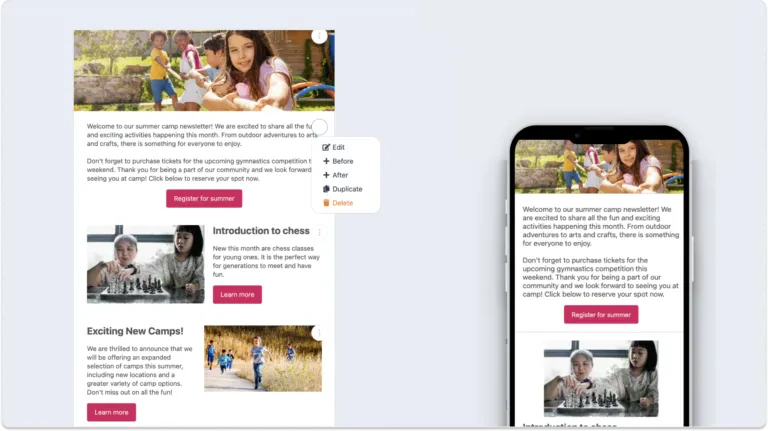
- Regular Updates: Send weekly newsletters with updates on the camp’s activities, highlighting exciting events and sharing photos of campers in action. This not only keeps parents informed but also reinforces a positive perception of the camp.
- In-Person Meetings: Give parents a first-hand look at what their children have been doing by organizing a family day or end-of-camp showcase. This provides an opportunity for personal interaction and feedback.
- Virtual Events: Host virtual events on platforms such as Zoom or Google Meet for parents who cannot attend in person. Include live streams of camp activities, virtual tours, or Q&A sessions with staff.
- Open Communication: Encourage parents to share their thoughts and concerns at any time by maintaining open lines of communication. You can prevent negative feedback and encourage positive reviews by taking this proactive approach.
📌 Read More: Set the right tone from day one and build the foundation for positive reviews with our article on how to write effective camp welcome emails. We also have a dedicated article on how to start and grow a summer camp.
Incentivize Feedback
Encouraging feedback through small incentives can significantly increase the number of reviews your camp gets:
Discounts: Offer a discount on future camp sessions to parents who leave a review. This gives them an immediate benefit while encouraging repeat business.
Prize Draws: Enter all reviewers in a drawing for a chance to win camp merchandise, a gift card, or a free session for their child. This adds an element of excitement and reward for providing feedback.
Referral Bonuses: Encourage families to leave reviews and refer new campers by offering referral bonuses, such as a discount for both the referring and referred families.
Highlight Reviews and Testimonials for Your Summer Camp
Showcasing reviews effectively can build trust with potential new campers and their families. This can be one of the most effective ways to market your summer camp.
How to use reviews:
- Website Features: Create a dedicated page on your website for testimonials, and consider adding a rotating testimonial section on the homepage. This allows potential customers to easily see positive feedback from other parents.
- Social Media: Share positive reviews on your social media channels, pairing them with photos or videos of happy campers. This can increase engagement and attract more followers.
- Marketing Materials: Include testimonials in brochures, flyers, and promotional emails. Highlight specific aspects of the camp experience that parents have praised, such as staff friendliness, the variety of activities, or the camp’s positive impact on their child’s development.
- Email Signatures: Add a link to your review page in your email signature, encouraging every recipient to leave feedback or read what others have to say.
- Camp Video: Create a promotional video featuring parent and camper testimonials alongside footage of camp activities. This multimedia approach can be compelling and emotionally engaging.
Leverage Video Testimonials
Video testimonials provide a personal touch that resonates with prospects and can be more powerful than written testimonials.
Camp Highlights Video: Create a video featuring highlights from the camp season, including short clips of parents talking about their positive experiences. Use these videos on your website and social media to reach a wider audience.
Interviews: Conduct brief interviews with parents during camp events, asking them about their experiences and what they like about camp. These in-camp moments can be incredibly powerful.
Camp Stories: Encourage parents and campers to share their favourite stories or moments from the summer. These stories can be compelling and relatable to prospective families.
Share on YouTube, Instagram, and TikTok: Regularly post video testimonials, camp updates, and other engaging video content on your different social media pages.
How to Manage and Respond to Reviews
Proactive management of online reviews can turn negative feedback into an opportunity to showcase your camp’s commitment to exceptional experiences.
Dedicated Review Manager: Assign a dedicated person to monitor and respond to reviews in a timely manner. This ensures that all feedback, whether positive or negative, receives attention and consideration.
Handle Negative Feedback: Train staff to respond to negative reviews constructively, turning potential negativity into an opportunity to demonstrate your camp’s commitment to continuous improvement and campers’ satisfaction.
Celebrate Positive Reviews: Share glowing reviews and highlight positive feedback within your camp community and on social media platforms.
Use Online Surveys to Prompt Testimonials for Your Summer Camp
Surveys are an excellent way to grow your camp’s online reputation. Here are a few recommendations for using end of camp surveys effectively:
1. Automate Surveys for a Summer Camp
Get immediate and authentic responses from parents and campers by automating the distribution of surveys at optimal times.
- Set Up Automated Emails/SMS: Use your camp management software or email marketing platforms to automatically send surveys via text or email immediately after a camp session ends. This ensures that feedback is collected while the experience is still fresh in their minds.
- Personalize: Tailor the survey invitation to the specific session or activity to make the request for feedback more personal and relevant.
- Optimize Timing: Experiment with different send times to maximize response rates and ensure broad feedback.
2. Keep Responses Internal
Maintain survey responses for internal use only. This approach encourages honest and constructive criticism.
- Highlight Confidentiality: Make it clear in your survey communication that responses will be kept within your camp staff. This assurance may encourage more open and honest feedback.
- Ease of Response: Respect parents’ time and increase the likelihood of participation by making your surveys quick and easy to fill out.
- Act on Feedback: Use the responses to address issues and improve the experience at your summer camp.
3. Filter Positive Experiences for Online Testimonials
Use survey insights to identify positive feedback. With participants’ permission, you can turn this feedback into public testimonials.
- Identify Positive Feedback: Analyze survey responses to identify positive experiences that stand out.
- Follow Up Personally: Reach out to those who have provided positive feedback, thanking them for taking the time to provide it and inviting them to share their experiences with you on public review platforms.
- Guide Your Clients: Provide clear instructions on how to post reviews online for those who want to share their feedback publicly, reducing barriers to sharing positive experiences.
Automate Your Waitlist for Better Reviews
A well-managed waitlist doesn’t just fill empty spots; it creates enthusiastic families who are grateful for the opportunity to attend your camp. These families often become your most passionate reviewers.
Here’s how to turn your waitlist into a review-generation tool:
Automate Waitlist Notifications: Use systems like Activity Messenger to automatically notify families when spots become available. Timely, personalized notifications increase conversion rates and create positive first impressions.
Create Excitement: Send engaging content to waitlisted families like camp highlights, testimonials from current campers, and behind-the-scenes videos to keep them engaged and excited about joining.
Prioritize Communication: Families who feel valued during the waitlist process are more likely to leave positive reviews once their child attends camp. Keep them informed with regular updates about their position and expected availability.
Request Reviews from Waitlist Converts: Families who successfully got off the waitlist often have an extra layer of gratitude. They make excellent candidates for testimonial requests.
📌 Read More: Learn how to automate your waitlist and turn waiting families into enthusiastic advocates.
Webinar Highlight: The Importance of Testimonials for Your Summer Camp
In this webinar, we discuss the increasing importance of testimonials as powerful marketing tools. Instead of highlighting one or two reviews, try to receive as many as possible to post on your website, social media, and newsletter to spread awareness and boost excitement.
Parents might see a glowing testimonial before anything else and consider looking into the camp based on that review alone.
“One thing I really like, is that at the end of a session or at the end of a camp at Sportball, parents would come out and be like ‘Hey, how was your class?’ and their kid has the big smile and loved it, they’re in the emotion. And as a parent, you feel that. They’re coming out of a camp and I can feel the genuine, ‘Wow, this was awesome.'”
👉 Want to watch the full webinar? You can find the “Camps That Reach 100% Capacity: Our Tips to Attract More Families” video on our YouTube channel, along with other walkthroughs, webinars, and marketing tips.
Frequently Asked Questions
Why are online reviews important for summer camps?
Online reviews improve the credibility and online presence of your camp and make your camp more attractive to potential campers and their parents or guardians.
For my summer camp reviews, which platforms should I prioritize?
Focus on Google, Facebook, and Yelp to increase your summer camp’s visibility and authenticity.
How can I encourage campers and their parents to leave reviews?
Use follow-up emails or take advantage of positive moments, such as after a successful camp event, to ask for reviews. Add a QR code at the camp entrance and automate end-of-camp surveys to streamline the process and make the experience more enjoyable.
What’s the best time to ask for a review from campers or their parents?
The ideal time to capitalize on a camper’s positive experience is after a great week at camp or a noticeable improvement in a particular skill or attitude. It is also effective to follow up a progress report with a request for a testimonial.
How should I respond to online negative reviews about my camp?
Respond to negative feedback with empathy and professionalism. Offer to resolve issues offline, which can help turn critics into advocates and improve your understanding of their experience.
Can incentives be used to encourage reviews, and if so, how?
Incentives can be a motivator for reviews when they are ethical and in line with platform policies. Consider offering discounts on future camps.
What kind of impact do reviews have on local SEO for my summer camp?
By providing fresh, relevant content and increasing your camp’s visibility in local search results, reviews boost local SEO. They also improve click-through rates as people tend to trust positively reviewed experiences.
💡 Did you know? Activity Messenger was built with the unique needs of summer camps in mind. It combines essential tools like email marketing, staff management, registration, and digital waivers into a single platform.
Final Thoughts: Start Collecting More Reviews Today
Building a strong collection of reviews and testimonials isn’t just about boosting your online reputation; it’s essential for attracting new families and staying competitive in today’s digital landscape. By implementing automated feedback requests, creating seamless mobile-friendly processes, and leveraging video testimonials, you can dramatically increase the quantity and quality of reviews your camp receives.
The camps that prioritize review collection consistently report higher enrolment rates, stronger parent trust, improved local SEO rankings, and valuable insights that help them continuously improve their programs.
The best part? You don’t need to spend hours manually requesting feedback. With the right tools and processes in place, collecting reviews becomes an automated part of your camp’s operations, freeing up your staff to focus on what matters most: creating amazing experiences for campers.
Ready to transform your review collection process?
📅 Book a free demo to see how Activity Messenger can help you:
- Automate end-of-camp survey distribution and follow-ups
- Create mobile-friendly feedback forms with conditional logic
- Send personalized review requests at optimal times
- Track and respond to reviews from a single dashboard
- Replace tools like SurveyMonkey, Mailchimp, and Google Forms