
Running a hockey league is a season-long commitment, not a single event. Once registration closes, you’re still assigning players to teams, collecting outstanding payments, communicating schedule changes, and tracking standings over the next several months.
That means your hockey registration form does much more than collect names. The information gathered during registration becomes the foundation for everything that follows, from building balanced teams to sending last-minute game updates. A well-designed registration process saves hours of administrative work later in the season.
This guide covers what to include in a hockey registration form for a league, arena, or community rink, plus a few best practices that make managing your season much easier once registration is complete.
Key Takeaways:
- A hockey registration form for a league needs to support the full season, not just the initial sign-up: team assignment, standings, and ongoing schedule changes all start from the data collected at registration.
- Liability waivers and digital signatures belong in the registration flow itself, collected once at the start of the season rather than chased down game by game.
- Payment flexibility (pay now, pay later, e-transfer) reduces the back-and-forth that slows down league administrators during the registration window.
- A platform built for hockey keeps registration, team management, payments, and mid-season communication in one place instead of split across a form tool, a spreadsheet, and a group text.
Table of Contents
- Step 1: Set Up Your League Details
- Step 2: Collect Player Information
- Step 3: Add Liability Waivers and Terms
- Step 4: Set Up Payment Collection
- Step 5: Share Your Registration Form
- Step 6: Manage Teams and Standings Throughout the Season
- Frequently Asked Questions
- Final Thoughts: Making the Season Easier to Run
Author’s note: Olivier shares tips and tricks he’s learned over the past decade as the owner of a kids’ sports program. Today, as co-founder of Activity Messenger, he helps hundreds of hockey leagues, arenas, and community rinks across North America simplify registration and season management.
Step 1: Set Up Your League Details
Start with a hockey registration form built for a league season rather than a single event.
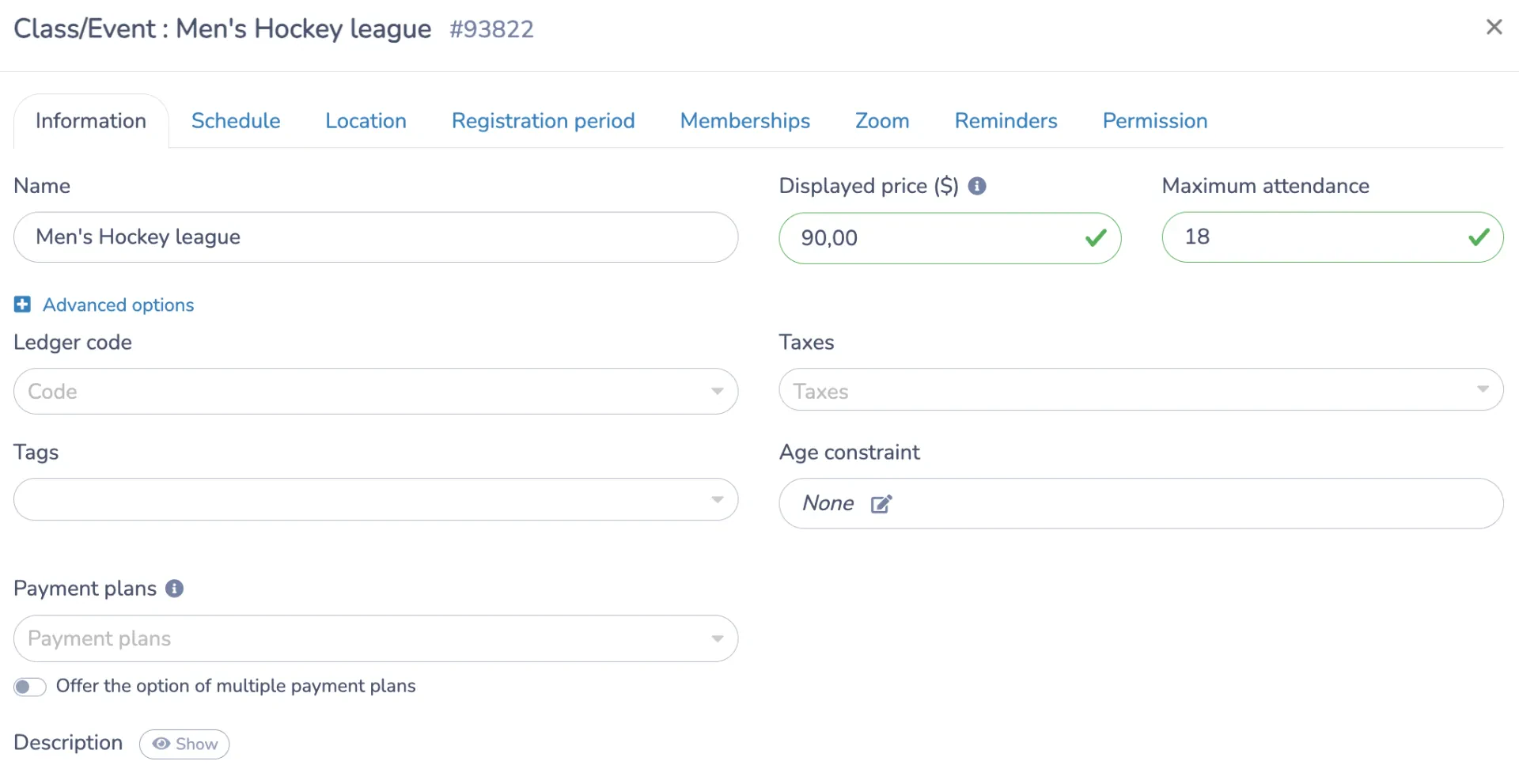
📅 Set the league name, registration fee, and maximum number of spots, and lay out the season schedule: game day and time each week, start and end dates, and the rink or arena where games are played.
🏟️ If your league runs across multiple rinks or divisions, note where each age group or skill division plays on, so parents aren’t left guessing which arena to show up at in week one.
For many families, the schedule is the deciding factor, so make it easy to review before they begin registration.
Plan Your Registration Timeline
Beyond listing your season schedule, you should also consider how registration will open and close.
📅 Consider offering an early-bird registration period with discounted pricing to encourage players to sign up sooner. Earlier registrations give you more time to estimate team numbers, reserve ice time, and recruit coaches before the season begins.
⏰ Set a firm registration deadline whenever possible. While late registrations are inevitable, having a target date makes it easier to build balanced teams and finalize schedules without constantly reshuffling rosters.
👥 If your league typically reaches capacity, enable an automatic waitlist before registration opens. Rather than turning interested players away, you’ll have a list ready if someone withdraws before opening day. If someone cancels before the season starts, you can invite the next player automatically instead of manually tracking names in a spreadsheet or email inbox.
A waitlist also gives you valuable insight into demand. If dozens of players are waiting for spots, it may justify opening another division, adding another team, or securing additional ice time in future seasons.
👉 Learn More: Why Parents Abandon Registration Forms (And How to Fix It)
Step 2: Collect Player Information
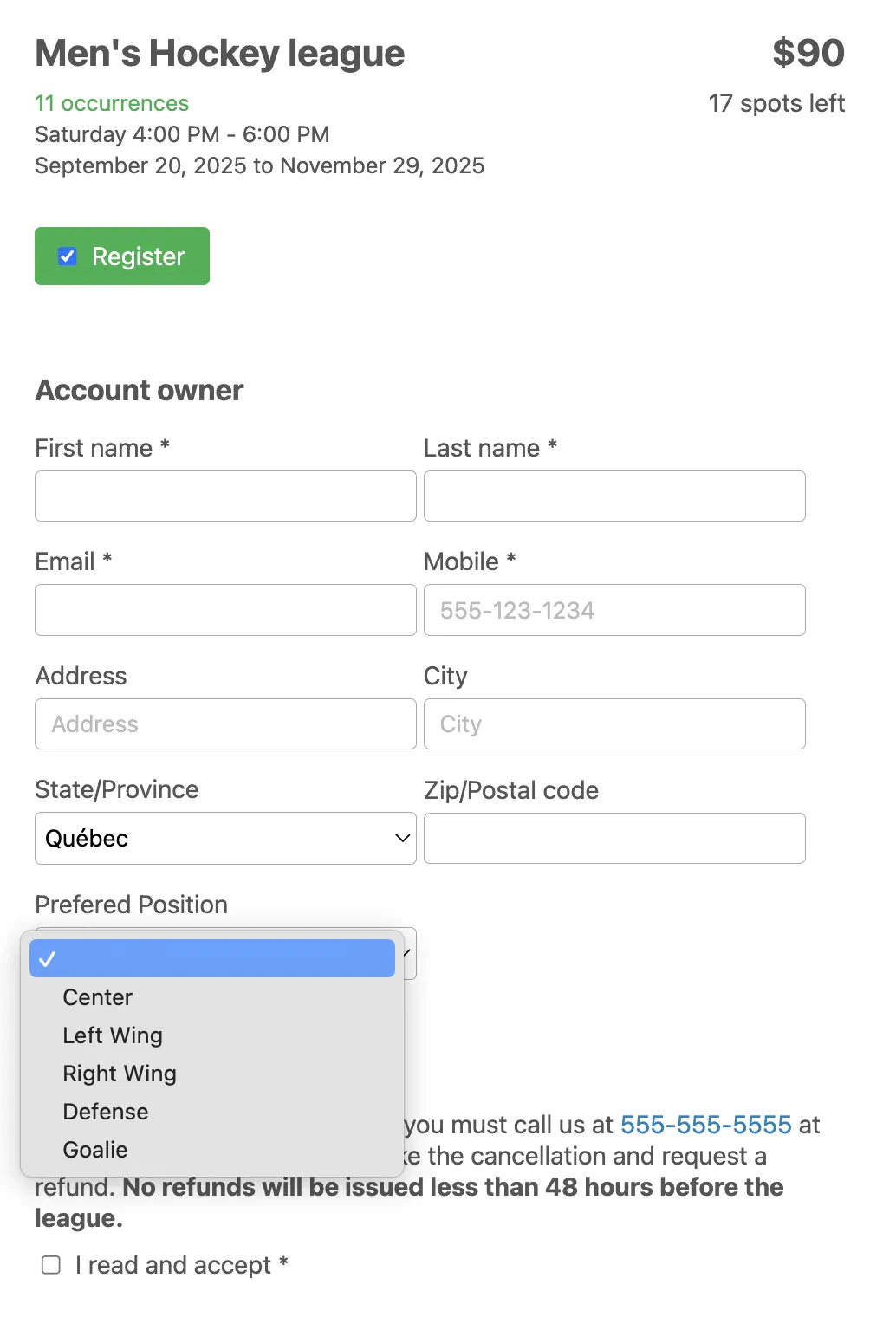
An ice hockey registration form needs a bit more than just a name and contact details, since the information collected here feeds into team assignment later in the season. Here’s what to add to your online form:
Player information:
- 🧍 Full name, date of birth, and contact information
- 🥅 Skill level or years of experience
- 🏒 Position, if relevant (forward, defence, goalie)
Parent or guardian information:
- 👪 Full name, email, and phone number
- 🔗 Relationship to the player
Emergency contact information:
- 📞 Full name and phone number, separate from the parent or guardian if possible
Medical information:
- 🩹 Allergies
- 💊 Current medications or medical conditions
- 🧠 Any previous concussion history worth flagging to coaches or on-ice staff
Custom and league-specific fields:
Not every league needs all of these. Pick the ones that match how your league actually runs, and leave the rest out.
- ✏️ Preferred linemates or division eligibility
- 👕 Jersey size / preferred jersey number
- 🤝 Friend or sibling requests
- 🥅 Goalie interest or goalie equipment availability
- 🏒 Previous team or division played
Make the essential fields mandatory and leave the rest optional, so the hockey registration form doesn’t feel longer than it needs to be, and keep the language consistent across sections so parents aren’t second-guessing which fields matter.
Step 3: Add Liability Waivers and Terms
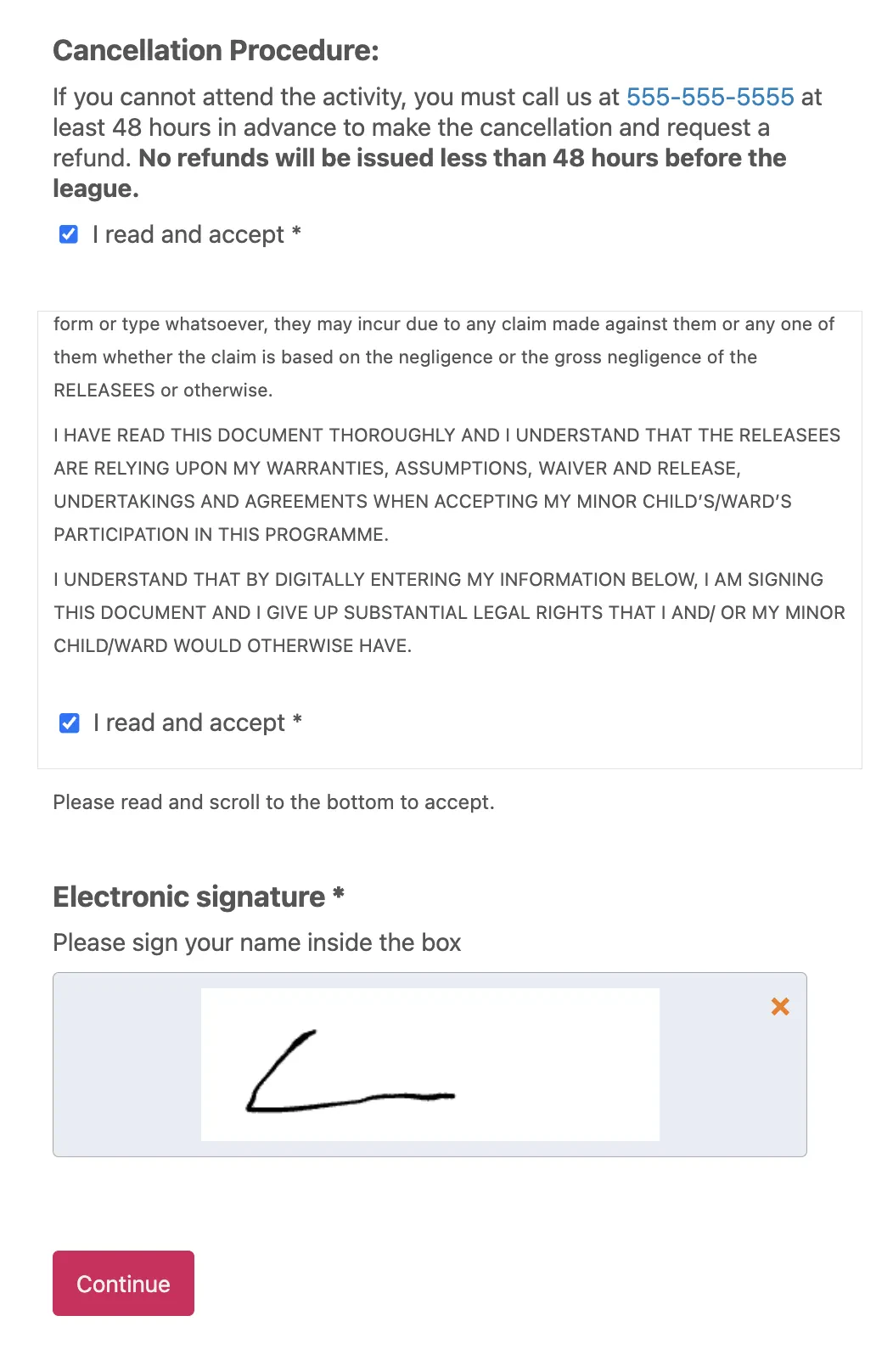
Hockey’s contact and collision risk makes a signed waiver more important here than for most youth activities. Build it into the registration form itself:
- 📋 Add a cancellation policy as a required field
- ✅ Include a liability waiver with an “I have read and accept” checkbox
- ✍️ Collect a digital signature so nobody’s chasing down a paper form at the rink
Getting this done at registration, rather than at the rink on day one, means the whole roster is covered before puck drop on week one. It also gives your league a single record to point to if a question comes up mid-season.
Step 4: Set Up Payment Collection
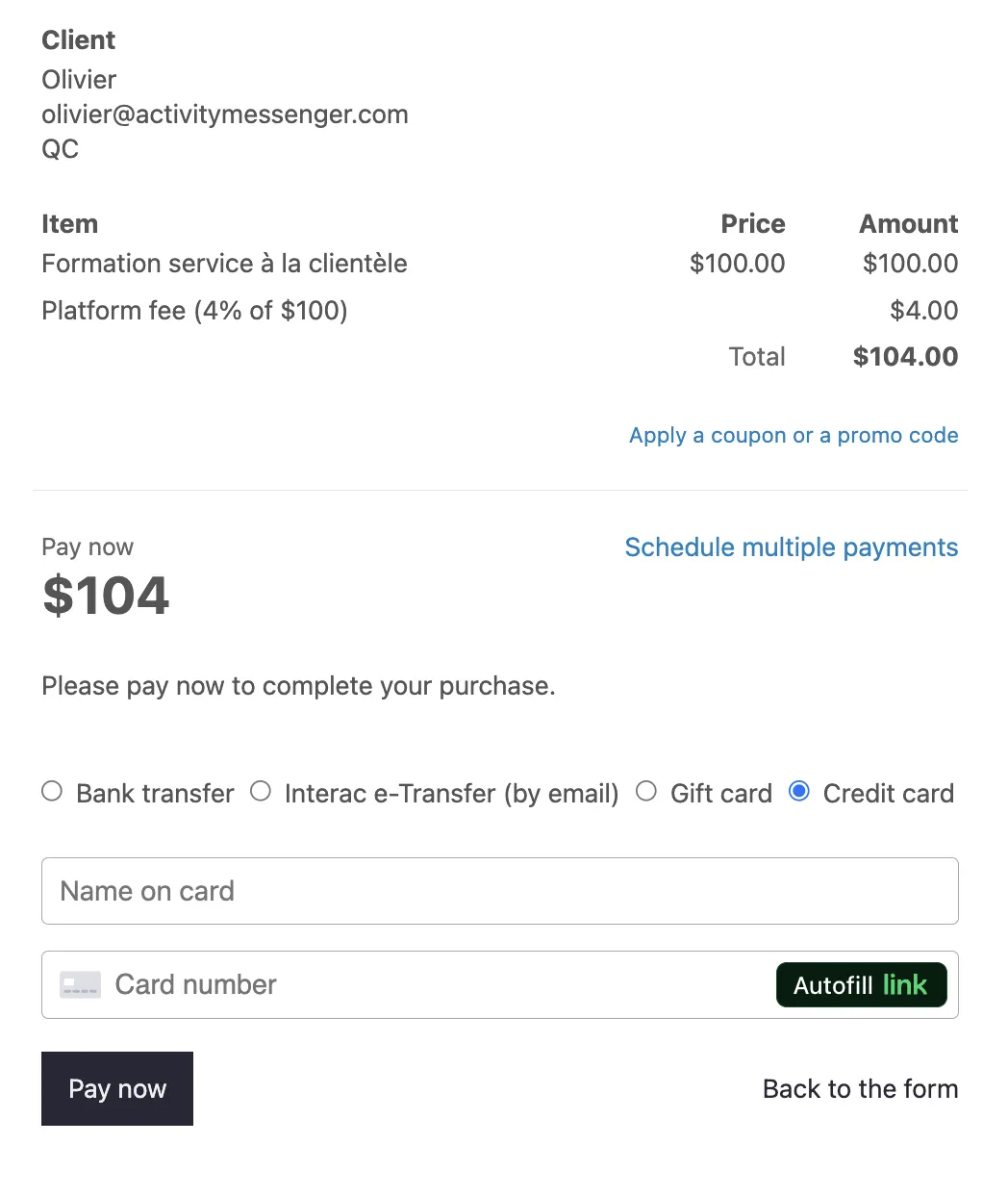
Give registrants more than one way to pay:
- 💳 Credit card or Interac e-transfer at the time of registration
- ⏸️ A “pay later” option, with an invoice sent automatically
- 🧾 Manual payment tracking for cash or cheque, so nothing falls through the cracks
Payment status remains visible on your dashboard throughout the season, not just at sign-up, which matters when a league runs 20 or more weeks and a family’s payment plan needs tracking along the way.
Step 6: Manage Teams and Standings Throughout the Season
Registration may only take a few weeks, but league management lasts for months. Once registration closes, the information you’ve collected becomes the foundation for your entire season.
🏒 Start by assigning players to teams directly within your registration platform. Whether you’re creating balanced recreational teams or organizing competitive divisions, having player information, skill levels, and registration details in one place makes roster building much faster than sorting through spreadsheets.
🔄 As the season progresses, you’ll inevitably need to move players between teams because of injuries, schedule conflicts, or roster imbalances. A platform that lets you make these adjustments without rebuilding your records saves considerable administrative work.
📅 Keep team schedules, game locations, and standings updated so coaches, players, and parents always have access to the latest information. Instead of maintaining separate documents or websites, everyone can reference the same source of truth.
✅ Track attendance for each game or practice to monitor participation throughout the season. Attendance records can help identify players who may need follow-up, simplify insurance documentation, or support end-of-season reporting.
Throughout the season, you’ll also need to communicate with players, parents, and coaches about schedule changes, rink updates, weather cancellations, playoff information, and outstanding payments. Being able to message individual teams instead of the entire league helps families receive only the updates that affect them.
🏆 As playoffs approach, continue using the same platform to publish updated brackets, game times, and championship schedules rather than switching to another communication tool.
📌 Pro Tip: Late registrations are common, especially in recreational leagues. Choose software that allows you to add new players after registration has closed without disrupting existing teams, payment records, or communications.
Frequently Asked Questions
What should a hockey registration form for a league include?
Beyond the basics of player name, date of birth, and contact information, a league form needs to capture whatever feeds team assignment, things like position, skill level, and division eligibility, since that data gets used again once rosters are built. Round it out with a liability waiver, a digital signature, and payment collection so nothing needs to be chased down once the season starts.
How is a league registration form different from a hockey camp registration form?
A camp form is built around a single week or weekend and tends to focus on gear, skill groups, and day-to-day logistics. A league registration form needs to support an entire season: team assignment, standings, mid-season roster changes, and ongoing schedule communication with specific teams rather than the full group.
How do I split players into teams after registration?
Once registrations close, use your platform to assign players to teams directly rather than exporting to a spreadsheet. Look for a system that also lets you move players between teams later in the season, since rosters often need adjusting once games are underway.
Can I collect payment through the registration form?
Yes, families can pay by credit card or Interac e-transfer at the time of registration, or choose a pay-later option if they need more time. For leagues that bill per season or per family with multiple kids registered, payment status stays visible on your dashboard so you’re not tracking who’s paid across separate invoices by hand.
What happens if my league fills up before everyone registers?
Turn on a waitlist so the form keeps collecting names once capacity is reached, and set up automatic notifications so families hear right away if a spot opens up rather than checking back manually.
Can returning players get priority registration?
Yes. Import your contact list from last season and open registration to that group first, either through an early access window or via direct email and SMS, before the form goes public to new families.
How do I communicate with specific teams once the season starts?
Message individual teams or players directly via SMS instead of sending a league-wide announcement. This matters most for things like a rescheduled game or a last-minute cancellation, where only one team needs to know.
Final Thoughts: Making the Season Easier to Run
A hockey registration form for your league is only the first step in running a season. Team assignment, standings, and communication with parents all draw on the information collected at sign-up, so a platform that carries that data through the whole season, rather than treating registration as a separate task from everything after, makes the rest of the year easier to manage.
💡 Curious how a hockey registration form holds up across a full season? Book a demo with Activity Messenger to see how leagues, arenas, and rinks across North America manage registration, team assignments, and communication from opening sign-up through the last game.
📖 Related Reading: