Hockey involves contact, speed, and hard ice. That combination is exactly why a hockey camp liability waiver isn’t optional paperwork for later; it’s one of the first things a parent should complete, ideally before their child steps onto the rink.
A camp liability waiver form does two things at once: it makes sure parents understand and accept the risks specific to hockey, and it gives your camp a signed, dated, and time-stamped record if a question ever comes up after the fact. Done well, it takes a few minutes to complete online and gets out of the way before the season even starts.
This guide covers what to include in a hockey camp waiver, how to build one using a simple online form, and how to get parents to actually complete it before day one. A free camp liability waiver form template is included below.
Author’s note: Olivier shares tips and tricks he’s learned over the past decade as the owner of a kids’ sports program. Today, as co-founder of Activity Messenger, he helps hundreds of hockey camps and academies across North America simplify registration, waivers, and communication with parents.
📋 Start from a camp liability waiver template rather than a blank page. A hockey-specific template already has the right sections in place, so you’re adjusting wording rather than building the form from scratch.
🎨 Add your camp’s logo and colours so the form looks like part of your registration, not a separate legal document parents have to track down. Canva integration makes this a quick step if you already have camp branding.
📱 Check how the form looks on a phone before you send it out. Most parents will fill this out on mobile, often while standing in a rink lobby.
🌍 Make it accessible. If your camp draws families who speak a language other than English at home, offer the waiver in more than one language. A form that’s only readable by some of your registrants isn’t doing its job for the rest of them.
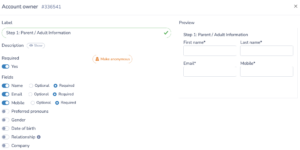
Start the form with the person who’s signing it:
If your camp regularly has more than one parent or guardian involved, for example after a separation or shared custody arrangement, decide up front whether you need one signature or both. A single required signature field is simpler to manage, but if your camp’s policy calls for both guardians to acknowledge the waiver, build that in now rather than adding a second signer after a dispute comes up.
Mark these fields as mandatory in the form builder and add validation rules so that an email typo doesn’t lead to a missed confirmation later in the season.
Next, create a section to capture participant details. This information is crucial for organizing participants and addressing individual needs. Consider including:
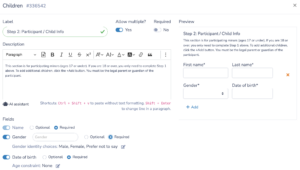
Medical information is sensitive, so limit access to it to staff who need it, coaches, and on-site first aid, rather than exposing it across your whole roster view.
Toggle fields on or off depending on how your camp runs. A day camp for beginners might not need the same medical detail as a contact-heavy elite program.
This is the section that makes a hockey camp liability waiver form legally meaningful, so it’s worth getting right:
End the section with an acknowledgment checkbox, something like “I have read and accept the terms above,” so there’s a clear, recorded confirmation before the signature step.
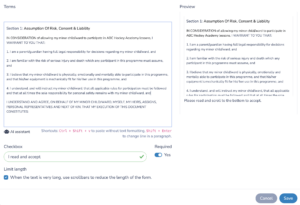
👉 Waiver language is one area worth having a lawyer review at least once, since enforceability rules for liability waivers vary by state and province. Once the wording is set, the template handles the rest of the season without needing a rewrite each time.
A hockey camp liability waiver form is only as good as the person who signed it having the authority to do so:
Building this logic into the form once means you don’t have to sort it out manually every time a registration doesn’t fit the usual parent-and-child pattern.
Your hockey camp liability waiver form isn’t complete without a signature that’s actually enforceable:
Set up the form so a signed copy is emailed to both the parent and your camp the moment it’s submitted. That gives everyone a record without anyone having to ask for one later.

👉 Electronic signatures are broadly recognized as legally valid in the US under the ESIGN Act and in Canada under provincial electronic transactions legislation, but the details of what makes one enforceable can vary. If your camp operates across state or provincial lines, it’s worth confirming that your process meets local requirements, rather than assuming a single setup covers every jurisdiction.
Run through the whole form yourself before it goes out to parents:
A few minutes of testing catches the kind of small errors (a missing required field, an odd line break) that otherwise show up as parent emails during your busiest registration week.
A hockey camp liability waiver is a document, usually completed online, where a parent or guardian acknowledges the risks of hockey and agrees not to hold the camp liable for injuries that happen during normal participation.
Hockey involves contact and speed that carry a real risk of injury. A signed camp liability waiver form protects your camp by documenting that parents understood and accepted those risks ahead of time, and gives you a clear record if a question comes up later.
At minimum, you need to collect parent and participant information, a plain-language assumption of risk section specific to hockey, emergency medical consent, and a legally binding digital signature with a timestamp.
Yes, a hockey camp liability waiver template gives you the sections that matter (risk statement, signature field, medical consent) already in place, so you’re editing wording rather than starting from a blank form.
Building the hockey liability waiver into registration, rather than handing it out at check-in, means the whole roster is covered before the first day of camp. It also avoids a line of parents filling out paperwork at the rink.
Automatic reminders by email and text noticeably improve completion rates. Set them up once, ahead of your registration deadline, so you’re not manually tracking down forms as camp approaches.
A hockey camp liability waiver form only works if parents actually complete it before their kid steps on the ice. Building it into your registration flow, with a clear risk statement and a digital signature, means the paperwork is done before camp starts rather than chased down during it.
💡 Want to see how it works for your hockey camp? Book a demo with Activity Messenger to see how hockey camps and schools across North America handle waivers, registration, and parent communication in one place.