
Running a hockey tournament means juggling ice time, officials, and rosters, and ticket sales often end up an afterthought until the week before puck drop. Selling tickets at the door works, but it means long lines, cash handling, and no real way to know how many people are actually coming.
Learning how to sell hockey tickets online fixes most of that before the tournament even starts. Families can buy ahead of time, you get a headcount to plan around, and checking in at the rink takes seconds instead of minutes.
This guide walks through how to set up online ticket sales for a hockey tournament, from choosing a platform to tracking sales as they come in.
Key Takeaways:
- Selling hockey tickets online works best when it’s built into your existing registration and communication tools rather than running as a separate system you have to check on its own.
- A dedicated ticketing page with clear pricing, dates, and a strong call to action converts better than a generic event listing.
- Personalized tickets with mobile wallet support and QR code check-in cut down wait times at the rink and give volunteers a simple way to scan people in.
- Automated reminders and marketing integration do a lot of the sales work on their own once they’re set up.
- Selling online doesn’t rule out day-of sales. A synced point-of-sale option means walk-up and online buyers appear in the same system.
Table of Contents
- 1. Choose the Right Ticketing Platform to Sell Hockey Tickets Online
- 2. Set Up Your Ticketing Page
- 3. Offer Multiple Payment Options and Discounts
- 4. Personalize Tickets With Mobile Wallet Passes
- 5. Integrate Ticket Sales With Your Marketing
- 6. Use QR Codes for Check-In and Real-Time Attendance Tracking
- 7. Set Up Automated Reminders and Updates
- 8. Test Your Ticketing Page Before Tournament Day
- 9. Track Sales and Optimize
- Frequently Asked Questions
- Final Thoughts: Your Fast Track to Sell Hockey Tickets Online
Author’s note: Olivier shares tips and tricks he’s learned over the past decade as the owner of a kids’ sports program. Today, as co-founder of Activity Messenger, he helps hundreds of hockey tournaments, camps, and schools across North America simplify ticketing, registration, and communication.
1. Choose the Right Ticketing Platform to Sell Hockey Tickets Online
The platform you pick determines how smooth the rest of this process goes, so it’s worth getting right before you start building anything.
- 🎟️ Look for customizable ticket types: general admission, VIP seating, family passes, or single-game passes for tournaments that run multiple days.
- 💳 Secure payment options: credit cards, PayPal, and Interac e-transfer for Canadian families.
- 📱 Mobile ticketing with QR codes built in, so check-in doesn’t need a separate system.
- ✉️ Automated confirmations and reminders by email and SMS.
Popular options for tournament ticketing include Activity Messenger, Eventbrite, Ticketleap, and Universe. If your tournament already uses a registration platform for teams and officials, check whether it also handles ticketing.
Keeping ticket sales in the same system as your roster and communication tools saves you from reconciling numbers across three different logins during tournament week.
👉 Looking for the best event ticketing software for tournaments? Here is a list of the best event ticketing platforms on the market.
2. Set Up Your Ticketing Page
Once you’ve picked a platform, build a dedicated page rather than relying on a generic event listing. Include:
- 📅 Tournament details: dates, times, venue, and participating teams.
- 💵 Ticket pricing and categories, including any early-bird discounts or group packages.
- 🎨 Your logo and tournament colours, so the page looks like it belongs to your event rather than a third-party platform.
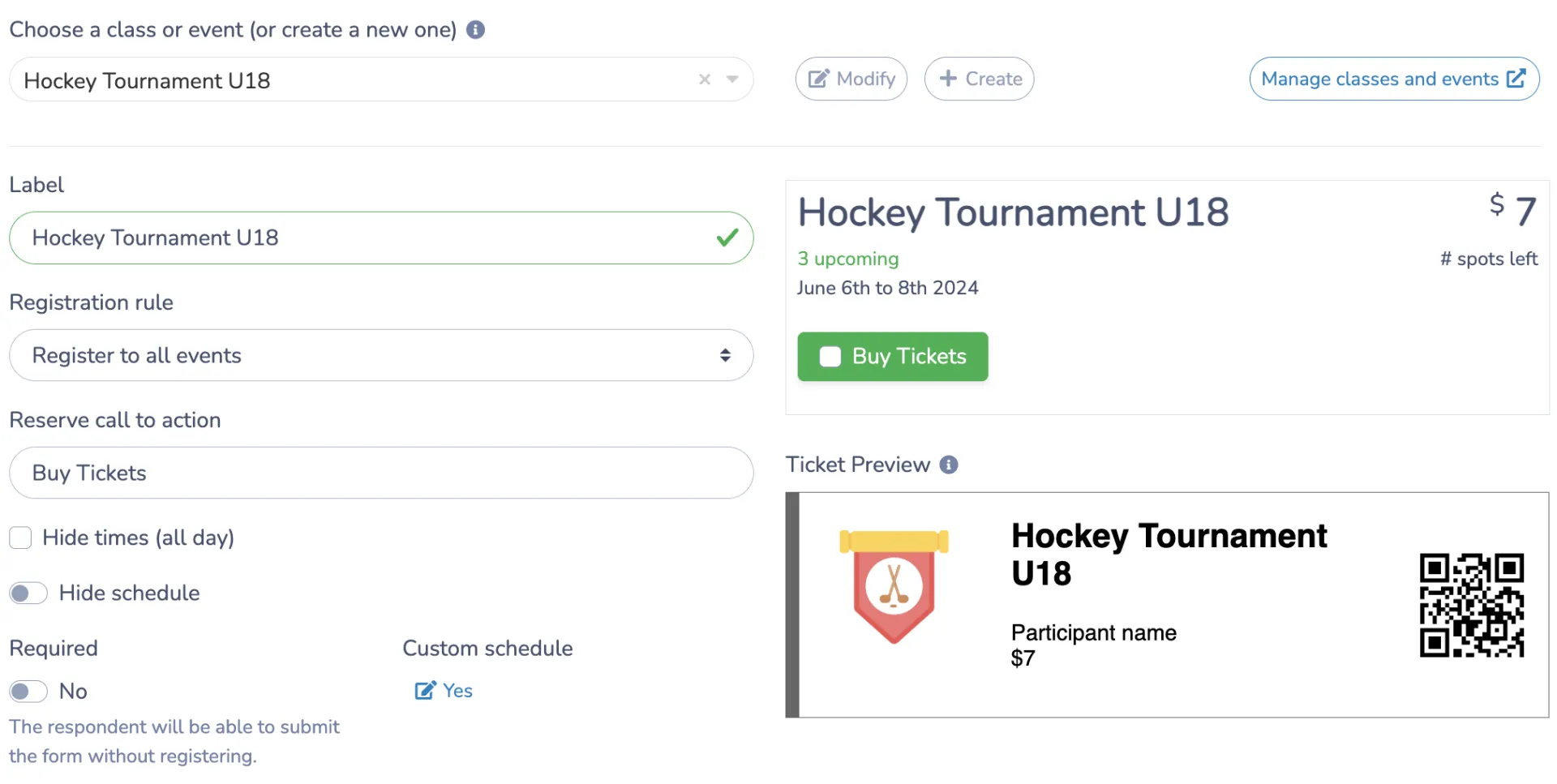
- 🔘 A clear call to action, something direct like “Buy Tickets Now” rather than a vague link.
- ⭐ Social proof, like a quote or photo from a past tournament, if you have one.
If your tournament sells reserved seating rather than general admission, an interactive seating chart lets buyers pick their own seats and see pricing by section as they go, instead of emailing you to ask what’s left.
Also, make sure the page works well on a phone. Most people buying tournament tickets are doing so on their phones, often while making other weekend plans, not at a desktop.
3. Offer Multiple Payment Options and Discounts
The easier it is to pay, the fewer people abandon the page halfway through. Consider offering:
- 💳 Credit and debit cards
- 🅿️ PayPal
- 🍁 Interac e-transfer for Canadian buyers
- 📲 Apple Pay and Google Pay
Families are used to having a payment option that matches whatever they already have set up on their phone. Cutting that option out over one or two fewer integrations isn’t worth the drop in completed purchases.
🏷️ Promo codes and early-bird pricing are worth setting up here too. They give you a way to track exactly which channel is driving sales.
4. Personalize Tickets With Mobile Wallet Passes
A ticket that’s just a PDF attachment is easy to lose in an inbox by tournament day. Branded, mobile-friendly tickets solve that:
- 🎨 Add your tournament logo and colours directly to the ticket design.
- 📱 Let buyers save tickets to Apple Wallet or Google Wallet, so the ticket lives on their phone’s lock screen instead of buried in an old email.
- 👪 Generate a separate ticket per attendee when someone buys multiple spots, each with the right name attached, so families aren’t sharing one QR code between four people at the gate.
This step doesn’t take long to set up, but it’s the difference between a professional-feeling event and one that looks like it was thrown together the week before.
5. Integrate Ticket Sales with Your Marketing
Online ticket sales work best when they’re part of a broader push, not a page you built once and linked to from one Facebook post. Strategies include:
- 📣 Social media: share the ticket link across Facebook, Instagram, and wherever your tournament already has a following.

- ✉️ Email marketing: send a newsletter to past attendees with a direct purchase link.
- 🌐 Website integration: embed the ticketing form directly on your tournament site instead of sending people offsite. If you don’t have a website built out yet, a simple branded microsite can serve as a placeholder until you do.
- 📲 SMS reminders: a text with a direct link tends to convert faster than an email buried in an inbox.
6. Use QR Codes for Check-In and Real-Time Attendance Tracking
QR codes are where online ticket sales pay off most visibly, right at the rink door.
- 🎟️ Tickets come with a QR code automatically attached to the confirmation email and the mobile wallet pass.
- 📱 Volunteers can scan tickets with a phone, no separate scanner hardware needed.
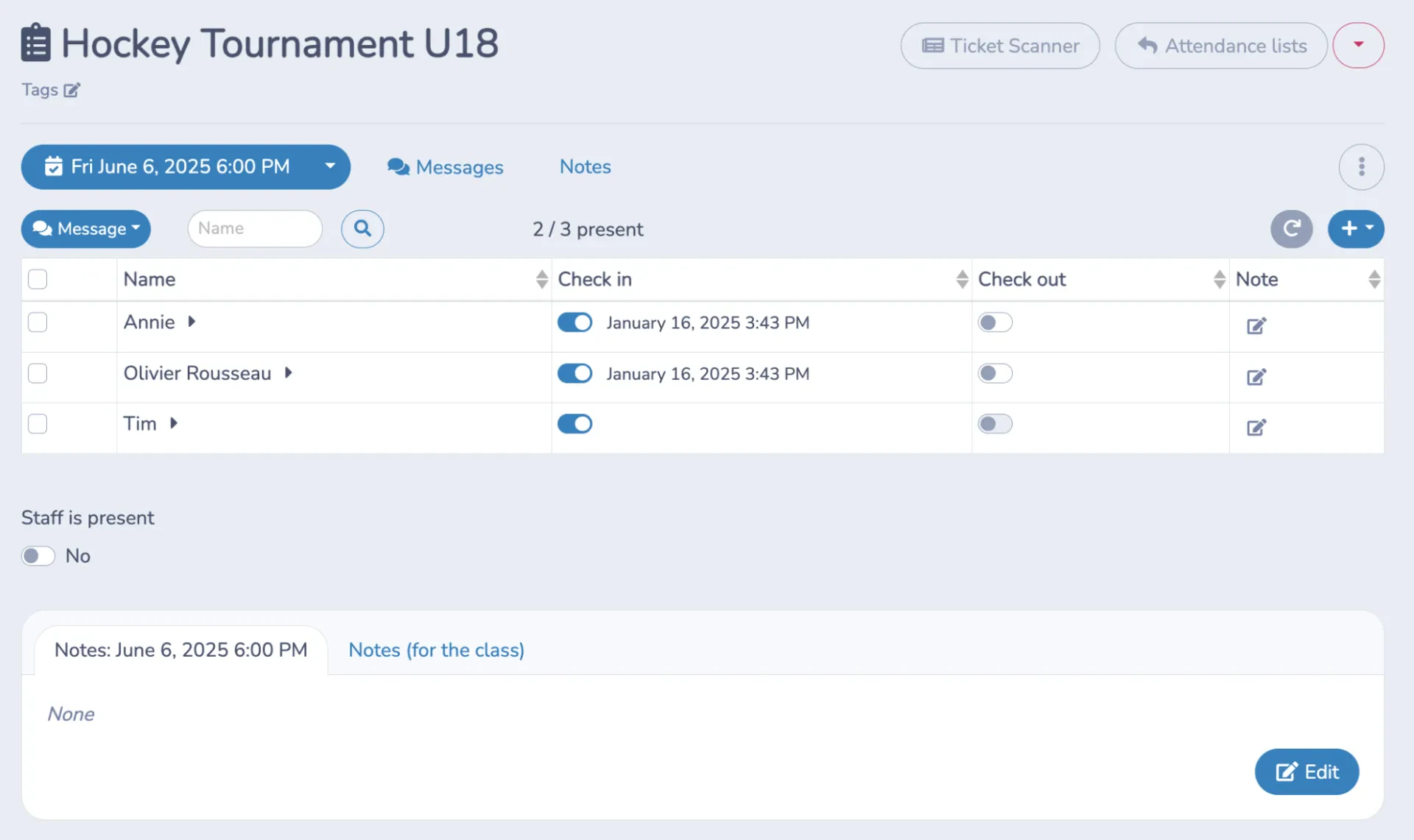
- ⏱️ A scanned ticket is checked in and timestamped automatically, and it can’t be scanned again, so a single purchased ticket can’t let two people in.
- 🖊️ If someone can’t find their ticket, staff at the door can look them up and check them in manually instead of holding up the line.
- 📊 An attendance list updates in real time, so you always know how many people have actually arrived, not just how many tickets sold.
That “walk-up” line doesn’t have to mean a separate cashbox. A point-of-sale option lets staff sell tickets directly at the door, credit card or cash, with those sales landing in the same system as everyone who bought online ahead of time.
You’ll get one accurate sales total instead of reconciling an online report against a handwritten door log after the tournament.
📌 Pro Tip: If you’re expecting a lot of walk-up sales, consider separating the check-in and ticket-purchase lines. This keeps people who already have tickets from waiting behind buyers who still need to purchase.
7. Set Up Automated Reminders and Updates
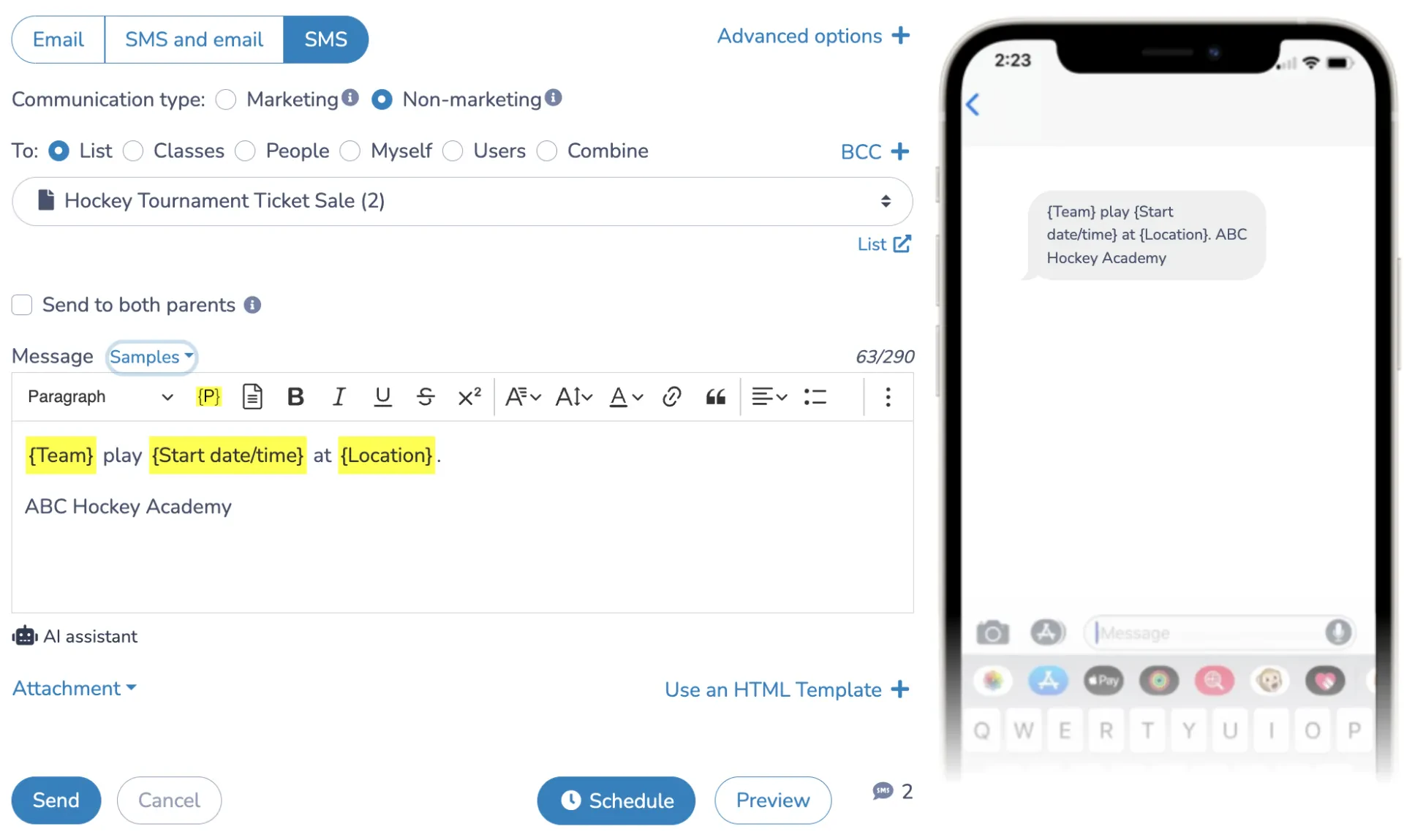
Leading up to the tournament, keep ticket holders in the loop without having to message everyone by hand. Automated reminders can cover:
- 🏒 Game schedules and matchups
- 🅿️ Parking, entrances, and seating info
- 🎁 Merchandise or concession offers
- ⚠️ Schedule changes, especially last-minute ones
Setting these up once, ahead of the tournament, means updates go out the moment something changes instead of whenever you get a chance to send them.
8. Test Your Ticketing Page Before Tournament Day
Before sending the link out to families, run through it yourself:
- Buy a ticket the way a parent would, on a phone.
- Check that the confirmation email includes a working QR code.
- Try adding the ticket to Apple Wallet or Google Wallet if you’ve set that up.
- Scan the test ticket at check-in to confirm it registers and timestamps correctly.
A few minutes of testing catches the kind of issue (a broken link, a missing field, a QR code that won’t scan) that’s far more time-consuming to fix once tickets are already in people’s inboxes.
9. Track Sales and Optimize
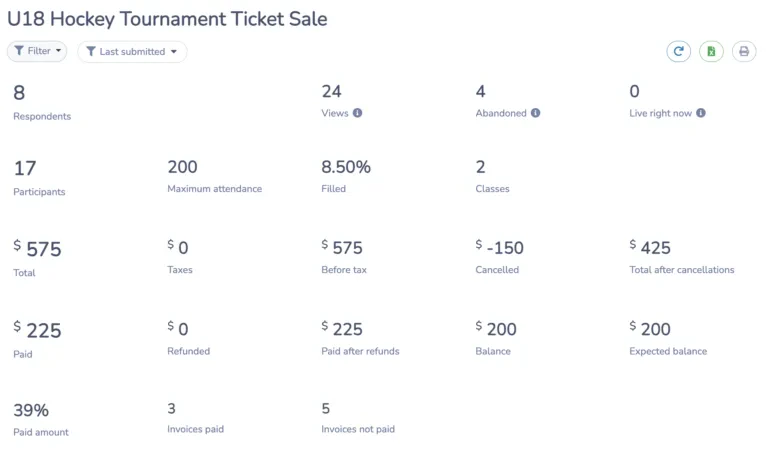
Most ticketing platforms give you real-time sales data. Use it to:
- 📊 Watch sales trends as the tournament date gets closer
- ⏰ Spot peak purchasing times, usually right after you send a reminder or post an update
- 📣 Adjust your marketing push based on how sales are tracking
- 🏷️ Run a short-term discount if sales slow down in the weeks before the event
- 🔁 Duplicate your event setup for the next tournament or a different age division so you’re not rebuilding the ticketing page from scratch each time.
Frequently Asked Questions
What’s the best way to sell hockey tickets online?
The most reliable approach is a dedicated ticketing platform with a clear ticketing page, multiple payment options, and built-in QR code check-in, rather than piecing together a payment link and a separate check-in process.
How do I set up online ticket sales for a hockey tournament?
Start by choosing a platform built for sporting events, build a dedicated ticketing page with pricing and dates, then connect it to your marketing channels so the link actually reaches people before the tournament.
Do I need special software to sell hockey tickets online, or can I use a general event platform?
A general platform can work, but sport-specific ticketing tools tend to handle things like team-based ticket categories, multi-day tournament passes, and QR check-in more smoothly than a generic event page built for concerts or conferences.
How much does it cost to sell hockey tournament tickets online?
Costs vary depending on the platform and features you need. Compare transaction fees, monthly software costs, payment processing fees, and any charges for features such as reserved seating or mobile tickets.
How do QR codes work for hockey tournament check-in?
Each ticket gets a unique QR code attached to the confirmation email. At the rink, a volunteer scans the ticket with a phone, which verifies it and checks the person in without needing a printed list.
What payment options should I offer for my hockey tournament ticketing?
Credit and debit cards cover most buyers, but adding Interac e-transfer for Canadian families and Apple Pay or Google Pay for mobile buyers reduces the number of people who abandon checkout.
How far in advance should I start selling hockey tournament tickets online?
Opening ticket sales four to six weeks before the tournament gives you time to run marketing and reminders without rushing, and it gives you an early read on attendance while there’s still time to adjust.
Can attendees add their hockey tournament ticket to Apple Wallet or Google Wallet?
Yes, if your platform supports it. Tickets saved to a mobile wallet stay accessible from the phone’s lock screen, which cuts down on the “I can’t find my email” delay at the door.
Can I sell reserved seats for a hockey tournament instead of general admission?
Some platforms support an interactive seating chart, letting buyers pick their own seats and see pricing by section during checkout. This matters more for tournaments with assigned seating than for standing-room or general-admission events.
Can I offer promo codes or discounts for early ticket purchases?
Yes, a promo code system lets you offer early-bird pricing or a discount for a specific group, like sponsors or returning families, and gives you a way to track which channel actually drove the sale.
Final Thoughts: Your Fast Track to Sell Hockey Tickets Online
Selling hockey tickets online does more than move transactions off a folding table at the rink door. It gives you a real headcount ahead of time, cuts down check-in lines, and frees up volunteers who’d otherwise be handling cash all weekend.
If you’re looking for a platform that handles ticketing alongside registration and communication, Activity Messenger covers ticket sales, automated reminders, and post-event surveys in one place.
🗓️ Book a demo with one of our experts to see how it works for your tournament.
📖 Related Reading: