If you’ve ever organized a gymnastics competition, dance recital, or community event in Canada, you’ve probably felt the squeeze of credit card fees eating into your revenue, or the chaos of managing cash at the door. Interac e-Transfer offers a third option: fast, low-cost, and familiar to almost every Canadian with a bank account.
In this article, I’ll walk through how to set up Interac e-Transfer for event ticket sales, automate reconciliation so you’re not manually matching payments, and use QR code scanning to run a smooth check-in on event day.
Key Takeaways:
- Interac e-Transfer processing fees are as low as 1% through Activity Messenger, compared to 6%+ on platforms like Eventbrite.
- Funds arrive instantly, unlike credit card payouts that can take 1 to 5 business days.
- Activity Messenger automates Interac e-Transfer reconciliation, matching payments to registrations without manual tracking.
- Tickets sent after an e-transfer payment include a QR code that can be scanned directly from a phone at the door.
- Auto-cancellation frees up unsold seats automatically if payment isn’t received within your specified window.
Table of Contents
- Why Canadian Event Organizers Are Choosing Interac
- How To Sell Event Tickets Online in Canada
- How To Connect Interac E-Transfers to Ticket Sales
- Automated Payment Reconciliation
- QR Code Tickets and Day-of Check-In
- Auto-Cancellation for Unpaid Reservations
- Fee Comparison: Interac vs. Credit Card vs. Eventbrite
- Tips For Promoting and Managing Your Event
- Frequently Asked Questions
- Final Thoughts
About the author: I’m Olivier, co-founder of Activity Messenger. I previously ran a multi-location children’s activity centre and have spent the last decade helping hundreds of organizations across North America improve their online registration process, increase conversion rates, and simplify online ticketing.
Why Canadian Event Organizers Are Choosing Interac
Interac e-Transfer is one of the most widely used payment methods in Canada. Most of your attendees already use it daily. For event organizers, that familiarity has a real practical upside: when you offer a payment method people already trust and know how to use, you get fewer abandoned checkouts and fewer support questions.
Beyond convenience, the economics are hard to argue with. Credit card processing fees typically run 2.9–3.9% per transaction, and platforms like Eventbrite stack their own fees on top of that. With Interac e-Transfer, fees are significantly lower, and you receive funds instantly rather than waiting several business days for a payout.
How to Sell Tickets Online In Canada
Whether you’re running a gymnastics competition, a year-end dance recital, or a community sports tournament, selling tickets online removes the cash-at-the-door bottleneck and gives you real time visibility into attendance.
Here’s the basic setup:
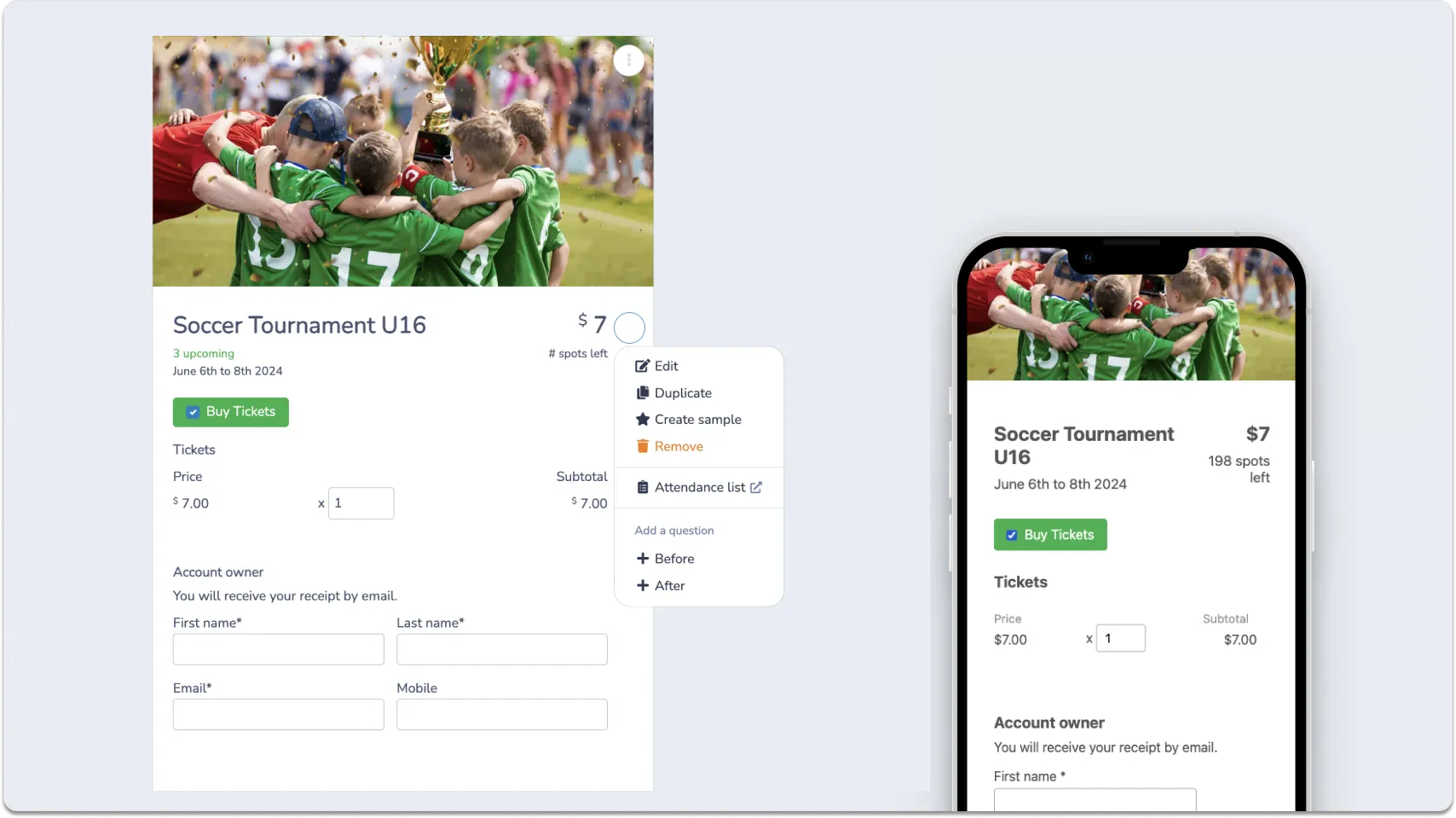
Create an event page: Use a platform like Activity Messenger to build a dedicated event page with all the details your attendees need: date, venue, schedule, and pricing.
Set your ticket structure: Decide whether you’re offering a single ticket tier or multiple options like early bird pricing, family packages, or VIP seating. Activity Messenger’s interactive seating plan lets attendees choose their specific seats at checkout, reducing support requests and helping sell higher-value spots.
Enable your payment methods: Connect Interac e-Transfer, credit card, or both. Offering both options lets attendees choose what works for them without creating extra admin work on your end.
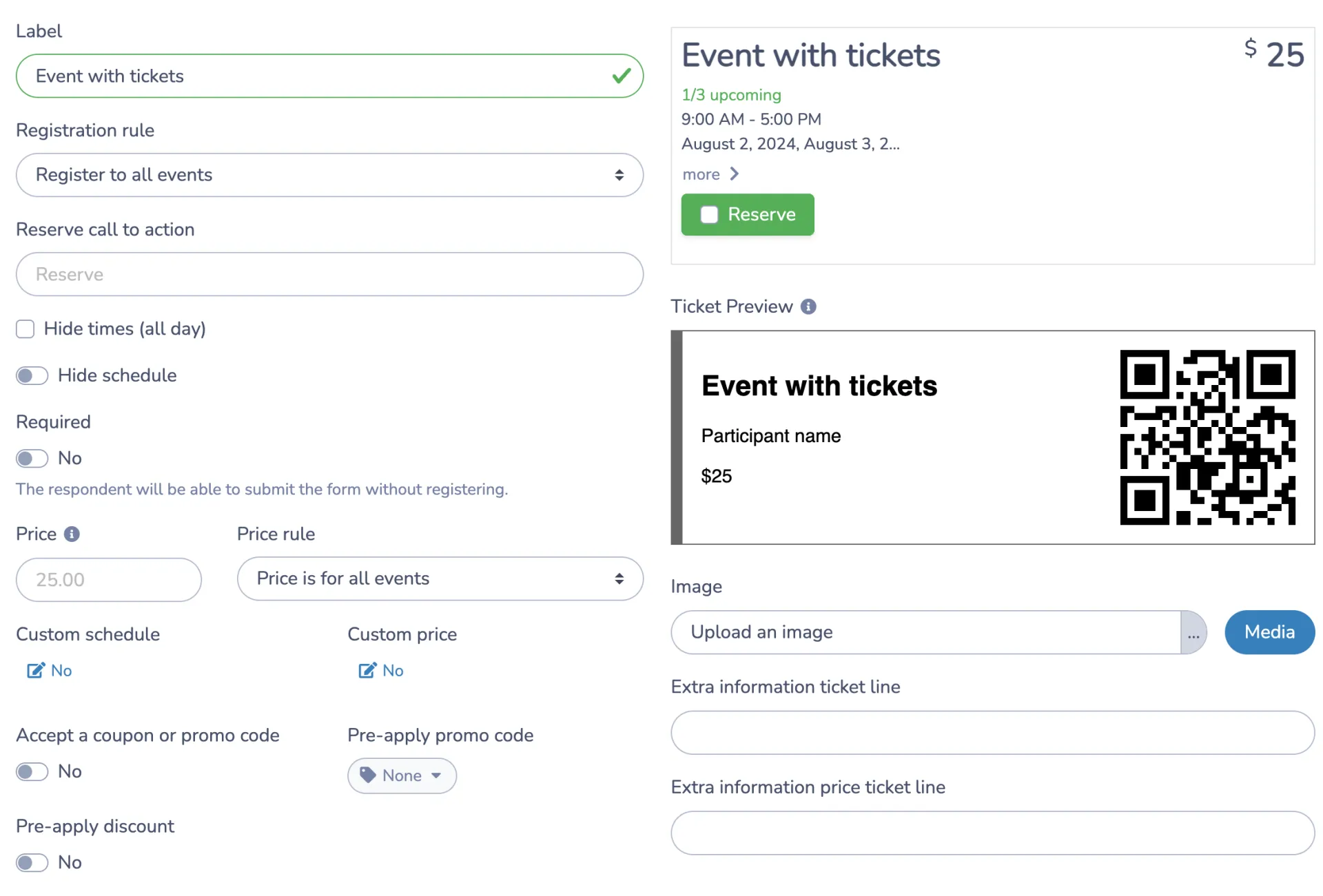
Send branded tickets automatically: Once someone completes their purchase, they receive a confirmation email with a personalized, branded ticket that includes a QR code. Tickets can be saved directly to Google Wallet or Apple Wallet, which makes them easy to pull up at the door.
How To Connect Interac E-Transfers to Ticket Sales
Adding Interac e-Transfer as a payment option in Activity Messenger takes a few minutes to configure. Here’s how it works:
- Set up your event: Create your event page and add ticket details, including pricing, capacity, and any seating configuration.
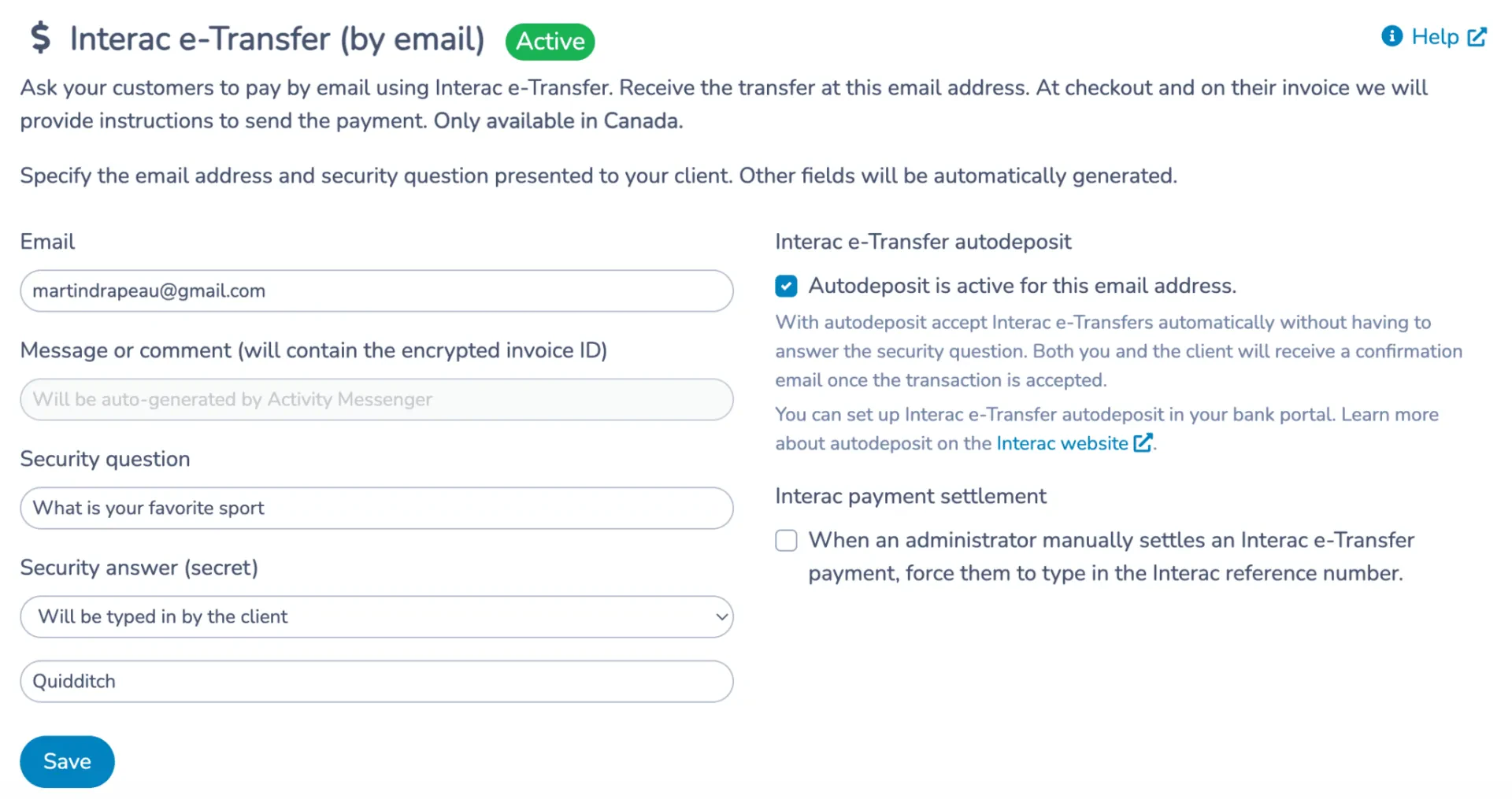
- Select Interac e-Transfer as a payment method: In your payment settings, choose Interac e-Transfer alongside or instead of a credit card.
- Configure recipient details: Add the email address participants should send transfers to, and set up a security question and answer for the transaction.
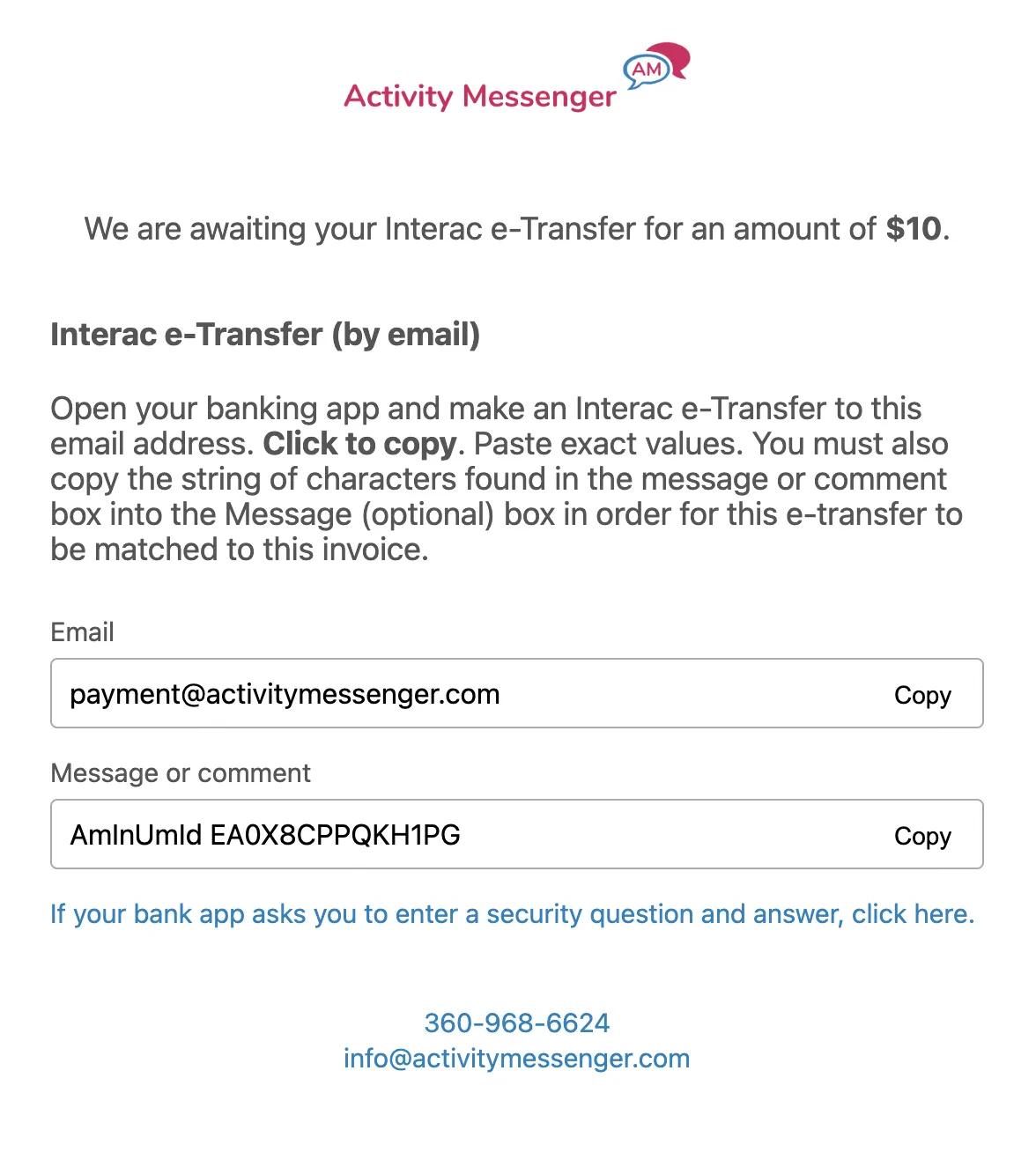
- Let the platform handle the instructions: Once Interac is enabled, Activity Messenger automatically displays payment instructions at checkout, including the recipient email, security question, and any notes you’ve added. Your attendees don’t need to figure anything out on their own.
- Turn on automated reconciliation: This is where the real-time savings come in. Instead of manually matching each incoming transfer to a registration, Activity Messenger does it automatically.
Automated Payment Reconciliation
Manual reconciliation is one of the most time-consuming parts of accepting e-transfers for events. If you’re running a tournament with 80 participants all sending transfers within a few days of each other, matching each payment to the right registration by hand is genuinely painful.
Activity Messenger automates this entirely. When a transfer comes in, the platform matches it to the corresponding registration and marks it as paid without any manual input from your team.
💬 What our customers say:
“Adding Interac e-Transfer by email as an option to pay online has saved thousands of dollars a month in credit card fees. This was made possible by Activity Messenger’s auto-reconciliation, which saves us 3 days of admin work a week!” — Duncan M., Founder & CEO, HamOnt Sports
Funds from e-transfers also arrive in your account instantly, unlike credit card payments that can take 1 to 5 business days to clear. For event organizers who need early cash flow to book venues or order equipment, that difference matters.
QR Code Tickets and Day-of Check-In
When an attendee pays by Interac e-Transfer, and their payment is confirmed, Activity Messenger automatically generates a branded ticket with a unique QR code and emails it to them. They can also save it to Google Wallet or Apple Wallet so it’s ready to scan from their lock screen.
On event day, your team scans tickets directly from a mobile phone. The scanner confirms whether a ticket is valid and hasn’t already been scanned, which prevents duplicate entry without requiring dedicated hardware.
Your team at the door runs the same check-in process regardless of how someone paid, so they don’t have to juggle multiple systems on event day.
📌 Pro Tip: Set up a POS station at the door for anyone who wants to pay in person on the day of the event. Activity Messenger’s point-of-sale feature keeps in-person and online sales centralized in the same dashboard, so your attendance numbers stay accurate in real time.
Auto-Cancellation for Unpaid Reservations
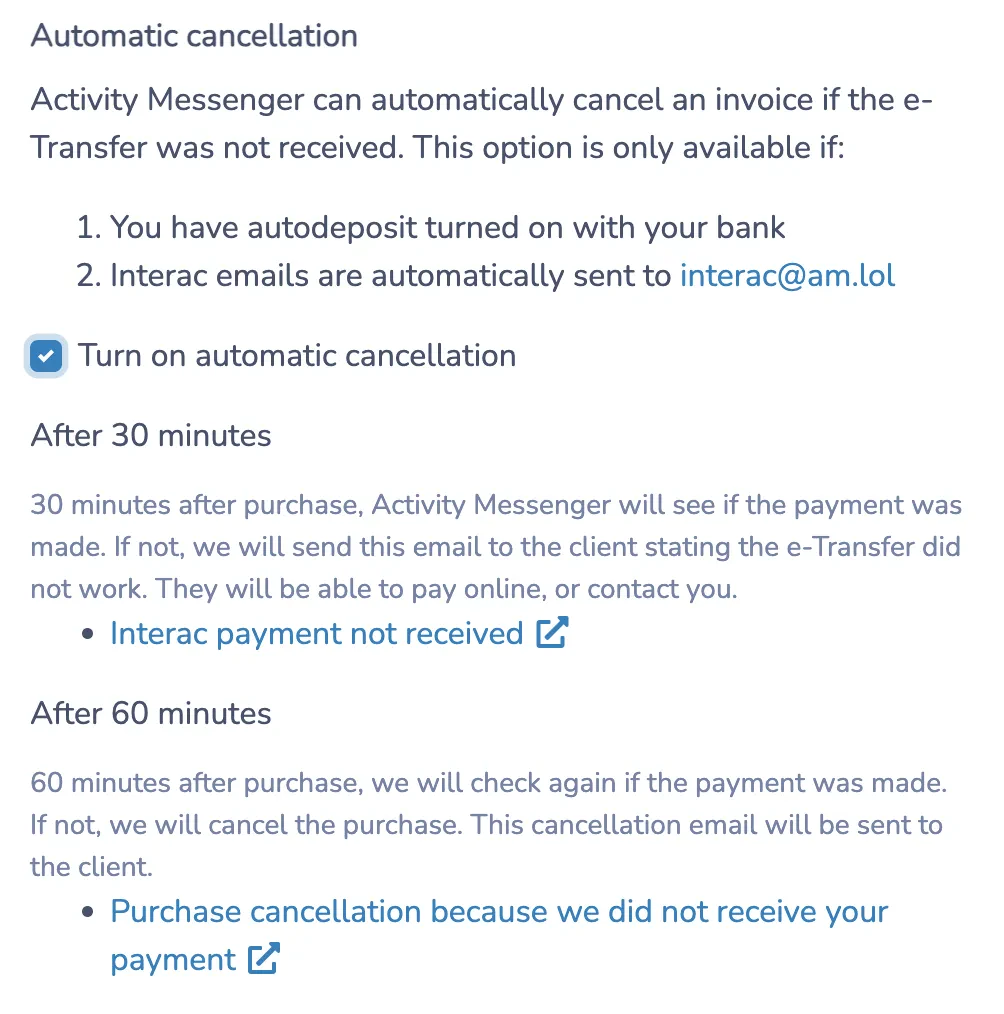
E-transfer payments have one issue to consider: unlike a credit card charge that processes immediately at checkout, an e-transfer requires the attendee to take a separate action after registering. That window between registration and payment is where seats get tied up by people who never follow through.
Activity Messenger’s auto-cancellation feature handles this automatically:
- Set a payment window (e.g., 48 hours) at the time of registration.
- If payment isn’t received within that window, the reservation is cancelled, and the spot is released.
- The attendee is notified, and the ticket becomes available for someone else to purchase.
This keeps your capacity numbers accurate and prevents you from turning away paying attendees because seats are being held by people who haven’t followed through.
Fee Comparison: Interac vs. Credit Card vs. Eventbrite
If you’ve run events on Eventbrite, you’re familiar with the fee structure. Between their service fee, payment processing, and any add-ons, the total cost per transaction can reach 6–7%. For a $30 ticket, that’s $1.80–$2.10 per sale going to the platform.
Here’s how the numbers compare:
| Activity Messenger (Interac) | Activity Messenger (Credit Card) | Eventbrite (Credit Card) | TutuTix (Credit Card) | |
|---|---|---|---|---|
| Processing fees* | 1% | 3.9% + $0.30 | 6.4% + $1.29 | 5% + $1.00 |
| Payout | Instant | 1–3 days | 5 days | Weekly |
| Settlement | Automated** | Automated | Automated | Automated |
*Includes all fees charged by registration software.
**Activity Messenger is the only registration platform that can automate Interac settlements.
For a one-time event or a smaller organization where margins are tight, the difference between 1% and 6% is significant. And when you factor in the instant payout, Interac e-Transfer is often the most practical choice for Canadian organizers who want to keep more of what they earn.
👉 Want to see how Activity Messenger and Eventbrite compare? You can read the full breakdown here.
Tips For Promoting and Managing Your Event
Once your ticketing and payment setup is in place, here’s how to drive attendance and stay organized leading up to the event.
Email Marketing
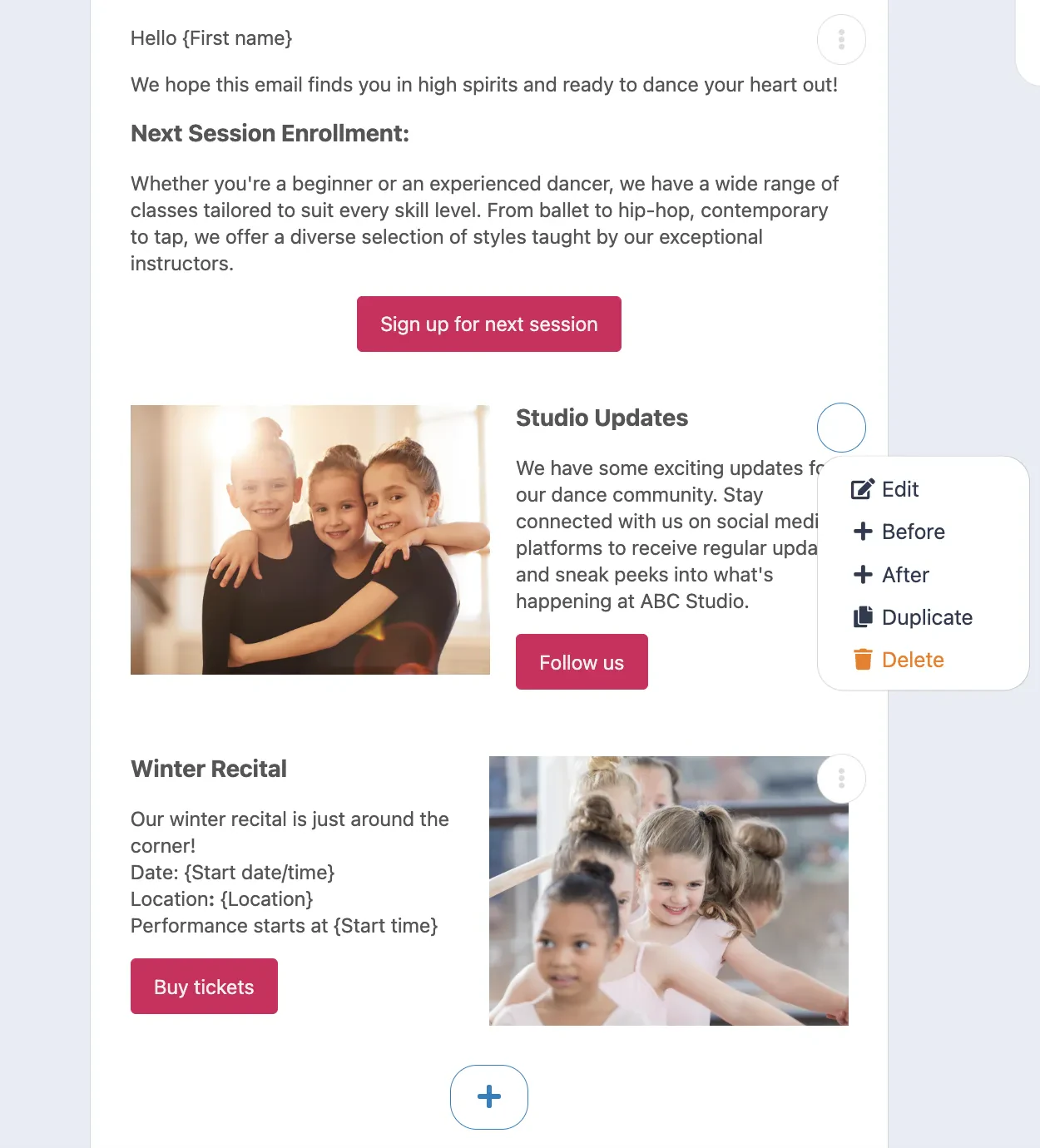
Email marketing is still one of the most effective channels for event promotion. With Activity Messenger, you can design professional emails and send them to your subscriber list directly from the platform. Early bird offers, lineup announcements, and last-chance reminders all perform well when they come from a recognizable sender with a clear call to action.
SMS Reminders
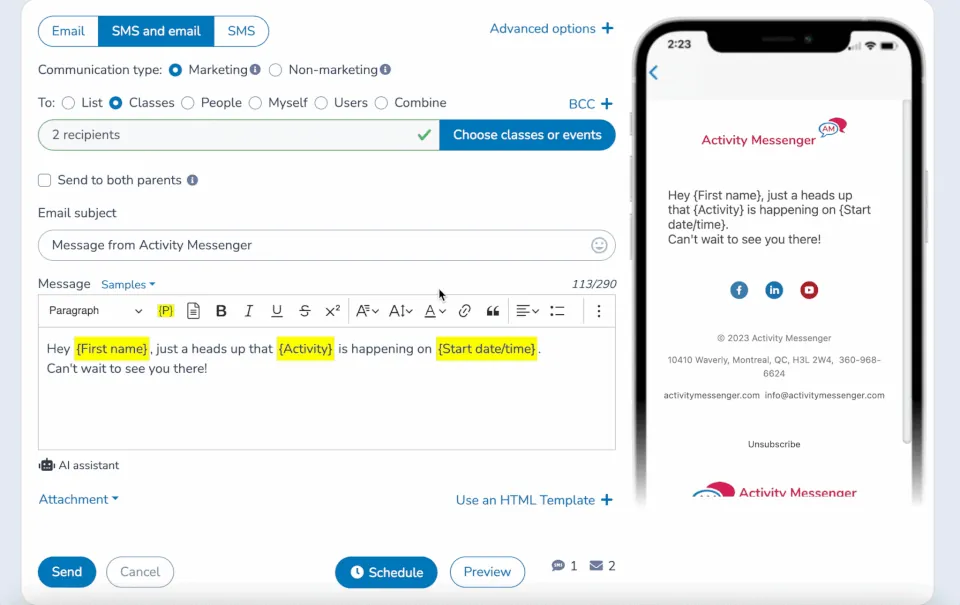
SMS has an open rate of around 98%, compared to roughly 20% for email. A reminder sent two or three days before the event, including a direct link to their ticket, significantly reduces no-shows and day-of questions. Activity Messenger lets you automate these reminders so they go out without any manual effort.
Post-Event Surveys
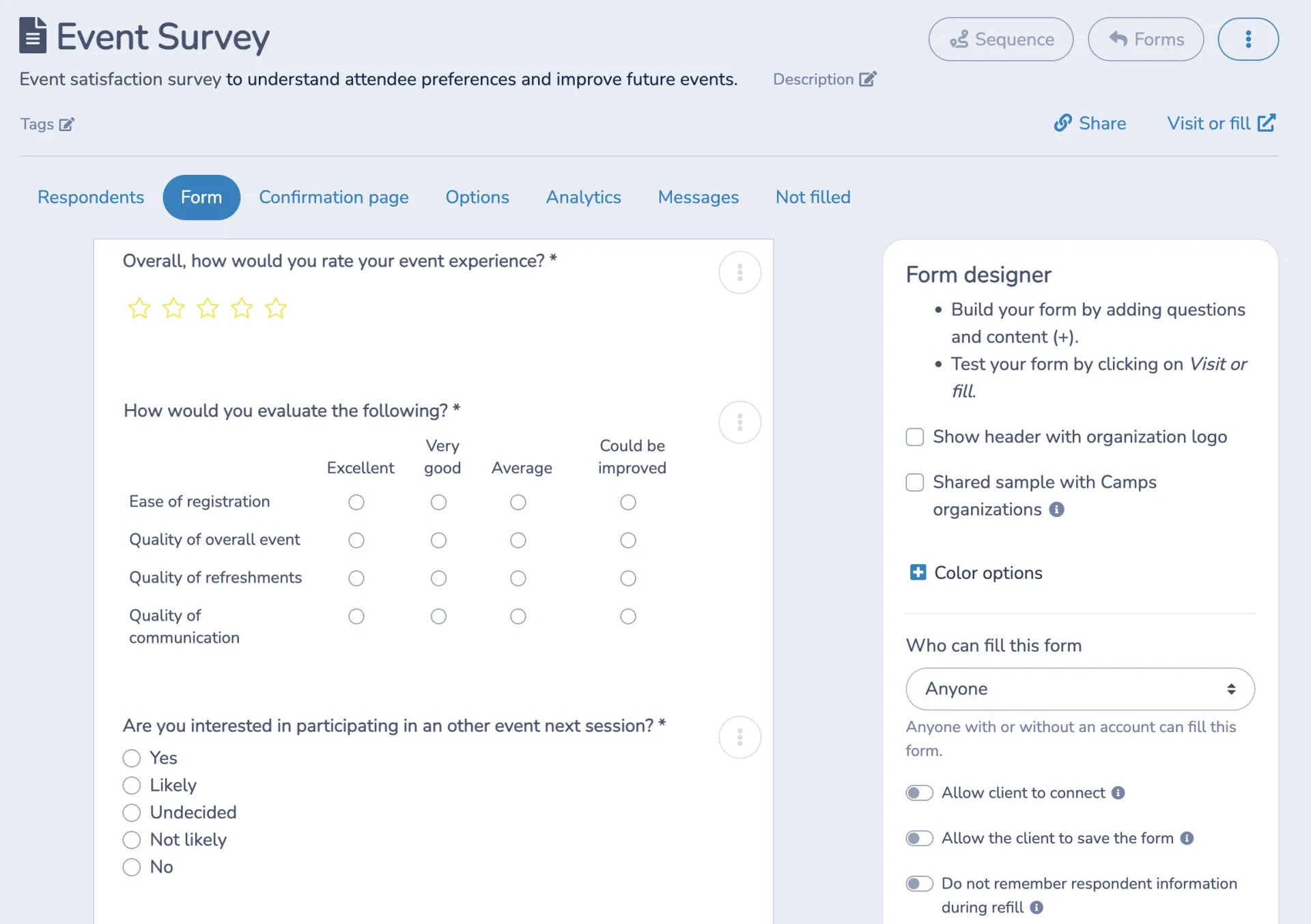
After the event, send a short survey to gather feedback. What worked, what didn’t, and what your attendees want to see next time. Activity Messenger lets you automate the survey to go out a set number of days after the event via email or SMS, so you capture responses while the experience is still fresh.
Frequently Asked Questions
Can I offer both Interac e-Transfer and credit card for the same event?
Yes, Activity Messenger lets you enable both payment methods simultaneously. Attendees choose their preferred option at checkout, and both are tracked in the same dashboard. You don’t need to manage two separate systems or manually reconcile payments from different sources.
What happens if someone sends the e-transfer to the wrong email address?
When Interac e-Transfer is enabled, Activity Messenger displays the correct recipient email and security question directly at checkout, reducing the chance of misdirected payments. If an error does occur, your admin team can manually mark a registration as paid and update the record accordingly.
How does QR code check-in work if someone paid by e-transfer?
Once a transfer is confirmed and matched to a registration, the platform automatically generates a ticket with a unique QR code and sends it to the attendee. At the door, your team scans the code from a phone. The system confirms whether the ticket is valid and whether it’s already been used, regardless of how the attendee paid.
Does Activity Messenger work for recurring events or multi-day events?
Yes, you can duplicate events, manage multiple sessions, and track sales across dates from the same dashboard. For organizations running tournaments across a weekend or a recital series over multiple evenings, everything stays centralized.
What’s the difference between Activity Messenger and Eventbrite for Canadian event organizers?
The main differences come down to fees, data, and integration. Eventbrite charges significantly higher transaction fees and stores data on US servers. Activity Messenger is built for Canadian sports and recreation organizations, integrates ticketing with registration, communications, and waivers in one place, and processes Interac e-Transfers natively, including automated reconciliation.
Final Thoughts
Accepting Interac e-Transfer for event ticket sales isn’t complicated, but it does require the right platform. The combination of lower fees, instant payouts, automated reconciliation, and QR code check-in makes it a genuinely practical choice for Canadian event organizers, whether you’re running a 40-person dance recital or a 400-person tournament across the country.
Activity Messenger handles the full process: ticket sales, e-transfer payments, automatic confirmation emails with QR code tickets, day-of scanning, and post-event communications, all from the same place.
📅 Book a demo to see how it works for your specific event type.
📖 Related Reading: