Running tennis lesson registrations through paper forms or a generic tool creates problems before the first ball is hit. Parents miss required fields, liability waivers get lost, and you end up making phone calls to track down information that should have been collected at sign-up.
A purpose-built online tennis lesson registration form fixes all of that. It collects participant details, skill level, emergency contacts, and signed waivers in one place, while automating confirmation emails and reminders so nothing slips through the cracks.
This guide walks through exactly how to build a tennis lesson registration form that works for your club or academy, which fields to include, which tools to consider, and how to set up automations that cut down on admin work. You can also skip ahead to the free template below to get a head start!
The goal of your tennis lesson registration form is to collect everything you need upfront so you’re not chasing parents for missing details the week lessons begin. Here’s what to include:
1. Participant Information
Collect basic details about the player, including:
2. Parent or Guardian Information
For junior programs, you’ll need to collect details about the parent or guardian:
3. Emergency Contact Information
In case of an emergency on the court, you need a contact who can be reached quickly:
4. Medical Information
Gather any relevant health details to keep players safe during lessons:
5. Program Selection
Let participants choose the lesson format that fits their schedule and level:
6. Waiver, Consent, and Digital Signature
Include a liability waiver section where participants or guardians agree to your terms before the session begins:
🎾 Want to start a tennis club or academy? Read our step-by-step guide to opening a new tennis club.
Generic form builders like Google Forms can handle basic data collection, but they were not built for sports programming. You end up patching together separate tools for payments, waivers, and communications, and none of them communicate well with each other.
Tools built specifically for sports and recreation, like Activity Messenger, give you a more complete feature set out of the box. When evaluating options, look for:
Popular alternatives include Google Forms, Jotform, and Wufoo. Each handles basic form collection, but for clubs that want to manage the full registration workflow in one place, a sport-specific tool is worth evaluating.
Once you have chosen your tool, here is how to put the form together:
📋 Choose a template. Start with a tennis lesson registration form template rather than building from scratch. Activity Messenger offers customizable templates that include all the fields from Step 1, saving you time on initial setup.
🎨 Add your branding. Upload your club logo, set your colours, and adjust the form language to match your club’s communication style. A branded form builds trust with first-time registrants and reinforces your professionalism. Activity Messenger integrates with Canva, so your design assets are easy to pull in.
💳 Set up payment processing. If your program charges a registration fee, connect a payment gateway like Stripe. You can also configure early-bird pricing, payment plans, and promo codes directly in the form. Canadian clubs can add Interact E-transfer as a low-fee alternative to credit cards.
✅ Test before you launch. Submit a test registration yourself. Confirm that all fields work correctly, that payment goes through, and that the confirmation email is sent with accurate information.
Your tennis lesson registration form should help parents and players find the right program quickly, without having to email you for details.
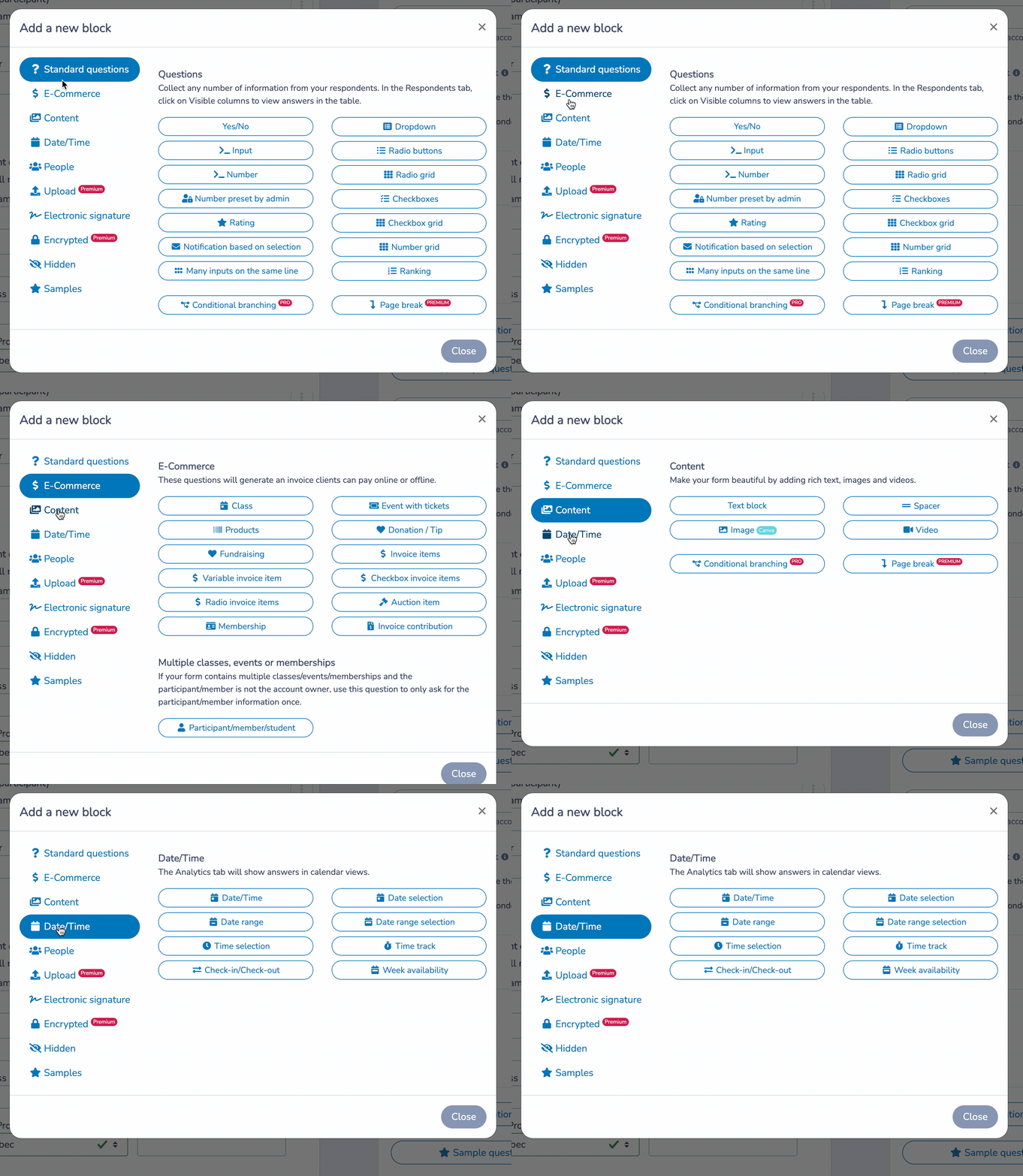
📅 Create program options. List each lesson format, clinic, or camp as a selectable option. Include the cost, number of available spots, location, court number, session time, and instructor name. The more detail parents see upfront, the fewer questions you receive after sign-up. Need help writing your descriptions? Our ChatGPT integration will help you write a compelling description for your tennis lessons.
⚙️ Configure payment options. Support multiple payment methods, offer pro-rated fees or payment plans where applicable, and include any discount codes for returning members or early registrations. Canadian clubs can enable Interac e-Transfer directly within the form.
⏳ Show real-time availability. If a session is full, your form should automatically display that and offer waitlist enrolment instead of letting parents complete a registration that cannot be processed.
⏱️ Offer multiple lesson lengths from one package. Instead of setting up a separate program for each session length, combine 1 hour, 1.5 hour, and 2 hour options into a single package. Parents choose their preferred duration from a dropdown, and the form updates to show times available at that length.

Every tennis lesson registration form should include a liability waiver. Collecting it during registration, rather than scrambling for signatures on the first day of lessons, removes a significant administrative headache and ensures signed documentation is on file before anyone steps on the court.
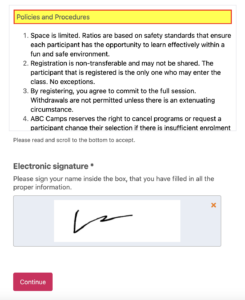
✍️ Add a digital signature field. Parents sign directly in the registration form by typing their name or drawing a signature on their phone. No printing, scanning, or separate waiver platform required.
🔒 Require acceptance before submission. The form won’t go through until the parent has checked the acknowledgment box and signed. This removes any ambiguity about whether the waiver was read and agreed to.
🗂️ Store signed waivers automatically. All completed waivers are saved and accessible from your account, so you can pull them up at any time without digging through a filing cabinet or email thread.
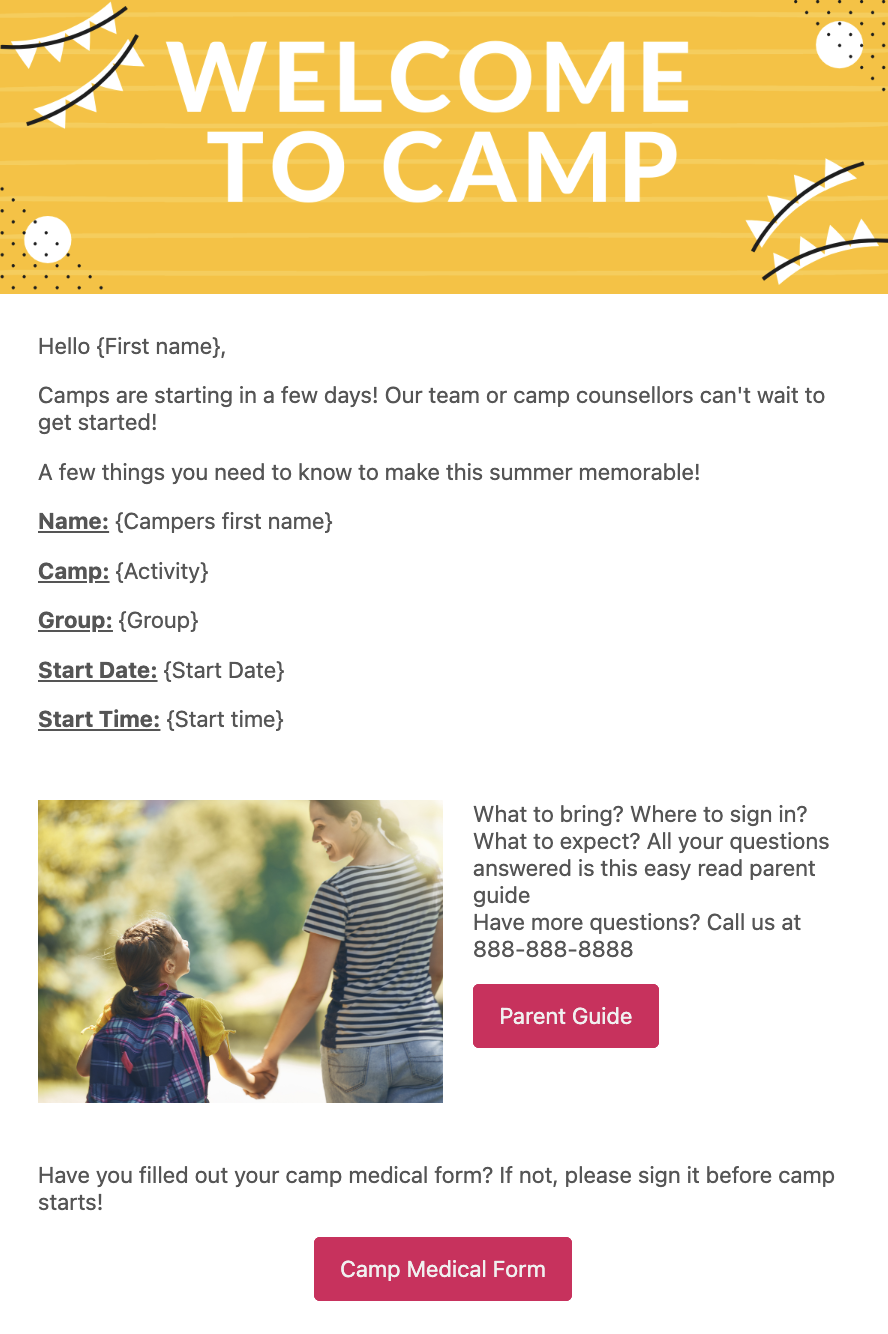
Activity Messenger sends a confirmation email automatically as soon as a parent enrolls their child in your tennis lessons. This email confirms the registration, includes a copy of the invoice, and should cover any other important details about the upcoming program.
⚡ Instant confirmation. The moment someone registers, an automated email goes out confirming enrolment and providing invoice details. Parents aren’t left wondering whether their registration went through.
📍 Include session details. Add the lesson date, time, location, court assignment, and instructor name directly in the email. Don’t make parents log back into an account to find basic information.
👋 Personalize the welcome message. Use mail merge to insert the player’s name and program-specific instructions. A personalized email makes a strong first impression before the first lesson even starts.
Once your form is ready, here are the most effective channels for getting it in front of parents:
📬 Email and SMS outreach. Use Activity Messenger to send a newsletter or a direct message to your contact list that includes a link to the registration form. SMS sees significantly higher open rates than email, making it especially useful for time-sensitive enrolment windows.
🔗 Share the link directly. Post the registration link on your social media channels, add it to your email signature, and send it directly to anyone who has expressed interest in lessons.
📱 QR code. Activity Messenger generates a unique QR code for each registration form. Display it at your facility, at tournaments, or on printed flyers so players and parents can register on the spot from their phone.
🌐 Embed on your website. Add the form directly to your website or place it behind a “Register Now” button to reduce friction for anyone ready to sign up.
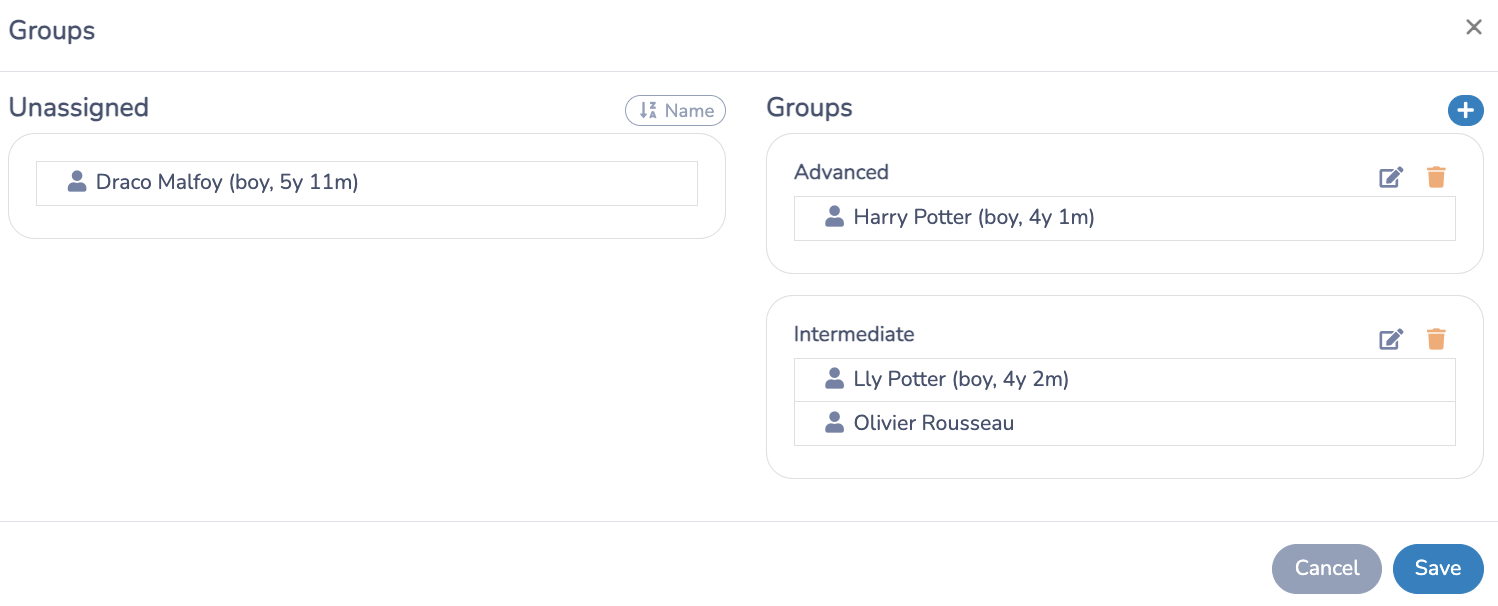
Attendance Tracking: Use a customizable check-in list for each lesson. Assign instructors, divide players into groups by skill level, and keep attendance records on file for later review.
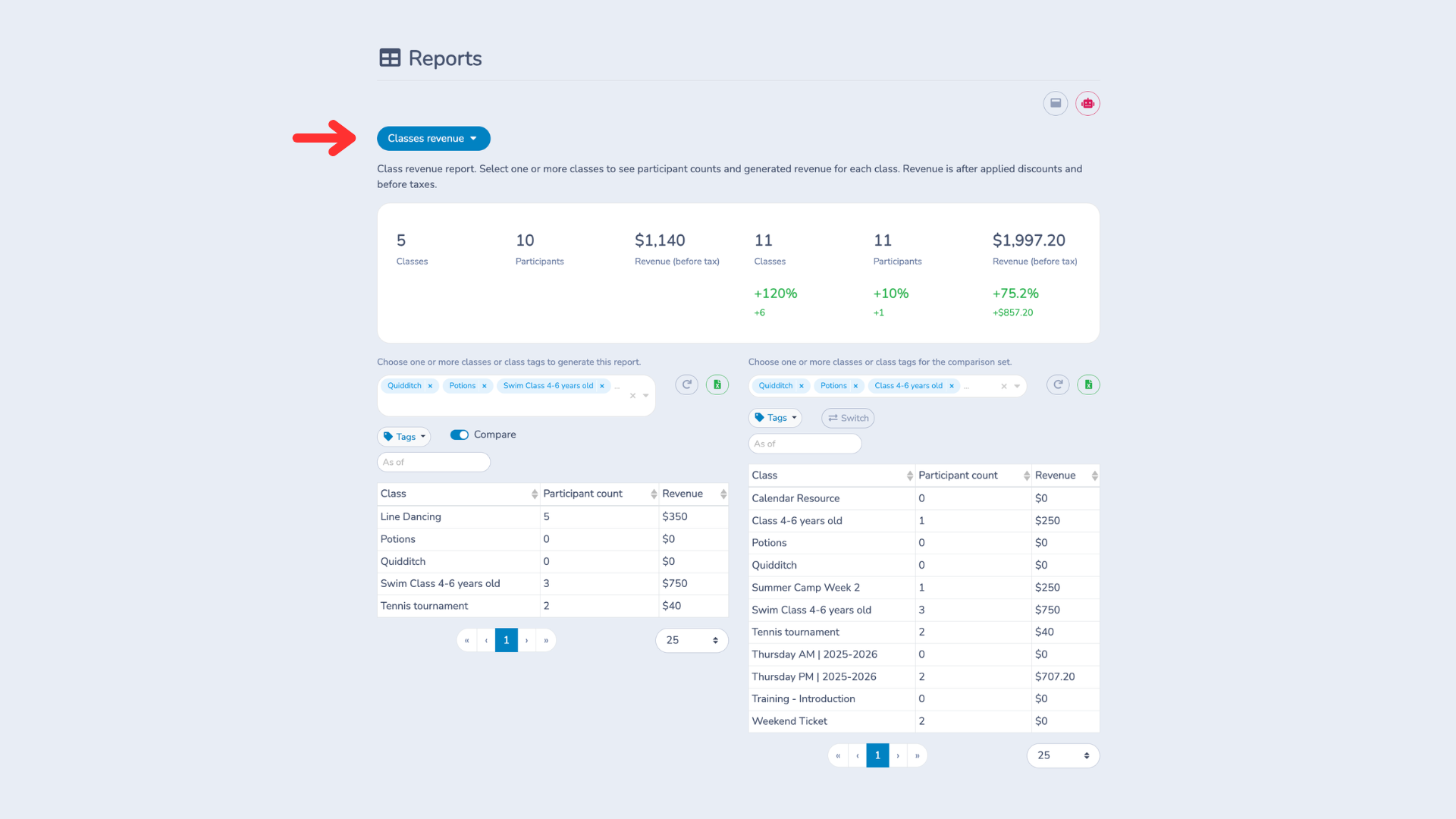
Data and Analytics: Activity Messenger provides detailed reporting so you can track enrolment trends, spot which programs fill fastest, and make informed decisions about your lesson schedule and pricing.
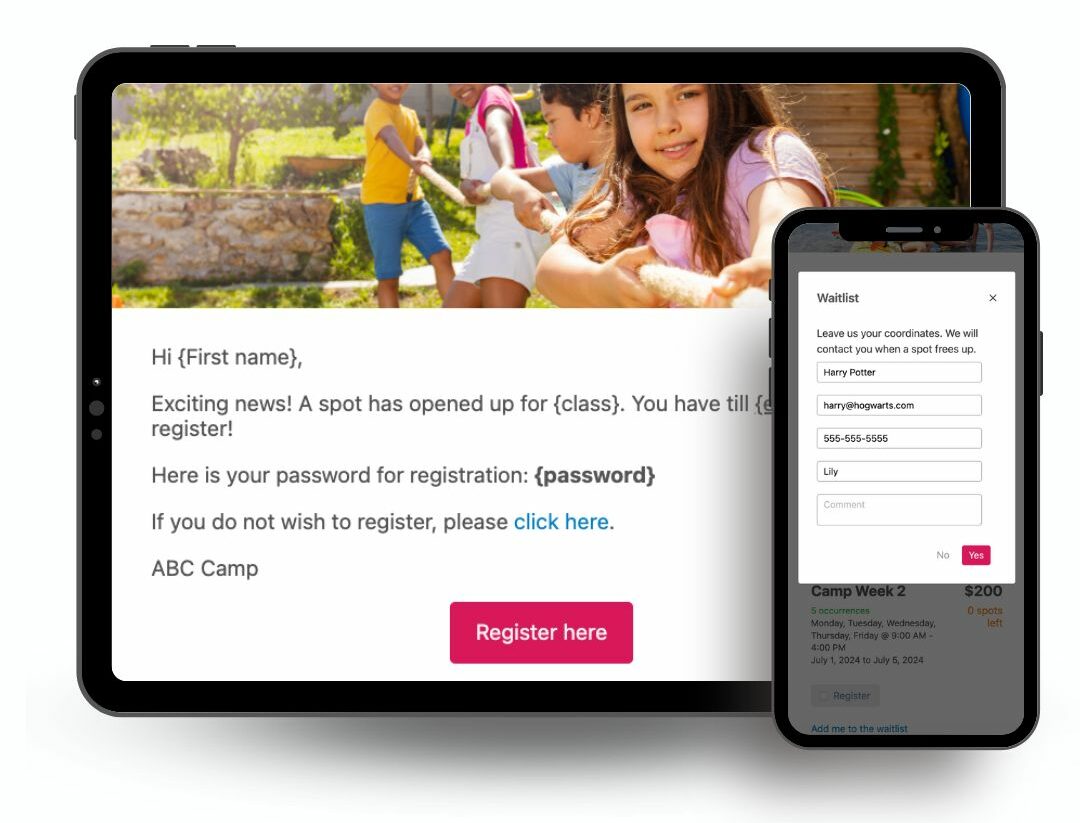
Waitlist Management: When a session is full, the system automatically emails or texts waitlisted participants as spots open up. That way, there’s no manual tracking and no missed opportunities to fill your courts.
A tennis lesson registration form is an online form that collects the information your club needs to enrol a player in a program. This typically includes participant details, emergency contacts, medical information, program selection, payment, and a signed liability waiver. A well-built form replaces paper forms entirely and gives coaches everything they need before the first session.
At a minimum, include the participant’s name, date of birth, contact information, and current skill level. For junior programs, add a parent or guardian section and emergency contact details. Medical information, program selection, payment, and a signed liability waiver should also be part of every form.
It depends on your needs. Generic form builders work for simple data collection but lack integrated payments, waivers, and automated reminders. Tools designed for sports programs, like Activity Messenger, handle the full registration workflow from sign-up to first session in one place.
Yes, most sport-specific form tools support integrated payment processing through platforms like Stripe, and Canadian clubs can also add Interac e-Transfer. You can collect registration fees, offer payment plans, and apply discount codes all within the same form.
Not with the right tool. Activity Messenger lets you include a digital signature field directly in your tennis lesson registration form, so parents sign the waiver at the same time they register. Signed waivers are stored automatically and are accessible at any time without a separate system.
Keep the form as short as possible while still collecting what you need. Make sure it works well on mobile. Send a direct link by email or SMS rather than asking people to navigate to your website to find it. An early-bird discount can also drive completions before your enrolment window closes.
Online registration forms eliminate manual data entry, reduce errors, and ensure you collect all required information upfront. Parents can register from anywhere at any time, payments are processed instantly, and you have a complete record of every registration in one place.
A good tennis lesson registration form does more than collect names. It captures the information your coaches need, processes payments, collects signed waivers, and automatically triggers confirmation emails and reminders before anyone picks up a racquet. That is a significant amount of manual work removed from your plate before the season starts.
If your club is still relying on paper forms or a generic tool that was not built for sports programming, moving to a purpose-built platform like Activity Messenger is one of the simplest upgrades you can make.
💡 Ready to simplify registration for your tennis club? Book a demo with Activity Messenger to see how clubs across North America manage sign-ups, communications, and waivers in one place.