Activity Messenger Help Center
Configure messaging defaults
Choose the starting settings for new messages and decide where replies should go. Review each message before sending: defaults do not replace its audience, channel, communication type or automation settings.
Open messaging settings
Open your organization settings and select Messaging. You need access to organization settings. Save changes with Update.
Choose channels and communication types
When client communication preferences are disabled, choose email, SMS or both as the default channel. Email is a useful starting point if you want staff to choose SMS deliberately for time-sensitive messages.
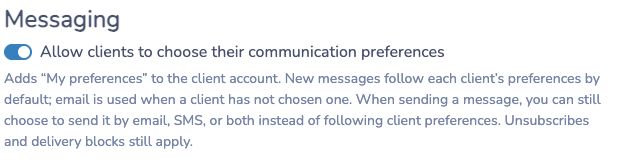
When client communication preferences are enabled, the preferences mode replaces this default-channel selector. Review the available communication categories and each client's choices. See message sending options for how the mode affects a send, including clients who have not chosen a preference.
Choose a default communication type that matches your usual work. Marketing and non-marketing messages are treated differently for subscriptions. A non-marketing label does not guarantee delivery and should not be used to bypass a marketing unsubscribe.
Route email and SMS replies
Set a monitored Reply-to email. This is separate from the verified From email recipients see. Check both when preparing a message.
A user can override this starting email destination with Use the user’s email address for replies. When enabled, new email messages use that user’s address as Reply-To, while SMS reply settings stay separate. Newly added instructors start with it enabled; other new users and users already present when the option was introduced start with it disabled. Users can change it in My Account › Update Information, and authorized administrators can change it individually or in bulk. See Choosing a Reply-To email address and Users and permissions.
For SMS, select the reply behavior:
| Option | What it does |
|---|---|
| Forward to the organization | Sends replies to the organization's reply-to mobile number. |
| Forward to the sender | Uses the sending user's mobile number. |
| Auto-reply | Responds with the configured automatic reply. |
| Do nothing | Does not forward or automatically answer the reply. |
Fill the reply-to mobile number when using organization forwarding. Enter an auto-reply when choosing that option and respect the limit shown in the field. These settings are defaults; review the actual message's reply options.
Review SMS length and sender identity
The option to remove the limit on long SMS affects shortening behavior and can increase usage. A text longer than the standard threshold may otherwise be shortened with a link to the full message; actual processing depends on its content. Read SMS length and media behavior before changing this setting.
The outbound sending number is managed separately from your reply-to mobile. Changing the reply destination does not change the number clients see. See SMS sender numbers and replies for dedicated-number options.
Notify your team of incoming SMS
Select the internal users who should receive email notifications of incoming SMS. Choose people responsible for following up and verify that their account email addresses are current. Manage those users in Users and permissions.
Before a large send, check the recipients, SMS usage estimate, communication type and reply destinations in the message composer.